
Suno by Ace Data Cloud for CrewAI
Generate Suno music and retrieve the same asynchronous task from native CrewAI tools. Ace Data Cloud provides this integration; it is not an official Suno or CrewAI product.
简体中文 · Current models and pricing
1. Install the integration
This is the standalone Suno package, not an all-services bundle. A GitHub review preview with wheel and source archive is available; implementation remains under review. No PyPI release or official CrewAI catalog listing is claimed. Use the exact source commit below, or the hash-pinned wheel command after it. Do not install an attachment merely by tag name:
uv add 'crewai-suno @ git+https://github.com/AceDataCloud/SunoCrewAI.git@e5eeb04661ed7b9a86e1f2f970a9e7943b027ca2'
uv add 'crewai-suno @ https://github.com/AceDataCloud/SunoCrewAI/releases/download/v0.1.0-preview.1/crewai_suno-0.1.0-py3-none-any.whl#sha256=d31998ca7f33f54c9603a0acb0d906f25933e858be6c83babc5a6d0e5a478e51'
The wheel was built from the exact source SHA above. Its SHA256 is pinned in the URL; if an asset is replaced, installation must fail the digest check. The release page is informational, not the trust anchor.
The source SHA identifies the reviewed preview; inspect the implementation PR before adoption. After a verified PyPI release, the standard entry will be uv add crewai-suno. Do not interpret a repository or built wheel as an official listing. CrewAI currently requires Python 3.10–3.13; on Intel macOS its mandatory lancedb dependency may lack a wheel. Use a supported Linux environment rather than skipping dependencies for production.
2. Register, sign in and obtain your own Token
- Open Ace Data Cloud → Applications. Register or sign in. If needed, choose Initialize General Application.
- Open General application. Check Suno access, current price and balance before generating. A service-specific application can only use its allowed service.
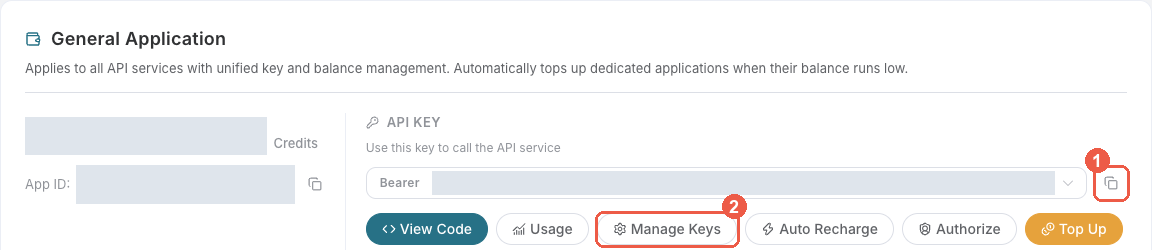
- Copy the selected API key with the copy icon 1, or choose Manage Keys 2 to create a separate key.
- Choose Create, name the key
CrewAI Suno, and configure expiration/restrictions as needed. If Allowed APIs is enabled, allow both/suno/audiosand/suno/tasks.
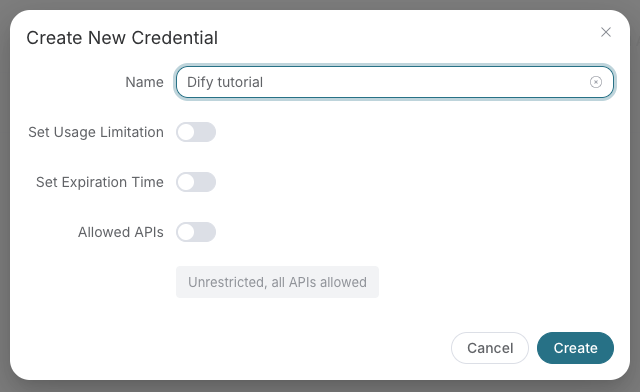
These redacted screenshots are reused unchanged from the Ace SunoDify tutorial, revision 8d3d03570e73324220f111f7fe343da0792a8071, retrieved 2026-10-18. The historical name Dify tutorial in the second screenshot is only an example; use CrewAI Suno. No visible real credential is included. See image sources.
Set the raw API-consumer Token in the environment variable ACEDATACLOUD_API_KEY using your secret manager or terminal's secure input. Do not prepend Bearer, use a platform management Token, put the key in prompts, or commit .env files. Tools also accept api_key=... when a secure credential store supplies it; it is excluded from serialization.
3. Add the named Suno tools to your CrewAI agent
from crewai import Agent
from suno_crewai import SunoGenerateMusicTool, SunoRetrieveTaskTool

agent = Agent(
    role="Music producer",
    goal="Create the requested music and check its task result",
    backstory="Use Suno through Ace Data Cloud within the user's approved budget.",
    llm=your_configured_llm,
    tools=[SunoGenerateMusicTool(), SunoRetrieveTaskTool()],
    allow_delegation=False,
    max_retry_limit=0,
)
These are actual CrewAI BaseTool implementations with input schemas and discoverable names Suno by Ace Data Cloud - Generate Music and Suno by Ace Data Cloud - Retrieve Task. They need no MCP server configuration. Adding a generation tool does not itself submit a request. The caller is responsible for approving the workflow's paid actions. The generation tool defaults to one use per instance to reduce duplicate submissions; this is not a funds cap or permission system.
4. First use: submit once, then query the same ID
First inspect the current model and price catalog. Select a currently supported Suno model; chirp-v6 is an example from the current Suno API contract, not a permanent default.
A generation invocation is billable. Run it only after agreeing the model and budget:
import json
from suno_crewai import SunoGenerateMusicTool, SunoRetrieveTaskTool

# BILLABLE when run; this README does not execute it.
submitted = json.loads(SunoGenerateMusicTool().run(
    prompt="A gentle instrumental piano melody for a sunrise, no vocals.",
    model="chirp-v6",
    instrumental=True,
))
print(submitted["task_id"])

# accepted/pending is not completion. Preserve this same ID.
result = SunoRetrieveTaskTool().run(task_id=submitted["task_id"], wait_seconds=240)
print(result)
A pending result looks like {"status":"pending","success":false,"task_id":"...","media_urls":[]}. Do not rerun the generation if pending, timeout or an unknown submission outcome occurs. Query the same ID again. A terminal successful result includes status=succeeded, success=true, audio URLs and the original cost, when returned by the service. Costs are Credits; they are not USD. A link's presence does not verify that it remains playable.
For an existing task, run only this read-only example:
uv run python examples/query_existing.py YOUR_EXISTING_TASK_ID
The ID must belong to your Key. The published payloads are /suno/audios with async=true and /suno/tasks with action=retrieve,id=...; model IDs pass through unchanged. No substitute model or automatic paid HTTP retry is added. Bounded polling only queries the same task.
5. Inspect execution and output
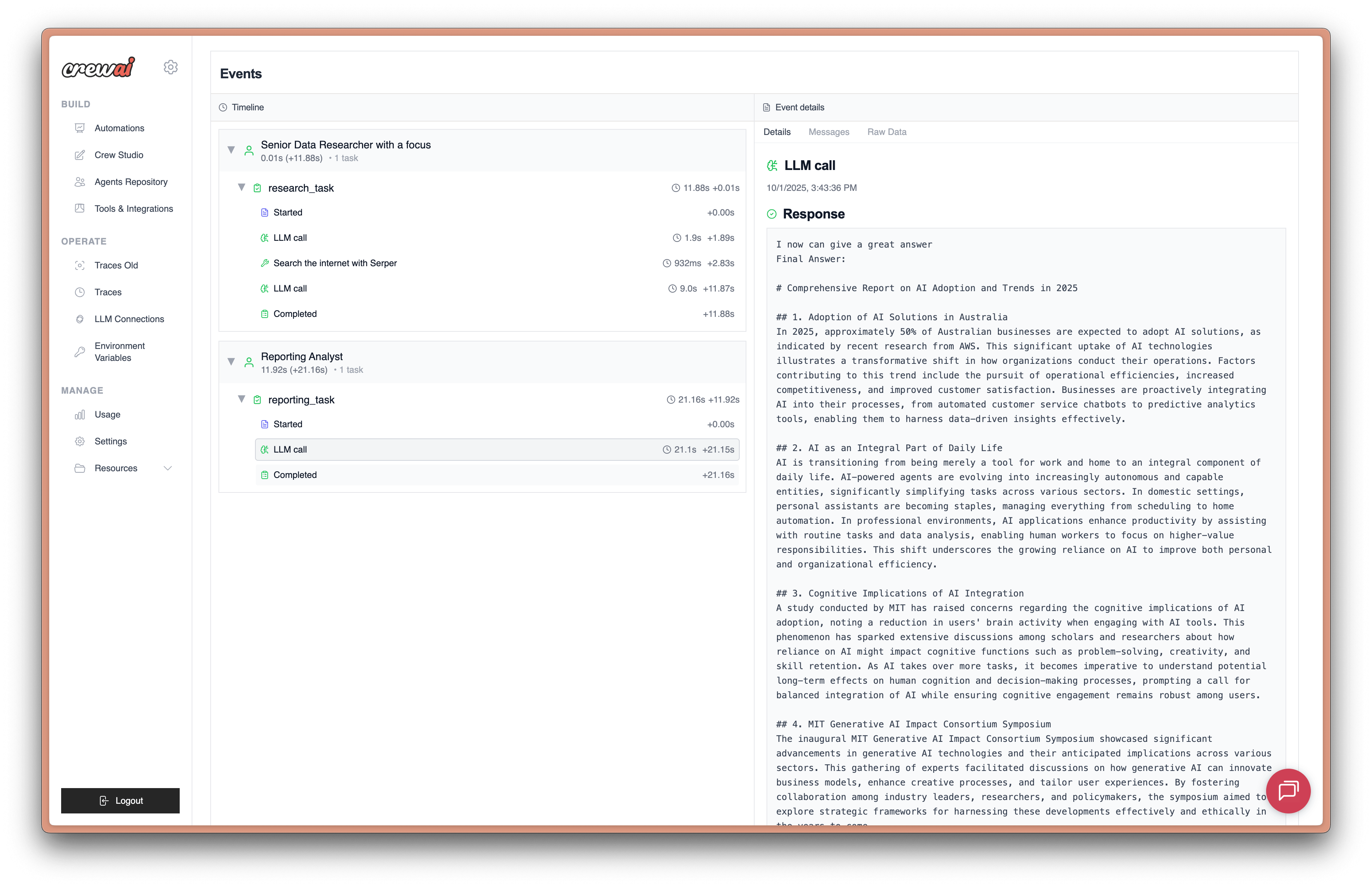
Official CrewAI reference, downloaded 2026-10-18 from its tracing documentation. The screenshot's historical date marker is 10/1/2025; its capture version is unspecified. It shows a task timeline and Response output, not this Suno tool running, not an Ace result, and not a new GUI promised by this package. Inputs are not expanded in this image. For your own run, inspect the named Suno tool event and its returned task status. See official tracing guide for optional account/authentication requirements; tracing is not enabled by this package.
Troubleshooting and cost boundaries
| Result | Action |
|---|---|
| 401 / 403 | Check raw consumer Token, expiry, Suno entitlement, Allowed APIs and balance; inspect the actual business error. A 403 is not always moderation. |
| 400 | Use current public model ID and schema; this first tool only exposes basic text-to-music. Duration/custom actions are not silently guessed. |
| pending / empty media list | Query the same task ID; never regenerate to poll. |
| 429 | Reduce concurrency and wait; the tool makes one HTTP attempt. Your agent/LLM may have separate retry behavior. |
| Timeout / 5xx | Submission may have reached the service; inspect request history before creating a new job. |
| ToolFailure | The terminal task failed; failure is structured and non-retryable by default. Preserve task/trace ID for support, never the key. |
| Media won't open | Verify terminal success and network access to the returned HTTPS audio URL. |
The integration code is free; API generation and any configured LLM follow their current prices. cost is the original task's Credits cost, not a new charge for querying it. Do not use a test count, install count or trace screenshot as revenue evidence. The tool sends the provided music prompt and consumer Token to api.acedata.cloud; only filtered result fields are returned to the agent. Do not submit private content without authorization.
Source · Issues · dev@acedata.cloud
Development: uv sync --group dev, uv run pytest, uv run ruff check ., uv build. Tests mock paid HTTP calls. No paid generation is performed by CI.
Release safety: HTTP errors retain status without raw bodies/headers; nested explicit failure is terminal before finished_at, and terminal missing audio is not success. Cost output is filtered.
1 maintainer

Metadata
1 maintainer
Release files for crewai-suno 0.1.0
For a detailed explanation of source distributions (sdists) and built distributions (wheels), please see the package formats documentation.
Source distribution (sdist)
| File | Size | Uploaded | Provenance | Actions |
|---|---|---|---|---|
| crewai_suno-0.1.0.tar.gz | 560.3 kB | Without provenance | Details for crewai_suno-0.1.0.tar.gz |
Built distribution (wheel)
| File | Interpreter | ABI | Platform | Actions Reset |
|---|---|---|---|---|
| crewai_suno-0.1.0-py3-none-any.whl | Python 3 | none | any | Details for crewai_suno-0.1.0-py3-none-any.whl |
Total release size: 570.8 kB
Release files / crewai_suno-0.1.0.tar.gz
| Download URL | crewai_suno-0.1.0.tar.gz |
|---|---|
| Size | 560.3 kB |
| Tags | Source |
|
SHA-256 checksum How to use checksums |
675121850a37e87d92d360b43499a469c0b0990f6b07d21371049391729a9252
|
|
BLAKE2b-256 checksum How to use checksums |
d5bb2959b2cbfd113ea85593637e1810dd09da22db4bd7467e979548f7e6d0ba
|
| Upload date | |
|
Uploaded using Trusted Publishing? What is trusted publishing? |
No |
| Uploaded via |
twine/7.0.0 CPython/3.13.3
|
Release files / crewai_suno-0.1.0-py3-none-any.whl
| Download URL | crewai_suno-0.1.0-py3-none-any.whl |
|---|---|
| Size | 10.5 kB |
| Tags | Python 3 |
|
SHA-256 checksum How to use checksums |
c00d2d011c72f0b1d294ce020b06c20668ef8d4572aaffbc53874341bc707ecf
|
|
BLAKE2b-256 checksum How to use checksums |
17191c321e5b0b7a393c4baada7d4840aa3d72c19017eac18f150bf12a7e349a
|
| Upload date | |
|
Uploaded using Trusted Publishing? What is trusted publishing? |
No |
| Uploaded via |
twine/7.0.0 CPython/3.13.3
|
Security for crewai-suno 0.1.0
Provenance
Provenance describes where a file came from. On PyPI, provenance is shared via attestations, which provide a verifiable record of the build or publishing details. View details, limitations and caveats.
No provenance found
None of the files in this release were uploaded with provenance metadata.
A note on package security
PyPI is a repository for distributing packages, not a service for auditing them. While third-party security researchers and our staff do their best to detect and remove malicious packages, PyPI cannot guarantee the quality, security or suitability of any given package.
To learn more about protecting yourself from malicious actors, visit our package security documentation.













