
🥐 croissant-rdf


A proud Biohackathon project 🧑💻🧬👩💻
- Bridging Machine Learning and Semantic Web: A Case Study on Converting Hugging Face Metadata to RDF
- (In progress) Preprint from Elixir Biohackathon


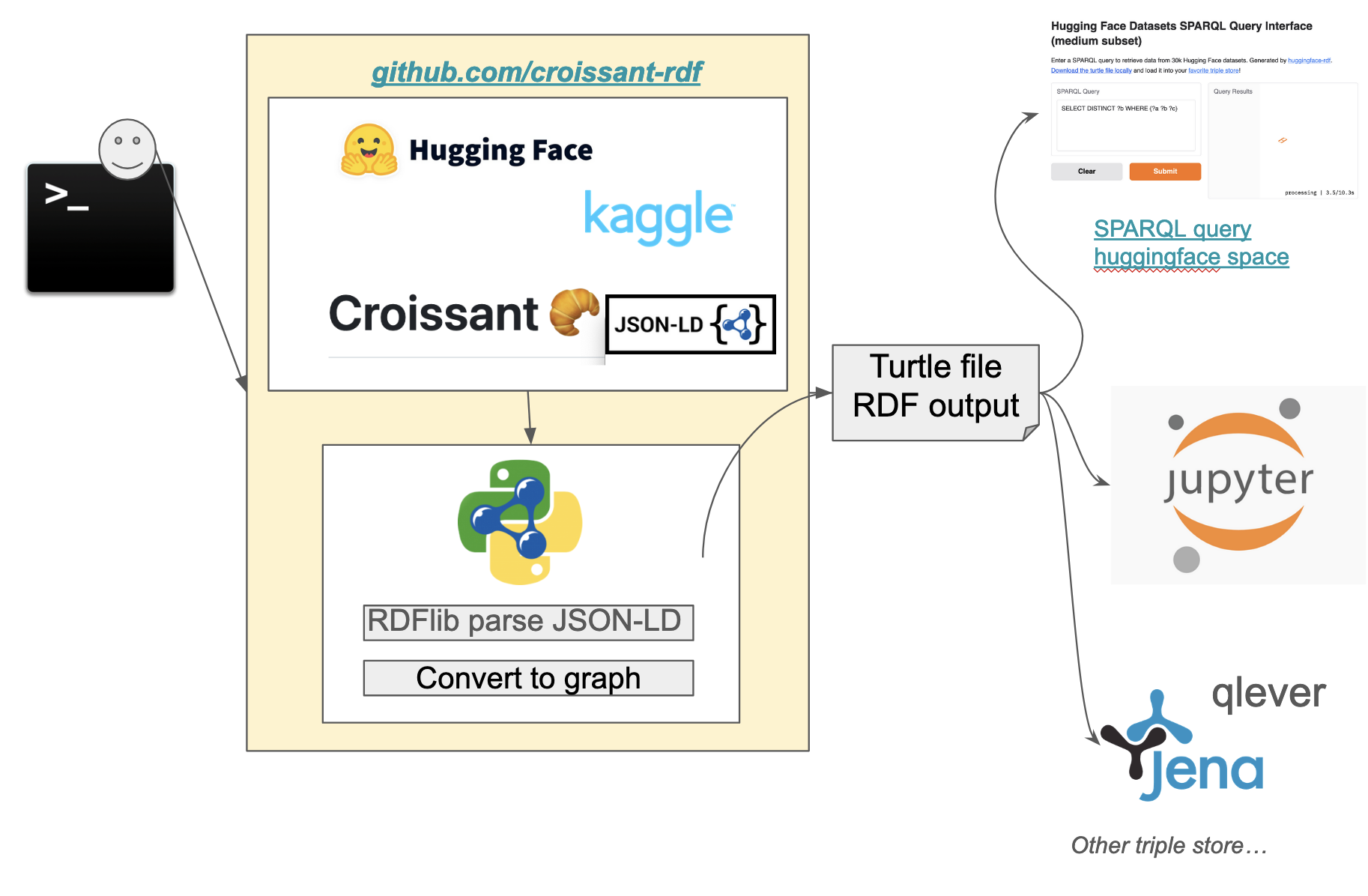
croissant-rdf is a Python tool that generates RDF (Resource Description Framework) data from datasets available on Hugging Face. This tool enables researchers and developers to convert data into a machine-readable format for enhanced querying and data analysis.
This is made possible due to an effort to align to the MLCommons Croissant schema, which HF and others conform to.
Features
- Fetch datasets from HuggingFace or Kaggle.
- Convert datasets metadata to RDF format.
- Generate Turtle (
.ttl) files for easy integration with SPARQL endpoints.
Installation
croissant-rdf is available in PyPi!
pip install croissant-rdf
Usage
After installing the package, you can use the command-line interface (CLI) to generate RDF data:
export HF_API_KEY={YOUR_KEY}
huggingface-rdf --fname huggingface.ttl --limit 10
Check out the qlever_scripts directory to get help loading the RDF into qlever for querying.
You can also easily use Jena fuseki and load the generated .ttl file from the Fuseki ui.
docker run -it -p 3030:3030 stain/jena-fuseki
Extracting data from Kaggle
You'll need to get a Kaggle API key and it comes in a file called kaggle.json, you have to put the username and key into environment variables.
export KAGGLE_USERNAME={YOUR_USERNAME}
export KAGGLE_KEY={YOUR_KEY}
kaggle-rdf --fname kaggle.ttl --limit 10

# Optionally you can provide a positional argument to filter the dataset search
kaggle-rdf --fname kaggle.ttl --limit 10 covid
Running via Docker
You can use the huggingface-rdf or kaggle-rdf tools via Docker:
docker run -t -v $(pwd):/app david4096/croissant-rdf huggingface-rdf --fname docker.ttl
This will create a Turtle file docker.ttl in the current working directory.
Using Common Workflow Language (CWL)
First install cwltool and then you can run the workflow using:
cwltool https://raw.githubusercontent.com/david4096/croissant-rdf/refs/heads/main/workflows/huggingface-rdf.cwl --fname cwl.ttl --limit 5
This will output a Turtle file called cwl.ttl in your local directory.
Using Docker to run a Jupyter server
To launch a jupyter notebook server to run and develop on the project locally run the following:
Build:
docker build -t croissant-rdf-jupyter -f notebooks/Dockerfile .
Run Jupyter:
docker run -p 8888:8888 -v $(pwd):/app croissant-rdf-jupyter
The run command works for mac and linux for windows in PowerShell you need to use the following:
docker run -p 8888:8888 -v ${PWD}:/app croissant-rdf-jupyter
After that, you can access the Jupyter notebook server at http://localhost:8888.
Useful SPARQL Queries
SPARQL (SPARQL Protocol and RDF Query Language) is a query language used to retrieve and manipulate data stored in RDF (Resource Description Framework) format, typically within a triplestore. Here are a few useful SPARQL query examples you can try to implement on https://huggingface.co/spaces/david4096/huggingface-rdf
The basic structure of a SPQRQL query is SELECT: which you have to include a keywords that you would like to return in the result. WHERE: Defines the triple pattern we want to match in the RDF dataset.
- This query is used to retrieve distinct predicates from an Huggingface RDF dataset
SELECT DISTINCT ?b WHERE {?a ?b ?c}
- To retrieve information about a dataset, including its name, predicates, and the count of objects associated with each predicate. Includes a filters in the results to include only resources that are of type https://schema.org/Dataset.
PREFIX schema: <https://schema.org/>
SELECT ?name ?p (count(?o) as ?predicate_count)
WHERE {
    ?dataset a schema:Dataset ;
        schema:name ?name ;
        ?p ?o .
}
GROUP BY ?p ?dataset
- To retrieve distinct values with the keyword "bio" associated with the property https://schema.org/keywords regardless of the case.
PREFIX schema: <https://schema.org/>
SELECT DISTINCT ?keyword
WHERE {
    ?s schema:keywords ?keyword .
    FILTER(CONTAINS(LCASE(?keyword), "bio"))
}
- To retrieve distinct values for croissant columns associated with the predicate.
PREFIX cr: <http://mlcommons.org/croissant/>
SELECT DISTINCT ?column
WHERE {
  	?s cr:column ?column
}
- To retrieves the names of creators and the count of items they are associated with.
PREFIX schema: <https://schema.org/>
SELECT ?creatorName (COUNT(?a) AS ?count)
WHERE {
    ?s schema:creator ?creator .
    ?creator schema:name ?creatorName .
}
GROUP BY ?creatorName
ORDER BY DESC(?count)
Contributing
We welcome contributions! Please open an issue or submit a pull request!
Development
We recommend to use
uvfor working in development, it will handle virtual environments and dependencies automatically and really quickly.
Create a .env file with the required API keys.
HF_API_KEY=hf_YYY
KAGGLE_USERNAME=you
KAGGLE_KEY=0000
Run for HuggingFace:
uv run --env-file .env huggingface-rdf --fname huggingface.ttl --limit 10 covid
Run for kaggle:
uv run --env-file .env kaggle-rdf --fname kaggle.ttl --limit 10 covid
Run tests:
uv run pytest
Test with HTML coverage report:
uv run pytest --cov-report html && uv run python -m http.server 3000 --directory ./htmlcov
Run formatting and linting:
uvx ruff format && uvx ruff check --fix
Start a SPARQL endpoint on the generated files using rdflib-endpoint:
uv run rdflib-endpoint serve --store Oxigraph *.ttl
1 maintainer

Metadata
1 maintainer
Release files for croissant-rdf 0.1.2
For a detailed explanation of source distributions (sdists) and built distributions (wheels), please see the package formats documentation.
Source distribution (sdist)
| File | Size | Uploaded | Provenance | |
|---|---|---|---|---|
| croissant_rdf-0.1.2.tar.gz | 192.0 kB | Without provenance | Details |
Built distribution (wheel)
| File | Interpreter | ABI | Platform | Reset |
|---|---|---|---|---|
| croissant_rdf-0.1.2-py3-none-any.whl | Python 3 | none | any | Details |
Total release size: 205.2 kB
Release files / croissant_rdf-0.1.2.tar.gz
| Download URL | croissant_rdf-0.1.2.tar.gz |
|---|---|
| Size | 192.0 kB |
| Tags | Source |
|
SHA-256 checksum How to use checksums |
e989da2e8f202c1e4323150ca1ec414d3a8f2781825bb9e3940f76226b633cee
|
|
BLAKE2b-256 checksum How to use checksums |
1de756ceae1112383c6897c4bc17e9f0b684f08ed5d72b15da13d65bc320398c
|
| Upload date | |
|
Uploaded using Trusted Publishing? What is trusted publishing? |
No |
| Uploaded via |
twine/6.1.0 CPython/3.9.21
|
Release files / croissant_rdf-0.1.2-py3-none-any.whl
| Download URL | croissant_rdf-0.1.2-py3-none-any.whl |
|---|---|
| Size | 13.2 kB |
| Tags | Python 3 |
|
SHA-256 checksum How to use checksums |
e2d0dc6b93c68c87fd71ebf6618bd489cb7b0981df0e279446623021e4f5c6e5
|
|
BLAKE2b-256 checksum How to use checksums |
37bb1ec35f36bf0e0f53af2745e5bd554b370b770aa135a0c79782ecf39eea14
|
| Upload date | |
|
Uploaded using Trusted Publishing? What is trusted publishing? |
No |
| Uploaded via |
twine/6.1.0 CPython/3.9.21
|
Security for croissant-rdf 0.1.2
Provenance
Provenance describes where a file came from. On PyPI, provenance is shared via attestations, which provide a verifiable record of the build or publishing details. View details, limitations and caveats.
No provenance found
None of the files in this release were uploaded with provenance metadata.
A note on package security
PyPI is a repository for distributing packages, not a service for auditing them. While third-party security researchers and our staff do their best to detect and remove malicious packages, PyPI cannot guarantee the quality, security or suitability of any given package.
To learn more about protecting yourself from malicious actors, visit our package security documentation.














