
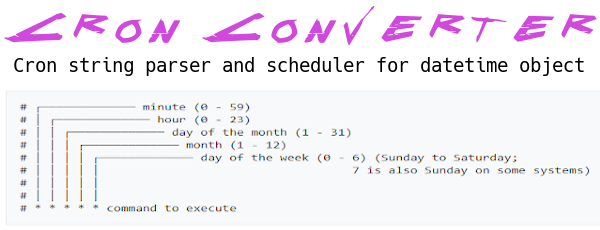
Cron-converter provides a Cron string parser ( from string/lists to string/lists ) and iteration for the datetime object with a cron like format.
This project would be a transposition in Python of JS cron-converter by roccivic.



Install
Pip
pip install cron-converter
Use
from cron_converter import Cron
Create a new instance
cron_instance = Cron()
or
cron_instance = Cron('*/10 9-17 1 * *')
or (with constructor options)
cron_instance = Cron('*/10 9-17 1 * *', {
  'output_weekday_names': True,
  'output_month_names': True
})
Parse a cron string
# Every 10 mins between 9am and 5pm on the 1st of every month
# In the case of the second or third creation method this step is not required
cron_instance.from_string('*/10 9-17 1 * *')

# Prints: '*/10 9-17 1 * *'
print(cron_instance.to_string())
# Alternatively, you could print directly the object obtaining the same result:
# print(cron_instance) # Prints: '*/10 9-17 1 * *'

# Prints:
# [
#   [ 0, 10, 20, 30, 40, 50 ],
#   [ 9, 10, 11, 12, 13, 14, 15, 16, 17 ],
#   [ 1 ],
#   [ 1, 2, 3, 4, 5, 6, 7, 8, 9, 10, 11, 12 ],
#   [ 0, 1, 2, 3, 4, 5, 6 ]
# ]
print(cron_instance.to_list())
Parse an Array
cron_instance.from_list([[0], [1], [1], [5], [0,2,4,6]])

# Prints: '0 1 1 5 */2'
print(cron_instance.to_string())
Constructor options
Possible options:
- output_weekday_names: false (default)
- output_month_names: false (default)
- output_hashes: false (default)
output_weekday_names and output_month_names
cron_instance = Cron(None, {
  'output_weekday_names': True,
  'output_month_names': True
})
cron_instance.from_string('*/5 9-17/2 * 1-3 1-5')
# Prints: '*/5 9-17/2 * JAN-MAR MON-FRI'
print(cron_instance)
or
cron_instance = Cron('*/5 9-17/2 * 1-3 1-5', {
  'output_weekday_names': True,
  'output_month_names': True
})
# Prints: '*/5 9-17/2 * JAN-MAR MON-FRI'
print(cron_instance)
output_hashes
cron_instance = Cron('*/5 9-17/2 * 1-3 1-5', {
  'output_hashes': True
})
# Prints: 'H/5 H(9-17)/2 H 1-3 1-5'
print(cron_instance.to_string())
Get the schedule execution times. Example with raw Datetime
# Parse a string to init a schedule
cron_instance.from_string('*/5 * * * *')

# Raw datetime without timezone info (not aware)
reference = datetime.now()
# Get the iterator, initialised to now
schedule = cron_instance.schedule(reference)

# Calls to .next() and .prev()
# return a Datetime object

# Examples with time now: '2021-01-01T09:32:00
# Prints: '2021-01-01T09:35:00'
print(schedule.next().isoformat())
# Prints: '2021-01-01T09:40:00'
print(schedule.next().isoformat())

# Reset
schedule.reset()

# Prints: '2021-01-01T09:30:00'
print(schedule.prev().isoformat())
# Prints: '2021-01-01T09:25:00'
print(schedule.prev().isoformat())
Using the Iterator Protocol
Starting from version 1.3, the Seeker object implements Python's Iterator protocol, enabling standard iteration patterns.
Important: The schedule iterator is infinite. Always use limiting mechanisms like itertools.islice() or explicit break conditions.
from cron_converter import Cron
from datetime import datetime
from itertools import islice

cron = Cron('*/5 * * * *')
schedule = cron.schedule(datetime(2021, 1, 1, 9, 32))

# Using built-in next()
next_time = next(schedule)
print(next_time)  # 2021-01-01T09:35:00

# Get multiple occurrences with islice
next_10 = list(islice(schedule, 10))

# For loops with islice
for dt in islice(schedule, 5):
    print(dt.isoformat())

# List comprehensions
dates = [dt.isoformat() for dt in islice(schedule, 7)]

# Conditional iteration with break
for dt in schedule:
    print(dt)
    if dt.year > 2021:
        break
Mixing Iterator Protocol with Custom Methods
You can combine standard iteration with custom .next(), .prev(), and .reset() methods:
cron = Cron('*/15 * * * *')
schedule = cron.schedule(datetime(2021, 1, 1, 10, 0))

dt1 = next(schedule)      # 10:15 (iterator protocol)
dt2 = schedule.prev()     # 10:00 (custom method)
dt3 = next(schedule)      # 10:15 (iterator protocol)
schedule.reset()          # Back to start
dt4 = next(schedule)      # 10:15 again
Exclusive and inclusive next()
.next() is exclusive: the datetime it returns is always strictly after the start date,
or after the value returned by the previous call. In the example above the start date is
10:00, which is itself a scheduled minute, so the first .next() skips it and returns
10:15.
Pass inclusive=True when you want to know whether a run is due at or after a given
moment, and a start date landing exactly on a scheduled minute should count:
schedule = Cron('0 12 * * *').schedule(datetime(2021, 1, 1, 12, 0))

schedule.next(inclusive=True)   # 2021-01-01T12:00:00 - the start minute itself
schedule.next()                 # 2021-01-02T12:00:00 - the following occurrence
inclusive only affects the first call on a new or freshly reset() schedule; every
later call is exclusive regardless. A start date carrying seconds or microseconds never
sits exactly on a scheduled minute, so inclusive makes no difference there. The
parameter is not reachable through the iterator protocol (next(schedule),
islice(schedule, n)), which is always exclusive.
Migrating from 1.x — before 2.0.0
.next()was inclusive on that first call, so a start date falling exactly on a scheduled minute returned that same minute. The shift is one full cron period: on0 12 * * *starting at2021-01-01 12:00, 1.x returned2021-01-01T12:00:00where 2.0.0 returns2021-01-02T12:00:00. Addinclusive=Trueto the first call to keep the 1.x results.
Warning: Avoiding Infinite Loops
# Avoid this - will hang forever!
all_dates = list(schedule)

# Do this - always limit iteration
dates = list(islice(schedule, 100))
# or
dates = [dt for dt in schedule if dt.year < 2025]  # Limit with condition
About DST
Be sure to init your cron-converter instance with a TZ aware datetime for this to work!
A Scheduler has two optional mutually exclusive arguments: start_date or timezone_str.
By default (no parameters), a Scheduler start count with a UTC datetime ( utcnow() ) if you not specify any start_date datetime object.
If you provide timezone_str the Scheduler will start count from a localized now datetime ( datetime.now(tz_object) ).
Example starting from localized now datetime
from cron_converter import Cron

cron = Cron('0 0 * * *')
schedule = cron.schedule(timezone_str='Europe/Rome')
# Prints: result datetime + utc offset
print(schedule.next())
Example using pytz:
from pytz import timezone
from datetime import datetime
from cron_converter import Cron

tz = timezone('Europe/Rome')
local_date = tz.localize(datetime(2021, 1, 1))
cron = Cron('0 0 * * *')
schedule = cron.schedule(start_date=local_date)
next_schedule = schedule.next()
next_next_schedule = schedule.next()
# Prints: '2021-01-01T00:00:00+01:00'
print(next_schedule.isoformat())
# Prints: '2021-01-02T00:00:00+01:00'
print(next_next_schedule.isoformat())
Example using python_dateutil:
import dateutil.tz
from datetime import datetime
from cron_converter import Cron

tz = dateutil.tz.gettz('Asia/Tokyo')
local_date = datetime(2021, 1, 1, tzinfo=tz)
cron = Cron('0 0 * * *')
schedule = cron.schedule(start_date=local_date)
next_schedule = schedule.next()
next_next_schedule = schedule.next()
# Prints: '2021-01-01T00:00:00+09:00'
print(next_schedule.isoformat())
# Prints: '2021-01-02T00:00:00+09:00'
print(next_next_schedule.isoformat())
About Cron schedule times frequency
It's possible to compare the Cron object schedules frequency. Thanks @zevaverbach.
# Hours
Cron('0 1 * * 1-5') == Cron('0 2 * * 1-5') # True
Cron('0 1,2,3 * * 1-5') > Cron('0 1,23 * * 1-5') # True
# Minutes
Cron('* 1 * * 1-5') == Cron('0-59 1 * * 1-5') # True
Cron('1-30 1 * * 1-5') > Cron('1-29 1 * * 1-5') # True
# Days
Cron('* 1 1 * 1-5') == Cron('0-59 1 2 * 1-5') # True
Cron('* 1 1,2 * 1-5') > Cron('* 1 6 * 1-5') # True
# Month
Cron('* 1 1 11 1-5') == Cron('* 1 1 1 1-5') # True
Cron('* 1 6 * 1-5') > Cron('* 1 6 1 1-5') # True
# WeekDay
Cron('* 1 1 11 *') == Cron('* 1 1 11 0-6') # True
Cron('* 1 6 * 1-5') > Cron('* 1 6 * 1-4') # True
About seconds repeats
Cron-converter is NOT able to do second repetition crontabs form.
About datetime objects validation
Cron can also validate datetime objects (datetime and date).
Cron("* * 10 * *").validate(datetime(2022, 1, 10, 1, 9)) # True
Cron("* * 12 * *").validate(datetime(2022, 1, 10, 1, 9)) # False
A datetime object can also be validated with the in operator
datetime(2024, 3, 19, 15, 55) in Cron('*/5 9-17/2 * 1-3 1-5') # True
Develop & Tests
git clone https://github.com/Sonic0/cron-converter
cd cron-converter
...
python -m unittest discover -s tests/unit
python -m unittest discover -s tests/integration
1 maintainer

Metadata
1 maintainer
Release files for cron-converter 2.0.2
For a detailed explanation of source distributions (sdists) and built distributions (wheels), please see the package formats documentation.
Source distribution (sdist)
| File | Size | Uploaded | |
|---|---|---|---|
| cron_converter-2.0.2.tar.gz | 17.4 kB | Details |
Built distribution (wheel)
| File | Interpreter | ABI | Platform | Reset |
|---|---|---|---|---|
| cron_converter-2.0.2-py3-none-any.whl | Python 3 | none | any | Details |
Total release size: 32.9 kB
Release files / cron_converter-2.0.2.tar.gz
| Download URL | cron_converter-2.0.2.tar.gz |
|---|---|
| Size | 17.4 kB |
| Tags | Source |
|
SHA-256 checksum How to use checksums |
7c60785af5fc104bced2fdb2a16664d4eb232a4ab10c0df9b97e4f125cb6869e
|
|
BLAKE2b-256 checksum How to use checksums |
bada4966883d9eedaddcb0a5c5c1e73654c9731130d9a97f9a9a03dd5e3371b0
|
| Upload date | |
|
Uploaded using Trusted Publishing? What is trusted publishing? |
No |
| Uploaded via |
twine/6.1.0 CPython/3.12.3
|
Release files / cron_converter-2.0.2-py3-none-any.whl
| Download URL | cron_converter-2.0.2-py3-none-any.whl |
|---|---|
| Size | 15.5 kB |
| Tags | Python 3 |
|
SHA-256 checksum How to use checksums |
81993220ff9f18f998efdfe84bd6558edc96d56f831c17e9bf830c32d7793daa
|
|
BLAKE2b-256 checksum How to use checksums |
fa082155630b4a1e87bc53a441804a781adcfbfcdd2176af3370bf3d5e0589d9
|
| Upload date | |
|
Uploaded using Trusted Publishing? What is trusted publishing? |
No |
| Uploaded via |
twine/6.1.0 CPython/3.12.3
|














