
croparray
Authors: Tim Stasevich and Luis Aguilera.
Description
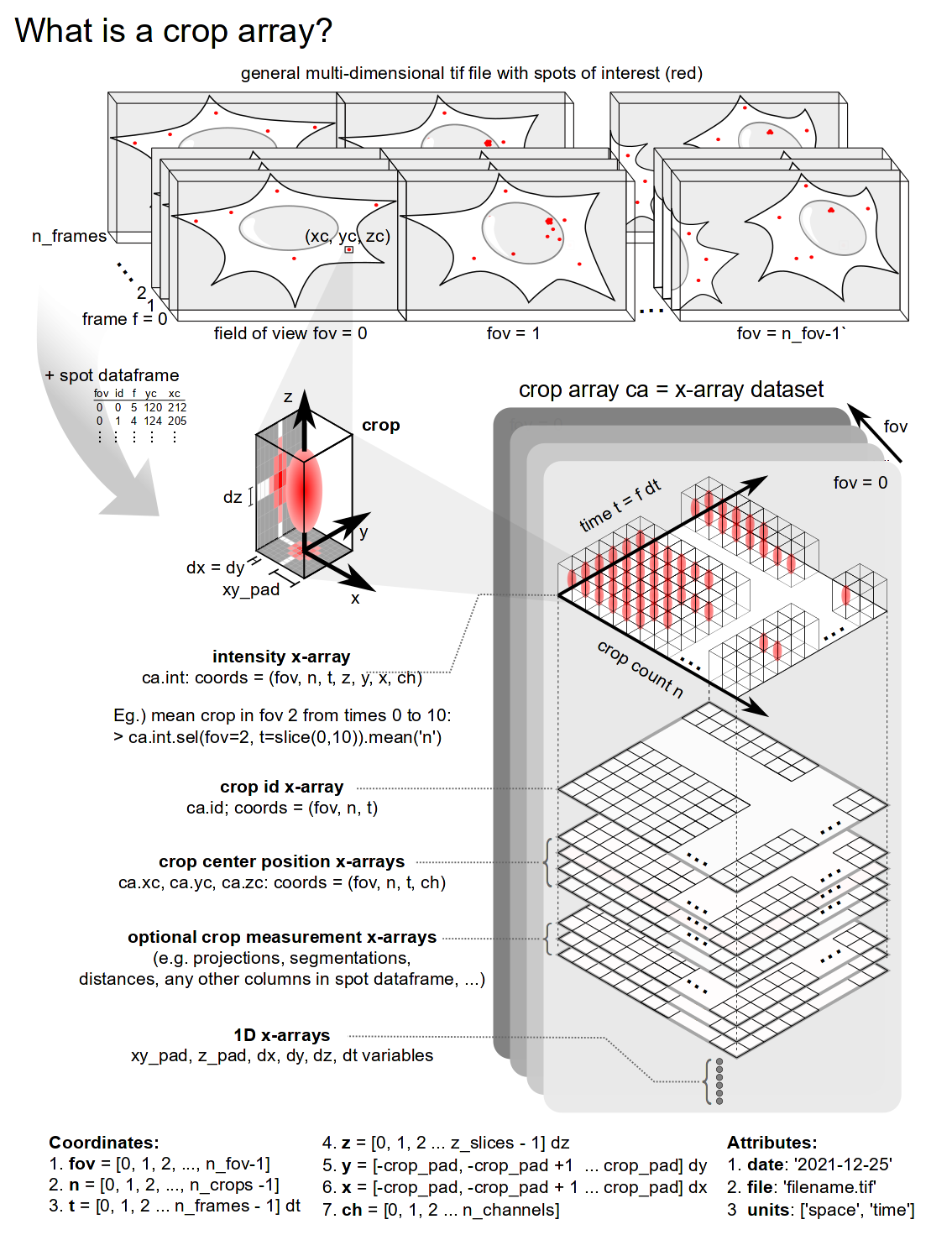
This module is intended for creating and manipulating an array of crops (or regions of interest) that were generated from a multicolor TIF video obtained from single-molecule microscopy.
Documentation
- Documentation is accessible via croparray.readthedocs
Colab implementation
- Implementation in Google Colab


Local installation from the Github repository
-
Install anaconda.
-
Clone the Github repository
git clone https://github.com/Colorado-State-University-Stasevich-Lab/croparray.git
- To create a virtual environment navigate to your local repository and use:
    conda create -n croparray_env python=3.8 -y
    source activate croparray_env
- To install the rest of requirements use:
pip install -r requirements.txt
- To install napari use:
python -m pip install "napari[all]"
Local installation using PIP
- To create a virtual environment using:
    conda create -n croparray_env python=3.8 -y
    source activate croparray_env
- Open the terminal and use pip for the installation:
pip install croparray
- To install napari use:
python -m pip install "napari[all]"
Deactivating and removing the environment
- To deactivate or remove the environment from your computer use:
conda deactivate
- To remove the environment use:
conda env remove -n croparray_env
- To unistall croparray use
pip uninstall croparray
additional troubleshooting information
- If you cannot see the package installed on your computer, try using
pip3. For example:
pip3 install croparray
Installing from yml env
- To creating an environment file (yml) use:
source activate croparray_env
conda env export > croparray_env.yml
- ToCreate an environment from this yml file.
conda env create -f croparray_env.yml
Usage
- Organizes crops and measurements of spots of interest from tif images in a convenient x-array format for reduced filesize and more open and reproducible analyses.
- Visualizes crops of detected spots from super-resolution microscope images.
- Calculates the best maximum projection for each crop containing a detected spot.
- Measures intensity of detected spots within crops.
- Calculates the correlation between two equal-length, 1D signals.
- Saves the crop array as a netcdf file at output_direction/output_filename.
- Integrates with Napari for fast and convenient review of crops of detected spots.
Licenses for dependencies
1 maintainer

Download files
Download the file for your platform. If you're not sure which to choose, learn more about installing packages.
Source Distribution
croparray-0.1.2.tar.gz
(30.3 kB
view details)
Built Distribution
Filter files by name, interpreter, ABI, and platform.
If you're not sure about the file name format, learn more about wheel file names.
Copy a direct link to the current filters
croparray-0.1.2-py3-none-any.whl
(29.0 kB
view details)
File details
Details for the file croparray-0.1.2.tar.gz.
File metadata
- Download URL: croparray-0.1.2.tar.gz
- Upload date:
- Size: 30.3 kB
- Tags: Source
- Uploaded using Trusted Publishing? No
- Uploaded via:
twine/3.3.0 pkginfo/1.7.0 requests/2.25.1 setuptools/54.2.0 requests-toolbelt/0.9.1 tqdm/4.62.3 CPython/3.8.5
File hashes
| Algorithm | Hash digest | |
|---|---|---|
| SHA256 |
dea46108701ba38bfea4d230da48c8f4aa4893d0749fb156f2f440a860cfabe7
|
|
| MD5 |
ab69c3a857d7afffd4e1c0c3fa1d890b
|
|
| BLAKE2b-256 |
8fde6a7a1c5aaa112522f0f7606c79cbe0c73a120e76f49a4622dd1f2ce3beec
|
File details
Details for the file croparray-0.1.2-py3-none-any.whl.
File metadata
- Download URL: croparray-0.1.2-py3-none-any.whl
- Upload date:
- Size: 29.0 kB
- Tags: Python 3
- Uploaded using Trusted Publishing? No
- Uploaded via:
twine/3.3.0 pkginfo/1.7.0 requests/2.25.1 setuptools/54.2.0 requests-toolbelt/0.9.1 tqdm/4.62.3 CPython/3.8.5
File hashes
| Algorithm | Hash digest | |
|---|---|---|
| SHA256 |
603da1099c66b3b908612845cfa7c76521d70b3fb9669aefcbdbffaff5b690a2
|
|
| MD5 |
6c17a2e3115681fb228c134dc068b138
|
|
| BLAKE2b-256 |
4b9c257287e4f8d2523ef5112a12a59f4d35cfd2ede11e7dbce5ca9f99c594ab
|














