
AI reports. Cross-examined. Research reports from multiple AI providers, fact-checked against each other.

Project description
Cross
AI reports. Cross-examined.

Cross is released under the MIT License. Free for personal, academic, and open-source use. Commercial organizations are encouraged to contact us for a commercial license — see COMMERCIAL_LICENSE.md.
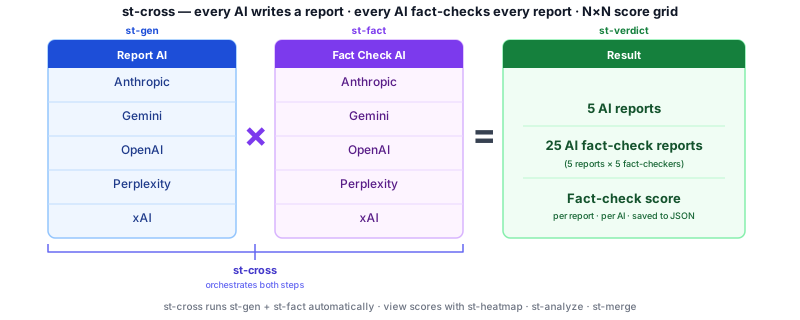
Cross is an open-source command-line tool that generates research reports using five AI (more or less) simultaneously, then cross-checks each report against all the others. The result is a cross-product fact-check matrix — every AI evaluating every other AI — so you can see exactly where they agree, where they diverge, and which claims don't hold up. Reports publish directly to Discourse. It's research-grade, keyboard-first, and built for people who want to publish accurate content fast.
Cross-check before you publish.
Features
- Multi-AI generation — submit the same prompt to multiple AI providers simultaneously
- Cross-product fact-checking — each AI fact-checks every other AI's report (5×5 matrix)
- Analysis and plots — reading metrics, score heatmaps, bar charts
- Discourse publishing — post stories, fact-checks, and audio to any Discourse site
- Text-to-speech — generate and post MP3 audio via a local TTS server
- API response cache — avoid redundant API calls; replay results instantly
- Interactive CLI — menu-driven
stcommand or directst-*commands
AI Providers
| Provider | Model |
|---|---|
| Anthropic | claude-opus-4-5 |
| xAI | grok-4-latest |
| OpenAI | gpt-4o |
| Perplexity | sonar-pro |
| gemini-2.5-flash |
Quick Start — Users
1. Install Homebrew (macOS — skip if already installed)
Homebrew is the standard macOS package manager. If you don't have it:
/bin/bash -c "$(curl -fsSL https://raw.githubusercontent.com/Homebrew/install/HEAD/install.sh)"
2. Install pipx and set up your PATH
pipx installs Python CLI tools into isolated environments and puts them on your PATH —
no virtualenv management, no version conflicts.
# macOS
brew install pipx
pipx ensurepath

# Linux — Debian / Ubuntu
sudo apt install pipx
pipx ensurepath

# Linux — Fedora / RHEL
sudo dnf install pipx
pipx ensurepath
Restart your terminal (or open a new one) so the updated PATH takes effect.
3. Install Cross
pipx install cross-st
To install with TTS/audio (st-speak, st-voice, st-prep --mp3):
pipx install "cross-st[tts]"
Works on Python 3.10–3.13. See README-TTS-audio.md for TTS server setup.
4. Set up API keys
What you'll need:
| What | Required? | Notes |
|---|---|---|
| AI API key (at least one) | ✅ Required | Google Gemini is free — no credit card. Others: Anthropic, OpenAI, xAI, Perplexity |
| Discourse forum credentials | Optional | Only needed to publish reports to a forum. Skip if unsure — see Configuring Discourse. |
st-admin --setup
The wizard walks through each item one at a time and saves everything to ~/.crossenv.
You can re-run it any time to add or change settings.
5. Write your first report
st-new my-first-report                              # create a prompt file, opens in editor
st-gen my-first-report.prompt                       # generate a report (runs prep automatically)
st-ls my-first-report.json                          # see what was created
st-print --preview --story 1 my-first-report.json   # read story 1 as a formatted preview
st-gen submits your prompt to your default AI provider, saves the response, and
runs st-prep on it automatically — so the story is ready to read straight away.
st-ls shows you what's inside the container. st-print --preview renders the
story as formatted text so you can read it before doing anything else with it.
Quick Start — Developers
Developers work from a cloned repo with an editable install. Two repos are needed:
the main cross repo and a separate cross-story repo for story containers.
1. Install Homebrew (macOS — skip if already installed)
/bin/bash -c "$(curl -fsSL https://raw.githubusercontent.com/Homebrew/install/HEAD/install.sh)"
2. Install prerequisites
# macOS
brew install python@3.11 aspell grip

# Linux — Debian / Ubuntu
sudo apt install python3.11 python3.11-venv aspell
pip install grip

# Linux — Fedora / RHEL
sudo dnf install python3.11 aspell
pip install grip
ffmpeg is only needed for TTS/audio — install it when you set up the Piper server.
Why Python 3.11? Cross runs on Python 3.10, 3.11, 3.12, and 3.13 — all four pass the full import test (
tests/test_tts_stack.py). Python 3.11 is the recommended dev baseline becauserequirements.txtwas built and pinned on 3.11. Using 3.12 or 3.13 works fine; 3.11 is just the known-good reference for debugging package conflicts.
Platform support: macOS and Linux are fully supported. Windows requires WSL2 — see README_FAQ.md.
3. Clone the repo
git clone https://github.com/b202i/cross-st.git
cd cross-st
Story file location —
.jsoncontainers and.promptfiles are created in whatever directory you runst-*commands from. You decide the folder structure: keep stories alongside the repo, in a separate project folder, or anywhere else that suits your workflow. A common pattern is a dedicated~/stories/directory that youcdinto before runningst-neworst-gen.
4. Create the virtual environment and install
python3.11 -m venv .venv
source .venv/bin/activate
pip install -r requirements.txt
pip install -e .
5. Configure API keys
cp .env.example .env
# open .env and fill in at least one API key
See README_opensource.md for provider sign-up links and Discourse
configuration. API keys live in .env — never commit this file.
6. Generate your first report
st-new my_topic.prompt            # create a prompt from the template, opens in editor
st-new --bang my_topic.prompt     # generate with all AI, then open the interactive menu
Typical Workflow
Generate → View → Edit → Analyze → Post
st-new— create a prompt from a templatest-bang— generate reports from all 5 AI in parallelst-prep— extract title, text, markdown, and spoken versionsst-fact/st-cross— fact-check one story or the full 5×5 matrixst-analyze— generate a cross-product summary reportst-edit— review and refine in vim with optional browser previewst-post— publish to Discourse with optional MP3 audio
All steps are also accessible through the st interactive menu.
Command Reference
| Command | Purpose |
|---|---|
st |
Interactive menu — accepts .json or .prompt; generates .json if needed |
st-new |
Create a prompt from template; optionally generate with --bang or --st |
st-gen |
Generate a story from a prompt with one AI |
st-bang |
Generate stories from all AI in parallel |
st-prep |
Process raw AI output into title / markdown / text / spoken |
st-merge |
Merge multiple AI stories into one |
st-edit |
Edit or browser-preview a story |
st-ls |
List stories and fact-checks in a container |
st-find |
Search for keywords (with wildcards and boolean operators) in titles, prompts, and stories |
st-fact |
Fact-check a story with one AI |
st-cross |
Cross-product fact-check — all stories × all AI |
st-analyze |
Generate a cross-product analysis report |
st-speed |
Analyze AI performance and speed from timing data |
st-fix |
Revise a story using its fact-check results |
st-read |
Show reading-level metrics |
st-plot |
Plot cross-product scores |
st-heatmap |
Score heatmap across AI combinations |
st-post |
Post story (and optional audio) to Discourse |
st-speak |
Generate TTS audio for a story |
st-voice |
Manage TTS voice selection |
st-rm |
Remove a story or fact-check from a container |
st-cat |
Print raw JSON container contents |
Project Structure
cross/
├── cross_st/               # Python package — all runtime code lives here
│   ├── st.py               # Interactive menu (command builder)
│   ├── st-*.py             # Individual CLI commands (28 tools)
│   ├── ai_handler.py       # AI dispatcher (shim → cross-ai-core)
│   ├── base_handler.py     # Abstract base class shim → cross-ai-core
│   ├── discourse.py        # Discourse API client
│   ├── mmd_*.py            # Support modules (processing, plotting, voice, util)
│   ├── commands.py         # Entry-point dispatch for pyproject.toml
│   └── template/           # Prompt templates for st-new
├── tests/                  # Test suite
├── docs/wiki/              # GitHub Wiki source (auto-built)
├── pyproject.toml          # Package metadata and entry points
├── requirements.txt        # Pinned Python dependencies
├── .env                    # API keys and Discourse credentials (never commit)
└── tmp/                    # Transient coordination files (gitignored)
Further Reading
| File | Contents |
|---|---|
| README_install.md | Full install guide for a new machine (clone, venv, symlinks, keys) |
| README-TTS-audio.md | TTS audio setup — Python versions, platform install, Piper server, voices |
| README_post.md | Publishing guide — Discourse, GitHub Gist, Bluesky, Reddit, X.com |
| README_ui.md | Full menu reference and UI conventions |
| README_FAQ.md | Frequently asked questions |
| ERROR_QUICK_REFERENCE.md | API errors and solutions — quota limits, rate limits, troubleshooting |
| README_opensource.md | Setup, API keys, Discourse configuration |
| README_devel.md | Developer notes and architecture |
| README_cross_product.md | Cross-product analysis deep dive |
| README_speed_comparison.md | AI performance metrics and speed comparison strategy |
| README_testing.md | Regression testing strategy and best practices |
| TESTING_QUICKSTART.md | Run tests quickly — commands and current status |
Ecosystem
Cross is built on two companion packages and one third-party library:
| Package | PyPI | Purpose |
|---|---|---|
| cross-ai-core | cross-ai-core · GitHub |
AI provider dispatch library — the engine that routes prompts to Anthropic, OpenAI, xAI, Perplexity, and Gemini. Install separately if you want the AI layer without the full CLI: pip install cross-ai-core |
| cross-st | cross-st |
This package — the full st-* CLI toolkit |
| yakyak | yakyak |
Third-party TTS client library used by st-speak, st-voice, and st-prep --mp3 to communicate with a local Piper TTS server. Installed automatically with cross-st[tts] and installed separately with pip install yakyak |
📺 Video tutorials — coming soon on YouTube.
License
MIT — free for personal, academic, and open-source use. See LICENSE for the full text.
Organizations deploying Cross in commercial or government contexts are encouraged to reach out for a licensing and support agreement. See COMMERCIAL_LICENSE.md.
For the full licensing strategy and roadmap see README_license.md.
AI reports. Cross-examined.
GitHub: github.com/b202i/cross-st
Release history Release notifications | RSS feed


Download files
Download the file for your platform. If you're not sure which to choose, learn more about installing packages.
Source Distribution
Built Distribution
Filter files by name, interpreter, ABI, and platform.
If you're not sure about the file name format, learn more about wheel file names.
Copy a direct link to the current filters
File details
Details for the file cross_st-0.5.0.tar.gz.
File metadata
- Download URL: cross_st-0.5.0.tar.gz
- Upload date:
- Size: 293.0 kB
- Tags: Source
- Uploaded using Trusted Publishing? No
- Uploaded via: twine/6.2.0 CPython/3.11.15
File hashes
| Algorithm | Hash digest | |
|---|---|---|
| SHA256 |
da43e1e0d9aeb475fd0069c2fb817cc13ae93bbbd28b81c8b7b1f44aa4e8ef3c
|
|
| MD5 |
364bccde60592e49634588c267912ff0
|
|
| BLAKE2b-256 |
ed077a9c7e5e7a35b37e356359b9385baadcb133e045156f5113714cae2c84d8
|
File details
Details for the file cross_st-0.5.0-py3-none-any.whl.
File metadata
- Download URL: cross_st-0.5.0-py3-none-any.whl
- Upload date:
- Size: 258.4 kB
- Tags: Python 3
- Uploaded using Trusted Publishing? No
- Uploaded via: twine/6.2.0 CPython/3.11.15
File hashes
| Algorithm | Hash digest | |
|---|---|---|
| SHA256 |
7762ef7b659eb580ec8daefafb545e9fd0e4fcf5b17321df04f2df2e65fb6b9d
|
|
| MD5 |
cdc2abcbd222d9d7a7075bc682ea457c
|
|
| BLAKE2b-256 |
f6888be40a57f2575420923bbaf5a87b14769ff311bee59b2165869a5ced3aad
|






