
Rearrange data from a normalized CSV format to a crosstabulated format, with styling.

Project description
crosstab





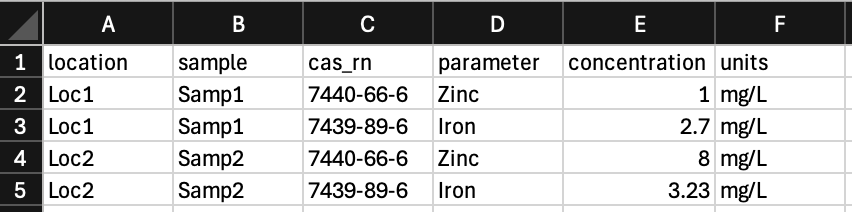
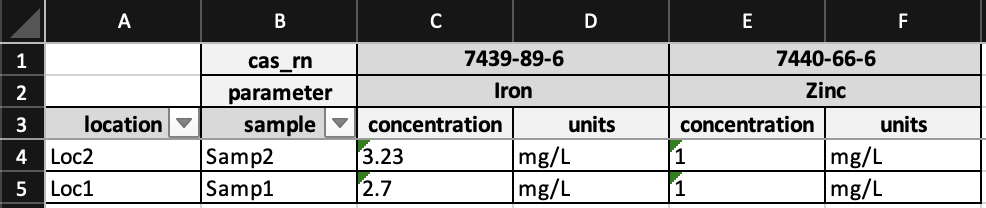
crosstab is a Python package that rearranges data from a normalized CSV format to a crosstabulated format, with styling.
Go from this:
To this:
Installation
You can install crosstab via pip from PyPI:
pip install crosstab
There is also a Docker image available on the GitHub Container Registry:
docker pull ghcr.io/geocoug/crosstab:latest
Usage
The following examples demonstrate how to use crosstab to crosstabulate a CSV file. By default, the output is an Excel file with two sheets: one that contains metadata about the crosstabulation (ie. who ran the script, when it was run, etc.) and another with the data crosstabulated. If the keep_sqlite parameter is set to True, the SQLite database used to store the source data is kept. The SQLite file will have the same basename as the input CSV file, but with a .sqlite extension. If the keep_src parameter is set to True, the source CSV data is copied to the Excel file as a third sheet.
Each of the examples below will produce the exact same output.
Python
from pathlib import Path

from crosstab import Crosstab

Crosstab(
    incsv=Path("data.csv"),
    outxlsx=Path("crosstabbed_data.xlsx"),
    row_headers=("location", "sample"),
    col_headers=("cas_rn", "parameter"),
    value_cols=("concentration", "units"),
    keep_sqlite=True,
    keep_src=True,
).crosstab()
Command Line
crosstab -k -s -f data.csv -o crosstabbed_data.xlsx -r location sample -c cas_rn parameter -v concentration units
Docker
docker run --rm -v $(pwd):/data ghcr.io/geocoug/crosstab:latest -k -s -f /data/data.csv -o /data/crosstabbed_data.xlsx -r location sample -c cas_rn parameter -v concentration units
Release history Release notifications | RSS feed


Download files
Download the file for your platform. If you're not sure which to choose, learn more about installing packages.
Source Distribution
Built Distribution
Filter files by name, interpreter, ABI, and platform.
If you're not sure about the file name format, learn more about wheel file names.
Copy a direct link to the current filters
File details
Details for the file crosstab-0.0.14.tar.gz.
File metadata
- Download URL: crosstab-0.0.14.tar.gz
- Upload date:
- Size: 49.9 kB
- Tags: Source
- Uploaded using Trusted Publishing? No
- Uploaded via: twine/6.1.0 CPython/3.13.3
File hashes
| Algorithm | Hash digest | |
|---|---|---|
| SHA256 |
1a76d6480b6d5149d1c35c4093cd724d1dcd4d9cd127c09ad465b881c9d04513
|
|
| MD5 |
e6a95be5b1007fd3a8a54188f1b1a424
|
|
| BLAKE2b-256 |
e2ea46302676641dea19ceed35ede78192edc6008673675ba4f6adbf57da095a
|
File details
Details for the file crosstab-0.0.14-py3-none-any.whl.
File metadata
- Download URL: crosstab-0.0.14-py3-none-any.whl
- Upload date:
- Size: 34.7 kB
- Tags: Python 3
- Uploaded using Trusted Publishing? No
- Uploaded via: twine/6.1.0 CPython/3.13.3
File hashes
| Algorithm | Hash digest | |
|---|---|---|
| SHA256 |
d623a0a23fe0e3e08de4fe894f4960f129422fac0b9ef8c4ce1ac0b509eededc
|
|
| MD5 |
4c712a62d819fe0476f5af526885a195
|
|
| BLAKE2b-256 |
89fe0043bf8cf098789f0195ad4a1d15ca79b1cd5ae63e0ed31b763be2ef66c1
|






