
MCTS Crossword Generator
This package provides a pure Python implementation for generating crosswords using Monte Carlo Tree Search (MCTS).
- A good overview about the project can be found in this blog post.
- The pip package can be found on PyPI
Quickstart
A: Install package:
- Create and activate a virtual environment based on Python >= 3.8
- Install crossword_generator package:
pip install crossword-generator
B: Generate crossword with default settings:
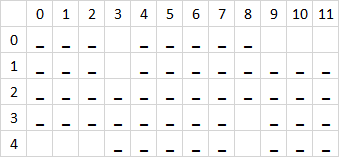
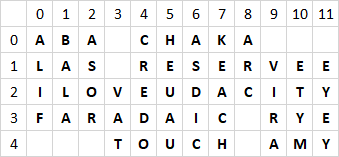
You can generate a crossword without providing any arguments. This will fill a 4x5 layout without any black squares using words from an English dictionary.
To do so, activate your virtual environment and chose one of the following (equivalent) options:
- Call application directly:
crossword
- Execute package:
python -m crossword_generator
- Run the main function in a python shell or your own script:
>>> from crossword_generator import generate_crossword
>>> generate_crossword()
For the next examples I assume you are using the first option to interact with the package.
Examples
- To get started and see which input formats are required, you can download some english (comma-separated) or german (semicolon-separated) sample data.
- Let's assume you have downloaded the sample files into a directory called "crossword_input" inside your working directory.
A: Use your own layouts
- In order to use your own layouts, you will need to set argument
path_to_layoutto a CSV file on your local machine. - the CSV file must have an index column and a header row
- potential letters are marked with "_" (underscore)
- black squares are marked with "" (empty)
Fill an empty 5x12 layout:
crossword --path_to_layout "crossword_input/layout_5_12_empty.csv"
Fill a prefilled 5x12 layout:
crossword --path_to_layout "crossword_input/layout_5_12_prefilled.csv"
Fill an entire NYT-style 15x15 layout:
crossword --path_to_layout "crossword_input/layout_15_15_empty.csv"
Of course, you can also provide arguments from within your code:
generate_crossword(
  path_to_layout="crossword_input/layout_15_15_empty.csv",
)
B: Use your own words
- In order to use your own set of words, you will need to set argument
path_to_wordsto a CSV file (or pattern of CSV files) on your local machine. - the CSV file(s) must contain a column named "answer" with the relevant words
Fill an empty 5x12 layout with words from a list
crossword --path_to_layout "crossword_input/layout_5_12_empty.csv" --path_to_words "crossword_input/sample_words.csv"
Again, you can do the same from within your code:
generate_crossword(
  path_to_layout="crossword_input/layout_5_12_empty.csv",
  path_to_words="crossword_input/sample_words.csv",
)
C: Other arguments you might want to play with:
- num_rows & num_cols [int]
- number of rows / columns the layout should have
- will only be considered if
path_to_layoutis not specified
- max_num_words [int]
- limits the number of words to improve runtime
- max_mcts_iterations [int]
- sets the maximum number of MCTS iterations
- can be increased to get a better solution or decreased to improve runtime
- random_seed [int]
- change the seed to obtain different filled crosswords
- output_path [str]
- if provided, save the final grid and a summary as CSV files into the provided directory
Modules
- optimizer.py
- script that contains the main function
generate_crossword()
- script that contains the main function
- layout_handler.py
- Provides the layout that will later be filled with words
NewLayoutHandler: creates a new layout from scratchExistingLayoutHandler: reads an existing layout from a CSV file
- word_handler.py
- Provides the words that will later be filled into the layout
DictionaryWordHandler: get words from NLTK corpusFileWordHandler: read words from CSV files
- state.py
Entry: class that represents the current state of one entry of the crosswordCrosswordState: class that represents the current state of whole crossword
- tree_search.py
TreeNode: represents one node of the MCTS treeMCTS: represents the whole MCTS tree and provides all necessary functionalities such as- Selection
- Expansion
- Simulation / Rollout
- Backpropagation
References & Dependencies
- The MCTS implementation in
tree_search.pyis based on the algorithm provided by pbsinclair42, which I adapted in several ways:- Convert from 2-player to 1-player domain
- Adjust reward function + exploration term
- Add additional methods to analyze the game tree
- Use PEP 8 code style
- Have a look at
pyproject.tomlfor a list of all required and optional dependencies - Python >= 3.8
- Required packages
- nltk>=3.5
- pandas>=1.4.0
- numpy>=1.22.0
- tqdm>=4.41.0
Future work
- Add a python module that creates questions for given answers using NLP techniques
- Add a graphical user interface (GUI)
1 maintainer

Metadata
1 maintainer
Release files for crossword-generator 0.2.2
For a detailed explanation of source distributions (sdists) and built distributions (wheels), please see the package formats documentation.
Source distribution (sdist)
| File | Size | Uploaded | Provenance | Actions |
|---|---|---|---|---|
| crossword-generator-0.2.2.tar.gz | 19.7 kB | Without provenance | Details for crossword-generator-0.2.2.tar.gz |
Built distribution (wheel)
| File | Interpreter | ABI | Platform | Actions Reset |
|---|---|---|---|---|
| crossword_generator-0.2.2-py3-none-any.whl | Python 3 | none | any | Details for crossword_generator-0.2.2-py3-none-any.whl |
Total release size: 39.7 kB
Release files / crossword-generator-0.2.2.tar.gz
| Download URL | crossword-generator-0.2.2.tar.gz |
|---|---|
| Size | 19.7 kB |
| Tags | Source |
|
SHA-256 checksum How to use checksums |
bba7fd094939df010b12c89d5a23965bd8941218ca103037b97dded0b02d54f9
|
|
BLAKE2b-256 checksum How to use checksums |
e1ababe45774c9cb9027e7319268da964edb518391450a04ad6800a18224dfde
|
| Upload date | |
|
Uploaded using Trusted Publishing? What is trusted publishing? |
No |
| Uploaded via |
twine/4.0.2 CPython/3.10.7
|
Release files / crossword_generator-0.2.2-py3-none-any.whl
| Download URL | crossword_generator-0.2.2-py3-none-any.whl |
|---|---|
| Size | 20.0 kB |
| Tags | Python 3 |
|
SHA-256 checksum How to use checksums |
71de259060c8c65c6d608568553e5cd0e806d29667355f22f16c081adcb21f6c
|
|
BLAKE2b-256 checksum How to use checksums |
c4c0f62d6038ebbb4421d62342be4d5dc87e692f7659b110d4283047e5970abc
|
| Upload date | |
|
Uploaded using Trusted Publishing? What is trusted publishing? |
No |
| Uploaded via |
twine/4.0.2 CPython/3.10.7
|
Security for crossword-generator 0.2.2
Provenance
Provenance describes where a file came from. On PyPI, provenance is shared via attestations, which provide a verifiable record of the build or publishing details. View details, limitations and caveats.
No provenance found
None of the files in this release were uploaded with provenance metadata.
A note on package security
PyPI is a repository for distributing packages, not a service for auditing them. While third-party security researchers and our staff do their best to detect and remove malicious packages, PyPI cannot guarantee the quality, security or suitability of any given package.
To learn more about protecting yourself from malicious actors, visit our package security documentation.














