
CrumPy
Visualize quantum circuits with error propagation in a Jupyter widget.
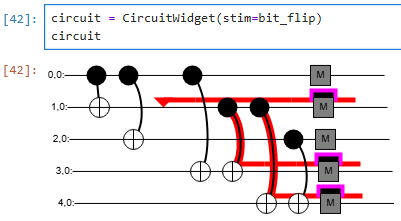
This package builds off of the existing circuit visualizations of Crumble, a stabilizer circuit editor and sub-project of the open-source stabilizer circuit project Stim.
Installation
Requires: Python 3.11+
pip install crumpy
Usage
CrumPy provides a convenient Jupyter widget that makes use of Crumble's ability to generate quantum circuit timeline visualizations with Pauli propagation from Stim circuit specifications.
Using CircuitWidget
CircuitWidget takes a
Stim circuit specification
in the form of a Python str. To convert from the official Stim package's
stim.Circuit, use str(stim_circuit). If coming from another circuit type, it
is recommended to first convert to a stim.Circuit (e.g., with Stim's
stimcirq package),
then to str. Note that not all circuits may be convertible to Stim.
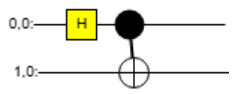
from crumpy import CircuitWidget

your_circuit = """
H 0
CNOT 0 1
"""

circuit = CircuitWidget(stim=your_circuit)
circuit
Propagating Paulis
A useful feature of Crumble (and CrumPy) is the ability to propagate Paulis through a quantum circuit. Propagation is done automatically based on the specified circuit and Pauli markers. From the Crumble docs:
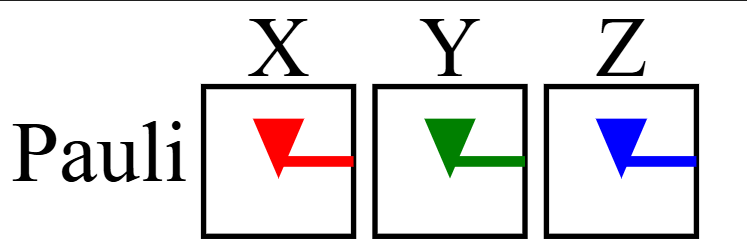
Propagating Paulis is done by placing markers to indicate where to add terms. Each marker has a type (X, Y, or Z) and an index (0-9) indicating which indexed Pauli product the marker is modifying.
Define a Pauli X, Y, or Z marker with the #!pragma MARK_ instruction. Note
that for compatibility with Stim, the '#!pragma ' is included as MARK_ is
not considered a standard Stim instruction:
z_error_on_qubit_2 = "#!pragma MARKZ(0) 2"
Legend
Example
circuit_with_error = """
#!pragma MARKX(0) 0
TICK
CNOT 0 1
TICK
H 0
"""

CircuitWidget(stim=circuit_with_error)
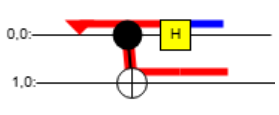
Notice how the single specified Pauli X marker propagates both through the control and across the connector of the CNOT, and gets transformed into a Pauli Z error when it encounters an H gate.
Local Development
See the contribution guidelines for a quick start guide and Python best practices.
Additional requirements
npm/Node.js (for bundling JavaScript); versions 11+/22+ recommended
Project Layout
CrumPy makes use of the widget creation tool AnyWidget. With AnyWidget, Python classes are able to take JavaScript and display custom widgets in Jupyter environments. CrumPy therefore includes both JavaScript and Python subparts:
crumpy/
├── src/
│   ├── crumpy/
│   │   ├── __init__.py       # Python code for CircuitWidget
│   │   └── bundle.js         # Bundled JavaScript will appear here
│   └── js/
│       ├── crumble/          # Modified Crumble code
│       │   ├── main.js       # Main circuit visualization/setup
│       │   └── ...
│       └── package.json      # Bundling setup and scripts
├── tests/                    # Python tests
└── ...
src/crumpy contains the main Python package code.
src/crumpy/__init__.py contains the main class of the crumpy package,
CircuitWidget.
src/js/crumble/ contains the modified Crumble circuit visualization code that
will be rendered in the CircuitWidget widget.
src/js/crumble/main.js contains the main circuit visualization and setup logic
in the form of the render function
used by AnyWidget.
Bundling
To create a Jupyter widget, AnyWidget takes in JavaScript as an ECMAScript Module (ESM). Any changes made to the JavaScript code that backs the circuit visualization will require re-bundling into one optimized ESM file.
To bundle the JavaScript:
- Navigate to
src/js - If you haven't yet, run
npm install(this will install the esbuild bundler) - Run
npm run build(ornpm run watchfor watch mode)
A new bundle should appear at src/crumpy/bundle.js.
Note: If you are working in a Jupyter notebook and re-bundle the JavaScript, you may need to restart the notebook kernel and rerun any widget-displaying code for the changes to take effect.
1 maintainer

Metadata
1 maintainer
Release files for crumpy 0.2.0
For a detailed explanation of source distributions (sdists) and built distributions (wheels), please see the package formats documentation.
Source distribution (sdist)
| File | Size | Uploaded | |
|---|---|---|---|
| crumpy-0.2.0.tar.gz | 42.2 kB | Details |
Built distribution (wheel)
| File | Interpreter | ABI | Platform | Reset |
|---|---|---|---|---|
| crumpy-0.2.0-py3-none-any.whl | Python 3 | none | any | Details |
Total release size: 82.0 kB
Release files / crumpy-0.2.0.tar.gz
| Download URL | crumpy-0.2.0.tar.gz |
|---|---|
| Size | 42.2 kB |
| Tags | Source |
|
SHA-256 checksum How to use checksums |
3cb6a48a540e53dd4137064975a95e81f2f8eff2d5226eb6e06501bb98d6b3d2
|
|
BLAKE2b-256 checksum How to use checksums |
d9224f5d67fb5c00b15c07d8e43d0628faf32b2de1ecf7b66e6a2ab9610084b0
|
| Upload date | |
|
Uploaded using Trusted Publishing? What is trusted publishing? |
Yes |
| Uploaded via |
twine/6.1.0 CPython/3.13.7
|
Provenance
Provenance describes where a file came from. On PyPI, provenance is shared via attestations, which provide a verifiable record of the build or publishing details. View details, limitations and caveats.


PyPI Publish Attestation
PyPI verified that this artifact, at this checksum, originated from the publisher listed below.
Signed by GitHub Actions, verified by PyPI on Sep 12, 2025.
Transparency logRelease files / crumpy-0.2.0-py3-none-any.whl
| Download URL | crumpy-0.2.0-py3-none-any.whl |
|---|---|
| Size | 39.8 kB |
| Tags | Python 3 |
|
SHA-256 checksum How to use checksums |
200feb432ea8897606ce9c5005a07904abd25971a16c28449ae29c3adf5aa644
|
|
BLAKE2b-256 checksum How to use checksums |
488e21ce1a6f0bce886bfe5a052c33f76448966c98ab8c678b22a4f2d51eb274
|
| Upload date | |
|
Uploaded using Trusted Publishing? What is trusted publishing? |
Yes |
| Uploaded via |
twine/6.1.0 CPython/3.13.7
|
Provenance
Provenance describes where a file came from. On PyPI, provenance is shared via attestations, which provide a verifiable record of the build or publishing details. View details, limitations and caveats.
PyPI Publish Attestation
PyPI verified that this artifact, at this checksum, originated from the publisher listed below.
Signed by GitHub Actions, verified by PyPI on Sep 12, 2025.
Transparency log













