
Intro
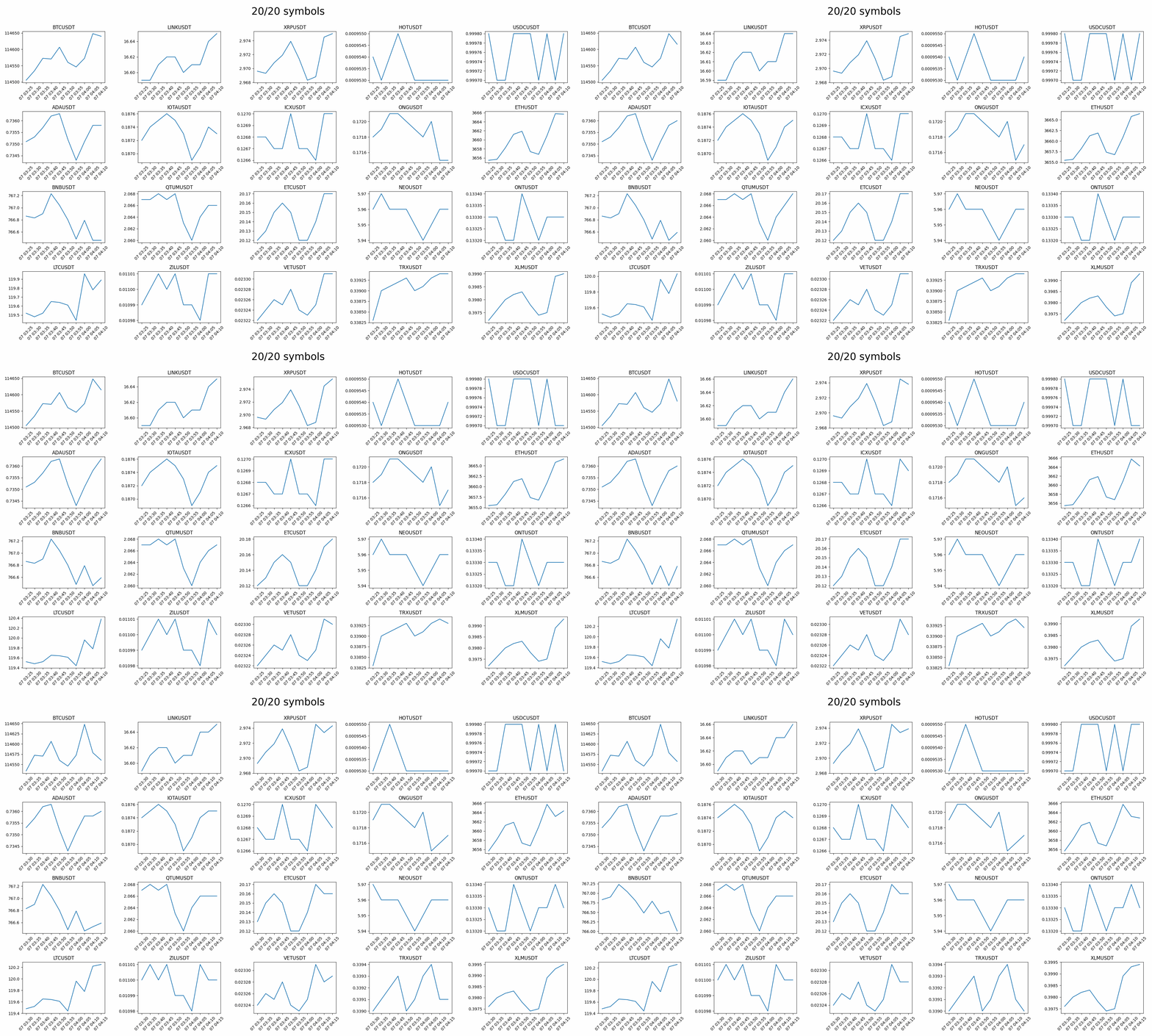
- Monitors the entire crypto market kline (candlestick) data, showing 20 symbols only below for illustration
- Other tools
Usage
pip install crypto-monitor
- You can either react to individual symbol updates by defining a callback
on_changeas shown below - Or define a task like
plot_taskbelow that handles all symbols (x.data) repeatedlyx.data: Dict[str, np.ndarray] x.update_time: Dict[str, int] print(x.data["BTCUSDT"], x.update_time["BTCUSDT"])
import asyncio
from typing import List

import numpy as np
from crypto_data_downloader.binance import ALL_COLUMNS
from crypto_data_downloader.utils import format_date, plot_crypto_data, timestamp
from PIL import Image

from crypto_monitor.binance import CryptoMonitor
from crypto_monitor.utils import safe_exit, save_gif


async def main():
    async def on_change(sym: str, arr: np.ndarray, e_time: int):
        if sym == "BTCUSDT":
            f = format_date
            print(
                f"BTC. my time: {f(timestamp())}, event time: {f(e_time)}, price: {arr[-1, 1]}"
            )

    x = CryptoMonitor()
    x.quote = "USDT"  # Quote asset
    x.interval = "5m"  # Kline time interval
    x.columns = ["open_time", "close"]  # Data columns to include
    print(f"All data columns: {ALL_COLUMNS}")
    x.kline_lim = 10  # Only show 10 time steps for clearer visualization
    x.market = ["SPOT", "MARGIN"][1]
    x.max_num = 20  # Only show 20 symbols for visualization
    x.on_change = on_change

    async def plot_task():
        frames: List[Image.Image] = []
        while True:
            await asyncio.sleep(2)
            safe_exit.check()
            if len(x.data):
                id = "data/CryptoMonitor"
                plot_crypto_data(x.data, id)
                frames.append(Image.open(f"{id}.png").copy())
                assert len(frames) < 150, save_gif(frames, id, fps=5)

    await asyncio.gather(x.watch(), plot_task())


asyncio.run(main())
- Output
All data columns: ['open_time', 'open', 'high', 'low', 'close', 'volume', 'close_time', 'quote_volume', 'n_trades', 'taker_buy_base_volume', 'taker_buy_quote_volume', 'unused']
weight lim: 5000/6000, USDT symbols: 599, spot: 559, margin: 403
BTC. my time: 2025-08-07 04:10:22, event time: 2025-08-07 04:10:22, price: 114639.92
BTC. my time: 2025-08-07 04:10:24, event time: 2025-08-07 04:10:24, price: 114639.91
BTC. my time: 2025-08-07 04:10:26, event time: 2025-08-07 04:10:26, price: 114639.92
...
1 maintainer

Metadata
1 maintainer
Release files for crypto-monitor 0.2.3
For a detailed explanation of source distributions (sdists) and built distributions (wheels), please see the package formats documentation.
Source distribution (sdist)
| File | Size | Uploaded | |
|---|---|---|---|
| crypto_monitor-0.2.3.tar.gz | 5.1 kB | Details |
Built distribution (wheel)
| File | Interpreter | ABI | Platform | Reset |
|---|---|---|---|---|
| crypto_monitor-0.2.3-py3-none-any.whl | Python 3 | none | any | Details |
Total release size: 10.4 kB
Release files / crypto_monitor-0.2.3.tar.gz
| Download URL | crypto_monitor-0.2.3.tar.gz |
|---|---|
| Size | 5.1 kB |
| Tags | Source |
|
SHA-256 checksum How to use checksums |
1606713643cea302300fe01d5af0110426acc3938ffe2c7bd1e23a6cf4742b34
|
|
BLAKE2b-256 checksum How to use checksums |
cffc02876e91f947be40fb132436ad26f5e49a4654b7223bed4d300b86902db7
|
| Upload date | |
|
Uploaded using Trusted Publishing? What is trusted publishing? |
No |
| Uploaded via |
twine/6.2.0 CPython/3.13.2
|
Release files / crypto_monitor-0.2.3-py3-none-any.whl
| Download URL | crypto_monitor-0.2.3-py3-none-any.whl |
|---|---|
| Size | 5.4 kB |
| Tags | Python 3 |
|
SHA-256 checksum How to use checksums |
2abf53dc8a396da6f57287ebe51b9321daaf5326f9beb4f15d829c6effdb6fdf
|
|
BLAKE2b-256 checksum How to use checksums |
d18bc4302fade66ed4dbf417c8c5af1e9d3dbcd1b7efb5fb2a885a78b7611d7e
|
| Upload date | |
|
Uploaded using Trusted Publishing? What is trusted publishing? |
No |
| Uploaded via |
twine/6.2.0 CPython/3.13.2
|














