
crypto-terminal
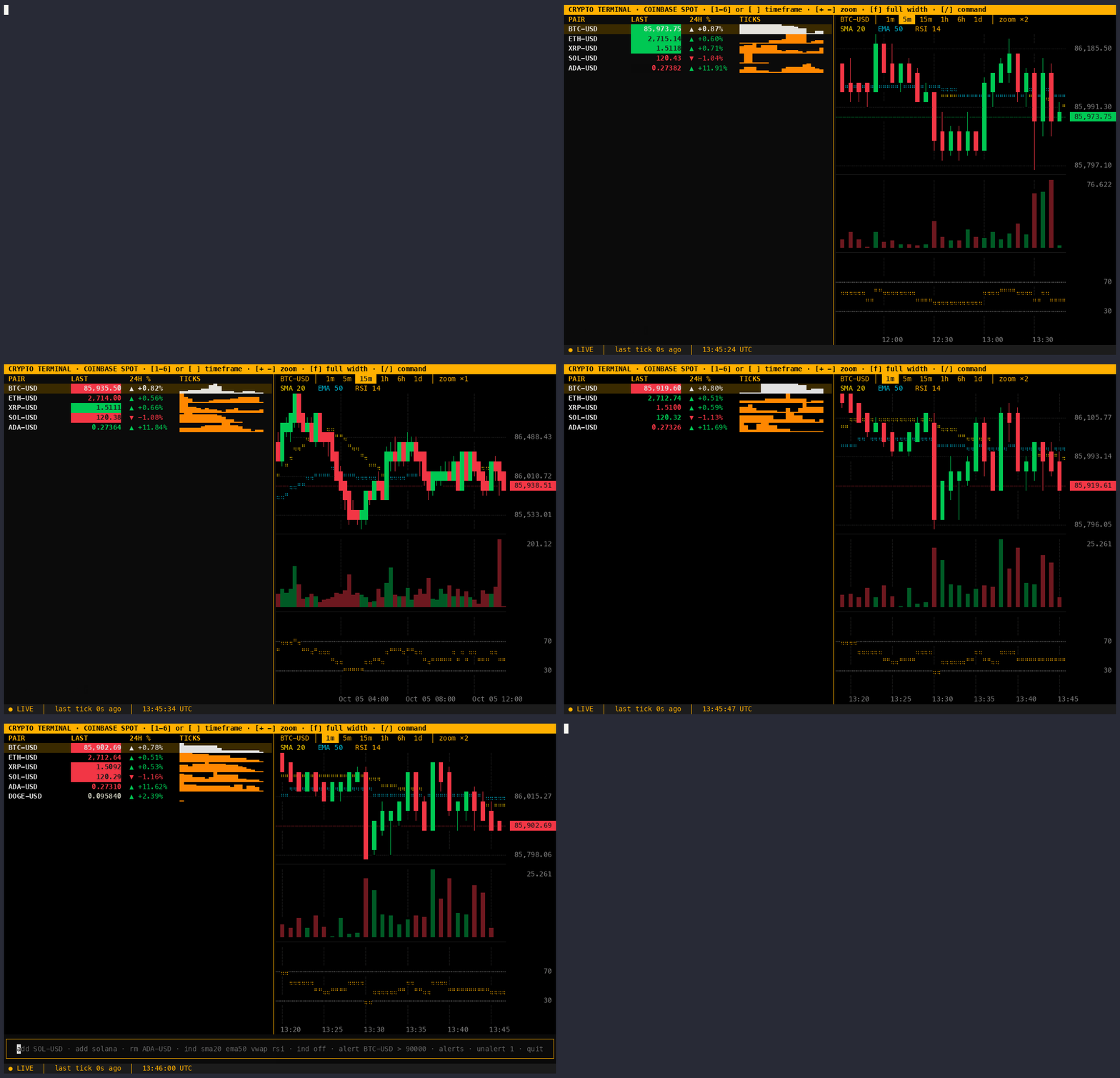
A free, Bloomberg-style crypto terminal that runs in your shell. Live spot prices stream straight from the Coinbase Exchange public websocket: no API key, no account, no polling. Candlestick charts with a live last bar, a live order book and trade tape, indicators, price alerts, and search across every Coinbase pair.



Install
Requires Python 3.10+.
pipx install crypto-terminal
crypto-terminal
Or pip install crypto-terminal into any virtualenv.
Features
- Live watchlist: last price, 24h change, and a sparkline of recent ticks. Prices flash green/red on every up/down tick.
- Candlestick chart for the highlighted pair, with volume underneath. Six timeframes (1m to 1d candles) in a strip above the chart, three zoom levels, and
fto switch between split, chart-only and watchlist-only views. The last candle follows the live price and a new one opens at each candle boundary. Wick tips (highs and lows) are drawn to half a character row and bodies are solid whole rows, so candles never break in any terminal; the highest high and lowest low fill the panel exactly, and each axis label is the exact price of its grid line. Missing candles leave a gap rather than squashing time. A dashed line and tag mark the last price. - Order book for the highlighted pair: the best bids and asks with size and a depth bar (cumulative size from the best price out), and the real spread in price and basis points. Prices are grouped so walls are visible: each pair opens at the step nearest 1 basis point of its price ($10 for BTC at ~$82k), and
gcycles coarser up to 0.5% of the price, then back to ungrouped. Grouped asks round up and bids round down, so a level never shows a better price than is really on offer. A size too small for the column reads<0.0001, never0. If the connection drops or goes quiet, the book is hidden (not shown stale) until a fresh snapshot arrives. - Trade tape: every trade as it prints, green when the buyer crossed the spread, red when the seller did. A bar on top shows the share of the last minute's volume that was bought. Trades in the same second, side and price are combined into one line with a count (
×3); lines bigger than 98% of recent ones are highlighted. Trade ids are sequential, so a trade that never arrived shows as1 missedinstead of silently vanishing.bhides or shows the book and tape; on terminals narrower than 140 columns they start hidden. - Indicators: SMA 20, EMA 50 and VWAP (resets at the UTC day) over the candles, RSI 14 in its own panel.
- Coin search:
add solanalists every online Solana pair (USD, USDC, USDT, EUR, GBP and BTC quotes first). Exact pairs likeadd SOL-BTCadd directly. Sub-cent and BTC-quoted prices keep 5 significant figures. - Price alerts: on a level (
>/<) or a percentage move. A firing alert rings the terminal bell, shows a toast, and sends a desktop notification (macOS, or Linux withnotify-send). Pairs with an alert carry a 🔔. - Status line: connection state, time since the last tick, UTC clock. Shows
STALEafter 10s without data and reconnects automatically with exponential backoff.
Default pairs: BTC-USD, ETH-USD, XRP-USD, SOL-USD, ADA-USD.
How live is it?
Measured on the five default pairs over 60s:
| Quiet (Sunday) | Busy | |
|---|---|---|
| Price updates | ~5.5 / s | ~12 / s |
| Bandwidth | ~0.02 Mbps | ~0.04 Mbps |
The order book adds one connection for the highlighted pair only: a ~1.1 MB snapshot when you select BTC-USD, then ~18 updates/s at ~0.03 Mbps (measured over 60s on a Friday night). It opens 0.3s after the selection settles, so scrolling through the watchlist doesn't download a book for every pair, and it closes while the book is hidden.
Coinbase pushes an update on every trade (bursts are batched); nothing is polled. A heartbeat arrives every second, so a dead connection is spotted and replaced within seconds. The chart redraws at most four times a second.
Keys
| Key | Action |
|---|---|
↑ ↓ |
Select pair (chart follows) |
1 – 6 |
Candles: 1m, 5m, 15m, 1h, 6h, 1d |
[ ] |
Shorter / longer candles |
+ - |
Zoom: 4, 2 or 1 columns per candle |
f |
Cycle the view: split → chart only → watchlist only (the watchlist is only as wide as its columns; alone, its sparkline stretches to fill the width) |
b |
Hide / show the order book and trade tape (in watchlist-only view, adds it beside the watchlist) |
g |
Group book prices more coarsely (wraps back to ungrouped) |
/ or : |
Open command bar (esc closes it) |
ctrl+q |
Quit |
Commands
| Command | Effect |
|---|---|
add SOL-USD |
Add a pair |
add sol / add solana |
Search by symbol or name: pick with ↑ ↓, enter adds, esc cancels |
rm ADA-USD |
Remove a pair |
ind sma20 ema50 vwap rsi |
Toggle indicators (any subset) |
ind off |
Clear all indicators |
alert BTC-USD > 90000 |
Alert when the price reaches 90,000 or more (< for at or below) |
alert BTC-USD move 5% |
Alert on a ±5% move from the current price |
alerts |
List alerts with their numbers |
unalert 2 |
Remove alert 2 |
quit |
Exit |
Alerts fire once and are then removed. The watchlist, indicators and alerts are saved in ~/.config/crypto-terminal/ (or $XDG_CONFIG_HOME/crypto-terminal/).
From source
git clone https://github.com/owen-alderson/crypto-terminal.git
cd crypto-terminal
python3 -m venv .venv
source .venv/bin/activate
pip install -r requirements.txt
python -m crypto_terminal
Architecture
crypto_terminal/
  feed.py        websocket client: subscribes to ticker + heartbeat, validates each message,
                 reconnects with exponential backoff (1s → 30s); 30s of silence = dead socket
  history.py     REST: candles, the product list for search, the live-candle update
  indicators.py  SMA, EMA, RSI, VWAP as pure functions
  alerts.py      alert rules, trigger check, desktop notification
  chart.py       the chart as a pure function: candles in, text lines out; wick tips exact to half a row, solid whole-row bodies
  theme.py       the colour palette
  widgets.py     PriceTable (watchlist), ChartPane (draws chart.py's lines), PairPicker (search results)
  app.py         Textual app: layout, command parsing, saved config, status line
tests/           pytest: parsing, indicators against reference values, search, alerts, reconnect
                 against a local websocket server, headless UI tests with Textual's Pilot (no internet)
The feed, the chart fetch and the product list run as Textual async workers. Changing the watchlist restarts the feed worker, and a new chart request cancels the previous one so a slow response can't draw the wrong pair.
Tests
pytest
History
This repo started as a Streamlit + CoinGecko portfolio dashboard that polled every 60s. That version is preserved at the v1-streamlit tag (git checkout v1-streamlit).
License
MIT, see LICENSE. Provided as is, with no warranty: this is a market-data viewer, not financial advice.
1 maintainer

Metadata
1 maintainer
Release files for crypto-terminal 2.2.0
For a detailed explanation of source distributions (sdists) and built distributions (wheels), please see the package formats documentation.
Source distribution (sdist)
| File | Size | Uploaded | |
|---|---|---|---|
| crypto_terminal-2.2.0.tar.gz | 3.4 MB | Details |
Built distribution (wheel)
| File | Interpreter | ABI | Platform | Reset |
|---|---|---|---|---|
| crypto_terminal-2.2.0-py3-none-any.whl | Python 3 | none | any | Details |
Total release size: 3.4 MB
Release files / crypto_terminal-2.2.0.tar.gz
| Download URL | crypto_terminal-2.2.0.tar.gz |
|---|---|
| Size | 3.4 MB |
| Tags | Source |
|
SHA-256 checksum How to use checksums |
1defddb77e7a99223570d9d6d7e3d44ff5ea9daecd12e53107ea81baef7ac8dd
|
|
BLAKE2b-256 checksum How to use checksums |
6fb348e4716400ed5742f0624bfdeeb4e027a1f1e6edeb18ba2badff44827e75
|
| Upload date | |
|
Uploaded using Trusted Publishing? What is trusted publishing? |
Yes |
| Uploaded via |
twine/7.0.0 CPython/3.13.14
|
Provenance
Provenance describes where a file came from. On PyPI, provenance is shared via attestations, which provide a verifiable record of the build or publishing details. View details, limitations and caveats.


PyPI Publish Attestation
PyPI verified that this artifact, at this checksum, originated from the publisher listed below.
Signed by GitHub Actions, verified by PyPI on Oct 10, 2026.
Transparency logRelease files / crypto_terminal-2.2.0-py3-none-any.whl
| Download URL | crypto_terminal-2.2.0-py3-none-any.whl |
|---|---|
| Size | 32.3 kB |
| Tags | Python 3 |
|
SHA-256 checksum How to use checksums |
d442129d5661c0e50638bae180b21d8a5f6619e021f2f3d8557f9a07d1b51f1a
|
|
BLAKE2b-256 checksum How to use checksums |
136342305159c89876a31ab3feae52220d7a139b0bf2de1b652c8ae1762493ba
|
| Upload date | |
|
Uploaded using Trusted Publishing? What is trusted publishing? |
Yes |
| Uploaded via |
twine/7.0.0 CPython/3.13.14
|
Provenance
Provenance describes where a file came from. On PyPI, provenance is shared via attestations, which provide a verifiable record of the build or publishing details. View details, limitations and caveats.
PyPI Publish Attestation
PyPI verified that this artifact, at this checksum, originated from the publisher listed below.
Signed by GitHub Actions, verified by PyPI on Oct 10, 2026.
Transparency log













