
CrysViz - Crystal Structure Visualisation & Analysis
Light-weight browser-based crystal structure visualisation and analysis with on-device rendering.
Run it in your browser at crysviz.org.
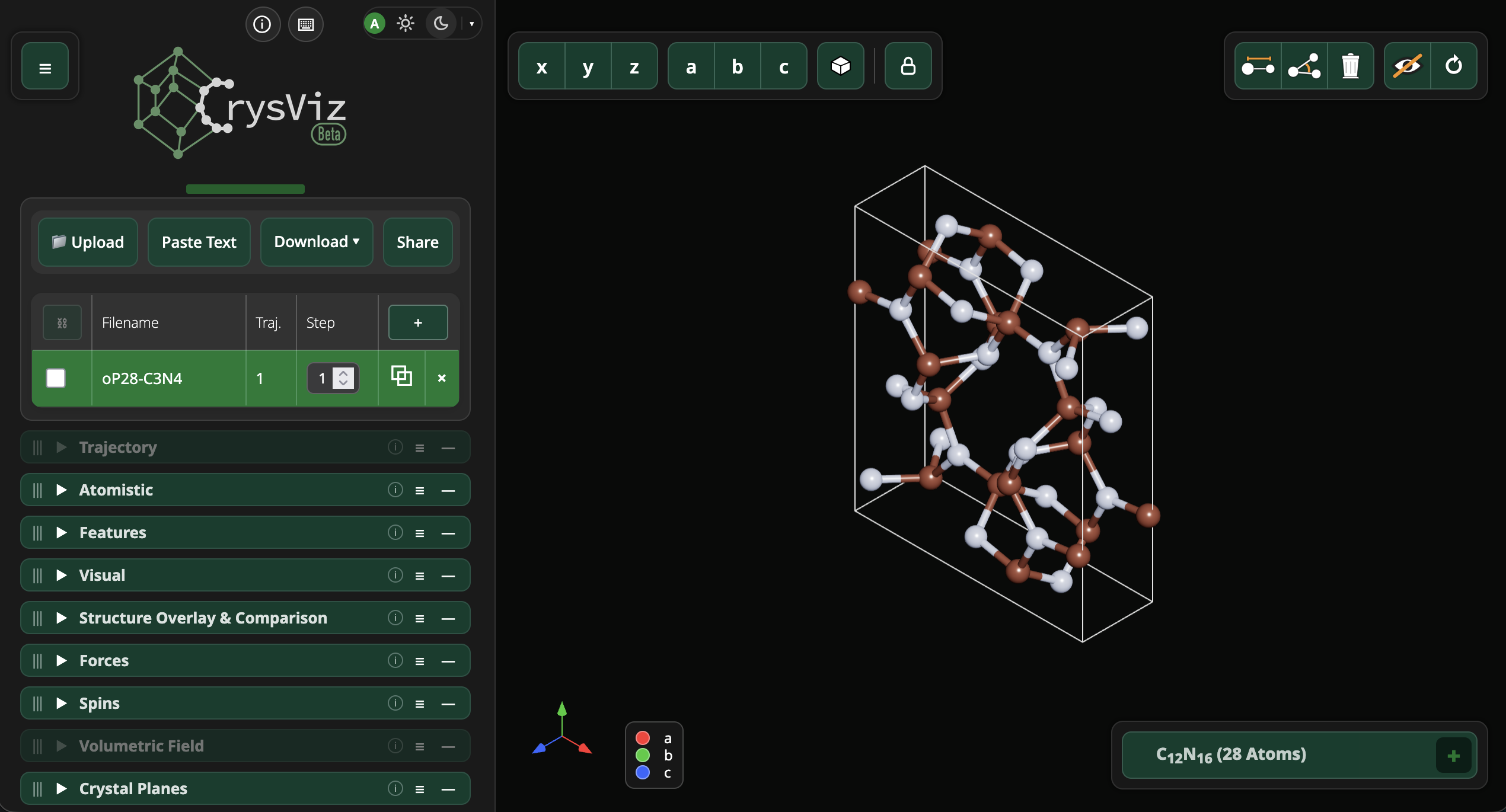
CrysViz is a standalone visualisation tool built on top of Three.js. Paste a POSCAR/OUTCAR/CIF snippet, drop a local file (POSCAR, OUTCAR, CIF or QE input/output), or grab an OPTIMADE endpoint (or just Materials Project or Alexandria IDs). Your crystal structures will NOT leave your device!
Copyright (C) 2025-2026 Florian Trybel, Abhijith S Parackal, Oscar Bulancea-Lindvall, Henricus R.A. ten Eikelder and Rickard Armiento
Key Features
- No backend required; runs entirely in the browser, no data leaves your machine. Runs in nearly every device (in particular smartphons and tablets) and in every browser.
- Visualise Input and output from VASP, Quantum Espresso, and CIF files.
- Measure distances and angles.
- Use custom bond lengths with the optional ability to display atoms outside the unit cell that are bonded neighbours.
- Customizable color schemes can be choosen for any individual atoms
- Forces and spin visualisation. Dynamically for relaxaton or MD trajectories
- Trajectory player. Load VASP OUTCARs and Quantum Espresso vc-relax output files directly and visualise the trajectories. Long MD trajecetories might be beyond your browsers memory limits.
- Symmetry anlysis and structure refinement (powered by Moyo WASM)
- Relxations and molecular dynamics simulations directly on your device with NEP potentials with upt to several hundred atoms.
- Possibility to activate a calculation backend. This allows structural relaxations with any ASE compatible calculater, e.g., MACE, UPET, VASP, QE; trajectory is added and can be played using the trajectory player.
- Bond length histogram (angles and coordiantion numbers are comming soon).
- and many more...
This project is licensed under the GNU Affero General Public License v3.0 (AGPL-3.0). This program is free software: you can redistribute it and/or modify it under the terms of the GNU Affero General Public License as published by the Free Software Foundation, either version 3 of the License, or (at your option) any later version. This program is distributed in the hope that it will be useful, but WITHOUT ANY WARRANTY; without even the implied warranty of MERCHANTABILITY or FITNESS FOR A PARTICULAR PURPOSE. See the GNU Affero General Public License for more details. You should have received a copy of the GNU Affero General Public License along with this program. If not, see https://www.gnu.org/licenses/.
Maintainer
- Florian Trybel - Project lead
- Abhijith S Parackal
- Rickard Armiento
- Oscar Bulancea-Lindvall
- Henricus R.A. ten Eikelder
Local in-browser installation and use
If you do not want to use CrysViz over the Internet, you can run it via a webserver on your own computer:
-
Clone the CrysViz repository from GitHub
-
Start the local server:
make serve -
Visit the URL shown.
Run CrysViz as a stand-alone application
The stand-alone application uses pywebview, which requires a native GUI backend. This sometimes works automatically via CrysViz dependency handling, but if not, follow the installation instructions for pywebview).
We suggest that you set up pywebview and CrysViz in a venv. For pywebview to access its required system packages, you may need to create it as, e.g.:
python3 -m venv --system-site-packages .venv
source .venv/bin/activate
python -m pip install pywebview
And then test that the pywebview backend works:
import webview
webview.create_window('Hello world', 'https://pywebview.flowrl.com/')
webview.start()
Now you can install CrysViz into the venv as:
python -m pip install -e .
(Good alternatives are via pipx install or uv tool install if you have these tools available.)
And then run the standalone application with:
crysviz
Python API
If you have the standalone application installed, you can also use the Python API for visualization and remote-control from Python. For example:
from crysviz import Payload, Viewer, show

payload = Payload("silicon.cif", "data_Si\n_cell_length_a 5.43\n")
with Viewer([payload]) as viewer:
    structures = viewer.list_structures()
    viewer.select(structures[0].id, frame=0)
    viewer.update_lattice([[5.7, 0.0, 0.0], [0.2, 5.4, 0.0], [0.0, 0.0, 5.2]])
    viewer.update_fractional_positions([[0.0, 0.0, 0.0]], commit=False)
    viewer.commit_positions()
    viewer.recenter_camera()

# Equivalent concise construction; returns once the window is ready.
viewer = show(["structure.cif"])
For more, see examples.
Widget mode / embedding
CrysViz can be embedded in another site as a compact interactive viewer with
?widget=1. Widget mode shows only the 3D structure view (with spin arrows), a
locked composition legend, a small CrysViz logo (top-left) that opens the full
UI in a new tab, and a settings menu (top-right) for the cell choice
(As loaded / Conventional / Primitive) and rendering style
(Normal / Cel shading / Ray tracing / Path tracing).
URL contract — the embedder points an <iframe> at:
https://crysviz.org/index.html?widget=1#load-file=<urlenc name>.crysviz|<urlenc base64 JSON>
The fragment is the existing #load-file= loader: filename|content, each part
URL-encoded, the content being base64-encoded UTF-8 of a frames-style .crysviz
session (the "CrysViz" download format). The minimal session is a single frame
with spins and the display toggle on:
{
  "format": "crysviz",
  "version": "2.16",
  "frames": [{
    "elements": ["Fe", "Fe", "O", "O"],
    "lattice": [[a,0,0],[0,a,0],[0,0,c]],
    "positions": [[0,0,0], ...],
    "spins": [{ "vector": [0,0,2] }, ...]
  }],
  "selectedFrameIndex": 0,
  "display": { "spinsActive": true }
}
Spin vectors are Cartesian magnetic moments, index-aligned to positions. The
Conventional/Primitive options symmetrise the cell (via moyo) and remap the
moments onto the new cell; a magnetic order that the smaller cell cannot carry
(a magnetic supercell) leaves that option greyed out. The top-left logo links
back to the same structure in the full UI (the same URL minus widget=1).
Precomputed cells (frameKinds) — a database that already knows the
conventional and primitive cells can ship them as extra frames instead of
paying for the in-browser symmetrisation. Send a multi-frame session whose
frames are [as-loaded, conventional?, primitive?] and add a top-level
frameKinds array, order-aligned with frames, labelling each with
"loaded", "conventional", or "primitive" (kinds after the first are
optional):
{
  "format": "crysviz",
  "version": "2.16",
  "frames": [ { …loaded… }, { …conventional… }, { …primitive… } ],
  "frameKinds": ["loaded", "conventional", "primitive"],
  "selectedFrameIndex": 0,
  "display": { "spinsActive": true }
}
When frameKinds is present the widget's Structures menu simply selects the
matching frame — no moyo runs and no in-browser spin remapping happens; a
cell kind not listed is greyed out ("not provided by the database"). When
frameKinds is absent the menu falls back to the moyo build path above. The
key is widget-only: the full app ignores frameKinds entirely (a session with
it loads as an ordinary multi-frame trajectory).
Menu links (menuLinks) — the embedder can add its own dropdown items that
open URLs. A top-level menuLinks array of {label, url} (same channel as
frameKinds) renders as plain items in the widget menu, between the toggles and
"Open in CrysViz"; clicking one opens url in a new tab. The altermagnets DB
uses this for e.g. "Download CIF" / "Download POSCAR" links to its files
endpoint. Validated strictly: each label a non-empty string (≤40 chars), each
url an http/https URL that parses; invalid entries are dropped, an empty
result shows no group. Widget-only — the full app ignores it.
{ "menuLinks": [
  { "label": "Download CIF", "url": "https://altermagnets.example/files/x.cif" },
  { "label": "Download POSCAR", "url": "https://altermagnets.example/files/x.vasp" }
] }
Theme — append &theme=dark or &theme=light to the URL (?widget=1&theme=dark#load-file=…) to force the embed's UI theme at boot; any other/absent value keeps the default (follow the OS). The choice is applied through the theme manager and is not persisted.
Saved preferences — the full app remembers per-structure customisations
(per-atom colours, focus regions) in the browser's storage and re-applies them
when the same structure is loaded again. Widget mode does not do this by
default: the embed has no UI to inspect, change or reset those preferences, so
a structure always opens with its defaults (or exactly the state a .crysviz
session carries). Append &prefs=1 (?widget=1&prefs=1#load-file=…) to opt
in and let the viewer's own saved customisations for that structure carry over
into the embed.
Sandboxing — the iframe does not need allow-same-origin: widget mode
runs correctly in an opaque origin where browser storage is unavailable
(theme/font preferences silently fall back to defaults). An opaque-origin embed
does, however, require the CrysViz host to serve CORS headers
(Access-Control-Allow-Origin) for its ES-module and WASM fetches — true on
GitHub Pages (where crysviz.org is served), and something self-hosters must
configure.
Third-Party Libraries
-
THREE.js
- Repository: https://github.com/mrdoob/three.js/
- License: MIT
- Copyright: THREE.js authors
- See docs/external/three/LICENSE for the full license text.
- License and code can be found in docs/external/three/
-
Moyo
- Repository: https://github.com/spglib/moyo
- License: MIT or Apache-2.0
- Copyright: Kohei Shinohara
- See docs/external/moyo-test/LICENSE for the full license text.
- Explicitly moyo-wasm is used.
- License and code can be found in docs/external/moyo-test/
-
NEP_CPU
- Repository: https://github.com/brucefan1983/NEP_CPU
- License: GPL-3.0
- Copyright: NEP_CPU authors
- See docs/external/nep_wasm/LICENSE-NEP_CPU for the full license text.
- Explicitly NEP_CPU is compliled into a WASM module.
- License and code can be found in docs/external/nep_wasm/
-
NEP89 Weights (from GPUMD)
- Repository: https://github.com/brucefan1983/GPUMD
- License: GPL-3.0
- Copyright: GPUMD authors
- The weights can be found in docs/external/nep_wasm/
- See docs/external/nep_wasm/LICENSE-GPUMD for the full license text.
-
three-wboit
- Repository: https://github.com/stevinz/three-wboit
- License: MIT
- Copyright: Stephens Nunnally (@stevinz); portions mrdoob and three.js authors, Alexander Rose
- See docs/external/three-wboit/LICENSE for the full license text.
- Used by the optional "Weighted blended (WBOIT)" rendering pipeline.
- License and code can be found in docs/external/three-wboit/
-
three-depthpeeling-demo
- Repository: https://github.com/gkjohnson/three-depthpeeling-demo
- License: MIT
- Copyright: Garrett Johnson
- See docs/external/three-depthpeeling/LICENSE for the full license text.
- Adapted (not verbatim) for the optional "Depth peeling" rendering pipeline; see docs/external/three-depthpeeling/README.md for the divergences.
- License and code can be found in docs/external/three-depthpeeling/
-
THREE.js-RayTracing-Renderer
- Repository: https://github.com/erichlof/THREE.js-RayTracing-Renderer
- License: CC0 1.0 (public domain; attribution given as a courtesy) The CC0 dedication applies to the upstream original only; CrysViz's local adaptations in docs/external/three-raytracing/ and the first-party ray/path tracing code under docs/render/pipeline/ are licensed AGPL-3.0.
- Author: Erich Loftis (@erichlof)
- See docs/external/three-raytracing/LICENSE for the full license text.
- GLSL chunk library adapted for the optional "Ray tracing" rendering pipeline; see docs/external/three-raytracing/README.md for the adaptations.
- License and code can be found in docs/external/three-raytracing/
-
THREE.js-PathTracing-Renderer
- Repository: https://github.com/erichlof/THREE.js-PathTracing-Renderer
- License: CC0 1.0 (public domain; attribution given as a courtesy) The CC0 dedication applies to the upstream original only; CrysViz's local adaptations in docs/external/three-pathtracing/ and the first-party ray/path tracing code under docs/render/pipeline/ are licensed AGPL-3.0.
- Author: Erich Loftis (@erichlof)
- See docs/external/three-pathtracing/LICENSE for the full license text.
- GLSL chunk library adapted for the optional "Path tracing" rendering pipeline; see docs/external/three-pathtracing/README.md for the adaptations.
- License and code can be found in docs/external/three-pathtracing/
-
QR Code generator
- Repository: https://github.com/nayuki/QR-Code-generator
- License: MIT
- Copyright: Project Nayuki
- Loaded on demand from jsDelivr (npm
nayuki-qr-code-generator) to draw the QR code in the share-link dialog.
Other Attributions
- CrysViz uses some color maps from the Scientific colour maps by Fabio Crameri (Version 8)
- OPTIMADE compatible structure providers including Materials Project and Alexandria.
1 maintainer

Metadata
1 maintainer
Release files for crysviz 0.10.0
For a detailed explanation of source distributions (sdists) and built distributions (wheels), please see the package formats documentation.
Source distribution (sdist)
| File | Size | Uploaded | Provenance | Actions |
|---|---|---|---|---|
| crysviz-0.10.0.tar.gz | 27.4 MB | With provenance | Details for crysviz-0.10.0.tar.gz |
Built distribution (wheel)
| File | Interpreter | ABI | Platform | Actions Reset |
|---|---|---|---|---|
| crysviz-0.10.0-py3-none-any.whl | Python 3 | none | any | Details for crysviz-0.10.0-py3-none-any.whl |
Total release size: 55.3 MB
Release files / crysviz-0.10.0.tar.gz
| Download URL | crysviz-0.10.0.tar.gz |
|---|---|
| Size | 27.4 MB |
| Tags | Source |
|
SHA-256 checksum How to use checksums |
9ee7480c89fa9f95936fa6daab29a1431ab7eef2cf4189e89f601408bbe0a5ec
|
|
BLAKE2b-256 checksum How to use checksums |
8326e501e5f64860a138b793fd211d5c6b27806c09a4cc48675bc0d77f6d5282
|
| Upload date | |
|
Uploaded using Trusted Publishing? What is trusted publishing? |
Yes |
| Uploaded via |
twine/6.1.0 CPython/3.13.14
|
Provenance
Provenance describes where a file came from. On PyPI, provenance is shared via attestations, which provide a verifiable record of the build or publishing details. View details, limitations and caveats.


PyPI Publish Attestation
PyPI verified that this artifact, at this checksum, originated from the publisher listed below.
Signed by GitHub Actions, verified by PyPI on Sep 18, 2026.
Transparency logRelease files / crysviz-0.10.0-py3-none-any.whl
| Download URL | crysviz-0.10.0-py3-none-any.whl |
|---|---|
| Size | 27.9 MB |
| Tags | Python 3 |
|
SHA-256 checksum How to use checksums |
a7e18cda83936b4576dd43ee304abdf57138b09e6eb595bf53044890bf178121
|
|
BLAKE2b-256 checksum How to use checksums |
e8fba6bcd6478d51a9e1cba0b754e65c549b77dc4602309551c8c946472faf5a
|
| Upload date | |
|
Uploaded using Trusted Publishing? What is trusted publishing? |
Yes |
| Uploaded via |
twine/6.1.0 CPython/3.13.14
|
Provenance
Provenance describes where a file came from. On PyPI, provenance is shared via attestations, which provide a verifiable record of the build or publishing details. View details, limitations and caveats.
PyPI Publish Attestation
PyPI verified that this artifact, at this checksum, originated from the publisher listed below.
Signed by GitHub Actions, verified by PyPI on Sep 18, 2026.
Transparency logSecurity for crysviz 0.10.0
Provenance
Provenance describes where a file came from. On PyPI, provenance is shared via attestations, which provide a verifiable record of the build or publishing details. View details, limitations and caveats.
Full provenance
All 2 files in this release have been uploaded with provenance metadata.
Attestation for crysviz-0.10.0.tar.gz
PyPI Publish Attestation
PyPI verified that this artifact, at this checksum, originated from the publisher listed below.
Signed by GitHub Actions, verified by PyPI on Sep 18, 2026.
Transparency logA note on package security
PyPI is a repository for distributing packages, not a service for auditing them. While third-party security researchers and our staff do their best to detect and remove malicious packages, PyPI cannot guarantee the quality, security or suitability of any given package.
To learn more about protecting yourself from malicious actors, visit our package security documentation.














