
cscx
Turn the colour scheme you already use into one for every terminal, editor and command line tool / TUI you have.
You have the scheme you want. It lives in kitty's config, a konsole .colorscheme, or a neovim colorscheme you have used for years. cscx reads it and writes it out anywhere else: nine terminal formats in any direction, nine editors, and your desktop — KDE Plasma or GTK.
$ cscx browse                                          # find, preview, apply
$ cscx convert Gruvbox.colorscheme --to kitty          # one file, another format
$ cscx convert kitty.conf --to all -o ./out            # every format at once
Existing tools go one way only: base16 and themer generate from a palette you author in their format, pywal generates from a wallpaper, colortty converts to alacritty. None of them read the scheme you already have.
Install
Not on PyPI yet, so install from a clone:
$ git clone https://github.com/jcristovao/colorscheme-converter.git cscx && cd cscx

$ pipx install .               # the converter — no dependencies at all
$ pipx install '.[tui]'        # …and `cscx browse` too (pulls in Textual)
Python 3.11+. pip install . works the same way if you would rather it went into the current environment, and pipx install --editable '.[tui]' tracks your changes to the clone.
[tui] is an extra, not a package: it names the optional dependency group in pyproject.toml, which contains Textual and nothing else. cscx browse is the only command that needs it — every other one runs on the standard library. The quotes are for the shell, which would otherwise try to glob [tui].
Installing also puts man cscx in place.
The browser
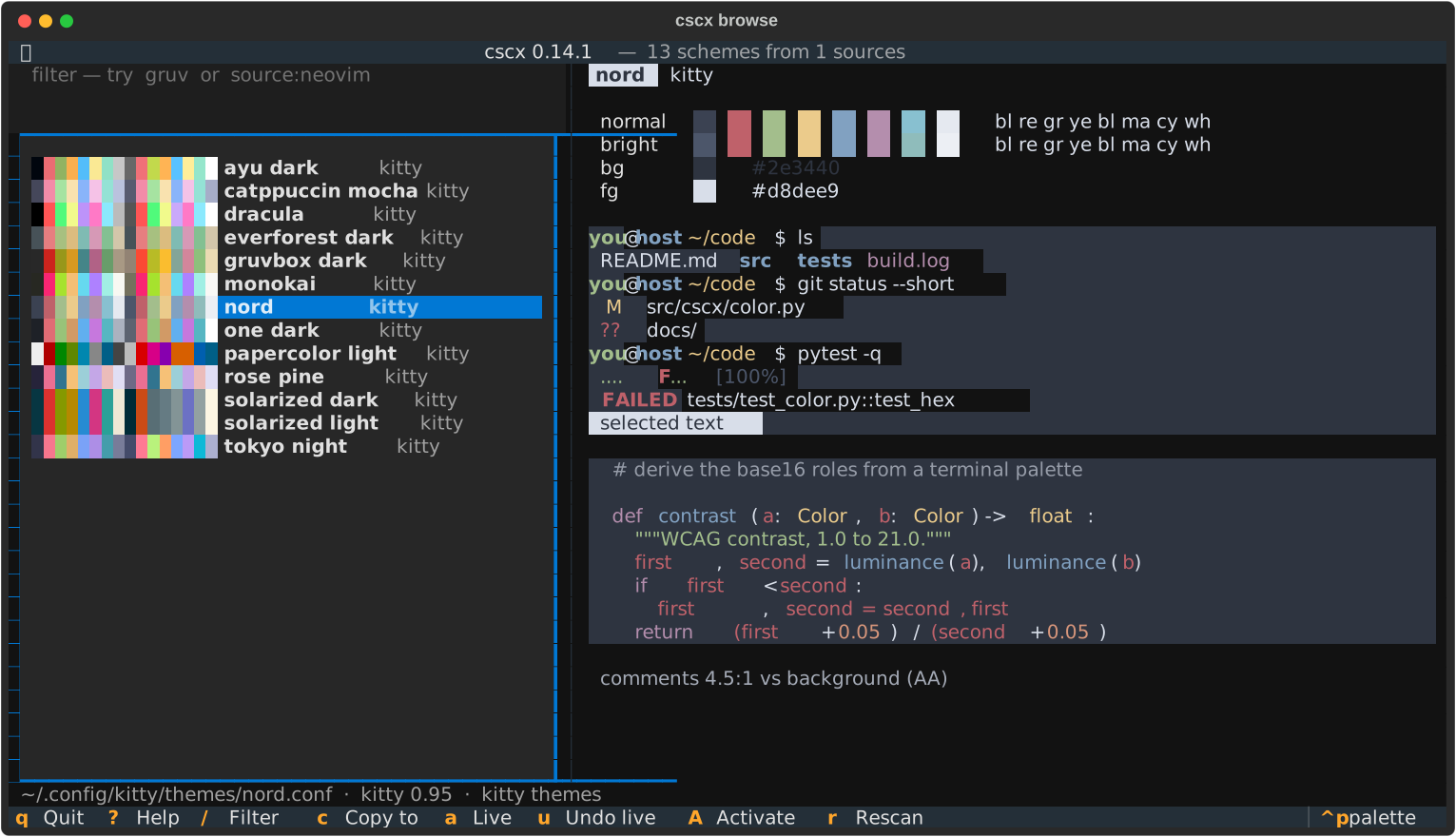
That picture is cscx browse, and it is the fastest way to use any of this. It finds the schemes already on your machine — you do not have to know where they live — shows you what each one actually looks like, and gives you one key each for the three things you want to do with one:
a |
try it right now. Recolours this terminal instantly. u puts it back, and so does quitting. |
c |
copy it to another format or editor, into the directory that application really reads themes from |
A |
install it for an application, so it survives a restart — after showing you the plan |
Plus / to filter (fuzzily — b16sulph finds base16-atelier-sulphurpool), j/k or the arrows to move, and ? for the keys.
Copying a scheme to another format (c)
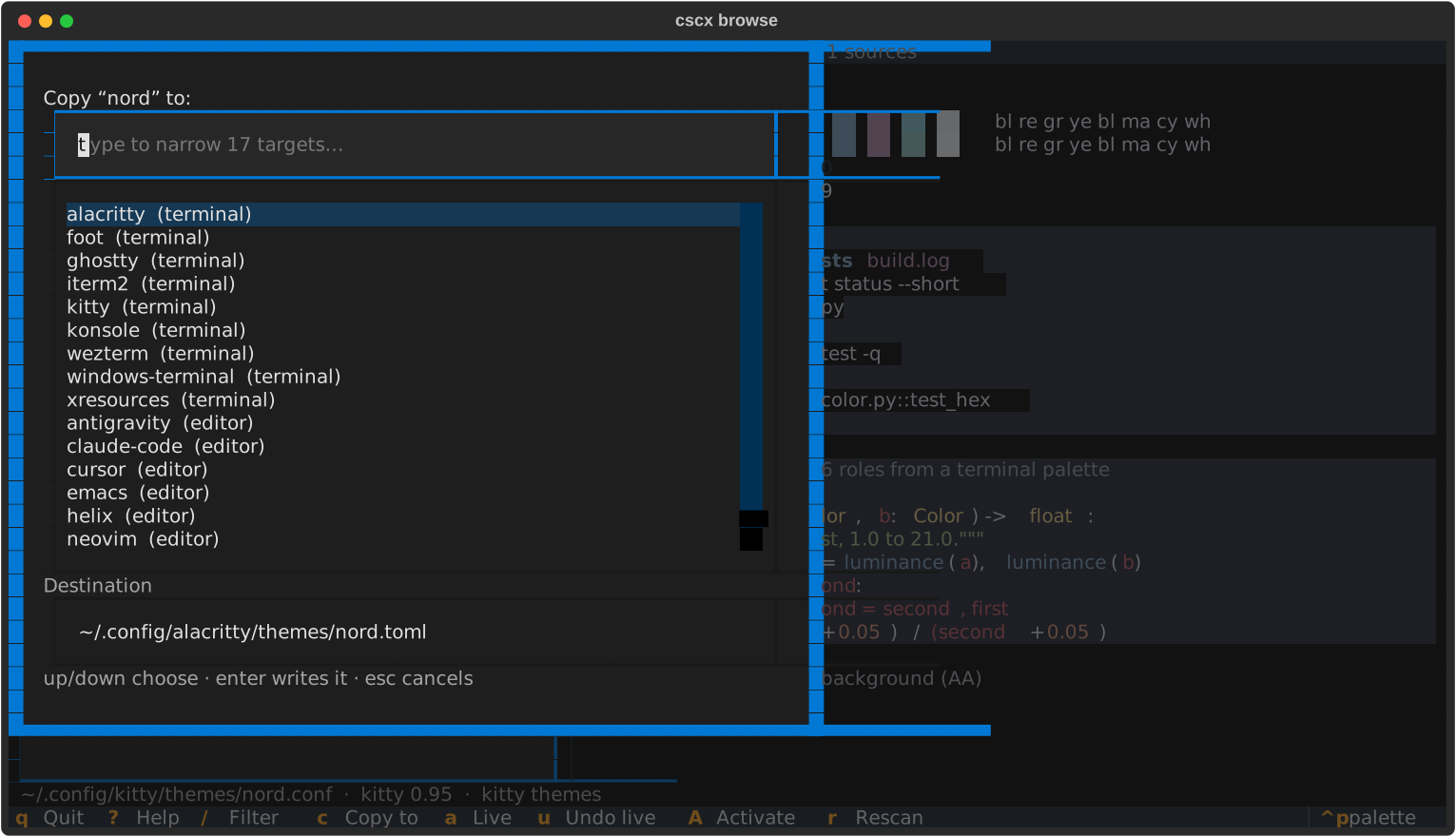
Type to narrow the seventeen targets. The destination is filled in for you and points at the directory that application reads themes from: ~/.claude/themes for Claude Code, ~/.config/nvim/colors for neovim. A theme written where the program never looks does nothing.
It is optional, and it is not the only way in
browse is the one part of cscx with a dependency, which is why it is an extra rather than a requirement. Everything it does has a plain command behind it, and those need nothing but Python:
| in the browser | on the command line |
|---|---|
| the list | cscx list, cscx list gruv dark |
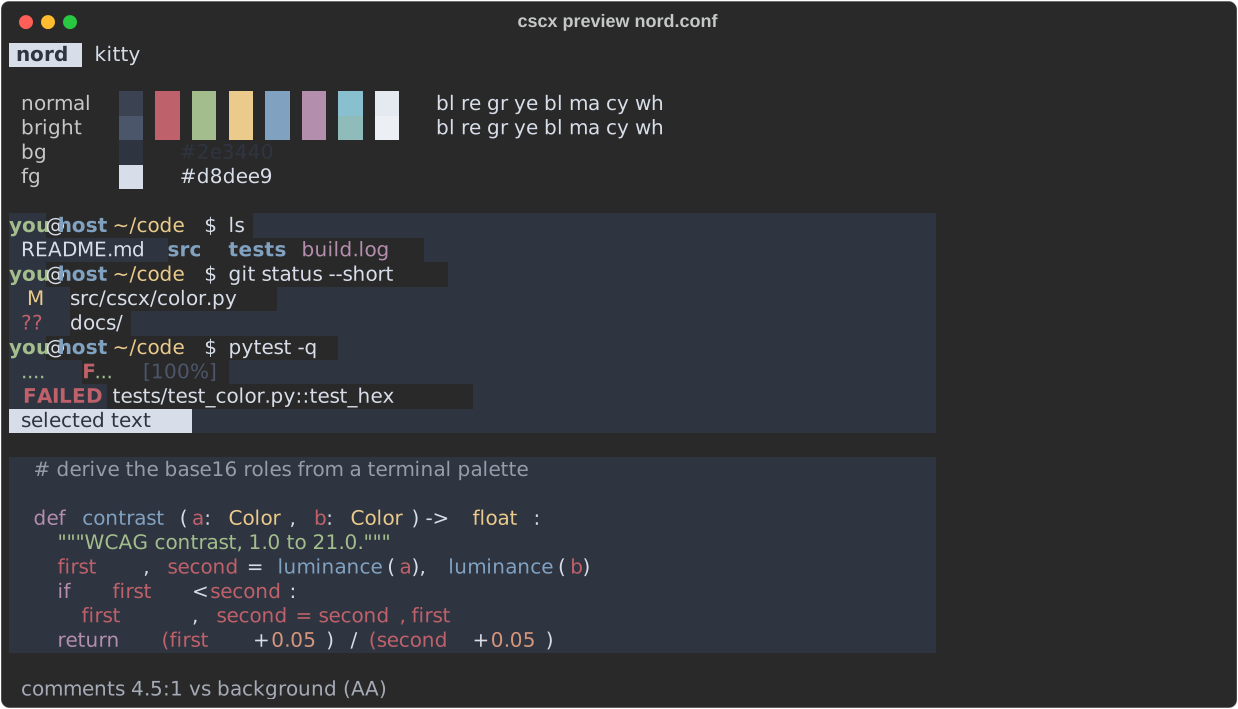
| the preview pane | cscx preview FILE |
a — try it now |
cscx live FILE, cscx live --reset |
c — copy to another format |
cscx convert FILE --to ghostty -o … |
A — install it |
cscx activate FILE --for kitty |
So a machine where you would rather not install Textual loses the browsing, not the converting.
Supported formats
All nine are both read and written.
| Format | Files | Notes |
|---|---|---|
kitty |
kitty.conf |
256 slots, tab bar colors, symbolic refs (cursor_text_color background) |
ghostty |
config |
palette = N=#hex, kebab-case keys, background opacity |
alacritty |
.toml, .yml |
current TOML and pre-0.13 YAML; dim, indexed |
konsole |
.colorscheme |
intense/faint variants, description, opacity |
iterm2 |
.itermcolors |
float components; reads XML and binary plists, writes XML |
foot |
foot.ini |
regular/bright/dim, alpha, two-value cursor, numeric slots |
wezterm |
.toml |
ansi/brights arrays, [metadata] name |
windows-terminal |
.json |
bare scheme, array, or nested in settings.json |
xresources |
.Xresources |
*color0:, urxvt/xterm prefixes, rgb: values |
The 16 ANSI slots plus foreground and background survive every conversion; the trim around them (cursor, selection, dim, indexed) depends on the target. → what survives a conversion
Editors
The same palette also produces a full editor theme.
| Editor | Output | Installs as |
|---|---|---|
vim |
.vim |
~/.vim/colors/NAME.vim |
neovim (nvim) |
.lua |
~/.config/nvim/colors/NAME.lua |
helix (hx) |
.toml |
~/.config/helix/themes/NAME.toml |
emacs |
.el |
~/.emacs.d/themes/NAME-theme.el |
vscode (code) |
.json |
inside an extension |
cursor |
.json |
inside an extension |
antigravity (ag) |
.json |
inside an extension |
claude-code (claude, cc) |
.json |
~/.claude/themes/NAME.json |
ghostwriter (gw) |
.json |
~/.local/share/ghostwriter/themes/NAME.json |
$ cscx convert kitty.conf --to neovim -o ~/.config/nvim/colors/mine.lua
Editors are written, not read — with one exception: neovim colorschemes can be read back into palettes, so a theme you love in your editor can become your terminal's. → editor themes
Desktops
And the desktop around them. A terminal palette also writes a KDE Plasma colour scheme, so Plasma stops fighting the terminal.
| Desktop | Output | Installs as |
|---|---|---|
kde (plasma, kde-plasma) |
.colors |
~/.local/share/color-schemes/NAME.colors |
gtk4 (gtk, gnome, libadwaita) |
.css |
~/.config/gtk-4.0/gtk.css |
gtk3 (gtk-3.0) |
.css |
~/.config/gtk-3.0/gtk.css |
$ cscx convert kitty.conf --to kde,konsole -o ~/themes
$ plasma-apply-colorscheme mine
GTK is two targets rather than one, because GTK 3 and GTK 4 take overrides by different mechanisms and neither file does anything for the other's applications: @define-color for GTK 3, CSS variables for libadwaita. Both write colour overrides on top of whichever theme is in use, not a theme of their own. That is what keeps the list short rather than thousands of lines of widget CSS.
The seven colour sets a .colors file carries turn out to be mostly the same base16 roles the editor themes use — red is ForegroundNegative, green is ForegroundPositive, blue is ForegroundLink — over a much finer surface ramp. What is genuinely new is the accent, which Plasma leans on and a terminal does not have, and a set of contrast checks calibrated so that Breeze passes them. Unlike the editors this one is also read, though mostly so the writer can be tested against itself. → desktop colour schemes
Commands
cscx browse |
find, preview, copy and install schemes |
cscx list |
every scheme on this machine, filterable |
cscx preview |
show one scheme's colors, no browser |
cscx convert |
one scheme, another format |
cscx detect |
what format is this file? |
cscx parse |
dump a scheme as JSON |
cscx live |
recolour this terminal now, --reset to undo |
cscx activate |
install a scheme so it persists |
cscx active |
what is each application using? |
cscx nvim-themes |
read neovim's colorschemes in as sources |
cscx mapping |
inspect or check the editor mapping |
cscx formats |
list every format, editor, desktop and alias |
Every command takes --help, and man cscx is the full reference.
Three things worth knowing
Nothing is invented. By default cscx emits only what it actually read. Converting from konsole, which has no cursor color, produces a kitty config with no cursor line — the terminal applies its own default. --fill derives the missing values from long-standing conventions and marks each one, so a derived value is never mistaken for a stated one. → gap filling
Only activate changes your configuration. convert and the browser's copy write new files and tell you where they went. activate is the one command that edits a file you didn't ask it to create, and it plans, backs up, validates with the real application, and rolls back if that application would reject the result. → applying a scheme
The editor mapping is yours to change. Which ANSI hue means "variable", how far the interface shades step, how readable a comment must be, which colour Plasma takes as its accent — all have defaults that need no configuration, and all can be overridden in ~/.config/cscx/mapping.toml. → tuning the mapping
Documentation
$ man cscx        # after install; otherwise: man -l docs/cscx.1
$ cscx formats
$ cscx convert --help
docs/cscx.1 is the reference: every command, option, format, editor and desktop. These pages are the detail behind it:
- Formats — color spellings, what survives a conversion, gap filling
- Finding and browsing — the browser, fuzzy filtering, where schemes are found
- Applying a scheme — live preview, activation, what each app is using
- Editor themes — the base16 mapping, per-editor notes, Claude Code, neovim read-back
- Desktop colour schemes — KDE Plasma: the surface ramp, the accent, what Plasma computes itself
- Tuning the mapping — the optional
mapping.toml - Design notes — why it's built this way, and how each format was verified
- Contributing — testing, adding a format, adding an editor
License
Apache-2.0. See LICENSE.
1 maintainer

Metadata
1 maintainer
Release files for cscx 0.18.1
For a detailed explanation of source distributions (sdists) and built distributions (wheels), please see the package formats documentation.
Source distribution (sdist)
| File | Size | Uploaded | |
|---|---|---|---|
| cscx-0.18.1.tar.gz | 228.2 kB | Details |
Built distribution (wheel)
| File | Interpreter | ABI | Platform | Reset |
|---|---|---|---|---|
| cscx-0.18.1-py3-none-any.whl | Python 3 | none | any | Details |
Total release size: 383.5 kB
Release files / cscx-0.18.1.tar.gz
| Download URL | cscx-0.18.1.tar.gz |
|---|---|
| Size | 228.2 kB |
| Tags | Source |
|
SHA-256 checksum How to use checksums |
bba0f743dbbab8aa796ee3259df4133bf64af139fee7138def59530cc8dec965
|
|
BLAKE2b-256 checksum How to use checksums |
c5fe4a888e19a97878c316500aea6d3b6763b6ad5d835a282e9d63225ad5b059
|
| Upload date | |
|
Uploaded using Trusted Publishing? What is trusted publishing? |
Yes |
| Uploaded via |
twine/7.0.0 CPython/3.13.14
|
Provenance
Provenance describes where a file came from. On PyPI, provenance is shared via attestations, which provide a verifiable record of the build or publishing details. View details, limitations and caveats.


PyPI Publish Attestation
PyPI verified that this artifact, at this checksum, originated from the publisher listed below.
Signed by GitHub Actions, verified by PyPI on Oct 11, 2026.
Transparency logRelease files / cscx-0.18.1-py3-none-any.whl
| Download URL | cscx-0.18.1-py3-none-any.whl |
|---|---|
| Size | 155.3 kB |
| Tags | Python 3 |
|
SHA-256 checksum How to use checksums |
f82562c88977f817dbc3b8a82b34ce8972c4ec2a5e1e288f23be556168e327a3
|
|
BLAKE2b-256 checksum How to use checksums |
0e1c5038e34adde01590fbfa2273ce2c99b35cb3303486029b247e975950a50d
|
| Upload date | |
|
Uploaded using Trusted Publishing? What is trusted publishing? |
Yes |
| Uploaded via |
twine/7.0.0 CPython/3.13.14
|
Provenance
Provenance describes where a file came from. On PyPI, provenance is shared via attestations, which provide a verifiable record of the build or publishing details. View details, limitations and caveats.
PyPI Publish Attestation
PyPI verified that this artifact, at this checksum, originated from the publisher listed below.
Signed by GitHub Actions, verified by PyPI on Oct 11, 2026.
Transparency log












