
Terminal explorer for OData CSDL metadata

Project description
CSDL Explorer



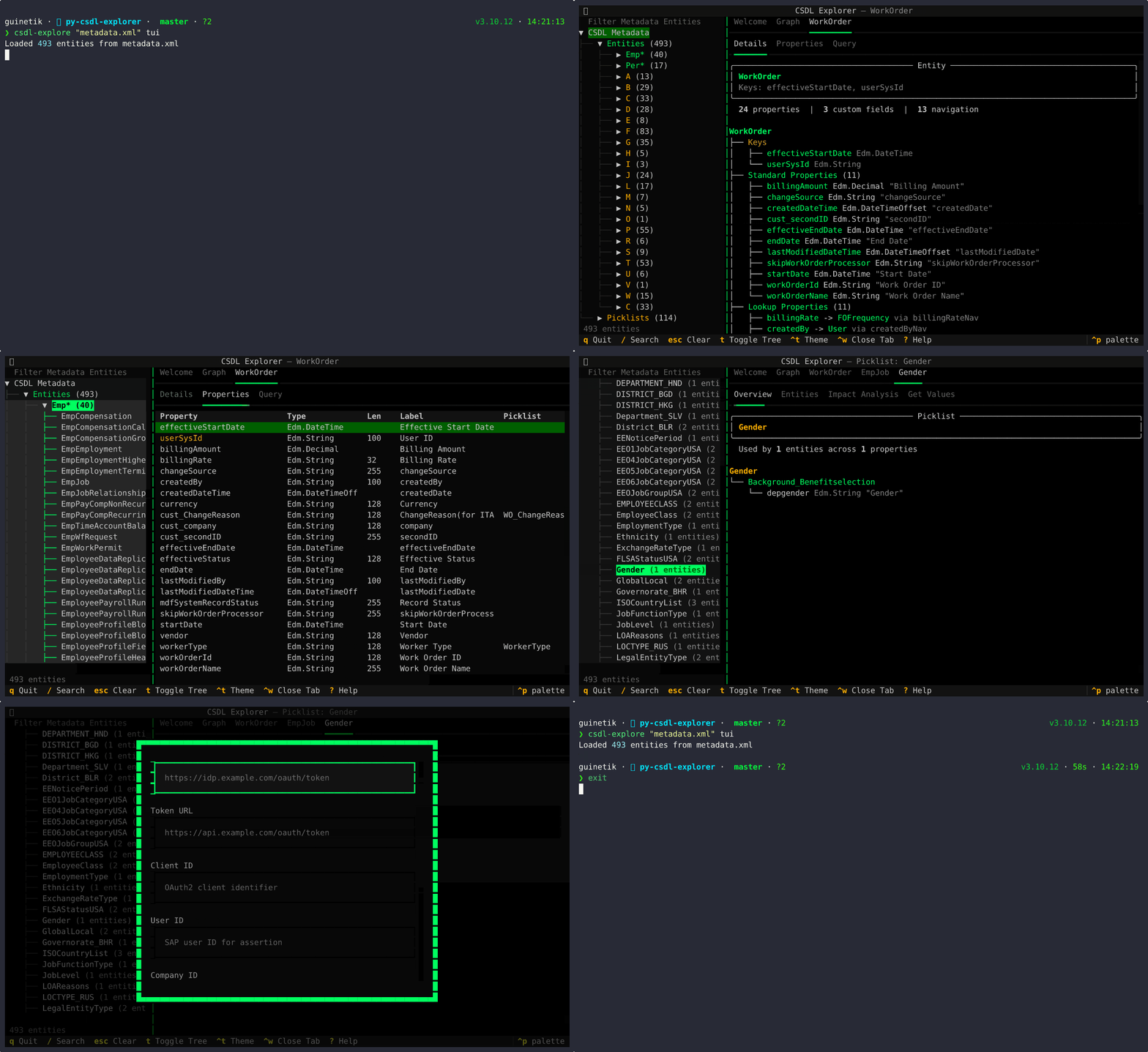
A terminal explorer for OData CSDL metadata. Parse any $metadata XML and discover entities, properties, relationships, and field attributes — then query live OData services directly from the terminal.
Why
OData services expose their schema through $metadata but those XML documents can be enormous (10MB+, 700+ entities). This tool parses the CSDL and gives you fast, searchable access to every entity, property, navigation relationship, and annotation.
Particularly useful with SAP SuccessFactors, where documentation says "Worker Category" but the actual field is customString17.
Install
pip install csdl-explore          # Rich REPL
pip install csdl-explore[tui]     # + Textual TUI (tree nav, split panes, query builder)
Quick Start
csdl-explore metadata.xml                    # Interactive REPL
csdl-explore metadata.xml --tui              # Full TUI
csdl-explore metadata.xml search contract    # Search fields
csdl-explore metadata.xml entity EmpJob      # Entity details
csdl-explore metadata.xml tree EmpJob        # Visual tree
Features
- Rich REPL — colored tables, visual trees, entity comparison
- Textual TUI — tree navigation, tabbed views, split panes, navigation graph
- Live OData queries — visual query builder with filter, select, expand, orderby
- SAP SuccessFactors auth — Bearer, Basic, OAuth2 SAML
- Picklist exploration — usage analysis, impact analysis, live value fetching
- Headless mode — all commands work non-interactively for scripts and AI assistants
- Search — across entity names, property names, labels, and picklist values
- Themes — Terminal green + amber accent (default), Classic
Interactive REPL
$ csdl-explore metadata.xml

╭─────────────────────────────────────────╮
│             CSDL Explorer               │
│         Loaded 735 entities             │
╰─────────────────────────────────────────╯

csdl> search contract
┏━━━━━━━━┳━━━━━━━━━━━┳━━━━━━━━━━━━━━━━━┳━━━━━━━━━┓
┃ Type   ┃ Entity    ┃ Match           ┃ Details ┃
┣━━━━━━━━╋━━━━━━━━━━━╋━━━━━━━━━━━━━━━━━╋━━━━━━━━━┫
┃ PROP   ┃ EmpJob    ┃ .contractType   ┃ String  ┃
┃ NAV    ┃ EmpJob    ┃ .contractTypeNav┃         ┃
┗━━━━━━━━┻━━━━━━━━━━━┻━━━━━━━━━━━━━━━━━┻━━━━━━━━━┛

csdl> tree EmpJob
EmpJob
├── Keys
│   ├── seqNumber Edm.Int64
│   ├── startDate Edm.DateTime
│   └── userId Edm.String
├── Properties (45)
│   ├── businessUnit Edm.String
│   └── ... and 43 more
├── Custom Fields (24)
│   ├── customString7 Edm.String
│   └── ... and 23 more
└── Navigation (8)
    ├── employmentNav -> EmpEmployment
    └── ... and 7 more
Commands
| Command | Aliases | Description |
|---|---|---|
entities |
List all entity types | |
entity <name> |
e |
Show all properties of an entity |
tree <name> |
t |
Show entity as visual tree |
search <term> |
s |
Search entities and properties |
custom <entity> |
c |
Show custom fields |
nav <entity> |
Show navigation properties | |
diff <e1> <e2> |
Compare two entities | |
path <entity> |
paths |
Suggest JSON paths |
emp / per |
List Emp*/Per* entities (SAP SF) | |
picklists |
List all picklists (JSON) | |
picklist <name> |
pk |
Fetch picklist values from live API |
batch-picklists <entity> |
Fetch all picklist values for an entity | |
query <entity> |
Execute OData query | |
model [entities] |
Show data model overview |
OData Queries
csdl-explore metadata.xml query EmpJob \
  --select "userId,company,businessUnit" \
  --filter "company eq 'ACME'" \
  --top 10
Query flags: --select, --filter, --orderby, --orderby-dir, --top, --expand, --asof-date, --from-date, --to-date
CLI Options
| Option | Description |
|---|---|
--tui |
Launch full Textual TUI |
--base-url <url> |
OData service base URL |
--auth-type <type> |
none, bearer, basic, oauth2 |
--format <fmt> |
table, json, json-compact, csv |
--wide |
Full column widths |
--filter <pattern> |
Filter properties by name glob |
--json-only |
JSON output only (for scripts) |
Connecting to an OData Service
CSDL Explorer can query live OData services — not just parse static metadata. You need a base URL and credentials.
Auth Types
| Type | Description |
|---|---|
none |
No authentication |
bearer |
Static Bearer token in the Authorization header |
basic |
HTTP Basic Auth (username + password) |
oauth2 |
SAP SAML Bearer assertion flow (IDP → token exchange) |
Inline Credentials
Pass connection flags directly:
# Bearer token
csdl-explore metadata.xml --base-url https://api.example.com/odata/v2 \
  --auth-type bearer --bearer-token YOUR_TOKEN \
  query EmpJob --top 5

# Basic auth
csdl-explore metadata.xml --base-url https://api.example.com/odata/v2 \
  --auth-type basic --username admin --password secret \
  picklist ecJobCode
.env File (Recommended)
Place a .env file next to your metadata XML with the same stem name. If your metadata is metadata.xml, create metadata.env:
SAP_BASE_URL=https://api.example.com/odata/v2
SAP_AUTH_TYPE=bearer
SAP_BEARER_TOKEN=your-token-here
Then just run commands — credentials are loaded automatically:
csdl-explore metadata.xml query EmpJob --top 5
csdl-explore metadata.xml picklist ecJobCode
CLI flags override .env values when both are present.
All .env keys:
| Key | Description |
|---|---|
SAP_BASE_URL |
OData service base URL |
SAP_AUTH_TYPE |
none, bearer, basic, oauth2 |
SAP_BEARER_TOKEN |
Bearer token |
SAP_USERNAME |
Basic auth username |
SAP_PASSWORD |
Basic auth password |
SAP_IDP_URL |
OAuth2: SAML IDP endpoint |
SAP_TOKEN_URL |
OAuth2: Token exchange endpoint |
SAP_CLIENT_ID |
OAuth2: Client ID |
SAP_USER_ID |
OAuth2: User ID for assertion |
SAP_COMPANY_ID |
OAuth2: Company ID |
SAP_PRIVATE_KEY |
OAuth2: Private key for signing |
SAP_GRANT_TYPE |
OAuth2: Grant type |
TUI Connection
In the Textual TUI, credentials are configured through the auth modal (accessible from the Query tab). The TUI also reads the .env file on startup, so if you've already configured it for the CLI, the TUI picks it up automatically.
Textual TUI
pip install csdl-explore[tui]
csdl-explore metadata.xml --tui
| Key | Action |
|---|---|
/ |
Focus search |
Escape |
Clear search |
t |
Toggle tree sidebar |
Ctrl+T |
Cycle theme |
Ctrl+W |
Close current tab |
? |
Help |
q |
Quit |
Python API
from csdl_explore import CSDLExplorer
from pathlib import Path

explorer = CSDLExplorer.from_file(Path("metadata.xml"))

# Search
for r in explorer.search("worker"):
    print(f"{r.entity}.{r.property}: {r.prop_type}")

# Entity details
entity = explorer.get_entity("EmpJob")
for prop in entity.properties.values():
    print(f"{prop.name}: {prop.type} (label={prop.label})")

# Custom fields, comparison, picklist usage
fields = explorer.get_custom_fields("EmpJob")
comp = explorer.compare_entities("EmpCompensation", "EmpPayCompRecurring")
usage = explorer.get_picklist_usage()
Supported Services
Any OData service with CSDL $metadata. Tested with:
- SAP SuccessFactors (full annotation support: labels, picklists, CRUD flags)
- SAP S/4HANA OData
- Standard OData v2/v3 services
License
MIT
Release history Release notifications | RSS feed


Download files
Download the file for your platform. If you're not sure which to choose, learn more about installing packages.
Source Distribution
Built Distribution
Filter files by name, interpreter, ABI, and platform.
If you're not sure about the file name format, learn more about wheel file names.
Copy a direct link to the current filters
File details
Details for the file csdl_explore-0.2.0.tar.gz.
File metadata
- Download URL: csdl_explore-0.2.0.tar.gz
- Upload date:
- Size: 3.1 MB
- Tags: Source
- Uploaded using Trusted Publishing? No
- Uploaded via: twine/6.2.0 CPython/3.13.3
File hashes
| Algorithm | Hash digest | |
|---|---|---|
| SHA256 |
4ed8f32e2af4427984763b87c23ee75210c9a1af8f4aaa8f52d7ebf553a5845f
|
|
| MD5 |
fc81faefacfcafec816cea847b501342
|
|
| BLAKE2b-256 |
955a897bf36cad84d9d58288c196e600c2ff26fa143c27c748716f109cb64bb1
|
File details
Details for the file csdl_explore-0.2.0-py3-none-any.whl.
File metadata
- Download URL: csdl_explore-0.2.0-py3-none-any.whl
- Upload date:
- Size: 78.7 kB
- Tags: Python 3
- Uploaded using Trusted Publishing? No
- Uploaded via: twine/6.2.0 CPython/3.13.3
File hashes
| Algorithm | Hash digest | |
|---|---|---|
| SHA256 |
b5021e3462dfd6a410242f9d2f7ca02c178ebb24ee392a5f25b764b936d21279
|
|
| MD5 |
064216c15c40b8d7446a2c256c270237
|
|
| BLAKE2b-256 |
689b418fa0d78ace582831d612a8a7ee4cef6982ca017de65b6e7241bda0f287
|






