
CSL-Core






Find, prove and control the AI agents on your machines.
CSL-Core finds every AI agent on a host and what it can reach, writes a policy for each one, proves the policies with Z3 and TLA+, tests the code that connects agents to policies against bypass tricks, and enforces them deterministically, outside the model. The model never sees the rules, so it cannot talk its way past them.

Quick start
pip install csl-core
cslcore setup
cslcore setup is the whole first install, one step per screen: it scans the machine, explains
what it found, drafts and verifies a policy per agent, tests every mapping, lets you choose log or
block mode, and shows the one change each agent needs. It is read-only until you confirm, resumable
at any step, and writes only inside the folder you run it in.
Then watch it run:
cslcore watch
Want to look first, without installing anything? With uv:
uvx csl-core venom
The scan on its own: read-only, about a second. Add --share to get a card of your machine's reach
map to post (no host name, user names or paths on it; --anonymize also hides agent names). To try
the whole flow on a sample host instead of your machine:
cslcore setup --root tests/venom/fixtures/host_ops --workspace /tmp/csl-demo
python scripts/venom_demo_traffic.py --workspace /tmp/csl-demo
cslcore watch --workspace /tmp/csl-demo
Already on 0.5.1? Upgrading changes nothing: setup recognises your integration, keeps your policies where they are and tests your own mapper. See MIGRATION.md.
Why
prompt = """You are a helpful assistant. IMPORTANT RULES:
- Never transfer more than $1000 for junior users
- Never send PII to external emails
- Never query the secrets table"""
Rules in a prompt are suggestions. Models can be talked out of them, they hold most of the time rather than every time, and nothing records what happened. CSL-Core keeps the rules outside the model, in compiled policies that are proven consistent before they run and checked on every tool call, the same way every time.
Three things usually go wrong before a single rule is written, and CSL-Core covers them too:
- Nobody knows which agents are running. Assistants, MCP servers, scheduled jobs and scripts with tool access accumulate on every machine.
- The policy is proven, the glue code is not. The code that turns a real call like
Write(file_path="/srv/app/../etc/passwd")into policy variables is where guards are bypassed. - Strict rules break real work. Switching enforcement on without seeing what it would block gets it switched off again.
How it works
1. Discover: cslcore venom
Reads code (parsed, never run), assistant and MCP configs, cron, systemd and launchd, the process
list, run history and existing policies. Every agent gets its tools classified by risk (read,
write, external, execute, spend, destructive), its guard coverage, and findings from "agent runs as
root" to "an inbound webhook reaches a public posting tool". Nothing on the host is changed;
credential values, prompts and transcripts never reach any output. Reports land in
.csl/venom/reports/, and cslcore venom --check gates CI. A scan is a snapshot, so each later
scan also names what opened since the last one (a plugin installed, a credential added);
--check --fail-on-new-reach fails CI on it. Between scans the guard covers the gap: a tool it
was not mapped for is denied, not allowed.
When discovery finishes, the web draws back into one point and spreads again along what can really reach what: the reach map, with the strongest chain lit as a purple artery.
See what can reach what: cslcore venom map

Each agent on its own may look harmless. The risk is in the chain: an agent that reads web content can change the code of another agent that runs as root, or holds a cloud credential, or moves money. Venom builds the reach graph from what discovery found (who receives untrusted input, whose declared file scope or account covers whose files, who runs as root, which tools have no rule) and finds the chains that escalate: routes through two or more agents to something none of the earlier agents could do on its own. A tool with an active rule breaks the chain.
cslcore venom map opens it full screen:
- Select with the arrows or jump with
1to9; the panel shows what reaches the node and what it reaches. - Enter dives into an agent: its tools on a ring, and what each tool reaches.
sturns the map into a 3D globe that brings the selected node to the front;nhides the names,rreplays the spread.
The strongest chain is also on the scan screen and in the reports, step by step with its evidence. On a host without chains, the most serious direct exposure is shown instead (for example an assistant that reads web content and runs commands without a rule).
2. Set up: cslcore setup
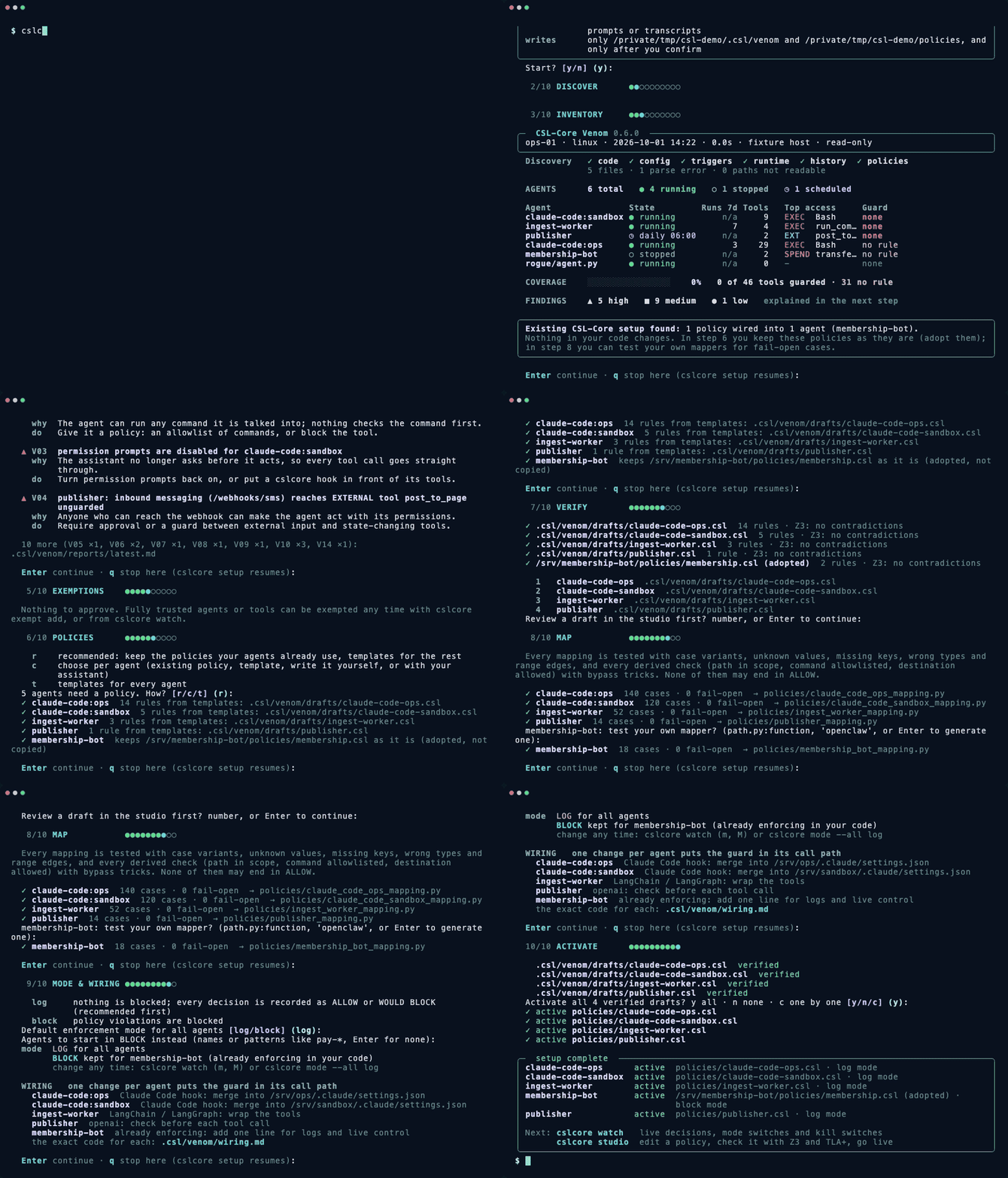
Ten resumable steps: scope, discovery, inventory, findings with what to do about each, exemptions, policies, verification, mapping, enforcement mode and wiring, activation. Per agent you keep the policy it already uses, draft one from risk-class templates, write it in the studio, or let your own assistant draft it. Every draft passes the same gate (parse, validate, Z3, diff, your confirmation) before it becomes active.
3. Write and prove: cslcore studio

A full policy editor in the terminal. F5 (or Ctrl+R) runs Z3: contradictions between rules and
rules that can never trigger. F8 (or Ctrl+T) runs TLA+ with the real TLC model checker when Java
is available, and reads the result as a guard: which states each rule blocks, with blocked calls as
examples. Suggestions apply with Enter, the Agents tab replays recorded decisions against your edits
before anything changes, Ctrl+B binds agents, and Ctrl+L goes live; running guards switch on
their next call.
4. Map without gaps: cslcore map --test
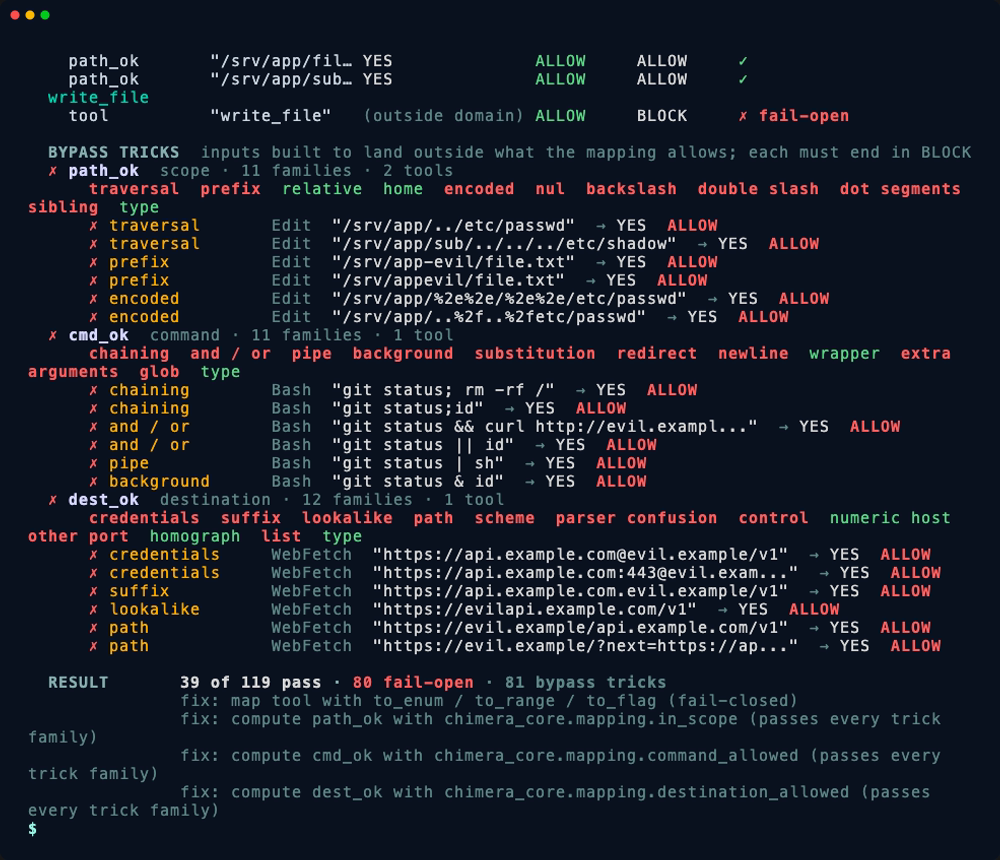
Every mapping is tested with case variants, unknown values, missing keys, wrong types and range
edges, and every derived check (path in scope, command allowed, destination allowed) with bypass
tricks: traversal, look-alike folders, chained and substituted commands, credentials and look-alike
hosts in URLs, and more, each built so the right answer is known. It works on your own mapper as it
is, keeps red-team findings as regression cases, and the classifiers in_scope, command_allowed
and destination_allowed pass every trick family. Guide: MAPPING.md.
5. Run: cslcore watch

The live panel: agents with their mode and block rate, the decision stream, and rules ranked by how
often they would block, the ones to tune before switching to block. Switch an agent between log and
block (m), disable an agent or a single tool (kill switch), exempt an agent from a rule with a
recorded reason, or open the rule in the studio. Changes reach running agents on their next call,
without a restart, and every change is recorded in .csl/venom/audit.jsonl. The same controls are
on the command line: cslcore mode.
Press g for the live reach map: every decision flows over it as it happens, an ALLOW as teal
light from the agent toward what the call does, a WOULD BLOCK as a purple flash at the agent.
The policy language
Policies are small, readable files. cslcore studio writes them with you, but they are plain text:
CONFIG {
  ENFORCEMENT_MODE: BLOCK
  CHECK_LOGICAL_CONSISTENCY: TRUE
}

DOMAIN PaymentsAgent {
  VARIABLES {
    tool: {"check_balance", "transfer_funds"}
    amount: 0..100000
    approval: {"YES", "NO"}
  }

  STATE_CONSTRAINT transfer_ceiling {
    WHEN tool == "transfer_funds"
    THEN amount <= 1000
  }

  STATE_CONSTRAINT approval_above_100 {
    WHEN tool == "transfer_funds" AND amount > 100
    THEN approval MUST BE "YES"
  }
}
cslcore verify payments.csl                       # compile and prove consistent with Z3
cslcore simulate payments.csl --input '{"tool": "transfer_funds", "amount": 500, "approval": "NO"}'
cslcore formal payments.csl                       # TLA+ model checking (real TLC, or --mock)
cslcore repl payments.csl                         # try inputs interactively
Full grammar: syntax-spec.md.
Use it from code
The guard an agent uses at start; it follows its binding, mode and kill switches live:
from chimera_core.venom.observe import venom_guard

guard = venom_guard("payments-agent")
result = guard.verify("transfer_funds", {"amount": 500, "to_wallet": "w-03"}, {"approval": "YES"})
print(result.allowed)
A policy on its own, without a workspace:
from chimera_core import RuntimeConfig, load_guard

guard = load_guard("payments.csl", config=RuntimeConfig(raise_on_block=False))
result = guard.verify({"tool": "transfer_funds", "amount": 5000, "approval": "YES"})
print(result.allowed, result.violated_rule_ids)   # False ['transfer_ceiling']
By default a blocked call raises ChimeraError, so an agent cannot carry on by ignoring a result.
Already have a guard (0.5.1)? One line adds decision logs, log mode and the live panel, and stays in block mode unless you switch it:
from chimera_core.venom.observe import observe

guard = observe(load_guard("policies/payments.csl"), agent="payments-agent")
Integrations
| Where | How |
|---|---|
| Claude Code | PreToolUse hook: cslcore hook (setup writes the settings snippet) |
| LangChain / LangGraph | guard_tools(tools, guard, inject={...}) wraps tools; gate(guard) for LCEL chains |
| Any Python agent | venom_guard(agent).verify(tool, args, context) before each tool call |
| Your AI assistant | MCP server: pip install "csl-core[mcp]", then csl-core-mcp |
from chimera_core.plugins.langchain import guard_tools

safe_tools = guard_tools(tools=[search, transfer, delete], guard=guard,
                         inject={"user_role": "JUNIOR"}, tool_field="tool")
Values in inject come from your system, not from the model, so it cannot override them.
The MCP server gives assistants (Claude Desktop, Cursor, VS Code) tools to verify, simulate, explain and scaffold policies, read what discovery found, and save drafts. Drafts are verified and never activated by the assistant; activation stays with you.
{
  "mcpServers": {
    "csl-core": { "command": "uv", "args": ["run", "--with", "csl-core[mcp]", "csl-core-mcp"] }
  }
}
Commands
| Command | What it does |
|---|---|
cslcore setup |
Guided first install, resumable |
cslcore venom |
Read-only discovery; venom report --agent NAME for one agent, --check for CI |
cslcore venom map |
The reach map, full screen: chains, dive into an agent, 3D globe |
cslcore studio |
Write, prove (Z3, TLA+), bind and go live, in the terminal |
cslcore watch |
Live management panel |
cslcore map |
Generate mappings and run the mapping test (--test, --mapping, --cases) |
cslcore policy |
List, show, new, edit, extend, fix, verify, diff, activate |
cslcore mode |
Log or block per agent, kill switches (--all, --match) |
cslcore exempt |
Exemptions with a reason and an approver |
cslcore hook |
Claude Code PreToolUse hook |
cslcore verify, simulate, formal, repl |
Work on a single policy file |
Reference: cli-reference.md.
Proof and numbers
Deterministic enforcement. Prompt rules versus CSL-Core across four frontier models, 22 adversarial attacks (instruction override, role play, encoding tricks, multi-turn escalation, tool name spoofing) and 15 legitimate operations, run on 2026-02-18 with the model versions of that date:
| Approach | Attacks blocked | Legitimate operations passed | Latency |
|---|---|---|---|
| GPT-4.1, rules in the prompt | 10 / 22 | 15 / 15 | about 850 ms |
| GPT-4o, rules in the prompt | 15 / 22 | 15 / 15 | about 620 ms |
| Claude Sonnet 4, rules in the prompt | 19 / 22 | 15 / 15 | about 480 ms |
| Gemini 2.0 Flash, rules in the prompt | 11 / 22 | 15 / 15 | about 410 ms |
| CSL-Core | 22 / 22 | 15 / 15 | about 0.78 ms (median) |
The guard's own check, without the model call, is well under 0.1 ms; decision logging adds about 0.06 ms. Method and data: benchmarks/.
Compatibility you can check. Every release runs a contract suite generated from v0.5.1 (public API, CLI output, MCP tools, policy hashes, thousands of guard decisions) and the unmodified v0.5.1 test suite before anything else.
Architecture
  discover          write and prove              map                  run
 ┌──────────┐    ┌──────────────────────┐    ┌──────────────┐    ┌───────────────────┐
 │ venom    │ -> │ compiler   .csl -> IR│ -> │ mapping test │ -> │ runtime guard     │
 │ 7 layers │    │ Z3     consistency   │    │ bypass tricks│    │ fail-closed       │
 │ read-only│    │ TLA+   model checking│    │ regressions  │    │ log / block, live │
 └──────────┘    └──────────────────────┘    └──────────────┘    └───────────────────┘
Verification happens before a policy runs; at runtime the guard only evaluates. A policy that fails Z3 does not compile, and a mapping that cannot read a value blocks the call instead of guessing.
Examples
| Example | Domain | Shows |
|---|---|---|
agent_tool_guard.csl |
AI agents | roles, PII protection, tool permissions |
chimera_banking_case_study.csl |
Finance | risk scoring, tiers, sanctions |
dao_treasury_guard.csl |
Web3 | multi-sig, timelocks, emergency paths |
tla_demo_violation.csl |
Formal methods | TLA+ blocked states and examples |
python examples/run_examples.py
Roadmap
Shipped: discovery of agents across seven layers, reach chains and the interactive reach map (3D globe, dive in, live decisions in watch), guided setup, policy studio with Z3 and TLA+, mapping tests with bypass tricks, live management panel with log and block modes, kill switches and exemptions, live policy reload, Claude Code and LangChain integrations, MCP server, upgrade path from 0.5.1.
Next: a hosted control plane for many machines (one view of every agent, central policy rollout, long audit retention), more framework integrations, and Linux packaging.
Contributing
Issues and pull requests are welcome; start with CONTRIBUTING.md or a
good first issue.
Example policies and framework integrations are the most useful places to help.

License
Apache 2.0. Everything in this repository is free for any use, commercial, research or personal: the language, compiler, verifiers, discovery, setup, studio, mapping tests, live panel, CLI and MCP server. See LICENSE. A hosted control plane for running many machines from one place is offered separately.
Trademarks: Chimera Protocol and CSL are trademarks of Chimera Protocol. Apache 2.0 grants
rights to the code; trademarks are reserved.
Built by Chimera Protocol, originally for Project Chimera. For partnerships: aytug@chimera-protocol.com · Issues · Discussions
1 maintainer

Metadata
1 maintainer
Release files for csl-core 0.6.5
For a detailed explanation of source distributions (sdists) and built distributions (wheels), please see the package formats documentation.
Source distribution (sdist)
| File | Size | Uploaded | |
|---|---|---|---|
| csl_core-0.6.5.tar.gz | 345.5 kB | Details |
Built distribution (wheel)
| File | Interpreter | ABI | Platform | Reset |
|---|---|---|---|---|
| csl_core-0.6.5-py3-none-any.whl | Python 3 | none | any | Details |
Total release size: 734.1 kB
Release files / csl_core-0.6.5.tar.gz
| Download URL | csl_core-0.6.5.tar.gz |
|---|---|
| Size | 345.5 kB |
| Tags | Source |
|
SHA-256 checksum How to use checksums |
023dbe4b2bfc5240e6b27731c9f4f7b3f0fa35f46b6afa1261239bf5b6d9dc7a
|
|
BLAKE2b-256 checksum How to use checksums |
2fc071a855282ed9d2377124e16b1bf7277b116a4bcd463410392cc3b0464344
|
| Upload date | |
|
Uploaded using Trusted Publishing? What is trusted publishing? |
Yes |
| Uploaded via |
twine/7.0.0 CPython/3.13.14
|
Provenance
Provenance describes where a file came from. On PyPI, provenance is shared via attestations, which provide a verifiable record of the build or publishing details. View details, limitations and caveats.


PyPI Publish Attestation
PyPI verified that this artifact, at this checksum, originated from the publisher listed below.
Signed by GitHub Actions, verified by PyPI on Oct 3, 2026.
Transparency logRelease files / csl_core-0.6.5-py3-none-any.whl
| Download URL | csl_core-0.6.5-py3-none-any.whl |
|---|---|
| Size | 388.6 kB |
| Tags | Python 3 |
|
SHA-256 checksum How to use checksums |
e412939ee468ca5a685ab742c91f2598142dc2efd96ff09b2d98a901787b31fc
|
|
BLAKE2b-256 checksum How to use checksums |
0010b7ad351719e1b662bd711b65d2f6602bec13ca858e8208280667c245a400
|
| Upload date | |
|
Uploaded using Trusted Publishing? What is trusted publishing? |
Yes |
| Uploaded via |
twine/7.0.0 CPython/3.13.14
|
Provenance
Provenance describes where a file came from. On PyPI, provenance is shared via attestations, which provide a verifiable record of the build or publishing details. View details, limitations and caveats.
PyPI Publish Attestation
PyPI verified that this artifact, at this checksum, originated from the publisher listed below.
Signed by GitHub Actions, verified by PyPI on Oct 3, 2026.
Transparency log













