
This package provides the reference implementation of the Convolutional Set Transformer (Chinello & Boracchi, 2025). It includes reusable Keras 3 layers for building CST architectures, and provides an easy interface to load and use the CST-15 model pre-trained on ImageNet.

Project description
Convolutional Set Transformer
The cstmodels package provides the reference implementation of the Convolutional Set Transformer (Chinello & Boracchi, 2025). It includes reusable Keras 3 layers for building CST architectures, and provides an easy interface to load and use CST-15, the first set-learning backbone pre-trained on ImageNet.
If you have any questions or concerns, please feel free to contact me at federico.chinello@studbocconi.it.
Table of Contents
- About Convolutional Set Transformers
- Installation
- Loading CST-15
- Building a CST from scratch
- Tutorial Notebooks
- Citation
About Convolutional Set Transformers
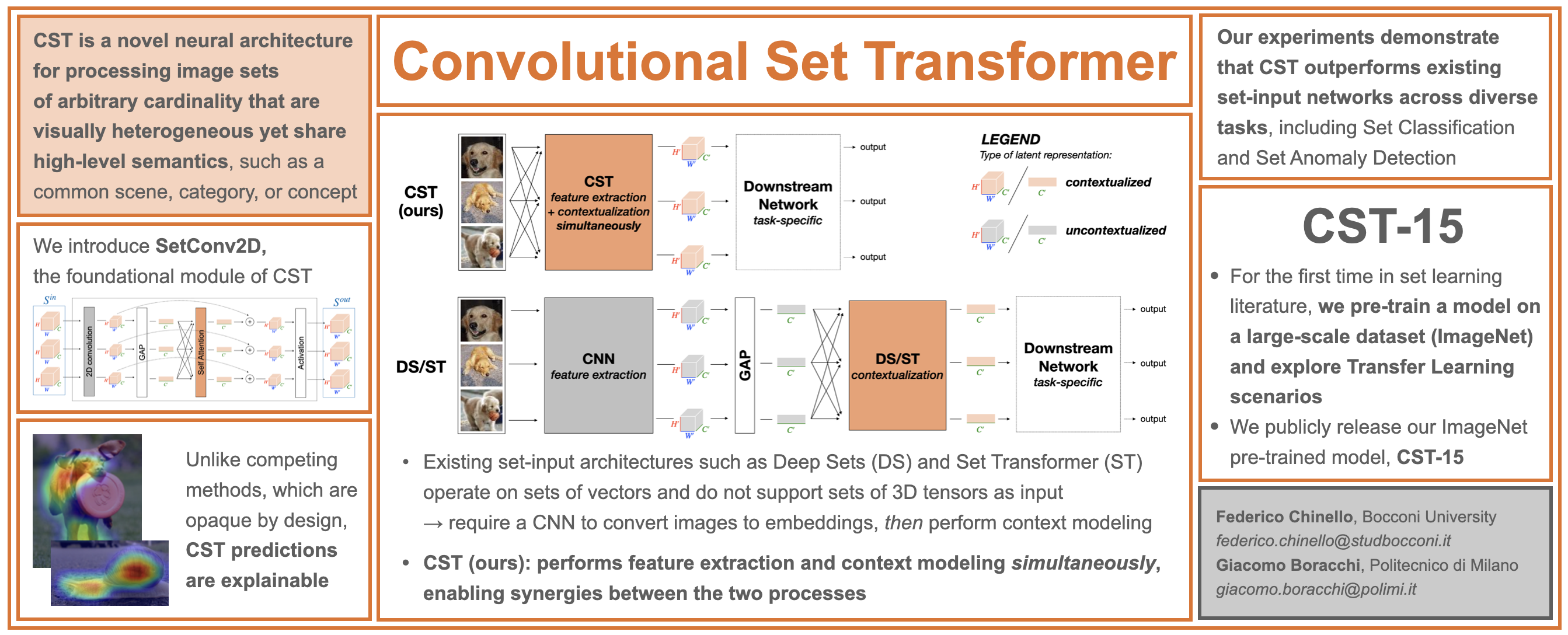
Highlights:
- CST is a novel deep learning architecture for processing image sets of arbitrary cardinality that are visually heterogeneous yet share high-level semantics (e.g., a common category, scene, or concept).
- CST is general-purpose and supports a broad range of applications, including set-based classification tasks and Set Anomaly Detection.
- In the domain of image-set processing, CST outperforms existing set-learning approaches such as Deep Sets and Set Transformer. Unlike these methods, which are inherently opaque, CST is fully compatible with standard CNN explainability tools, including Grad-CAM.
- While Deep Sets and Set Transformer are typically trained from scratch, CST supports Transfer Learning: it can be pre-trained on large-scale datasets and then effectively adapted to diverse downstream tasks. We publicly release CST-15, the first set-learning backbone pre-trained on ImageNet.
Want to dive deeper? Check out our paper!
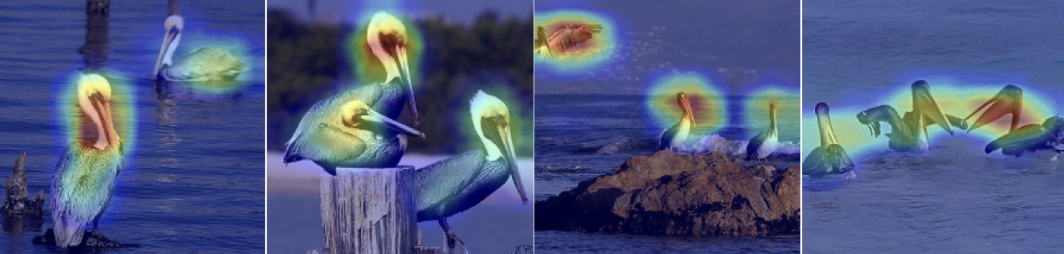
Unlike Deep Sets and Set Transformer, which are inherently opaque, CST is fully compatible with standard CNN explainability tools. The Figure above shows Grad-CAM overlays for an image set provided as input to CST-15, with respect to the ground-truth class.
Installation
You can install the latest release of cstmodels from PyPI:
pip install cstmodels
Loading CST-15
Instantiate CST-15 with or without pre-trained ImageNet weights:
from cstmodels import CST15

model = CST15(pretrained=True)
Building a CST from scratch
The package provides the tools needed to build a Convolutional Set Transformer from the ground up, including:
- SetConv2D: the reference implementation of the SetConv2D block introduced in Chinello & Boracchi, 2025.
- SmartReshape2D: a utility layer that reshapes tensors depending on whether a set dimension
is present. It automatically converts between(batch, set_size, H, W, C)→(batch*set_size, H, W, C)(batch*set_size, H, W, C)→(batch, set_size, H, W, C)
This is useful when switching between layers that operate per-image and those that require an
explicit set structure.
from keras import layers
from cstmodels import SetConv2D, SmartReshape2D

def CST():
    input_layer = layers.Input(shape=(None, None, None, 3))
    # Input is: (batch_size, set_size, heigh, width, channels)
    # We reshape to: (batch_size * set_size, heigh, width, channels)
    x, set_size = SmartReshape2D()(input_layer)

    x = SetConv2D(32, 3, activation='relu', padding='same')(
        x, set_size=set_size
    )
    x = SetConv2D(32, 3, activation='relu', padding='same')(
        x, set_size=set_size
    )
    x = layers.MaxPooling2D()(x)

    x = SetConv2D(64, 3, activation='relu', padding='same')(
        x, set_size=set_size
    )
    x = SetConv2D(64, 3, activation='relu', padding='same')(
        x, set_size=set_size
    )
    x = layers.MaxPooling2D()(x)

    x = SetConv2D(128, 3, activation='relu', padding='same')(
        x, set_size=set_size
    )
    x = SetConv2D(128, 3, activation='relu', padding='same')(
        x, set_size=set_size
    )
    x = layers.MaxPooling2D()(x)

    x = layers.GlobalAveragePooling2D()(x) # -> (batch_size * set_size, channels)

    output_layer = layers.Dense(units=10, activation='softmax')(x)

    model = keras.Model(inputs=input_layer, outputs=output_layer)

    return model

model = CST()
Tutorial Notebooks
We provide two self-contained tutorial notebooks here:
cst_from_scratch.ipynbdemonstrates how to build and train a CST from scratch on the CIFAR-10 dataset;cst15_transfer_learning.ipynbillustrates how to adapt the pre-trained CST-15 backbone to new tasks, using colorectal histopathology images as a case study for Transfer Learning.
Citation
If you use this package in your research, please cite:
Federico Chinello and Giacomo Boracchi. Convolutional Set Transformer. ArXiv preprint, 2025.
Release history Release notifications | RSS feed


Download files
Download the file for your platform. If you're not sure which to choose, learn more about installing packages.
Source Distribution
Built Distribution
Filter files by name, interpreter, ABI, and platform.
If you're not sure about the file name format, learn more about wheel file names.
Copy a direct link to the current filters
File details
Details for the file cstmodels-0.1.0.tar.gz.
File metadata
- Download URL: cstmodels-0.1.0.tar.gz
- Upload date:
- Size: 7.8 kB
- Tags: Source
- Uploaded using Trusted Publishing? No
- Uploaded via: twine/6.2.0 CPython/3.12.9
File hashes
| Algorithm | Hash digest | |
|---|---|---|
| SHA256 |
ba92b4d52b44e1f9922eca5cdb70d3280a62235ddafb88facbbf6f7aca0f50e3
|
|
| MD5 |
3c712e6b23942db57fd6f57ee24f877f
|
|
| BLAKE2b-256 |
af428b1a1acb5d0cbcb92bf009d1860fb7ef95bb8613740bfc6a0fc384013183
|
File details
Details for the file cstmodels-0.1.0-py3-none-any.whl.
File metadata
- Download URL: cstmodels-0.1.0-py3-none-any.whl
- Upload date:
- Size: 7.8 kB
- Tags: Python 3
- Uploaded using Trusted Publishing? No
- Uploaded via: twine/6.2.0 CPython/3.12.9
File hashes
| Algorithm | Hash digest | |
|---|---|---|
| SHA256 |
17b2d0183c8b8387fada090b39ea83c6852c8605f64c4a398c63979cc45bf0c1
|
|
| MD5 |
0c6534e3c9a86ee006187d70257d4ec4
|
|
| BLAKE2b-256 |
cebd5dd6177beef653335cebf34f07cfe69a35d8836616f78ae8eb0dbbd2417d
|






