
Cayley transform ellispoid fitting (CTEF)
Python implementation of Cayley tranform ellipsoid fitting (CTEF).
Associated paper
IEEE Transactions on Signal Processing: https://ieeexplore.ieee.org/abstract/document/10324847
arXiv: https://arxiv.org/abs/2304.10630
Installation
Install from PyPI:
pip install ctef
Clone from GitHub:
git clone git@github.com:omelikechi/ctef.git
Usage
Fit an ellipsoid to data arranged in an n-by-p numpy array X (n = number of samples, p = dimension):
from ctef.ctef import ctef

X = np.load('PATH_TO_DATA/X.npy')
fit = ctef(X)
With all arguments (and their default values) explicitly expressed:
fit = ctef(X, k=None, w=0.5, w_axis=10, ellipsoid_dimensions=None, trr_params=None)
The output of ctef, in this case fit, is a dictionary:
print(fit.keys())

dict_keys(['center', 'Lambda', 'Lambda_inv', 'result'])
The dictionay items are:
-
$c = $
centeris a p-dimensional numpy array. It is the ellipsoid center. -
$\Lambda = $
Lambdais a p-by-k numpy array (matrix). -
$\widetilde\Lambda = $
Lambda_invis a k-by-p numpy array (matrix). $\widetilde\Lambda = \Lambda^{-1}$ when k = p. -
resultis the output of the STIR optimization algorithm implemented in scipy
Ellipsoid of best fit
The ellipsoid of best fit is $\mathcal{E} = \{\Lambda\eta+c : \eta\in\mathbb{R}^k, \lVert\eta\rVert=1\} = \{x\in\mathbb{R}^p : \lVert \widetilde\Lambda(x-c)\rVert=1\}$.
Example
Examples are available in the examples folder. Here we highlight ellipsoid_gaussian.py.
Open ellipsoid_gaussian.ipynb in Google Colab:

2d version of ellipsoid_gaussian.py:
from ctef.ctef import ctef
from examples.helpers import generate_truth, simulate_data
import matplotlib.pyplot as plt
import numpy as np

p, tau, axis_ratio, noise_level, n_samples = 2, 2, 3, .01, 50

# generate data from Ellipsoid-Gaussian model
truth = generate_truth(p, tau, axis_ratio)
X = simulate_data(n_samples, noise_level, truth)

# fit ellipsoid to data X
fit = ctef(X)
Lambda, center = fit['Lambda'], fit['center']

# plot result
n_mesh = 100
fig = plt.figure(figsize=(8, 6))
ax = fig.add_subplot(1, 1, 1)
ax.scatter(X[:,0], X[:,1], color='black', s=5, alpha=1)
theta = np.linspace(0, 2*np.pi, n_mesh)
x = np.cos(theta)
y = np.sin(theta)
for j in range(n_mesh):
    eta = np.array([x[j],y[j]])
    [x[j],y[j]] = center + Lambda @ eta
ax.plot(x, y, alpha=1, lw=2, color='deepskyblue')

plt.show()
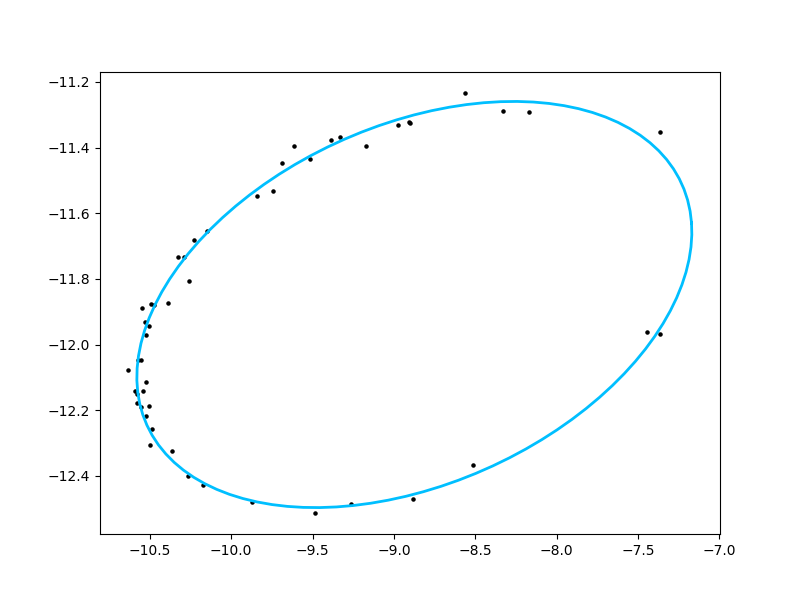
Lambda and center yield the best fit ellipsoid $\{\Lambda\eta+c : \lVert\eta\rVert=1\}$ pictured below:
Clustering
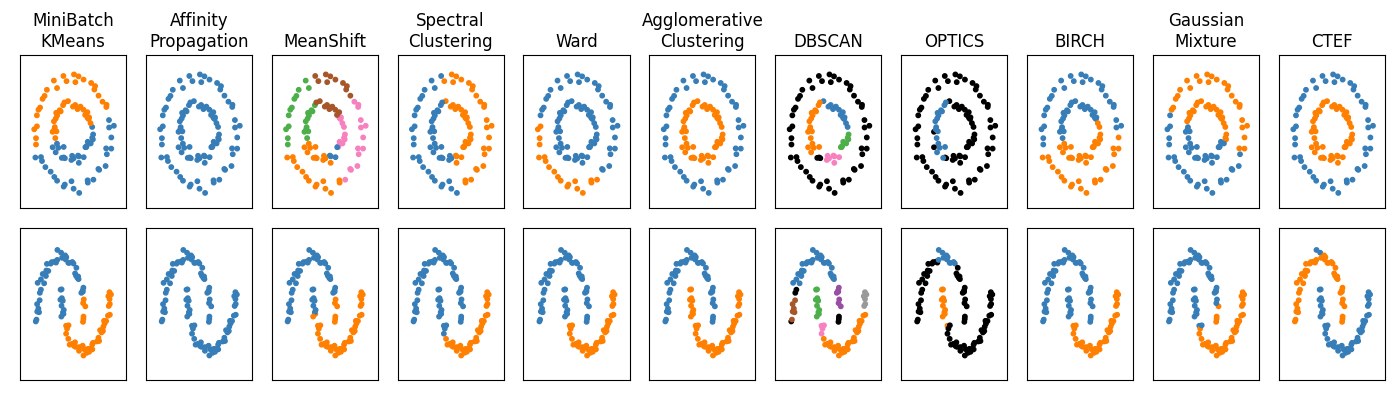
ctef_clustering.py in the ctef folder implements our ellipsoid clustering algorithm. This algorithm is tested against other clustering algorithms on two toy examples in the compare.py file. Here is its output.
1 maintainer

Metadata
1 maintainer
Release files for ctef 0.0.4
For a detailed explanation of source distributions (sdists) and built distributions (wheels), please see the package formats documentation.
Source distribution (sdist)
| File | Size | Uploaded | Provenance | Actions |
|---|---|---|---|---|
| ctef-0.0.4.tar.gz | 13.1 kB | Without provenance | Details for ctef-0.0.4.tar.gz |
Built distribution (wheel)
| File | Interpreter | ABI | Platform | Actions Reset |
|---|---|---|---|---|
| ctef-0.0.4-py3-none-any.whl | Python 3 | none | any | Details for ctef-0.0.4-py3-none-any.whl |
Total release size: 28.7 kB
Release files / ctef-0.0.4.tar.gz
| Download URL | ctef-0.0.4.tar.gz |
|---|---|
| Size | 13.1 kB |
| Tags | Source |
|
SHA-256 checksum How to use checksums |
f6a8fe9b2af425e8236bee220548ca7277b2cc6835c22e6faeb44467f0e995ee
|
|
BLAKE2b-256 checksum How to use checksums |
5b6112ae9d5580c9915d377219d66ad29dd6b24966d53c5fbb86b90b3b306f9d
|
| Upload date | |
|
Uploaded using Trusted Publishing? What is trusted publishing? |
No |
| Uploaded via |
twine/6.0.1 CPython/3.12.0
|
Release files / ctef-0.0.4-py3-none-any.whl
| Download URL | ctef-0.0.4-py3-none-any.whl |
|---|---|
| Size | 15.6 kB |
| Tags | Python 3 |
|
SHA-256 checksum How to use checksums |
eecfc967585f5a3c54b43da209b42990ee97bee75f07110d1627e77ed593d8a6
|
|
BLAKE2b-256 checksum How to use checksums |
1da0ca909457f7a339544a53b5e9e8f49e902122a68ea68bbb378b6568d5a09f
|
| Upload date | |
|
Uploaded using Trusted Publishing? What is trusted publishing? |
No |
| Uploaded via |
twine/6.0.1 CPython/3.12.0
|
Security for ctef 0.0.4
Provenance
Provenance describes where a file came from. On PyPI, provenance is shared via attestations, which provide a verifiable record of the build or publishing details. View details, limitations and caveats.
No provenance found
None of the files in this release were uploaded with provenance metadata.
A note on package security
PyPI is a repository for distributing packages, not a service for auditing them. While third-party security researchers and our staff do their best to detect and remove malicious packages, PyPI cannot guarantee the quality, security or suitability of any given package.
To learn more about protecting yourself from malicious actors, visit our package security documentation.














