
A collection of custom GUI components for Python

Project description


DevOpsNextGenX GUI Components
A collection of modern, customizable GUI components built with ttkbootstrap for Python desktop applications.
Installation
pip install -r requirements.txt
Requirements
- Python 3.x
- customtkinter
- ttkbootstrap
- pydantic
- pytest-cov
Test and Coverage
pytest tests/devopsnextgenx/utils/test_style.py
pytest tests/devopsnextgenx/utils/test_style.py::test_change_title_color_initialization
pytest --cov=src --cov-report=term-missing
Demo
Run the included demo to see all components in action:
python tests/demo.py

ffmpeg -i demo.webm -vf "scale=1000:-1:flags=lanczos,fps=10" -compression_level 50 demo.gif
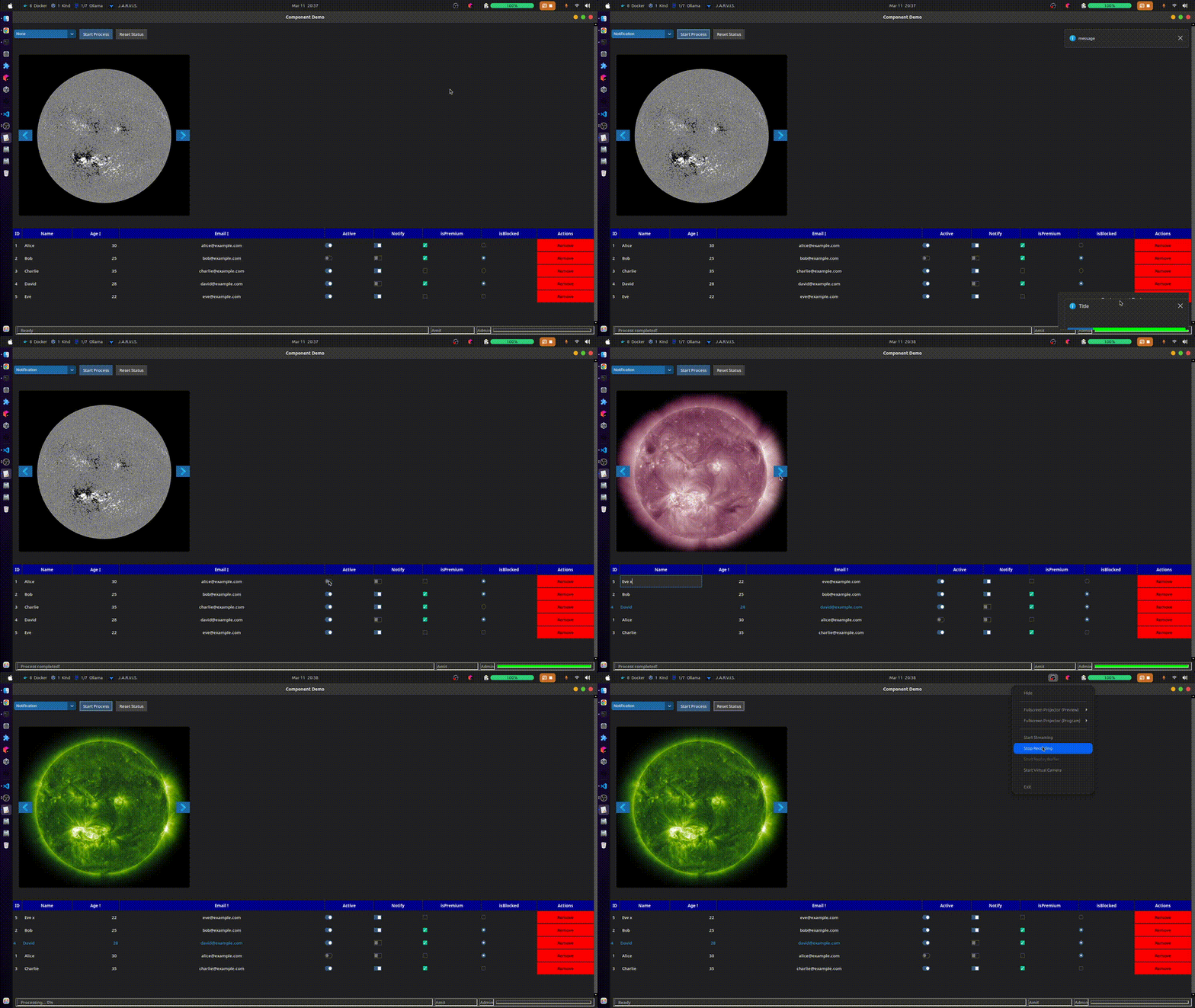
Features
StatusBar Component
A responsive status bar widget that includes:
- Status text display with progress bar
- User information display
- Access rights indicator
- Progress bar with percentage
- Auto-resizing capabilities
StatusBar Example
import ttkbootstrap as ttk
from devopsnextgenx.components import StatusBar

app = ttk.Window()

# Create status bar with custom height and progress bar thickness
status_bar = StatusBar(
    app,
    height=30,               # Custom height
    progress_thickness=3     # Thin progress bar
)
status_bar.pack(fill="x", side="bottom", padx=10, pady=5)

# Update status with text and progress
status_bar.update_status("Processing...", 0.5)  # 50% progress

# Reset status bar
status_bar.reset()  # Returns to "Ready" state with 0% progress
Table Component
A feature-rich table widget offering:
- Customizable headers with multiple column types
- Support for different widget types per column:
- TEXT: Regular text display
- CHECKBOX: Boolean value selector
- SQTOGGLE: Square toggle switch
- RNDTOGGLE: Round toggle switch
- ENTRY: Editable text field
- BUTTON: Clickable button
- Sortable columns
- Row selection and highlighting
- Cell editing capabilities
- Custom styling options
- Responsive layout
Table Example
import ttkbootstrap as ttk
from devopsnextgenx.components import Table, Header, WidgetType

app = ttk.Window()

# Define headers with advanced options
headers = [
    Header(
        text="ID",
        editable=False,
        type=WidgetType.TEXT,
        align="left"
    ),
    Header(
        text="Name",
        editable=True,
        type=WidgetType.ENTRY,
        weight=1,
        text_color="white",
        font_size=14,
        on_change=lambda data, row, col: print(f"Changed: {data[row][col]}")
    ),
    Header(
        text="Active",
        type=WidgetType.RNDTOGGLE,
        align="center",
        weight=1,
        fg_color="#2a2d2e",
        bg_color="#000000"
    ),
    Header(
        text="Actions",
        type=WidgetType.BUTTON,
        align="center",
        weight=1,
        style="primary"
    )
]

# Sample data
data = [
    [1, "John Doe", True, "Edit"],
    [2, "Jane Smith", False, "Edit"]
]

# Create table with custom styling
table = Table(
    app,
    headers=headers,
    data=data,
    row_height=30,
    header_color="primary",
    row_color="dark",
    alternate_row_color="secondary",
    highlight_color="info",
    hover_color="#404040"
)
table.pack(fill="both", expand=True)
MessageHub Components
Alert Example
import customtkinter as ctk
from devopsnextgenx.components.messageHub import provider

app = ctk.CTk()
provider.set_root_frame(app)

button = ctk.CTkButton(app, text="Show Alert", command=lambda: provider.show_alert("info", "Information", "This is an alert message.", "OK", "Cancel"))
button.pack(pady=20)

app.mainloop()
Banner Example
import customtkinter as ctk
from devopsnextgenx.components.messageHub import provider

app = ctk.CTk()
provider.set_root_frame(app)

button = ctk.CTkButton(app, text="Show Banner", command=lambda: provider.show_banner("info", "Information", "right_bottom", "Action 1", "Action 2"))
button.pack(pady=20)

app.mainloop()
Notification Example
import customtkinter as ctk
from devopsnextgenx.components.messageHub import provider

app = ctk.CTk()
provider.set_root_frame(app)

button = ctk.CTkButton(app, text="Show Notification", command=lambda: provider.show_notification("info", "This is a notification.", "right_bottom"))
button.pack(pady=20)

app.mainloop()
Carousel Component
A customizable carousel widget that displays a series of images.
Carousel Example
import customtkinter as ctk
from devopsnextgenx.components import Carousel, image_list_provider

app = ctk.CTk()

# Provide a list of image paths
image_paths = image_list_provider("path/to/images", imgOptions={"imgPrefix":"image", "suffix":"png", "start":1, "end":5})

carousel = Carousel(app, img_radius=25, img_list=image_paths)
carousel.pack(pady=20)

app.mainloop()
ScrollFrame Component
A scrollable frame widget that allows for easy scrolling of its contents.
ScrollFrame Example
import tkinter as tk
from devopsnextgenx.components import ScrollFrame

app = tk.Tk()

scroll_frame = ScrollFrame(app)
scroll_frame.pack(fill="both", expand=True)

# Add widgets to the scrollable frame
for i in range(50):
    tk.Label(scroll_frame.get_scrollable_frame(), text=f"Label {i}").pack()

app.mainloop()
Customization
Both components support extensive customization through their constructor parameters and methods:
- Colors and themes
- Sizes and proportions
- Event callbacks
- Visual styles
Build and Publish
pip install setuptools wheel
python setup.py sdist bdist_wheel
pip install twine
twine upload dist/*
twine upload --repository-url https://upload.pypi.org/legacy/ dist/*
License
Release history Release notifications | RSS feed


Download files
Download the file for your platform. If you're not sure which to choose, learn more about installing packages.
Source Distribution
Built Distribution
Filter files by name, interpreter, ABI, and platform.
If you're not sure about the file name format, learn more about wheel file names.
Copy a direct link to the current filters
File details
Details for the file ctk_gui_components-0.2.3.tar.gz.
File metadata
- Download URL: ctk_gui_components-0.2.3.tar.gz
- Upload date:
- Size: 21.8 kB
- Tags: Source
- Uploaded using Trusted Publishing? No
- Uploaded via: twine/6.1.0 CPython/3.12.7
File hashes
| Algorithm | Hash digest | |
|---|---|---|
| SHA256 |
9a843ea0b41eafa9c8e8cf9e5ef25215a03e16ebc8d8d9279e48f3dc3f35744f
|
|
| MD5 |
41d2f10225ffb6cf7213e568bbac71ee
|
|
| BLAKE2b-256 |
ac1c3e7c60dd3442d20a87c7cdbceef30aa0dbe669b4055bcc53e0b24e6e0f93
|
File details
Details for the file ctk_gui_components-0.2.3-py3-none-any.whl.
File metadata
- Download URL: ctk_gui_components-0.2.3-py3-none-any.whl
- Upload date:
- Size: 27.2 kB
- Tags: Python 3
- Uploaded using Trusted Publishing? No
- Uploaded via: twine/6.1.0 CPython/3.12.7
File hashes
| Algorithm | Hash digest | |
|---|---|---|
| SHA256 |
4aa65e2dc1a3c53e29d178f9f6375e1c50f74ef1d52ba890afef16059c4662c5
|
|
| MD5 |
1056d1ff2a48dc02e8b2b29b3988b61e
|
|
| BLAKE2b-256 |
ca24e4dba7f99b5498f6daf21e33c34900605b7824c5579559370e82b1f55e81
|






