
ctk-split-pane
A resizable two-pane widget for CustomTkinter.
It provides a draggable divider with three grip dots, double-click reset, minimum pane sizes and Dark/Light appearance support.
Português | English
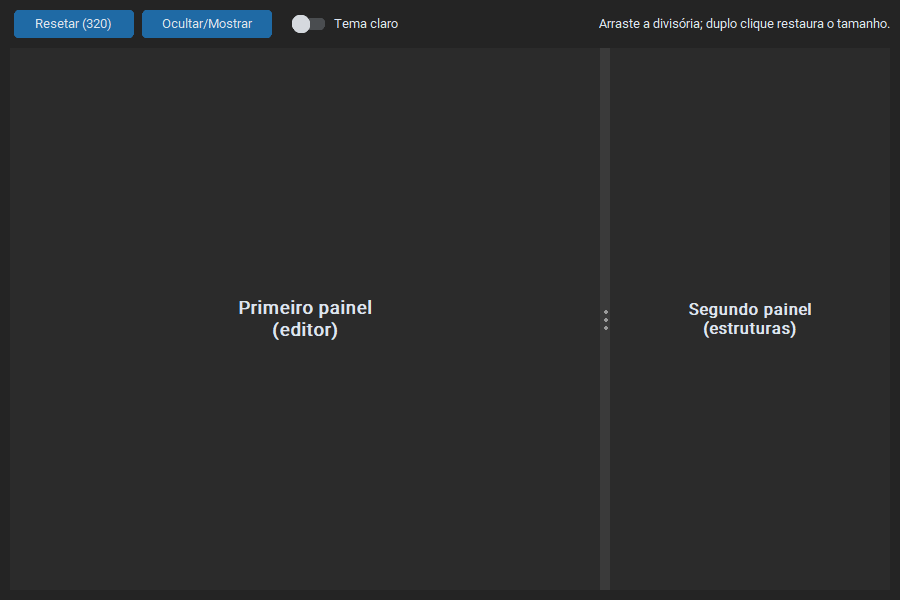
┌──────────────────────┬───────────────┐
│                      │               │
│      First pane      ║  Second pane  │
│                      │               │
└──────────────────────┴───────────────┘
                       ↑
                 drag to resize
Installation
pip install ctk-split-pane
Usage
import customtkinter as ctk
from ctk_split_pane import CTkSplitPane

ctk.set_appearance_mode("dark")

app = ctk.CTk()
app.geometry("900x600")

split = CTkSplitPane(
    app,
    orientation="horizontal",   # or "vertical"
    initial=280,                # initial size of the second pane
    default=280,                # size restored by double-click
    min_first=400,              # minimum size of the first pane
    min_second=220,             # minimum size of the second pane
)
split.pack(fill="both", expand=True, padx=10, pady=10)

left = ctk.CTkFrame(split.first)
left.pack(fill="both", expand=True)

right = ctk.CTkFrame(split.second)
right.pack(fill="both", expand=True)

app.mainloop()
The content of each pane must be created inside split.first / split.second
(or the aliases split.pane_a / split.pane_b).
Features
- Horizontal and vertical orientation.
- Draggable divider.
- Three vertical (or horizontal) grip dots as a visual indicator.
- Resize cursor.
- Double-click restores the default size.
- Minimum size for each pane.
- The second pane is never smaller than
min_second. - The first pane keeps
min_first; the second is limited to the available space. - Hide/show the second pane while preserving its current size.
- Colors and theme integrated with CustomTkinter; accepts fixed colors or
(light, dark)tuples. on_resizeandon_resetcallbacks.- Keyboard navigation on the divider: arrow keys and
Home(when focused). - No dependencies other than
customtkinter.
API
CTkSplitPane(master, **options)
| Option | Default | Description |
|---|---|---|
orientation |
"horizontal" |
"horizontal" or "vertical". |
initial |
default |
Initial size of the second pane. |
default |
250 |
Size restored by reset()/double-click. |
min_first |
120 |
Minimum size of the first pane. |
min_second |
120 |
Minimum size of the second pane. |
divider_width |
10 |
Divider thickness. |
grip |
"dots" |
"dots", "line" or "none". |
divider_color |
("#d9d9d9", "#3a3a3a") |
Divider color (str or (light, dark)). |
grip_color |
("#8a8a8a", "#9a9a9a") |
Grip color. |
hover_color |
("#c8c8c8", "#4a4a4a") |
Divider color on hover. |
cursor |
automatic | Divider cursor. |
on_resize |
None |
Called with the new second-pane size. |
on_reset |
None |
Called after a reset. |
first_pane_kwargs |
None |
Extra options for the first pane CTkFrame. |
second_pane_kwargs |
None |
Extra options for the second pane CTkFrame. |
Methods
| Method | Description |
|---|---|
set_second_size(size) |
Sets the second-pane size (within limits). |
get_second_size() |
Returns the current second-pane size. |
reset() |
Restores the default size. |
hide_second() |
Hides the second pane and divider. |
show_second() |
Shows the second pane at its previous position. |
toggle_second() |
Toggles hidden/visible. |
set_default_size(size) |
Changes the default size. |
set_min_second(size) |
Changes the second-pane minimum. |
set_min_first(size) |
Changes the first-pane minimum. |
is_second_visible |
Boolean property. |
first / second |
Internal frames where content should be created. |
pane_a / pane_b |
Aliases for first / second. |
Theming
Colors can be strings or (light, dark) tuples:
CTkSplitPane(
    app,
    divider_color=("#e5e5e5", "#2b2b2b"),
    grip_color=("#808080", "#a0a0a0"),
    hover_color=("#cccccc", "#444444"),
)
The widget follows ctk.set_appearance_mode("light"/"dark") automatically.
Default colors are neutral; consumers can pass their own palette.
Development
git clone https://github.com/MikaelGois/ctk-split-pane.git
cd ctk-split-pane
python -m venv .venv
.venv\Scripts\activate      # Windows
# source .venv/bin/activate # Linux/macOS
pip install customtkinter
python examples/demo.py
python -m unittest discover -s tests -v
On Linux, the graphical tests need a virtual display:
xvfb-run -a python -m unittest discover -s tests -v
Release process: see PUBLISHING.md (Portuguese).
License
MIT. See LICENSE.
1 maintainer

Metadata
1 maintainer
Release files for ctk-split-pane 0.1.0
For a detailed explanation of source distributions (sdists) and built distributions (wheels), please see the package formats documentation.
Source distribution (sdist)
| File | Size | Uploaded | Provenance | Actions |
|---|---|---|---|---|
| ctk_split_pane-0.1.0.tar.gz | 10.2 kB | With provenance | Details for ctk_split_pane-0.1.0.tar.gz |
Built distribution (wheel)
| File | Interpreter | ABI | Platform | Actions Reset |
|---|---|---|---|---|
| ctk_split_pane-0.1.0-py3-none-any.whl | Python 3 | none | any | Details for ctk_split_pane-0.1.0-py3-none-any.whl |
Total release size: 18.4 kB
Release files / ctk_split_pane-0.1.0.tar.gz
| Download URL | ctk_split_pane-0.1.0.tar.gz |
|---|---|
| Size | 10.2 kB |
| Tags | Source |
|
SHA-256 checksum How to use checksums |
150a586dd11d22a7615f365c4a0fa241a3f1755053da66615b4c73bbaf9418b1
|
|
BLAKE2b-256 checksum How to use checksums |
ef0de3456efb63225045dd91bcff032c98744d13f334190d22920ea25443b84a
|
| Upload date | |
|
Uploaded using Trusted Publishing? What is trusted publishing? |
Yes |
| Uploaded via |
twine/7.0.0 CPython/3.13.16
|
Provenance
Provenance describes where a file came from. On PyPI, provenance is shared via attestations, which provide a verifiable record of the build or publishing details. View details, limitations and caveats.


PyPI Publish Attestation
PyPI verified that this artifact, at this checksum, originated from the publisher listed below.
Signed by GitHub Actions, verified by PyPI on Nov 28, 2026.
Transparency logRelease files / ctk_split_pane-0.1.0-py3-none-any.whl
| Download URL | ctk_split_pane-0.1.0-py3-none-any.whl |
|---|---|
| Size | 8.2 kB |
| Tags | Python 3 |
|
SHA-256 checksum How to use checksums |
f5b80dcc3ee40d04b2f4a67efe5cbb8720cf813b1f545fbd1ee92770b5dda35e
|
|
BLAKE2b-256 checksum How to use checksums |
9d0ea220e3d4e206489d2b9ad5b72a23f4070b5c1a0dda15e61be606037a5e17
|
| Upload date | |
|
Uploaded using Trusted Publishing? What is trusted publishing? |
Yes |
| Uploaded via |
twine/7.0.0 CPython/3.13.16
|
Provenance
Provenance describes where a file came from. On PyPI, provenance is shared via attestations, which provide a verifiable record of the build or publishing details. View details, limitations and caveats.
PyPI Publish Attestation
PyPI verified that this artifact, at this checksum, originated from the publisher listed below.
Signed by GitHub Actions, verified by PyPI on Nov 28, 2026.
Transparency logSecurity for ctk-split-pane 0.1.0
Provenance
Provenance describes where a file came from. On PyPI, provenance is shared via attestations, which provide a verifiable record of the build or publishing details. View details, limitations and caveats.
Full provenance
Both files in this release have been uploaded with provenance metadata.
Attestation for ctk_split_pane-0.1.0.tar.gz
PyPI Publish Attestation
PyPI verified that this artifact, at this checksum, originated from the publisher listed below.
Signed by GitHub Actions, verified by PyPI on Nov 28, 2026.
Transparency logA note on package security
PyPI is a repository for distributing packages, not a service for auditing them. While third-party security researchers and our staff do their best to detect and remove malicious packages, PyPI cannot guarantee the quality, security or suitability of any given package.
To learn more about protecting yourself from malicious actors, visit our package security documentation.













