
ctk-color-picker



A modern, Photoshop-style color picker dialog for CustomTkinter. One function call, one hex string back.
Pure Python + Pillow. DPI-aware. Modal dialog. Works on Windows, macOS, Linux.
Features
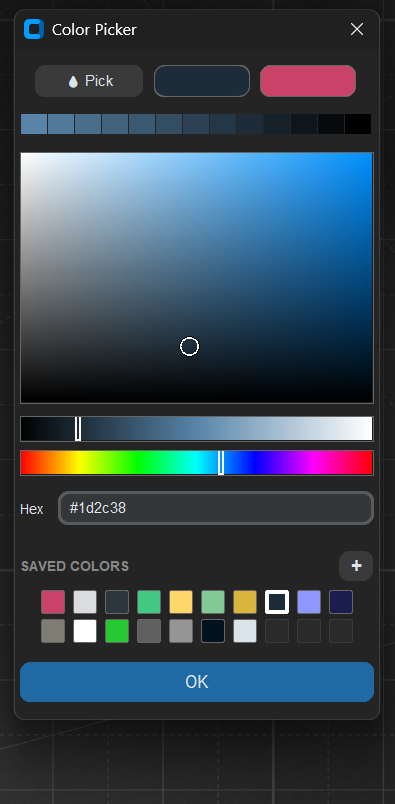
- 🎨 Saturation × Value square (drag to pick)
- 💡 HSL Lightness slider (black → color → white)
- 🌈 Hue slider
- 🔤 Hex input field
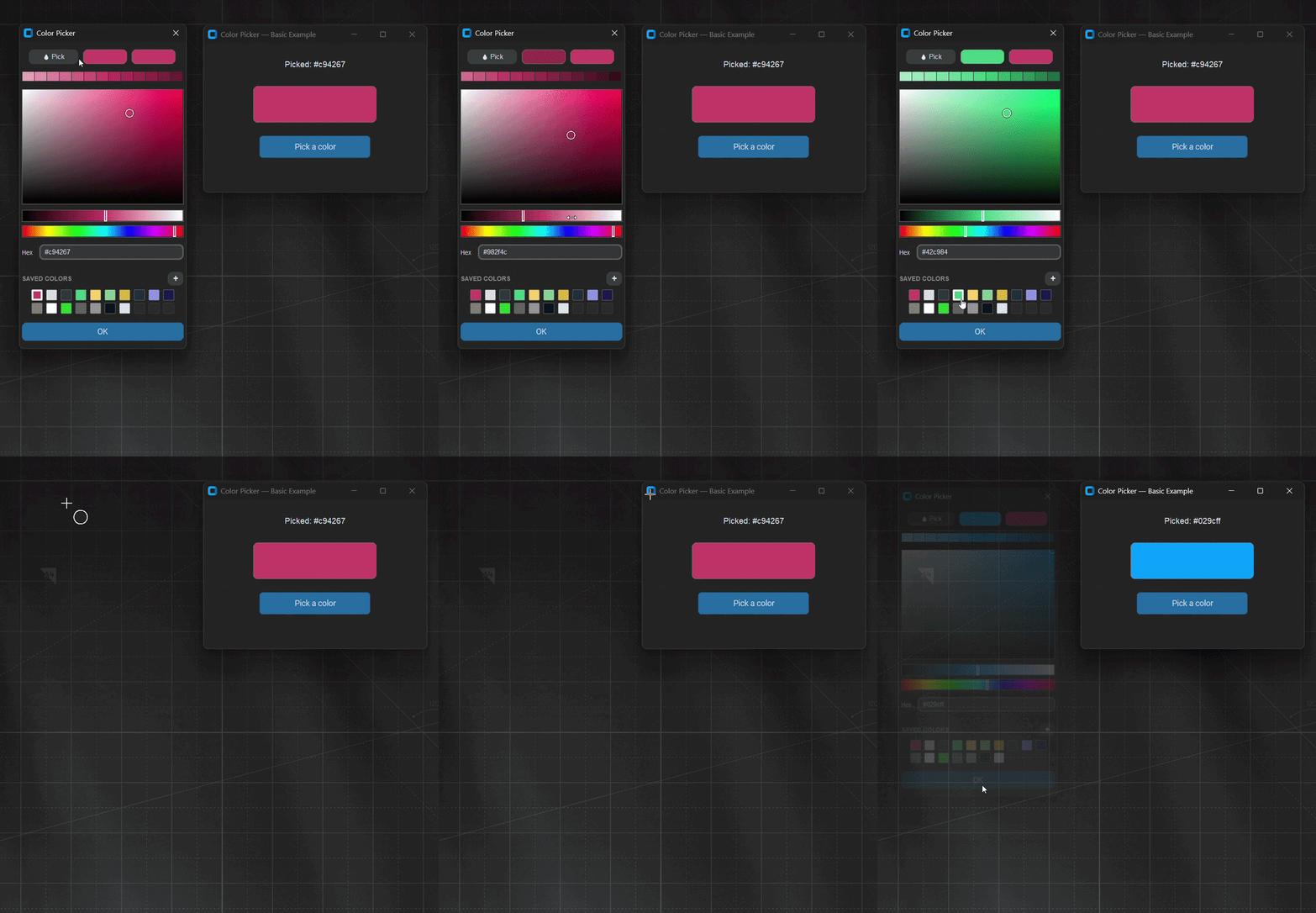
- 👀 Old / New comparison swatches
- 🎭 Tint strip — 13 dynamic variations of the current color
- 💾 Saved Colors — 20 slots, persistent across sessions (JSON)
- ⭐ Selection highlight on saved swatch matching current pick
- 🖥️ DPI-aware
tk.Canvas— matches CTk widget scaling
Requirements
| Python | 3.10+ |
| customtkinter | 5.2.2+ |
| Pillow | 10.0.0+ |
tkinter ships with Python on Windows/macOS. On Linux: sudo apt install python3-tk.
Install
pip install ctk-tint-color-picker
Or from source for development:
git clone https://github.com/kandelucky/ctk-color-picker.git
cd ctk-color-picker
pip install -e .
Quick start
import customtkinter as ctk
from ctk_color_picker import askcolor

ctk.set_appearance_mode("dark")
app = ctk.CTk()
app.geometry("300x200")

def on_pick():
    color = askcolor(app, initial="#1f6aa5")
    if color:
        button.configure(fg_color=color)

button = ctk.CTkButton(app, text="Pick a color", command=on_pick)
button.pack(expand=True, padx=20, pady=20)
app.mainloop()
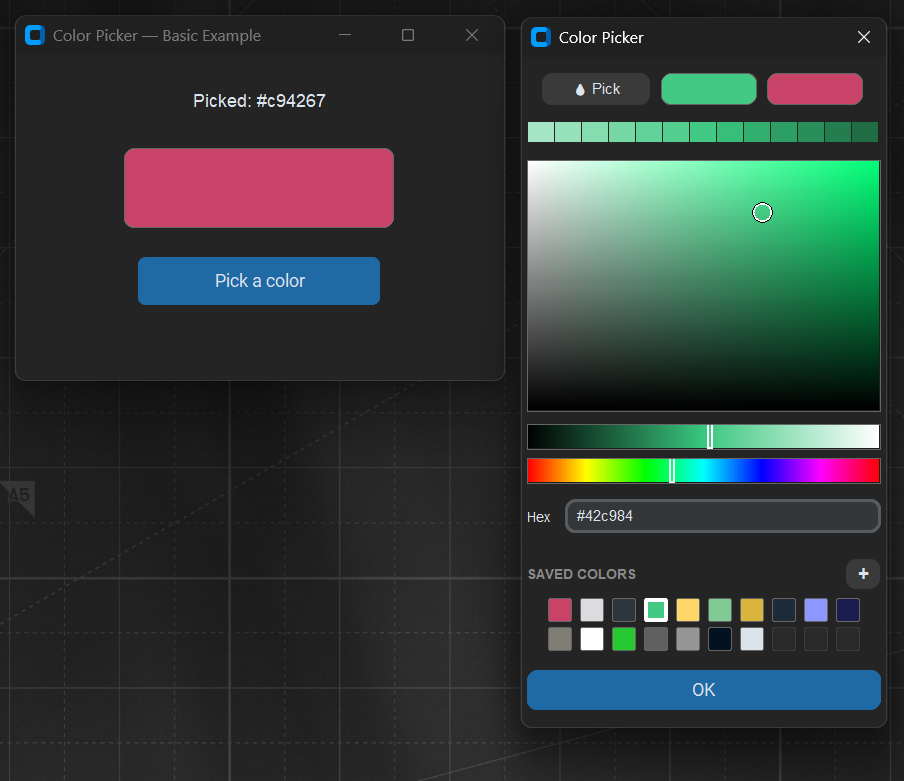
askcolor() opens the modal dialog, blocks until closed, and returns a hex string or None if cancelled.
API
askcolor(master, initial="#1f6aa5", history=None, title="Color Picker") -> str | None
Convenience function. Opens the dialog modally and returns the picked hex.
ColorPickerDialog(master, initial_color="#1f6aa5", history=None, title="Color Picker")
The dialog class. Use directly when you need more control:
dialog = ColorPickerDialog(parent, initial_color="#ff0000")
dialog.wait_window()
print(dialog.result)   # hex string or None
ColorHistory(path=None, max_entries=20)
Manages persistent saved colors as a JSON file. Default path is ~/.ctk_color_picker/colors.json. Pass to the dialog for custom storage.
palette = ColorHistory(path="./project_palette.json", max_entries=30)
color = askcolor(app, history=palette)
Methods: .add(hex), .all(), .clear().
When to use this
Reach for ctk-color-picker when you want:
- A themed picker that matches the rest of your CustomTkinter app
- Saturation × value picking plus a separate HSL lightness control
- A tint strip of the current color for quick shade tweaks
- A persistent saved-colors palette shared across sessions
- A screen eyedropper that samples any pixel with a single click
- DPI-aware rendering on high-resolution Windows displays
Reach for tkinter.colorchooser instead if you just need the OS native dialog with zero setup and no extra dependencies.
Troubleshooting
ModuleNotFoundError: No module named 'ctk_color_picker' — run pip install -e . from the repo root, or copy the ctk_color_picker/ folder next to your script.
Dialog tiny / blurry on a 4K display — make sure customtkinter ≥ 5.2.2.
Saved colors don't persist — check that ~/.ctk_color_picker/ is writable.
License
MIT © 2026 kandelucky
1 maintainer

Metadata
1 maintainer
Release files for ctk-tint-color-picker 0.3.4
For a detailed explanation of source distributions (sdists) and built distributions (wheels), please see the package formats documentation.
Source distribution (sdist)
| File | Size | Uploaded | Provenance | |
|---|---|---|---|---|
| ctk_tint_color_picker-0.3.4.tar.gz | 19.9 kB | Without provenance | Details |
Built distribution (wheel)
| File | Interpreter | ABI | Platform | Reset |
|---|---|---|---|---|
| ctk_tint_color_picker-0.3.4-py3-none-any.whl | Python 3 | none | any | Details |
Total release size: 37.6 kB
Release files / ctk_tint_color_picker-0.3.4.tar.gz
| Download URL | ctk_tint_color_picker-0.3.4.tar.gz |
|---|---|
| Size | 19.9 kB |
| Tags | Source |
|
SHA-256 checksum How to use checksums |
82f9ad2e4e68dff18b31519b5e89a5b056d7119ecd10e5a8c8b641670efcb78a
|
|
BLAKE2b-256 checksum How to use checksums |
f566653800855e4ee32b5aaa2b1cb212a1b95e7971c8abcaa9239d79c36f2c98
|
| Upload date | |
|
Uploaded using Trusted Publishing? What is trusted publishing? |
No |
| Uploaded via |
twine/6.2.0 CPython/3.14.4
|
Release files / ctk_tint_color_picker-0.3.4-py3-none-any.whl
| Download URL | ctk_tint_color_picker-0.3.4-py3-none-any.whl |
|---|---|
| Size | 17.7 kB |
| Tags | Python 3 |
|
SHA-256 checksum How to use checksums |
e466715446f5214667349fb6ebfb80df3e5d135bac87c0de38f9f6b9cb803fa9
|
|
BLAKE2b-256 checksum How to use checksums |
45fc9b71857d0832d1960ea59fca54320feddeb7a6ed51a8364700db8c790a9f
|
| Upload date | |
|
Uploaded using Trusted Publishing? What is trusted publishing? |
No |
| Uploaded via |
twine/6.2.0 CPython/3.14.4
|
Security for ctk-tint-color-picker 0.3.4
Provenance
Provenance describes where a file came from. On PyPI, provenance is shared via attestations, which provide a verifiable record of the build or publishing details. View details, limitations and caveats.
No provenance found
None of the files in this release were uploaded with provenance metadata.
A note on package security
PyPI is a repository for distributing packages, not a service for auditing them. While third-party security researchers and our staff do their best to detect and remove malicious packages, PyPI cannot guarantee the quality, security or suitability of any given package.
To learn more about protecting yourself from malicious actors, visit our package security documentation.














