
CTkFileDialog





A modern and fully customizable File Dialog for CustomTkinter — a must-have extension pack!
🚀 Features
- 🔍 Autocomplete in the path entry field (with
Tab,Up, andDown) - 🧩 Flexible filetype filters: accepts simple extensions or tkinter-style
(label, pattern)tuples (patterns may contain multiple space‑separated globs). Wildcards like*/*.*are treated as match‑all. - � Search/filter files in real-time
- 🖼️ Live image preview
- 🎥 Video thumbnail preview
- 📁 Directory selection (single or multiple)
- 📄📁 Combined file-or-folder selection (single or multiple)
- ➕ Create new folders from within the dialog (
foldercreation) - 💾 Save file dialog (return path or open file), with automatic extension (
defaultext) - ❔ Tooltip support
- 🖥️ Shell Path Syntax Support
- ⌨️ Backspace using Alt + Left Arrow shortcut
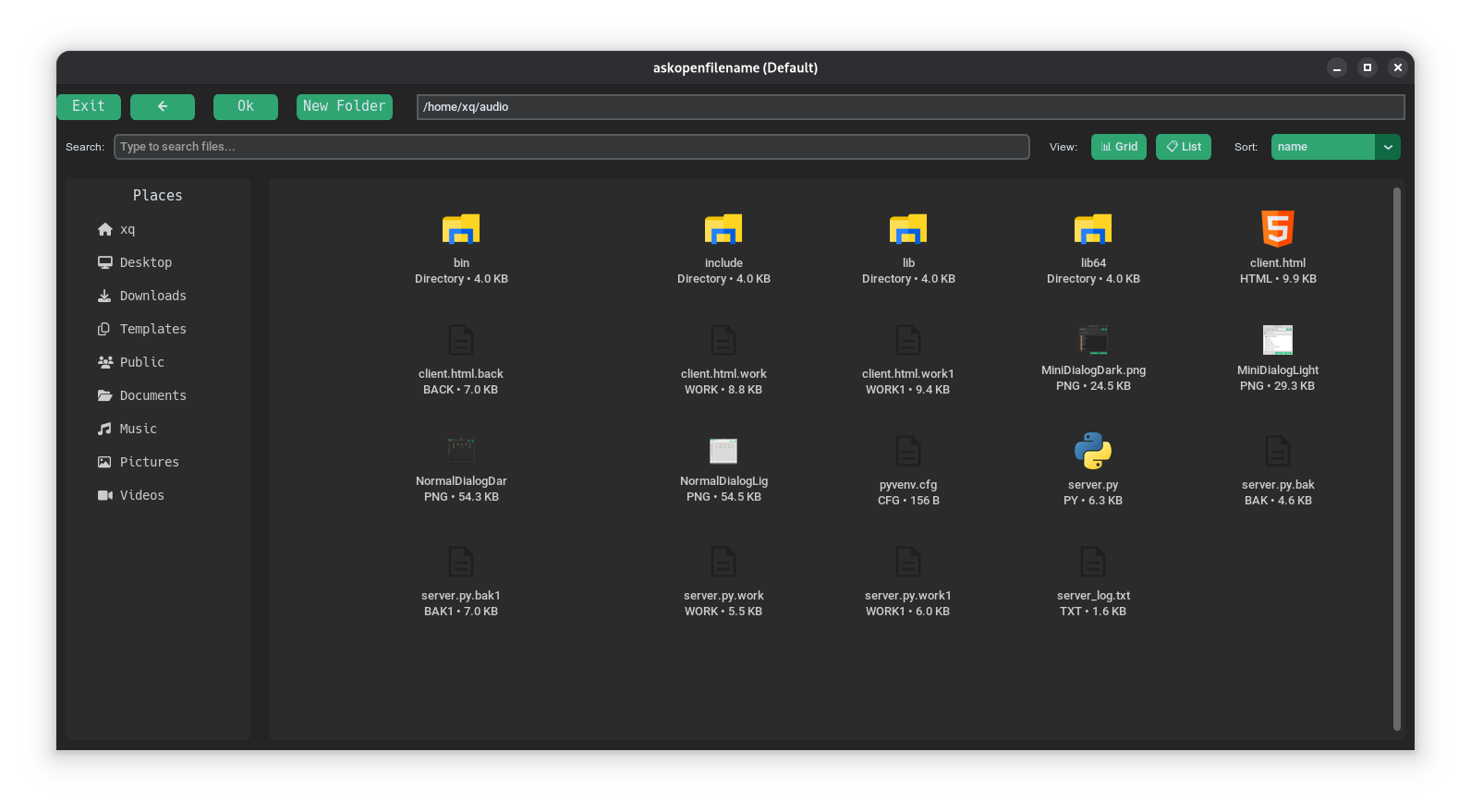
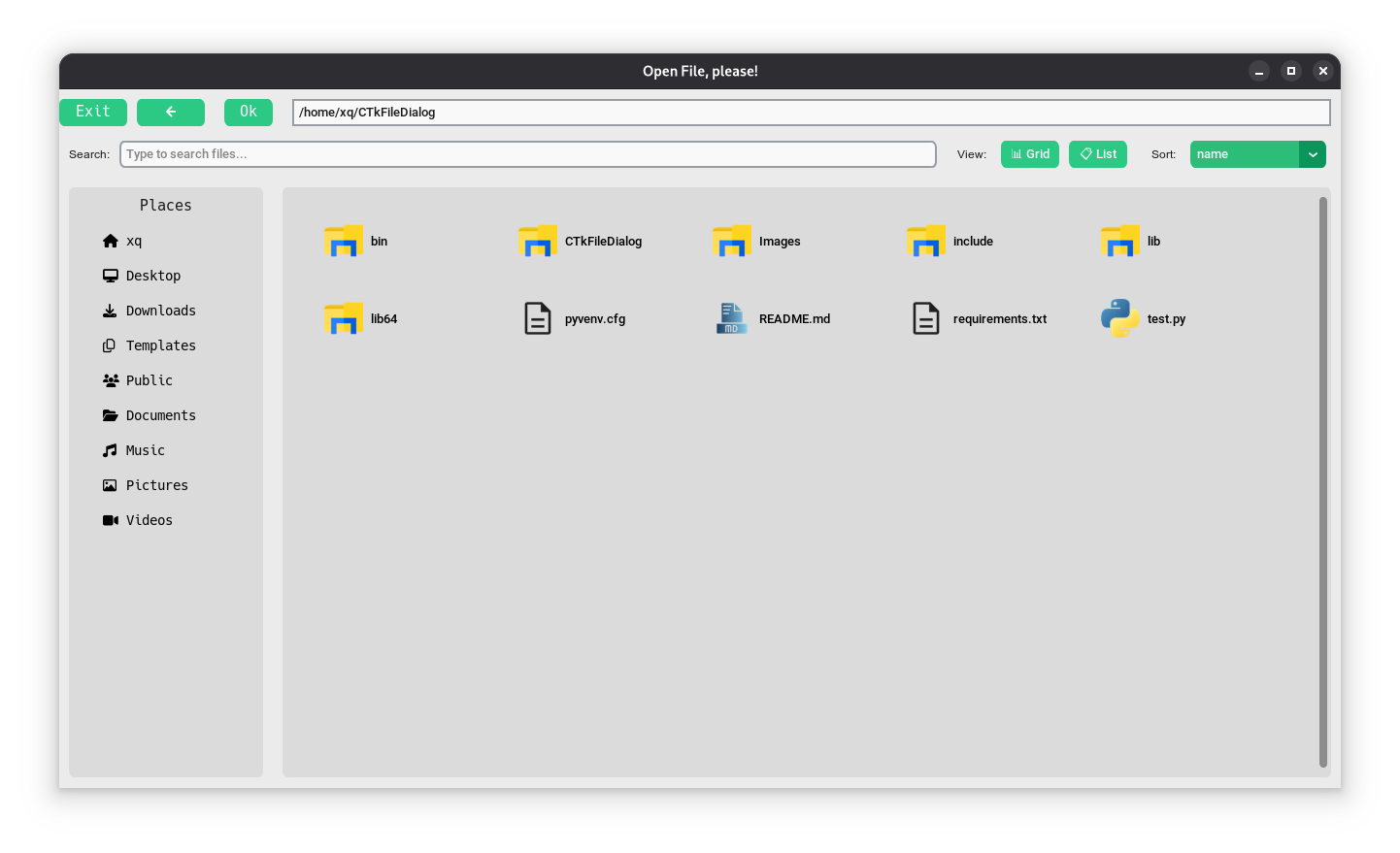
- 👀 Multiple view modes (Grid and List view in Default dialog)
- 📊 Sort files by name, date, size, type, or last modified
- 💡 Data type validation at runtime and for static type analyzers
📦 Installation
# Using bash
git clone https://github.com/hmidani-abdelilah/CTkFileDialog-plus
cd CTkFileDialog-plus
python3 -m venv .venv
source .venv/bin/activate
pip3 install -r requirements.txt

# On Windows
git clone https://github.com/hmidani-abdelilah/CTkFileDialog-plus
cd CTkFileDialog-plus
python3 -m venv .venv
.\.venv\Scripts\activate.ps1  # In PowerShell
pip3 install -r requirements.txt

# Or using pip
python3 -m venv .venv
source .venv/bin/activate  # On PowerShell use .\.venv\Scripts\activate.ps1
pip3 install CTkFileDialog-plus
📁 Project structure
CTkFileDialog-plus/
├── LICENSE                         # project license terms
├── README.md                       # user and developer documentation
├── requirements.txt                # Python dependencies
├── test.py                         # general package usage example
├── test_save_as.py                 # save-as dialog regression/test example
├── CTkFileDialog/                  # package source code
│   ├── __init__.py                 # public package API
│   ├── _functions.py               # dialog helper functions exposed to users
│   ├── _system.py                  # cross-platform path handling support
│   ├── Dialog.py                   # dialog imports and public component exports
│   ├── Constants/                  # reusable package constants
│   │   ├── __init__.py
│   │   └── constants.py
│   ├── core/                       # core filesystem/search/sorting logic
│   │   ├── __init__.py
│   │   ├── filesystem.py
│   │   ├── search.py
│   │   └── sorting.py
│   ├── icons/                      # icon assets for the dialogs
│   │   ├── _IconsMini/
│   │   └── *.png
│   ├── preview/                    # image/video preview helpers
│   │   ├── __init__.py
│   │   └── media.py
│   ├── resources/                  # shared resource loading utilities
│   │   ├── __init__.py
│   │   └── icons.py
│   ├── system/                     # platform-specific system utilities
│   │   ├── __init__.py
│   │   └── platform.py
│   ├── ui/                         # dialog UI implementations and widgets
│   │   ├── __init__.py
│   │   ├── default_dialog.py
│   │   ├── mini_dialog.py
│   │   └── tooltip.py
│   └── utils/                      # small helper utilities
│       ├── __init__.py
│       └── helpers.py
├── Images/                         # README screenshots showing light and dark themes
│   ├── MiniDialogDark.png
│   ├── MiniDialogLight.png
│   ├── NormalDialogDark.png
│   └── NormalDialogLight.png
🧪 Demo — All Methods
🗂️ Open File
import customtkinter as ctk
from CTkFileDialog import askopenfilename

ctk.set_appearance_mode("Dark")
ctk.set_default_color_theme("blue")

def open_file():
    # you can pass simple extensions...
    # path = askopenfilename(preview_img=True, autocomplete=True)
    # or tkinter‑style tuples with labels and multiple globs:
    path = askopenfilename(
        filetypes=[
            ("Text files","*.txt"),
            ("Python","*.py *.pyw"),
            ("All","*.*"),
        ],
        preview_img=True,
        autocomplete=True,
    )
    if path:
        result_label.configure(text=f"Selected file:\n{path}")

app = ctk.CTk()
app.title("askopenfilename Demo")
app.geometry("500x200")

ctk.CTkButton(app, text="Open File", command=open_file).pack(pady=20)
result_label = ctk.CTkLabel(app, text="Waiting for file selection...")
result_label.pack()

app.mainloop()
🗂️ Open Multiple Files
import customtkinter as ctk
from CTkFileDialog import askopenfilenames

ctk.set_appearance_mode("Dark")
ctk.set_default_color_theme("blue")

def open_files():
    paths = askopenfilenames(
        filetypes=[("Images","*.jpg *.png"), ("All","*.*")],
        preview_img=True,
        autocomplete=True,
    )
    if paths:
        result_label.configure(text="Selected files:\n" + "\n".join(paths))

app = ctk.CTk()
app.title("askopenfilenames Demo")
app.geometry("500x300")

ctk.CTkButton(app, text="Open Multiple Files", command=open_files).pack(pady=20)
result_label = ctk.CTkLabel(app, text="Waiting for file selection...", wraplength=450)
result_label.pack()

app.mainloop()
📁 Select Directory
import customtkinter as ctk
from CTkFileDialog import askdirectory

ctk.set_appearance_mode("Dark")
ctk.set_default_color_theme("blue")

def select_directory():
    folder = askdirectory(autocomplete=True)
    if folder:
        result_label.configure(text=f"Selected directory:\n{folder}")

app = ctk.CTk()
app.title("askdirectory Demo")
app.geometry("500x200")

ctk.CTkButton(app, text="Select Directory", command=select_directory).pack(pady=20)
result_label = ctk.CTkLabel(app, text="Waiting for directory selection...")
result_label.pack()

app.mainloop()
📁 Select Single Directory (askopendirname)
import customtkinter as ctk
from CTkFileDialog import askopendirname

ctk.set_appearance_mode("Dark")
ctk.set_default_color_theme("blue")

def select_directory():
    folder = askopendirname(autocomplete=True)
    if folder:
        result_label.configure(text=f"Selected directory:\n{folder}")

app = ctk.CTk()
app.title("askopendirname Demo")
app.geometry("500x200")

ctk.CTkButton(app, text="Select Directory", command=select_directory).pack(pady=20)
result_label = ctk.CTkLabel(app, text="Waiting for directory selection...")
result_label.pack()

app.mainloop()
📁 Select Multiple Directories (askopendirnames)
import customtkinter as ctk
from CTkFileDialog import askopendirnames

ctk.set_appearance_mode("Dark")
ctk.set_default_color_theme("blue")

def select_directories():
    # Hold Ctrl or Shift while clicking to select several folders
    folders = askopendirnames(autocomplete=True)
    if folders:
        result_label.configure(text="Selected directories:\n" + "\n".join(folders))

app = ctk.CTk()
app.title("askopendirnames Demo")
app.geometry("500x300")

ctk.CTkButton(app, text="Select Directories", command=select_directories).pack(pady=20)
result_label = ctk.CTkLabel(app, text="Waiting for directory selection...", wraplength=450)
result_label.pack()

app.mainloop()
📄📁 Select a File or a Folder (askopenpathname)
import customtkinter as ctk
from CTkFileDialog import askopenpathname

ctk.set_appearance_mode("Dark")
ctk.set_default_color_theme("blue")

def select_path():
    path = askopenpathname(autocomplete=True)
    if path:
        result_label.configure(text=f"Selected:\n{path}")

app = ctk.CTk()
app.title("askopenpathname Demo")
app.geometry("500x200")

ctk.CTkButton(app, text="Select File or Folder", command=select_path).pack(pady=20)
result_label = ctk.CTkLabel(app, text="Waiting for selection...")
result_label.pack()

app.mainloop()
📄📁 Select Multiple Files and/or Folders (askopenpathnames)
import customtkinter as ctk
from CTkFileDialog import askopenpathnames

ctk.set_appearance_mode("Dark")
ctk.set_default_color_theme("blue")

def select_paths():
    # Hold Ctrl or Shift while clicking to mix files and folders in one selection
    items = askopenpathnames(autocomplete=True)
    if items:
        result_label.configure(text="Selected:\n" + "\n".join(items))

app = ctk.CTk()
app.title("askopenpathnames Demo")
app.geometry("500x300")

ctk.CTkButton(app, text="Select Files/Folders", command=select_paths).pack(pady=20)
result_label = ctk.CTkLabel(app, text="Waiting for selection...", wraplength=450)
result_label.pack()

app.mainloop()
import customtkinter as ctk
from CTkFileDialog import asksaveasfilename

ctk.set_appearance_mode("Dark")
ctk.set_default_color_theme("blue")

def save_as_filename():
    path = asksaveasfilename(autocomplete=True)
    if path:
        result_label.configure(text=f"Save file as:\n{path}")

# You can also auto-append an extension if the user doesn't type one:
# path = asksaveasfilename(autocomplete=True, defaultext=".txt")

app = ctk.CTk()
app.title("asksaveasfilename Demo")
app.geometry("500x200")

ctk.CTkButton(app, text="Save As (Filename Only)", command=save_as_filename).pack(pady=20)
result_label = ctk.CTkLabel(app, text="Waiting for filename...")
result_label.pack()

app.mainloop()
💾 Save As (write to file)
import customtkinter as ctk
from CTkFileDialog import asksaveasfile

ctk.set_appearance_mode("Dark")
ctk.set_default_color_theme("blue")

def save_as_file():
    file = asksaveasfile(autocomplete=True)
    if file:
        file.write("This file was created using the demo.")
        file.close()
        result_label.configure(text=f"File saved:\n{file.name}")

# Alternatively, asksaveasfile supports the context manager protocol:
# with asksaveasfile(autocomplete=True) as file:
#     if file:
#         file.write("This file was created using the demo.")

app = ctk.CTk()
app.title("asksaveasfile Demo")
app.geometry("500x200")

ctk.CTkButton(app, text="Save As (Real File)", command=save_as_file).pack(pady=20)
result_label = ctk.CTkLabel(app, text="Waiting for save location...")
result_label.pack()

app.mainloop()
📂 Open File as Object
import customtkinter as ctk
from CTkFileDialog import askopenfile

ctk.set_appearance_mode("Dark")
ctk.set_default_color_theme("blue")

def open_file_obj():
    f = askopenfile(mode='rb',
                    filetypes=[("Binary","*.bin"), ("All","*.*")])
    if f:
        data = f.read()
        f.close()
        result_label.configure(text=f"Read {len(data)} bytes from {f.name}")

app = ctk.CTk()
app.title("askopenfile Demo")
app.geometry("500x200")

ctk.CTkButton(app, text="Open File Object", command=open_file_obj).pack(pady=20)
result_label = ctk.CTkLabel(app, text="Waiting for file selection...")
result_label.pack()

app.mainloop()
📂 Open Multiple Files as Objects
import customtkinter as ctk
from CTkFileDialog import askopenfiles

ctk.set_appearance_mode("Dark")
ctk.set_default_color_theme("blue")

def open_files_obj():
    files = askopenfiles(mode='r', filetypes=[("Text","*.txt")])
    if files:
        for f in files:
            content = f.read()
            f.close()
            print(f"{f.name}: {len(content)} chars")
        result_label.configure(text=f"Opened {len(files)} files, see console output.")

app = ctk.CTk()
app.title("askopenfiles Demo")
app.geometry("500x200")

ctk.CTkButton(app, text="Open Files Objects", command=open_files_obj).pack(pady=20)
result_label = ctk.CTkLabel(app, text="Waiting for file selection...")
result_label.pack()

app.mainloop()
🧩 Parameters
| Parameter | Description |
|---|---|
filetypes |
Optional filter list: either ['.txt', '.md'] or [('Text','*.txt'),('Py','*.py *.pyw'),('All','*.*')]. Wildcards are normalized internally. |
hidden |
Show hidden files or directories (False by default). |
preview_img |
Enable image preview in the file dialog. |
video_preview |
Show first frame of video files as thumbnail (experimental). |
autocomplete |
Enable path autocompletion with Tab, Up, and Down. |
initial_dir |
Set the initial directory when opening the dialog. |
tool_tip |
Enable the tool tip. |
foldercreation |
Enable a "New Folder" button so the user can create folders from within the dialog (True by default). |
defaultext |
(asksaveasfilename/asksaveasfile only) Extension appended to the filename if the user didn't type one (default is none). |
style |
Defines the dialog style, by default it will be 'Default' but you can choose a small one ('Mini'). |
geometry |
Defines the dialog size. For functions that support both styles, pass a tuple (default_geometry, mini_geometry). |
title |
Define the title for the dialog window. Defaults to CTkFileDialog. |
🎯 Using New Features
🔎 Search/Filter Files
Both Default and Mini dialogs include a search bar. Simply type in the search field to filter files and directories in real-time:
file = askopenfilename(style='Default')
# Use the search bar in the dialog to filter results
👀 View Modes (Default Dialog Only)
The Default dialog supports two view modes:
- Grid View: Icon-based grid layout (default)
- List View: Detailed list with file info (size, date modified, type)
Toggle between modes using the view buttons in the toolbar.
📊 Sorting Options (Default Dialog Only)
Sort files by:
- Name (alphabetical)
- Date (creation/modification time)
- Type (file extension)
- Size (file size)
- Last Modified (most recent first)
Select a sort option from the sort menu in the toolbar.
This module has constants that can be used outside or inside the dialog, they are used to obtain paths like /home/user or /home/user/.config/ Here is a basic example
#!/usr/bin/env python3
import customtkinter as ctk
from CTkFileDialog import askopenfilename
from CTkFileDialog.Constants import HOME

root = ctk.CTk()

def open_file():
    f = askopenfilename(initial_dir=HOME, autocomplete=True)
    if f:
        print(f"file selected: {f}")

ctk.CTkButton(master=root, command=open_file, text="Open File").pack(padx=10, pady=10, anchor=ctk.CENTER)

root.mainloop()
And here are the constants available from the package
| Parameter | Description |
|---|---|
PWD |
Current working directory (e.g., where the program was launched) |
HOME |
User's home directory (e.g., /home/user or C:\Users\user) |
TEMP |
Temporary directory (fallback to /tmp if no env vars are set) |
CONFIG_DIR |
XDG-compliant user configuration directory (default: ~/.config) |
CACHE_DIR |
XDG-compliant user cache directory (default: ~/.cache) |
PATH |
System PATH split into a list of directories |
DATA_DIR |
XDG-compliant user data directory (default: ~/.local/share) |
VENV |
Active Python virtual environment (venv or conda), fallback to PWD |
DOWNLOAD_DIR |
Default download directory (e.g., ~/Downloads or C:\Users\user\Download). |
DOWNLOAD_DIR_VIDEO |
Default video download directory (e.g., ~/Downloads/Video or C:\Users\user\Download\Video). |
🌙 Dark Mode Normal
☀️ Light Mode Preview
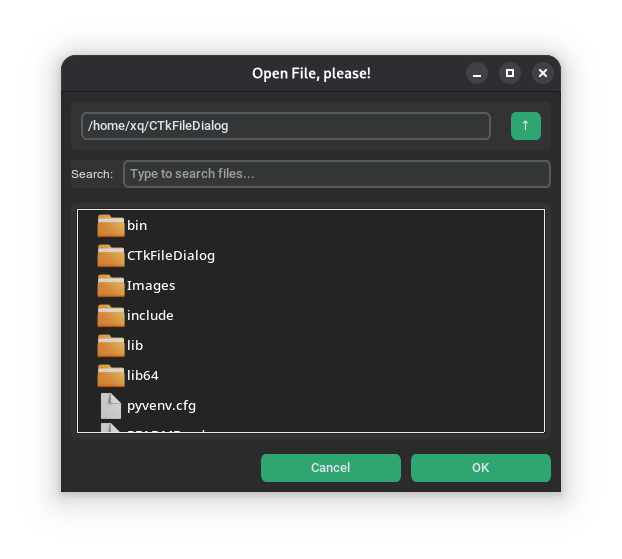
🌙 Dark Mode Mini
☀️ Light Mode Mini
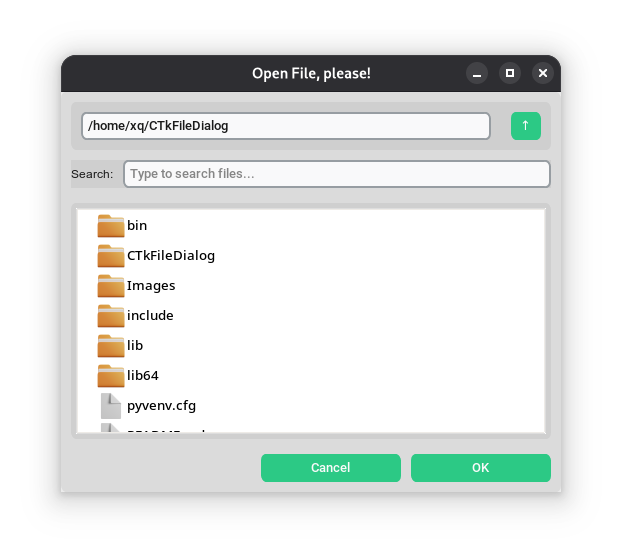
The mini design wasn't made by me; it was made by this user. Additionally, I did not design the normal interface; it was developed by this user, and they deserve all the credit. I would like to express my gratitude to them for developing that design beforehand.I revamped the interface, established a new framework, and incorporated additional features.
1 maintainer

Metadata
1 maintainer
Release files for CTKFileDialog-plus 2.2.0
For a detailed explanation of source distributions (sdists) and built distributions (wheels), please see the package formats documentation.
Source distribution (sdist)
| File | Size | Uploaded | |
|---|---|---|---|
| ctkfiledialog_plus-2.2.0.tar.gz | 224.9 kB | Details |
Built distribution (wheel)
| File | Interpreter | ABI | Platform | Reset |
|---|---|---|---|---|
| ctkfiledialog_plus-2.2.0-py3-none-any.whl | Python 3 | none | any | Details |
Total release size: 461.9 kB
Release files / ctkfiledialog_plus-2.2.0.tar.gz
| Download URL | ctkfiledialog_plus-2.2.0.tar.gz |
|---|---|
| Size | 224.9 kB |
| Tags | Source |
|
SHA-256 checksum How to use checksums |
e68d95266f856d7f7b4f12318869d1a0db58092d799836378696f308060fafbc
|
|
BLAKE2b-256 checksum How to use checksums |
da1bf7f599908de32117ad757dd2004d1b6ccd31b9351cc362f66823262f6a96
|
| Upload date | |
|
Uploaded using Trusted Publishing? What is trusted publishing? |
No |
| Uploaded via |
twine/7.0.0 CPython/3.13.5
|
Release files / ctkfiledialog_plus-2.2.0-py3-none-any.whl
| Download URL | ctkfiledialog_plus-2.2.0-py3-none-any.whl |
|---|---|
| Size | 237.0 kB |
| Tags | Python 3 |
|
SHA-256 checksum How to use checksums |
ef21db0ec6094a3dd44d8d5b4db13389400acd80eb060d40422c1be7b45a34f3
|
|
BLAKE2b-256 checksum How to use checksums |
b6abaa0d1245617e508efb4605858e1ead8fb2dc3a24b8dfee27c31a21f84168
|
| Upload date | |
|
Uploaded using Trusted Publishing? What is trusted publishing? |
No |
| Uploaded via |
twine/7.0.0 CPython/3.13.5
|














