
Use any of the 2k+ free FontAwesome icons in your CustomTkinter / Tkinter applications.

Project description


CTkFontAwesome
Requires Python 3.8+
CTkFontAwesome is a maintained continuation and repackaging of the original TkFontAwesome project by Israel Dryer.
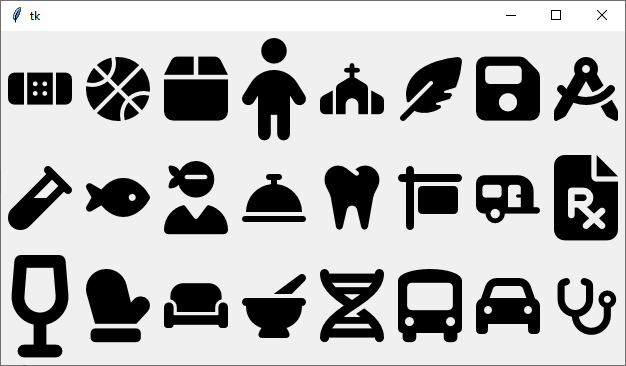
A library that enables you to use FontAwesome icons in your CustomTkinter / Tkinter application.
You may use any of the 2k+ free Font Awesome icons bundled with the package.
The fill colour and size are customised to your specifications and then rendered
with packaged Font Awesome fonts plus Pillow, so normal image generation works on
Windows, Linux, and macOS without requiring Cairo, GTK, CairoSVG, or tksvg.
Highlights
- Use 2k+ bundled free Font Awesome icons without downloading assets at runtime
- Render icons with bundled Font Awesome fonts and Pillow by default
- Generate
customtkinter.CTkImageobjects for DPI-aware CustomTkinter widgets - Generate
tkinter.PhotoImageobjects for Tkinter widgets - Launch an icon browser to search icons, preview them, and copy ready-to-use code
- Access raw SVG XML when you want to manage rendering yourself
Icon Browser
CTkFontAwesome includes an installable browser for searching the bundled icon set, previewing icons, and copying ready-to-use CustomTkinter code snippets.
ctkfontawesome-browser
The browser is included in the base install. If you want live CustomTkinter previews in the browser, install the optional CustomTkinter dependency:
python -m pip install "ctkfontawesome[images]"

Installation
python -m pip install ctkfontawesome
This installs Pillow plus the bundled icon metadata and font assets. The
default icon_to_image() and icon_to_pil() rendering path does not require
any native Cairo or GTK runtime.
If you also want icon_to_ctkimage() for CustomTkinter widgets, install the
optional CustomTkinter dependency:
python -m pip install "ctkfontawesome[images]"
If you explicitly want the legacy SVG-to-raster Cairo backend, install CairoSVG separately:
python -m pip install "ctkfontawesome[cairosvg]"
tksvg is not used by this project.
CustomTkinter Usage
Use icon_to_ctkimage() when you want a customtkinter.CTkImage for
CustomTkinter widgets.
import customtkinter as ctk
from ctkfontawesome import icon_to_ctkimage

app = ctk.CTk()
icon = icon_to_ctkimage("eye", fill="#1D9F75", scale_to_width=28)

button = ctk.CTkButton(app, text="Preview", image=icon, compound="left")
button.pack(padx=20, pady=20)

app.mainloop()
Tkinter Usage
Use icon_to_image() when you want a tkinter.PhotoImage for standard Tkinter
widgets.
import tkinter as tk
from ctkfontawesome import icon_to_image

root = tk.Tk()
fb = icon_to_image("facebook", fill="#4267B2", scale_to_width=64)
send = icon_to_image("paper-plane", fill="#1D9F75", scale_to_width=64)

tk.Label(root, image=fb).pack(padx=10, pady=10)
tk.Button(root, image=send).pack(padx=10, pady=10)

root.mainloop()
Usage Without CairoSVG
If you only need the bundled icon data, use icon_to_svg(). CairoSVG is only
required when you explicitly choose the legacy SVG backend.
from ctkfontawesome import icon_to_svg

svg = icon_to_svg("facebook")
print(svg[:80])
Development
poetry install
To install the optional image backend in the Poetry environment:
poetry install --extras images
To run the icon browser during development:
poetry run ctkfontawesome-browser
To run the automated test suite:
poetry run pytest -q
If you are using the project virtualenv directly instead of Poetry:
.venv/bin/python -m pytest -q
To refresh the bundled free Font Awesome assets from the upstream npm package, use the repo-level maintainer helper:
./utils/get_new_fa_icons.sh --python .venv/bin/python
This maintainer command installs @fortawesome/fontawesome-free into a
temporary directory, then refreshes:
ctkfontawesome/svgs.py- packaged metadata under
ctkfontawesome/assets/metadata/ - packaged font files under
ctkfontawesome/assets/fonts/
The helper also runs the generated-data smoke test after refreshing those assets.
Requirements for the update workflow:
npmmust be available onPATH- the selected Python must have
fonttoolsandbrotliinstalled
Example preparation:
.venv/bin/python -m pip install fonttools brotli
Recommended update workflow:
-
Refresh the checked-in bundled assets:
./utils/get_new_fa_icons.sh --python .venv/bin/python
-
Run the automated test suite:
.venv/bin/python -m pytest -q
If you want to inspect a candidate svgs.py file without touching the checked-in
module, the lower-level Python helper is still available:
.venv/bin/python development/update_fontawesome.py --output /tmp/svgs_new.py
.venv/bin/python development/smoke_test_fontawesome_update.py /tmp/svgs_new.py
The smoke test validates the generated module shape, checks a known icon is present, and compares counts with the current checked-in data. The repo-level wrapper runs the default smoke test automatically when refreshing the checked-in assets.
To compare a generated file against the current checked-in data:
.venv/bin/python development/smoke_test_fontawesome_update.py /tmp/svgs_new.py --compare-to ctkfontawesome/svgs.py
To bump the package version and create a git commit and tag:
poetry run bump2version patch
Use minor or major instead of patch when appropriate. The bump updates
both pyproject.toml and ctkfontawesome/__init__.py.
Once installed, you can launch the browser with:
ctkfontawesome-browser

API: icon_to_image()
(
    name=None,
    fill=None,
    scale_to_width=None,
    scale_to_height=None,
    scale=1
)
Parameters
| Name | Type | Description | Default |
|---|---|---|---|
| name | str | The name of the FontAwesome icon. | None |
| fill | str | The fill colour of the rendered icon. | None |
| scale_to_width | int | Adjust image width to this size (in pixels); maintains aspect ratio. | None |
| scale_to_height | int | Adjust image height to this size (in pixels); maintains aspect ratio. | None |
| scale | float | Scale the image width and height by this factor. | 1 |
API: icon_to_ctkimage()
Same parameters as icon_to_image(), but returns a customtkinter.CTkImage
for DPI-aware use in CustomTkinter widgets. This API requires the
ctkfontawesome[images] optional dependency for CustomTkinter.
icon_to_ctkimage() also accepts an optional dark_fill argument so light and
dark theme variants can use different colours.
API: Explicit CairoSVG backend
The default backend is Pillow plus packaged Font Awesome fonts. If you need the
legacy SVG route for a specific use case, pass backend="cairosvg" to
icon_to_pil(), icon_to_image(), or icon_to_ctkimage() after installing
ctkfontawesome[cairosvg].
API: icon_to_svg()
Returns the raw SVG XML string for the requested icon name.
License
The CC BY 4.0 license applies to all FontAwesome free icons used in the library. The MIT License applies to all other work.
Maintainer: Clive Bostock Original project concept and implementation by Israel Dryer 📦 Available on PyPI | 🐙 GitHub


Download files
Download the file for your platform. If you're not sure which to choose, learn more about installing packages.
Source Distribution
Built Distribution
Filter files by name, interpreter, ABI, and platform.
If you're not sure about the file name format, learn more about wheel file names.
Copy a direct link to the current filters
File details
Details for the file ctkfontawesome-0.8.0.tar.gz.
File metadata
- Download URL: ctkfontawesome-0.8.0.tar.gz
- Upload date:
- Size: 1.6 MB
- Tags: Source
- Uploaded using Trusted Publishing? No
- Uploaded via: twine/6.2.0 CPython/3.12.0
File hashes
| Algorithm | Hash digest | |
|---|---|---|
| SHA256 |
3d4ac9f3bdadd973c51e4ed251cbaf71598050dc0bd58c89d3154d92add871fd
|
|
| MD5 |
61c310af64ff6add5499ed4b23a2b0b2
|
|
| BLAKE2b-256 |
0f9e490caa7a10a56d629288fc5f7c003eb7a4dc3af36ab2247ced748f8a3152
|
File details
Details for the file ctkfontawesome-0.8.0-py3-none-any.whl.
File metadata
- Download URL: ctkfontawesome-0.8.0-py3-none-any.whl
- Upload date:
- Size: 1.6 MB
- Tags: Python 3
- Uploaded using Trusted Publishing? No
- Uploaded via: twine/6.2.0 CPython/3.12.0
File hashes
| Algorithm | Hash digest | |
|---|---|---|
| SHA256 |
e77dc11f20c9fa24c928a20eb88763345d1038b193baab72b54e463537e39e33
|
|
| MD5 |
80e2b8dc2b9e93fc6d53178d4d7ca744
|
|
| BLAKE2b-256 |
21d4323f1171010ec49fa59bdcab8e90d5ff67e1191fbbf1348d6e8f6febf0df
|






