
Package to control CTU/CIIRC robot Bosch SR450 via MARS control unit.

Project description
BOSCH SR450 Robot at CTU/CIIRC
Package to control CTU/CIIRC robot Bosch SR450 via MARS control unit.
This code is based on https://github.com/cvut/pyrocon but adds packaging,
documentation, and some testing.
Installation
pip install ctu_bosch_sr450
Installation for old systems via Conda
You need at least Python 3.7 to use this package. In case your python is old (Ubuntu in CIIRC labs has old 3.6), install updated version of python e.g. via miniconda:
# Install miniconda:
mkdir -p ~/miniconda3
wget https://repo.anaconda.com/miniconda/Miniconda3-latest-Linux-x86_64.sh -O ~/miniconda3/miniconda.sh
bash ~/miniconda3/miniconda.sh -b -u -p ~/miniconda3
rm -rf ~/miniconda3/miniconda.sh

# Create conda environment with newer python and install ctu_bosch_sr450:
conda create -n ctu_robotics python=3.8
conda activate ctu_robotics
pip install ctu_bosch_sr450
Usage
from ctu_bosch_sr450 import RobotBosch

robot = RobotBosch()  # set argument tty_dev=None if you are not connected to robot, it will allow you to compute FK and IK offline
robot.initialize()  # initialize connection to the robot
robot.move_to_q([0.1, 0.0, 0.0, 0.0])  # move robot
robot.wait_for_motion_stop()
robot.close()  # close the connection
Kinematics
robot = RobotBosch(tty_dev=None)  # initialize object without connection to the robot
x, y, z, phi = robot.fk([0, 0, 0, 0])  # compute forward kinematics
q = robot.ik([x, y, z, phi])[0]  # compute inverse kinematics, get the first solution
Coordinate systems
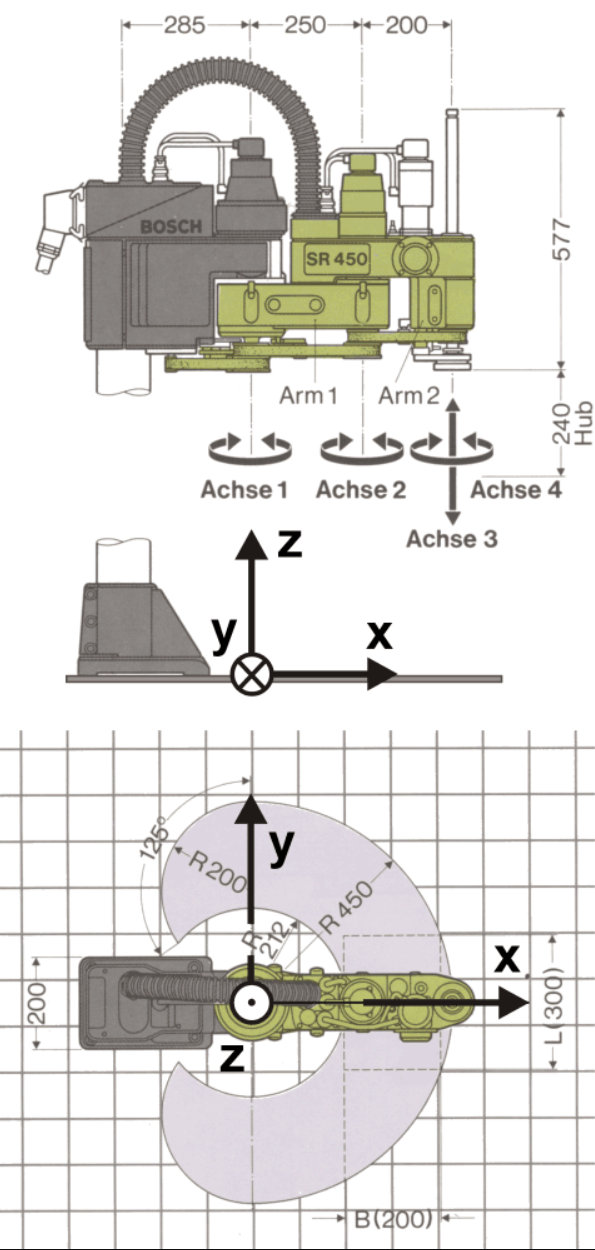
The library uses meters and radians for all values. Variable q is used to denote joint configuration, i.e. the array of joint angles/joint distance for revolute and prismatic joints, respectively. Variables x, y, z, and phi are used to denote position and orientation of the end-effector in the base frame. The orientation is given as rotation around the z-axis of the base frame. The reference base frame is located as shown in the figure below.
Joint configuration
The joint configuration is defined as follows:
- the first joint is revolute and its angle is measured w.r.t. the x-axis of the base frame
- the second joint is revolute and is measured w.r.t. the previous link
- the third joint is prismatic and controls the height (i.e. motion in z-axis)
- the last joint is revolute and measured w.r.t. the x-axis of the base frame (i.e. * not* w.r.t. the previous link)
How to control the robot
In case robot does anything unexpected, press the emergency button immediately.
Starting the robot
- power up the robot with red switch on the Mars control panel
- create RobotBosh() instance and call initialize()
- you will be asked to press the yellow button (Arm Power) on the Mars control panel
- robot will perform homing after which you are able to control it with this library
Finishing the work with the robot
- to turn robot of call soft_home() followed by the close() methods
- turn red switch off
Entering the cage
- to enter the cage, you need to call release() function, that will power-off the motors and activate breaks
Recovering from error
Emergency stop or cage entry
- unblock emergency stop button and/or closed the cage
- press red button called MotionStop on the Mars control panel
- press yellow button called ArmPower on the Mars control panel
- continue with normal operation
Motor error
- in case green led above motor axis is blinking and red led is on, there is a motor error
- to reset motors call reset_motors() method
Hard home
Hard home is needed after the control unit power was turned off. It is performed automatically in the initialize() method. However, it needs to be performed only after the power was turned off and on again. In case the connection needs to be reestablished, you can call initialize without homing by setting the argument home to False.
Acknowledgment
Preparation of the course materials was partially supported by:



Download files
Download the file for your platform. If you're not sure which to choose, learn more about installing packages.
Source Distribution
Built Distribution
Filter files by name, interpreter, ABI, and platform.
If you're not sure about the file name format, learn more about wheel file names.
Copy a direct link to the current filters
File details
Details for the file ctu_bosch_sr450-1.0.1.tar.gz.
File metadata
- Download URL: ctu_bosch_sr450-1.0.1.tar.gz
- Upload date:
- Size: 9.4 kB
- Tags: Source
- Uploaded using Trusted Publishing? Yes
- Uploaded via: pdm/2.20.0.post1 CPython/3.10.12 Linux/6.5.0-1025-azure
File hashes
| Algorithm | Hash digest | |
|---|---|---|
| SHA256 |
e703cac813a11584edd78d59b5ac0d2b59c61766ab0ee6e84b422f2f18220717
|
|
| MD5 |
a1b96ec49107735dbb62e418a34277fc
|
|
| BLAKE2b-256 |
87957c8782fa2608b9f32051ab2b959dc3e6240f06fbed5cdbf965f250d2369c
|
File details
Details for the file ctu_bosch_sr450-1.0.1-py3-none-any.whl.
File metadata
- Download URL: ctu_bosch_sr450-1.0.1-py3-none-any.whl
- Upload date:
- Size: 8.7 kB
- Tags: Python 3
- Uploaded using Trusted Publishing? Yes
- Uploaded via: pdm/2.20.0.post1 CPython/3.10.12 Linux/6.5.0-1025-azure
File hashes
| Algorithm | Hash digest | |
|---|---|---|
| SHA256 |
56dd91302f8efb587d41d53a5b9709a7d22f50b9d86b9e3374612e15ff2d4db3
|
|
| MD5 |
1e2135761743433f5c6011c7b29d535f
|
|
| BLAKE2b-256 |
327aa427330547fd11d1c5e579185056920e3675fb3ddd8a3ae17d727ea2b4ac
|






