
ctxburn
English | 中文
agent 每一轮都在把之前说过的话再说一遍。ctxburn 告诉你这件事占了多少。
一个跑了八轮的 coding agent,每一轮都会把 system prompt、几十个工具的描述、以及此前全部的消息历史,原封不动地重发一次。这不是谁写错了代码,这是 API 的工作方式。它通常也是你付钱的大头。
ctxburn 记录一次运行,把每次调用的输入 token 拆成首次发送和重发,然后生成一个离线能打开的单文件 HTML。
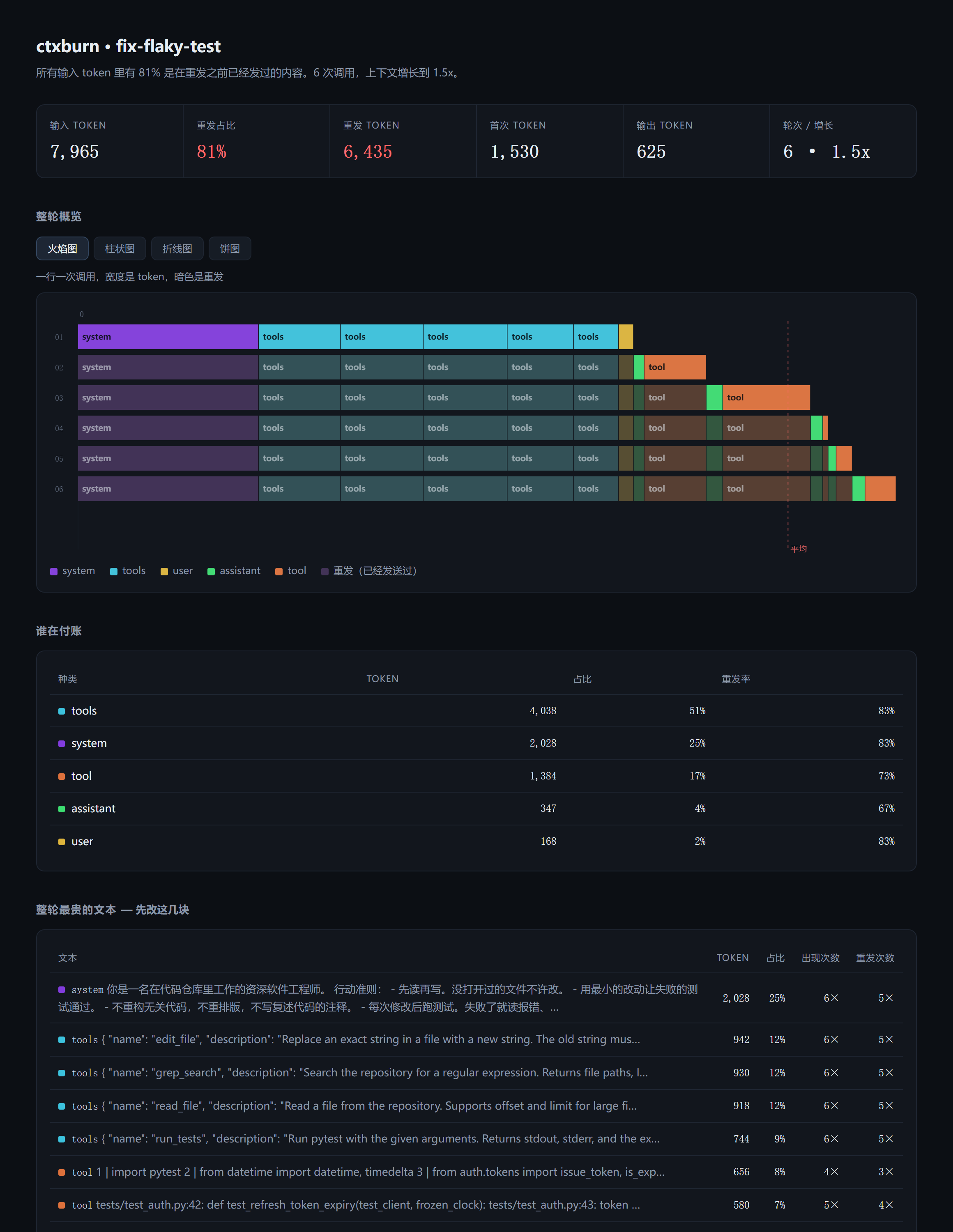
所有输入 token 里有 81% 是在重发之前已经发过的内容。6 次调用,上下文增长到 1.5x。
安装
pip install ctxburn # 或者:uvx ctxburn
零依赖。Python 3.10 及以上。
两种接入方式
一、Python 项目:import 一下
import ctxburn

ctxburn.watch("run.jsonl")   # 挂到 openai 和 anthropic 客户端上

# ……你的 agent 照常跑,一行都不用改……
ctxburn report run.jsonl -o report.html
打开 report.html。不用起服务,不用上传,不用注册。
二、其他任何语言:走代理
watch() 得被 import,所以只对 Python 有效。Node 写的 agent、Go 写的服务、Claude Code、Codex,都走这条:
ctxburn serve -o run.jsonl          # 只监听 127.0.0.1:8787

# Claude Code
export ANTHROPIC_BASE_URL=http://127.0.0.1:8787
claude

# 任何 OpenAI 兼容客户端,任何语言
export OPENAI_BASE_URL=http://127.0.0.1:8787/v1
客户端说的还是原来那套协议,只是 hostname 变了。代理把 /v1/messages 送去 Anthropic,把 /v1/chat/completions 和 /v1/responses 送去 OpenAI,鉴权头原样透传,流式响应边转发边从 SSE 事件里把 usage 拼出来。
两个让它不用改客户端的细节:流式的 chat completions 默认不报 usage,代理会在转发时替你把 stream_options.include_usage 补上;记录发生在响应交还之前,所以调用一返回就去读 trace 文件,读到的已经是完整的。
上游可以换,中转站、Azure、本地模型服务都行:
ctxburn serve -o run.jsonl --openai-base https://my-gateway.internal/v1
支持的端点
openaichat completionsopenairesponses(OpenAI 现在推荐的那个格式,含流式)anthropicmessages
chat completions 的流式要带 stream_options={"include_usage": True} 才会被记录,否则跳过并警告,不猜。responses 的流式从收尾的 response.completed 事件里取 usage。
有一种情况它不装:用了 previous_response_id 或 conversation 时,历史存在服务端,请求体只带新的一轮,但 usage 照样按整个历史计费。这种调用没法做分段归因,所以会打上标记,报告顶部挂一条提示,而不是编一个数出来。
没有 API key 也想看
ctxburn demo -o demo.jsonl && ctxburn report demo.jsonl -o demo.html
四种看法,同一份数据
页面里点着切;--chart 决定打开时停在哪个。
| 视图 | 画的是什么 | 回答什么 |
|---|---|---|
| 火焰图 flame | 一行一次调用,宽度是 token,暗色是重发 | 每一轮的上下文由什么组成 |
| 柱状图 bars | 一列一次调用,按种类堆叠,暗色是重发 | 总量怎么涨的,涨的是哪一类 |
| 折线图 lines | 每次调用的输入总量 与 新增量 | 增长是什么形状——总量往上爬,新增几乎平着 |
| 饼图 donut | 所有输入 token 按种类的分布 | 谁在付账,一眼看完 |
ctxburn report run.jsonl --chart line
折线图是最适合拿给人看的那张:两条线从同一个点出发,然后分开,缺口越拉越大。那道口子就是重发的量,被画成了形状。
这些数字是什么意思
对每一次 LLM 调用,ctxburn 翻一遍它发出去的上下文,对每一块问同一个问题:这段文字,在这次运行的前面出现过没有?
| 词 | 含义 |
|---|---|
| fresh(首次) | 第一次发送的 token。只有这部分是真的新内容。 |
| replay(重发) | 之前某次调用里已经发过,现在又发了一遍的 token。 |
| cached(命中缓存) | 重发里被 provider 按前缀缓存折扣计费的那部分,是重发的子集。 |
重发不等于浪费——有些躲不掉,而且缓存能让其中很大一部分变便宜。但你没法优化看不见的东西。一条长 agent 循环的重发占比,正常起点就是 60% 到 90%。
为什么不直接用 tracing 工具
tracing 工具回答的是「14:03 那一秒发生了什么」。它给你一条时间线,让你点开某个 span。有 400 个 span 的时候,你找得到慢的那一个。
它不回答「这次运行里,那段 900 token 的前言,被重复发了 40 次,一共多少 token」。这是个聚合问题,聚合需要另一种视图。CPU 早就遇到过同样的问题,火焰图是那时的答案。
| 工具 | 回答什么 |
|---|---|
| Langfuse / Phoenix / LangSmith | 第 7 轮发生了什么 |
| agentpprof | 跨很多次运行,哪一类任务吃掉了预算 |
| ctxburn | 这次上下文里哪一块被重复发送了,多少 |
ctxburn 是补充关系:它吃同一份调用流,只关心每次请求的构成。
拆分是怎么算出来的
provider 每次调用会报 usage.input_tokens,但不会告诉你这里面多少是你的 system prompt,多少是第三轮贴进去的那段工具结果。所以:
- 取指纹。每一块上下文按内容算一个指纹(
kind+ 全文,blake2b)。整次运行里第一次见到算 fresh,之后再出现都算 replay。 - 估体量再校准。每块的大小用一套无依赖的估算器算(ASCII 约 4 字符一 token,中日韩约 1.6 字符一 token),然后等比缩放,让它们加起来正好等于 provider 报的总数。整体是准的,拆分是估的。
- 摊缓存。
cached_tokens按重发块的大小加权摊到各段上,单独列出来——它是计费折扣,不是另一种上下文。
kind 的五个值(system / tools / user / assistant / tool)保留英文,因为它们就是 trace 文件里的字段名,翻译了反而对不上。
限制
- 块与块之间的拆分是估算的;只有每次调用的总数是权威值。
- trace 默认原样保存文本(重发检测靠的就是全文)。想瘦身或规避隐私,用
ctxburn.watch(..., keep_content=False),正文会被截到 400 字符。 - 一份 trace 对应一次运行,跨运行聚合是刻意不做的。
watch()只覆盖 Python SDK。其余走ctxburn serve,它只看得见真正过网的那些字节——如果客户端把历史放在服务端,就没有东西可归因,报告会直说。- 代理只监听回环地址,不转发到除上游以外的任何地方。但它能看到明文请求体,所以别在不受信任的机器上跑。
License
MIT
1 maintainer

Metadata
1 maintainer
Release files for ctxburn 0.1.0
For a detailed explanation of source distributions (sdists) and built distributions (wheels), please see the package formats documentation.
Source distribution (sdist)
| File | Size | Uploaded | Provenance | |
|---|---|---|---|---|
| ctxburn-0.1.0.tar.gz | 698.1 kB | Without provenance | Details |
Built distribution (wheel)
| File | Interpreter | ABI | Platform | Reset |
|---|---|---|---|---|
| ctxburn-0.1.0-py3-none-any.whl | Python 3 | none | any | Details |
Total release size: 727.8 kB
Release files / ctxburn-0.1.0.tar.gz
| Download URL | ctxburn-0.1.0.tar.gz |
|---|---|
| Size | 698.1 kB |
| Tags | Source |
|
SHA-256 checksum How to use checksums |
7bc979a90d00aad3513bdc579b7f79f06df5c7698af596b59e52ec9470b0bc59
|
|
BLAKE2b-256 checksum How to use checksums |
5260c5bc2e2d52655145c5d8ebcd324f1c13da2afd570b98682b7c1f82f23b58
|
| Upload date | |
|
Uploaded using Trusted Publishing? What is trusted publishing? |
No |
| Uploaded via |
twine/7.0.0 CPython/3.14.7
|
Release files / ctxburn-0.1.0-py3-none-any.whl
| Download URL | ctxburn-0.1.0-py3-none-any.whl |
|---|---|
| Size | 29.6 kB |
| Tags | Python 3 |
|
SHA-256 checksum How to use checksums |
e6a28833ebe28c57cc2728bc33f511b60f8e259d218139ee999b92dd8fd75eed
|
|
BLAKE2b-256 checksum How to use checksums |
1b0fa335125445e68c5a2d391ba15f4b7f364eb6bb6215211948a646cc20e562
|
| Upload date | |
|
Uploaded using Trusted Publishing? What is trusted publishing? |
No |
| Uploaded via |
twine/7.0.0 CPython/3.14.7
|
Security for ctxburn 0.1.0
Provenance
Provenance describes where a file came from. On PyPI, provenance is shared via attestations, which provide a verifiable record of the build or publishing details. View details, limitations and caveats.
No provenance found
None of the files in this release were uploaded with provenance metadata.
A note on package security
PyPI is a repository for distributing packages, not a service for auditing them. While third-party security researchers and our staff do their best to detect and remove malicious packages, PyPI cannot guarantee the quality, security or suitability of any given package.














