
CtxVault is a local-first knowledge vault that indexes your documents, generates embeddings, and enables fast semantic search via CLI or API. Designed for personal knowledge bases, RAG pipelines, and AI agents.

Project description
Semantic knowledge vault for AI agents and RAG pipelines
Local-first semantic memory you control. No cloud, no complexity.




Installation • Quick Start • Examples • Documentation • API Reference
What is CtxVault?
CtxVault is a local semantic memory layer for LLM applications. Index documents, let agents write context, and query everything semantically — all running on your machine, with zero cloud dependencies.
100% Local — No API keys, no cloud services, no telemetry. Your data never leaves your machine.
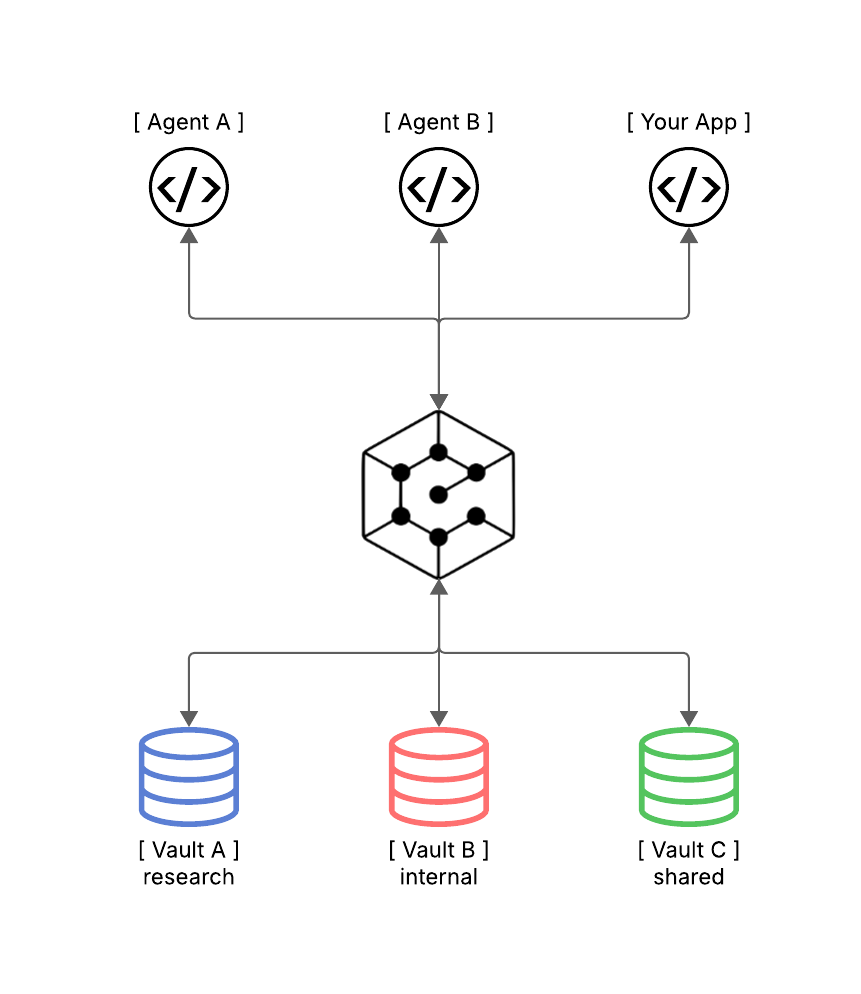
Multi-Vault Architecture — Run isolated vaults for different contexts. Separate personal notes from company docs, or give each agent its own knowledge domain.
Agent-Ready — Built-in FastAPI server for seamless integration with LangChain, LangGraph, and custom agent workflows. Write and query memory programmatically.
Developer-First — Simple CLI for manual use. HTTP API for programmatic integration. No configuration overhead.
Installation
Requirements: Python 3.10+
From PyPI
pip install ctxvault
From source
git clone https://github.com/Filippo-Venturini/ctxvault
cd ctxvault
python -m venv .venv && source .venv/bin/activate  # Windows: .venv\Scripts\activate
pip install -e .
Quick Start
Both CLI and API follow the same workflow: create a vault → add documents → index → query. Choose CLI for manual use, API for programmatic integration.
CLI Usage
# 1. Initialize a vault
ctxvault init my-vault

# 2. Add your documents to the vault folder
# Default location: ~/.ctxvault/vaults/my-vault/
# Drop your .txt, .md, .pdf or .docx files there

# 3. Index documents
ctxvault index my-vault

# 4. Query semantically
ctxvault query my-vault "transformer architecture"

# 5. List indexed documents
ctxvault list my-vault

# 6. List all your vaults
ctxvault vaults
Agent Integration
Give your agent persistent semantic memory in minutes. Start the server:
uvicorn ctxvault.api.app:app
Then write, store, and recall context across sessions:
import requests
from langchain_openai import ChatOpenAI

API = "http://127.0.0.1:8000/ctxvault"

# 1. Create a vault
requests.post(f"{API}/init", json={"vault_name": "agent-memory"})

# 2. Agent writes what it learns to memory
requests.post(f"{API}/write", json={
    "vault_name": "agent-memory",
    "filename": "session_monday.md",
    "content": "Discussed Q2 budget: need to cut cloud costs by 15%. "
               "Competitor pricing is 20% lower than ours."
})

# 3. Days later — query with completely different words
results = requests.post(f"{API}/query", json={
    "vault_name": "agent-memory",
    "query": "financial constraints from last week",  # ← never mentioned in the doc
    "top_k": 3
}).json()["results"]

# 4. Ground your LLM in retrieved memory
context = "\n".join(r["text"] for r in results)
answer = ChatOpenAI().invoke(f"Context:\n{context}\n\nQ: What are our cost targets?")
print(answer.content)
# → "You mentioned a 15% cloud cost reduction target, with competitor pricing 20% lower."
Any LLM works — swap
ChatOpenAIfor Ollama, Anthropic, or any provider. Ready to go further? See the examples for full RAG pipelines and multi-agent architectures — or browse the API Reference and the interactive docs athttp://127.0.0.1:8000/docs.
Examples
Three production-ready scenarios — each with full code and setup instructions.
| Example | What it shows | |
|---|---|---|
| 🟢 | 01 · Personal Research Assistant | Semantic RAG over PDF, MD, TXT, DOCX. Ask questions, get cited answers. ~100 lines. |
| 🔴 | 02 · Multi-Agent Isolation | Two agents, two vaults, one router. The public agent cannot access internal docs — privacy enforced at the knowledge layer. ~200 lines. |
| 🔵 | 03 · Persistent Memory Agent | Agent that recalls context across sessions with fuzzy semantic queries. "financial constraints" finds "cost cuts" from 3 days ago. |
CtxVault vs Alternatives
| Feature | CtxVault | Pinecone/Weaviate | LangChain VectorStores | Mem0/Zep |
|---|---|---|---|---|
| Local-first | ✓ | ✗ (cloud) | ✓ | ✗ (cloud APIs) |
| Multi-vault | ✓ | ✗ | ✗ | Partial |
| CLI + API | ✓ | API only | Code only | API only |
| Zero config | ✓ | ✗ (setup required) | ✗ (code integration) | ✗ (external service) |
| Agent write support | ✓ | ✓ | ✗ | ✓ |
| Privacy | 100% local | Cloud | Depends on backend | Cloud |
When to use CtxVault:
- You need local-first semantic search
- Multiple isolated knowledge contexts
- Simple setup without external services
- Integration with LangChain/LangGraph workflows
When to use alternatives:
- Cloud-native architecture required
- Already invested in specific cloud ecosystem
Documentation
CLI Commands
All commands require a vault name. Default vault location: ~/.ctxvault/vaults/<name>/
init
Initialize a new vault.
ctxvault init <name> [--path <path>]
Arguments:
<name>- Vault name (required)--path <path>- Custom vault location (optional, default:~/.ctxvault/vaults/<name>)
Example:
ctxvault init my-vault
ctxvault init my-vault --path /data/vaults
index
Index documents in vault.
ctxvault index <vault> [--path <path>]
Arguments:
<vault>- Vault name (required)--path <path>- Specific file or directory to index (optional, default: entire vault)
Example:
ctxvault index my-vault
ctxvault index my-vault --path docs/papers/
query
Perform semantic search.
ctxvault query <vault> <text>
Arguments:
<vault>- Vault name (required)<text>- Search query (required)
Example:
ctxvault query my-vault "attention mechanisms"
list
List all indexed documents in vault.
ctxvault list <vault>
Arguments:
<vault>- Vault name (required)
Example:
ctxvault list my-vault
delete
Remove document from vault.
ctxvault delete <vault> --path <path>
Arguments:
<vault>- Vault name (required)--path <path>- File path to delete (required)
Example:
ctxvault delete my-vault --path paper.pdf
reindex
Re-index documents in vault.
ctxvault reindex <vault> [--path <path>]
Arguments:
<vault>- Vault name (required)--path <path>- Specific file or directory to re-index (optional, default: entire vault)
Example:
ctxvault reindex my-vault
ctxvault reindex my-vault --path docs/
vaults
List all vaults and their paths.
ctxvault vaults
Example:
ctxvault vaults
Vault management:
- Default location:
~/.ctxvault/vaults/<vault-name>/ - Vault registry:
~/.ctxvault/config.jsontracks all vault names and their paths - Custom paths: Use
--pathflag duringinitto create vault at custom location - All other commands use vault name (path lookup via config.json)
Multi-vault support:
# Work with specific vault
ctxvault research query "topic"

# Default vault location: ~/.ctxvault/vaults/
# Override with --path for custom locations
API Reference
Base URL: http://127.0.0.1:8000/ctxvault
| Endpoint | Method | Description |
|---|---|---|
/init |
POST | Initialize vault |
/index |
PUT | Index entire vault or specific path |
/query |
POST | Semantic search |
/write |
POST | Write and index new file |
/docs |
GET | List indexed documents |
/delete |
DELETE | Remove document from vault |
/reindex |
PUT | Re-index entire vault or specific path |
/vaults |
GET | List all the initialized vaults |
Interactive documentation: Start the server and visit http://127.0.0.1:8000/docs
Roadmap
- CLI MVP
- FastAPI server
- Multi-vault support
- Agent write API
- File watcher / auto-sync
- Hybrid search (semantic + keyword)
- MCP server support
- Configurable embedding models
Contributing
Contributions welcome! Please check the issues for open tasks.
Development setup:
git clone https://github.com/Filippo-Venturini/ctxvault
cd ctxvault
python -m venv .venv && source .venv/bin/activate  # Windows: .venv\Scripts\activate
pip install -e ".[dev]"
pytest
Citation
If you use CtxVault in your research or project, please cite:
@software{ctxvault2026,
  author = {Filippo Venturini},
  title = {CtxVault: Local Semantic Knowledge Vault for AI Agents},
  year = {2026},
  url = {https://github.com/Filippo-Venturini/ctxvault}
}
License
MIT License - see LICENSE for details.
Acknowledgments
Built with ChromaDB, LangChain and FastAPI.
Release history Release notifications | RSS feed


Download files
Download the file for your platform. If you're not sure which to choose, learn more about installing packages.
Source Distribution
Built Distribution
Filter files by name, interpreter, ABI, and platform.
If you're not sure about the file name format, learn more about wheel file names.
Copy a direct link to the current filters
File details
Details for the file ctxvault-0.2.0.tar.gz.
File metadata
- Download URL: ctxvault-0.2.0.tar.gz
- Upload date:
- Size: 21.8 kB
- Tags: Source
- Uploaded using Trusted Publishing? No
- Uploaded via: twine/6.2.0 CPython/3.11.9
File hashes
| Algorithm | Hash digest | |
|---|---|---|
| SHA256 |
0225324bda0985120d0625d544e9458719c809fe64872a9a6d48b0a6829e390a
|
|
| MD5 |
a24a6a804285d17059810019008b6407
|
|
| BLAKE2b-256 |
855352c578e2096785afb204fbdf7f162ceb8a814d8646f829b40bbf6cfab65e
|
File details
Details for the file ctxvault-0.2.0-py3-none-any.whl.
File metadata
- Download URL: ctxvault-0.2.0-py3-none-any.whl
- Upload date:
- Size: 19.3 kB
- Tags: Python 3
- Uploaded using Trusted Publishing? No
- Uploaded via: twine/6.2.0 CPython/3.11.9
File hashes
| Algorithm | Hash digest | |
|---|---|---|
| SHA256 |
47ee219a3eb231a02a7699ca22ff710fb2dfd2a6e9681730446ee1197e913a14
|
|
| MD5 |
13d3c791d0850250e13bc21424110bc7
|
|
| BLAKE2b-256 |
81a7477206160eed53ee443a87c541c69b423d2871fee05e3726210bf969b0ae
|






