
cu-cat

cu-cat is an end-to-end gpu Python library that encodes categorical variables into machine-learnable numerics. It is a cuda accelerated port of what was dirty_cat, now rebranded as skrub, and allows more ambitious interactive analysis & real-time pipelines!
What can cu-cat do?
The latest PyGraphistry[AI] release GPU accelerates to its automatic feature encoding pipeline, and to do so, we are delighted to introduce the newest member to the open source GPU dataframe ecosystem: cu_cat! The Graphistry team has been growing the library out of need. The straw that broke the camel’s back was in December 2022 when we were hacking on our winning entry to the US Cyber Command AI competition for automatically correlating & triaging gigabytes of alerts, and we realized that what was slowing down our team's iteration cycles was CPU-based feature engineering, basically pouring sand into our otherwise humming end-to-end GPU AI pipeline. Two months later, cu_cat was born. Fast forward to now, and we are getting ready to make it default-on for all our work.
Hinted by its name, cu_cat is our GPU-accelerated open source fork of the popular CPU Python library dirty_cat. Like dirty_cat, cu_cat makes it easy to convert messy dataframes filled with numbers, strings, and timestamps into numeric feature columns optimized for AI models. It adds interoperability for GPU dataframes and replaces key kernels and algorithms with faster and more scalable GPU variants. Even on low-end GPUs, we are now able to tackle much larger datasets in the same amount of time – or for the first time! – with end-to-end pipelines. We typically save time with 3-5X speedups and will even see 10X+, to the point that the more data you encode, the more time you save!
What can cu-cat NOT do?
Since cu_cat is limited to CUDF/CUML dataframes, it is not a drop-in replacement for dirty_cat. While it can also fallback to CPU, it is also not a drop-in replacement for the CPU-based dirty_cat, and we are not planning to make it one. We developed this library to accelerate our own graphistry end-to-end pipelines, and as such it is only TableVectorizer and GapEncoder which have been optimized to take advantage of a GPU speed boost.
Similarly, cu_cat requires pandas or cudf input numpy array can be featurized but cannot be UMAP-ed since they lack index, and are thus not supported.
What degree of speed boost can I expect with cu-cat, compared to dirty-cat or similar CPU feature encoders?
We have routinely experienced boosts of 2x on smaller datasets to 10x and more as one scales data into millions of features (features roughly equates to unique elements in rows x columns). One can observe this in the video above, demonstrated in the following plots:
There is an inflection point when overhead of transing data to GPU is offset by speed boost, as we can see here. The axis represent unique features being inferred.
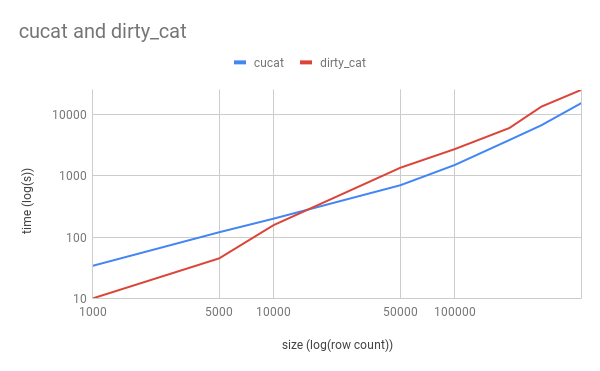
As we can see, with scale the divergence in speed is obvious.
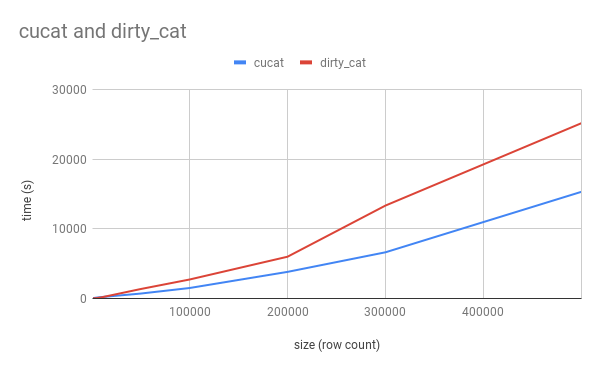
However, this graph does not mean to imply the trend goes on forever: cu-cat is single GPU, and each dataset, GPU, and GPU memory budget is unique, so these plots are meant merely for demonstrative purposes.
Larger-than-memory datasets
GapEncoder works on the unique strings in a column, so row count matters far less than cardinality. Two levers cover the cases where a dataset still does not fit:
Chunked fitting with partial_fit. Peak memory is set by the chunk rather than by the whole input:
from cu_cat import GapEncoder

enc = GapEncoder(n_components=10, hashing=True)
for chunk in pd.read_csv("huge.csv", chunksize=1_000_000):
    enc.partial_fit(chunk[["dirty_column"]])
encoded = enc.transform(df[["dirty_column"]])
Narrow the hash width when cardinality is high. The dominant GPU allocation during fitting is the dense H @ W term, which costs n_unique * hashing_n_features * 8 bytes with a few copies live at once. It scales with the number of distinct strings and with the vocabulary width, not with row count, so halving the width halves the peak. Measured on a Colab T4 (15 GB), 1M rows over 200,000 distinct strings:
hashing_n_features |
fit time |
|---|---|
| 4096 (default) | does not fit; falls back to chunked updates and becomes impractically slow |
| 1024 | 17.2 s |
| 512 | 14.1 s |
As a rule of thumb, keep n_unique * hashing_n_features * 24 bytes under your free GPU memory. If you exceed it, cu-cat automatically chunks the updates to stay within budget rather than raising an out-of-memory error, but narrowing the width is far faster than relying on that fallback.
What happens when GPU memory runs out. cu-cat degrades rather than failing:
- Block size is derived from free GPU memory before fitting starts, so the dense term is kept inside the budget.
- Free memory is only an estimate, so if a whole-matrix update still hits a CUDA out-of-memory error, the fit drops to blocks and continues.
- If an individual block cannot fit either, it is halved and retried.
- Only when a block at the minimum size still fails does it raise, and the error names the levers that help: lower
hashing_n_features, fewer distinct values per call viapartial_fit, or a larger GPU.
Measured on a T4 with a deliberately optimistic budget (1M rows, 200k distinct strings, an estimate claiming 19.5 GB fits in 14 GB): the fit recovers and completes in 31.1s, against 30.3s when the budget is correct from the start.
Comparison with skrub. skrub is the maintained successor to dirty_cat. With matched parameters (hashing=True, n_components=10, max_iter=5):

| Unique strings | skrub (CPU) | cu-cat (GPU T4) | Winner |
|---|---|---|---|
| 100 | 0.06s | 6.2s | skrub (GPU has CUDA warmup) |
| 1,000 | 0.7s | 0.9s | ~equal |
| 5,000 | 5.4s | 3.1s | GPU 1.7x |
| 10,000 | 11.9s | 4.8s | GPU 2.5x |
| 50,000 | CRASH | 26s | GPU only |
| 100,000 | CRASH | 54s | GPU only |
| 500,000 | CRASH | 5.1 min | GPU only |
| 1,000,000 | CRASH | 9.8 min | GPU only |

Key insight: GPU has overhead at tiny scale but wins at 5k+ unique strings. Beyond 20k unique, skrub crashes entirely while cu-cat GPU continues scaling to 1M+ unique strings.
dirty_cat (the predecessor) has not been updated for pandas ≥2.2.
hashing=True for unbounded cardinality. The default CountVectorizer learns a vocabulary, so it must see all unique strings at once and it freezes that vocabulary on the first partial_fit chunk. HashingVectorizer (hashing=True) is stateless with a fixed hashing_n_features width, so it needs no vocabulary pass and stays a constant size no matter how many distinct strings arrive. That makes it the right choice when the number of distinct values, not the number of rows, is what exceeds GPU memory.
GPU = colab T4 + 15gb mem and colab CPU + 12gb memory
Startup Code demonstrating speedup:
! pip install cu-cat dirty-cat
from time import time
from cu_cat._table_vectorizer import TableVectorizer as cu_TableVectorizer
from dirty_cat._table_vectorizer import TableVectorizer as dirty_TableVectorizer
from sklearn.datasets import fetch_20newsgroups
n_samples = 2000  # speed boost improves as n_samples increases, to the limit of gpu mem

news, _ = fetch_20newsgroups(
    shuffle=True,
    random_state=1,
    remove=("headers", "footers", "quotes"),
    return_X_y=True,
)

news = news[:n_samples]
news=pd.DataFrame(news)
table_vec = cu_TableVectorizer()
t = time()
aa = table_vec.fit_transform((news))
ct = time() - t
# if deps.dirty_cat:
t = time()
bb = dirty_TableVectorizer().fit_transform(news)
dt = time() - t
print(f"cu_cat: {ct:.2f}s, dirty_cat: {dt:.2f}s, speedup: {dt/ct:.2f}x")
>>> cu_cat: 58.76s, dirty_cat: 84.54s, speedup: 1.44x
Enhanced Code using Graphistry:
# !pip install graphistry[ai] ## future releases will have this by default
!pip install git+https://github.com/graphistry/pygraphistry.git@dev/depman_gpufeat

import cudf
import graphistry
df = cudf.read_csv(...)
g = graphistry.nodes(df).featurize(feature_engine='cu_cat')
print(g._node_features.describe()) # friendly dataframe interfaces
g.umap().plot() # ML/AI embedding model using the features
Example notebooks
Hello cu-cat notebook goes in-depth on how to identify and deal with messy data using the cu-cat library.
CPU v GPU Biological Demos:
-
Single Cell analysis generically and Single Cell analysis accelerated by cu-cat
-
Chemical Mapping generically and Chemical Mapping accelerated with cu-cat
-
Metagenomic Analysis generically and Metagenomic Analysis accelerated with cu-cat
Dependencies
Major dependencies the cuml and cudf libraries, as well as standard python libraries
Related projects
dirty_cat is now rebranded as part of the sklearn family as skrub
1 maintainer

Metadata
1 maintainer
Release files for cu-cat 1.0.0
For a detailed explanation of source distributions (sdists) and built distributions (wheels), please see the package formats documentation.
Source distribution (sdist)
| File | Size | Uploaded | |
|---|---|---|---|
| cu_cat-1.0.0.tar.gz | 61.9 kB | Details |
Built distribution (wheel)
| File | Interpreter | ABI | Platform | Reset |
|---|---|---|---|---|
| cu_cat-1.0.0-py3-none-any.whl | Python 3 | none | any | Details |
Total release size: 105.5 kB
Release files / cu_cat-1.0.0.tar.gz
| Download URL | cu_cat-1.0.0.tar.gz |
|---|---|
| Size | 61.9 kB |
| Tags | Source |
|
SHA-256 checksum How to use checksums |
4313a1ed2a2f698a28b9837bd06978ecd29f3b4688dc6b4307b34166c224bc32
|
|
BLAKE2b-256 checksum How to use checksums |
c938cff13614511a483877ebcd4662464299d338dd59afbf114c0da7dc92c2d6
|
| Upload date | |
|
Uploaded using Trusted Publishing? What is trusted publishing? |
No |
| Uploaded via |
twine/7.0.0 CPython/3.10.21
|
Release files / cu_cat-1.0.0-py3-none-any.whl
| Download URL | cu_cat-1.0.0-py3-none-any.whl |
|---|---|
| Size | 43.6 kB |
| Tags | Python 3 |
|
SHA-256 checksum How to use checksums |
94d0aba8a8c22231ee8d4c7e534b8318d2a54d81137f70dcbb2cdf0760a698c7
|
|
BLAKE2b-256 checksum How to use checksums |
d6b1e63f54f8701f89c1fc56b23ed7e4217e14abb55ed0864ac89d51e32d198d
|
| Upload date | |
|
Uploaded using Trusted Publishing? What is trusted publishing? |
No |
| Uploaded via |
twine/7.0.0 CPython/3.10.21
|














