
A Python library for creating 3D basic shape models and animations with Physics.

Project description
CubicPy
日本語 | English
CubicPy - A 3D programming learning app for placing and building physics objects with code
Call it "CubicPy" - or simply "CuPy" for short!
Application Description
CubicPy is an application that allows you to place objects in 3D space using Python code and build worlds that operate with realistic physics simulations. You can freely place boxes, spheres, and other objects to create structures and learn programming while experiencing physical laws such as gravity and collisions.
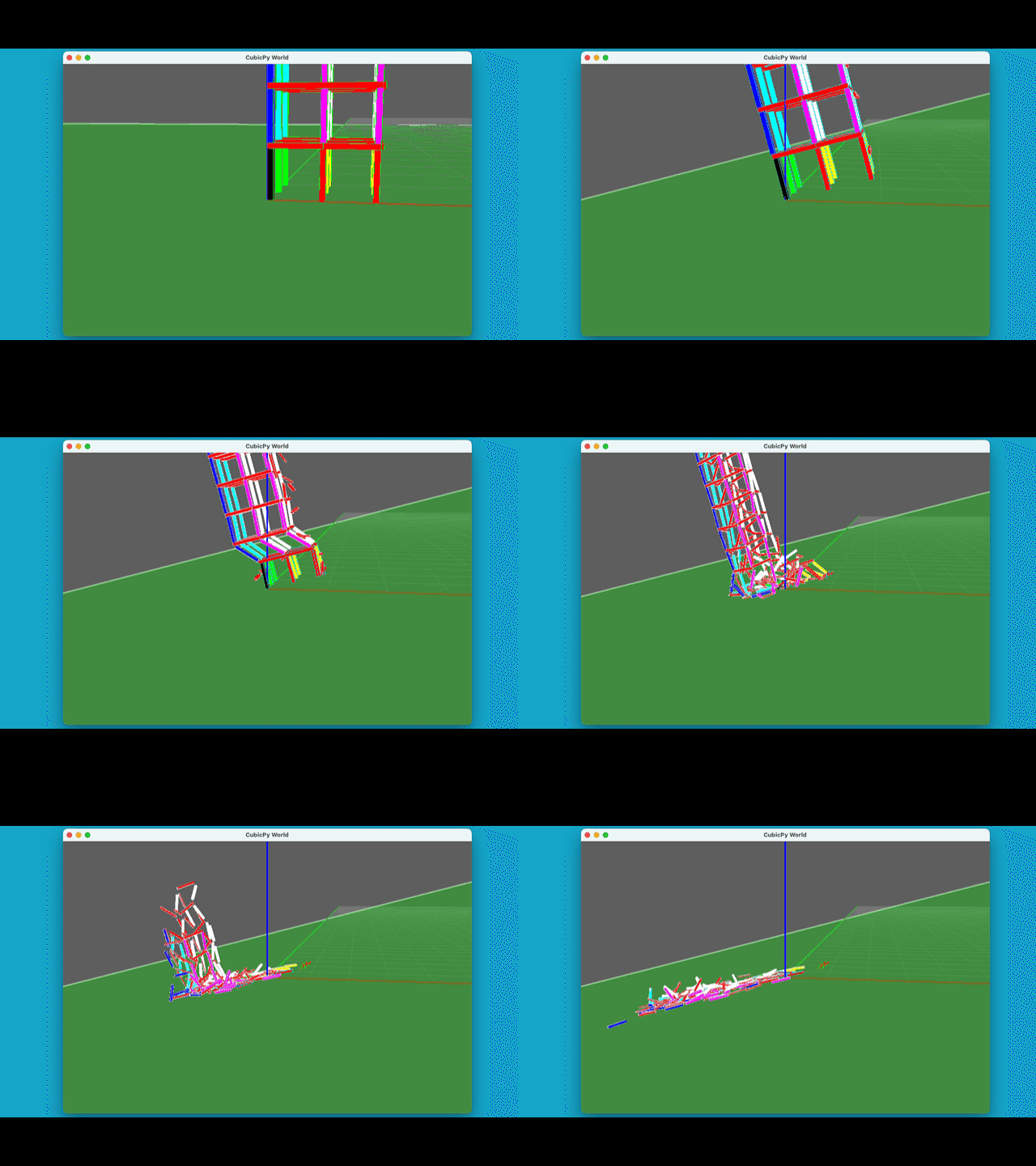
The constructed objects and structures can be observed undergoing realistic collapse processes by tilting the ground using physics simulations. You can also change the gravity factor to observe physical behavior under different gravitational environments.
Installation
pip install cubicpy
Using the cubicpy Command
After installation, you can easily run from the command line:
# Run a randomly selected sample code
cubicpy

# Display help
cubicpy --help
cubicpy -h

# Display sample list
cubicpy --list
cubicpy -l

# Run a specific sample
cubicpy --example box_tower_sample
cubicpy -e box_tower_sample

# Run your own Python file
cubicpy my_script.py

# Run with modified gravity factor (specifies the power of 10 to multiply gravity by)
cubicpy --gravity -6 --example box_tower_sample
cubicpy -g -6 -e box_tower_sample

# Run with custom window size (1280x720)
cubicpy -e box_tower_sample -w 1280,720
cubicpy --window-size 1280,720 -e box_tower_sample
Sample Code Examples
Creating a Tower of Boxes (box_tower_sample.py)

# Create an array of object data
body_data = []

# Stack 10 levels of boxes
for i in range(10):
    body_data.append({
        'type': 'box',
        'pos': (0, 0, i),  # Position: x, y, z
        'scale': (1, 1, 1),  # Size: width, depth, height
        'color': (i/10, 0, 1-i/10),  # Color: red, green, blue (0-1)
        'mass': 1  # Mass (optional)
    })
Object Definition Details (for cubicpy command)
Details of object definitions to add to the body_data list:
| Parameter | Description | Required | Default Value |
|---|---|---|---|
type |
Object type: 'box', 'sphere', 'cylinder' | Required | - |
pos |
Position coordinates (x, y, z) | Required | - |
scale |
Size (width, depth, height) | Optional | (1, 1, 1) |
color |
Color (red, green, blue) - values from 0 to 1 | Optional | (0.5, 0.5, 0.5) |
mass |
Mass (0: fixed object) | Optional | 1 |
color_alpha |
Transparency (0: transparent to 1: opaque) | Optional | 1 |
hpr |
Rotation angles (heading, pitch, roll) | Optional | (0, 0, 0) |
position_mode |
Position reference | Optional | 'corner_near_origin' |
※ position_mode can be set to the following values:
'corner_near_origin': The corner nearest to the origin is the reference'bottom_center': The center of the bottom surface is the reference'gravity_center': The center of gravity is the reference
Building Worlds with the cubicpy Command
- Create a Python file in the format of the sample
- Run it with the
cubicpy your_file.pycommand
Sample Code for API Mode
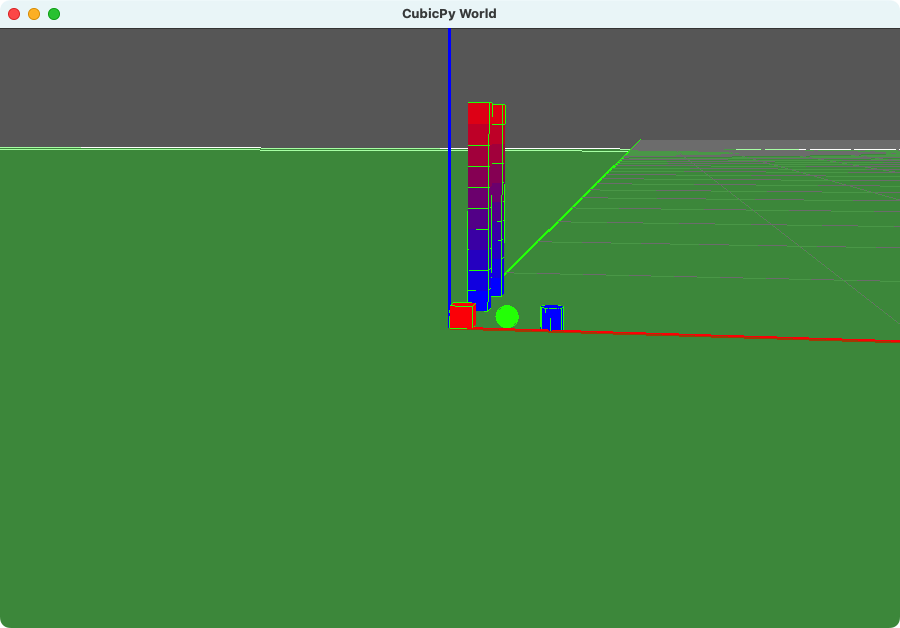
from cubicpy import CubicPyApp

# Instantiate
app = CubicPyApp(gravity_factor=-4)

# Adding individual objects
# Add objects using API
app.add_box(position=(0, 0, 0), scale=(1, 1, 1), color=(1, 0, 0))
app.add_sphere(position=(2, 0, 0),  scale=(1, 1, 1), color=(0, 1, 0))
app.add_cylinder(position=(4, 0, 0),  scale=(1, 1, 1), color=(0, 0, 1))

# Adding multiple objects (loop)
for i in range(10):
    app.add_box(
        position=(0, 5, i),
        color=(i/10, 0, 1-i/10)
    )

# Adding body_data for compatibility with cubicpy command
body_data = []
for i in range(10):
    body_data.append({
        'type': 'box',
        'pos': (0, 10, i),
        'scale': (1, 1, 1),
        'color': (i / 10, 0, 1 - i / 10),
        'mass': 1,
        'color_alpha': 1,
    })

app.from_body_data(body_data)

# Run simulation
app.run()
API Mode Method Details
CubicPyApp Class
CubicPyApp(code_file=None, gravity_factor=-6)
code_file: Path to Python file to execute (optional)gravity_factor: Gravity factor (optional, default: -4)
Object Addition Methods
Adding a Box
add_box(position=(0, 0, 0), scale=(1, 1, 1), color=(0.5, 0.5, 0.5), mass=1, color_alpha=1)
position: Position coordinates (x, y, z)scale: Size (width, depth, height)color: Color (red, green, blue) - values from 0 to 1mass: Mass (0: fixed object)color_alpha: Transparency (0: transparent to 1: opaque)
Adding a Sphere
add_sphere(position=(0, 0, 0), scale=(1, 1, 1), color=(0.5, 0.5, 0.5), mass=1, color_alpha=1)
- Parameters are the same as
add_box
Adding a Cylinder
add_cylinder(position=(0, 0, 0), scale=(1, 1, 1), color=(0.5, 0.5, 0.5), mass=1, color_alpha=1)
- Parameters are the same as
add_box
Building Objects from body_data List
from_body_data(body_data)
body_data: List of object definitions (dictionaries) as used by the cubicpy command
World Operation Methods
run()  # Build and run the world
reset()  # Reset the world
Building Worlds with API Mode
- Create a CubicPyApp instance in your Python script
- Add objects using methods like
add_box(),add_sphere(), etc. - Call the
run()method to build and run the world - If needed, use the
reset()method to rebuild - Run with
python your_script.py
Application Controls
- Arrow keys: Change camera angle
- Mouse wheel: Zoom in/out
- W/S/A/D: Tilt the ground
- F/G: Change gravity strength
- R: Reset
- F1: Toggle debug display
- ESC: Exit
Requirements
- Python 3.9 or higher
- Panda3D
- Panda3D-Bullet physics engine
- NumPy
These dependencies are automatically installed with pip install cubicpy.
Copyright
Released under the MIT License. See the LICENSE file for details.
Contribution
Bug reports and feature improvement suggestions are welcome via GitHub Issues or Pull Requests. New sample creation and documentation improvements are also welcome.
Have fun learning programming with CubicPy!
Release history Release notifications | RSS feed


Download files
Download the file for your platform. If you're not sure which to choose, learn more about installing packages.
Source Distributions
Built Distribution
Filter files by name, interpreter, ABI, and platform.
If you're not sure about the file name format, learn more about wheel file names.
Copy a direct link to the current filters
File details
Details for the file cubicpy-0.1.4-py3-none-any.whl.
File metadata
- Download URL: cubicpy-0.1.4-py3-none-any.whl
- Upload date:
- Size: 74.5 kB
- Tags: Python 3
- Uploaded using Trusted Publishing? No
- Uploaded via: twine/6.1.0 CPython/3.12.2
File hashes
| Algorithm | Hash digest | |
|---|---|---|
| SHA256 |
66f80d3fa54e4e323e378eaa126dbb71339025aff42c4e40c9774ac8d3b1210b
|
|
| MD5 |
204fd6dd79693186f2fc504203a665a6
|
|
| BLAKE2b-256 |
f11d3067c1d637591fb8c329f99239f43f9a170e05f94815bc3fdb865fdad6c8
|






