
Cubie
CUDA Batch Integration Engine






Cubie solves large batches of ODEs and DAEs on your computer's NVIDIA GPU. It's as easy to use as SciPy or MATLAB - you write your problem in Python and call solve_ivp on it. For a guide on converting your MATLAB or SciPy problem to Cubie, check out Coming from MATLAB and Coming from SciPy.
Cubie compiles your system of equations into a GPU kernel that integrates every trajectory in a batch of initial values or parameter sets in parallel. Because GPUs are so good at parallel workloads, a batch of ten thousand or so trajectories takes about as long as a batch of one.
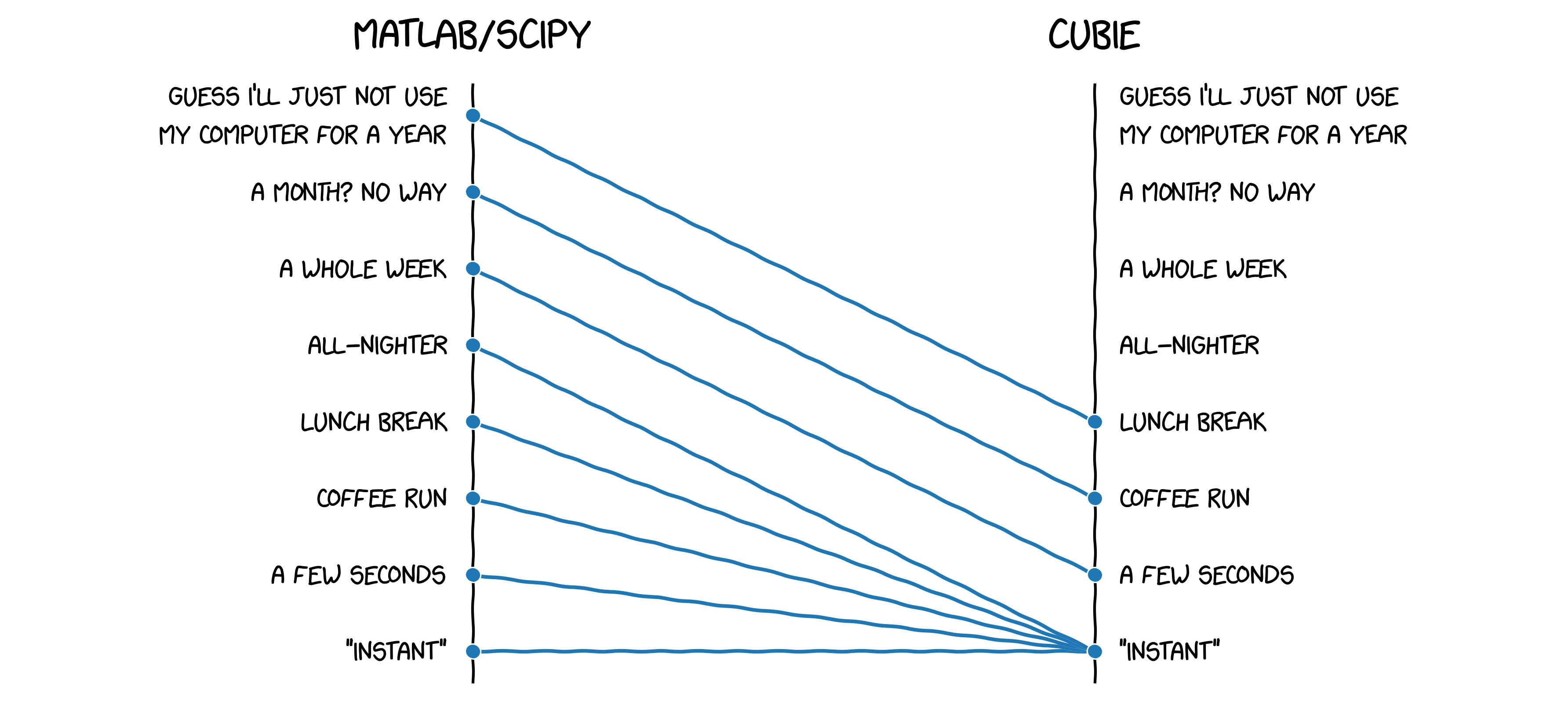
Cubie runs much faster than SciPy's solve_ivp or MATLAB's ode45/ode23s, even when you run them in parallel on the CPU. Cubie's advantage grows as you increase batch size, up to a plateau somewhere around 10,000x faster.
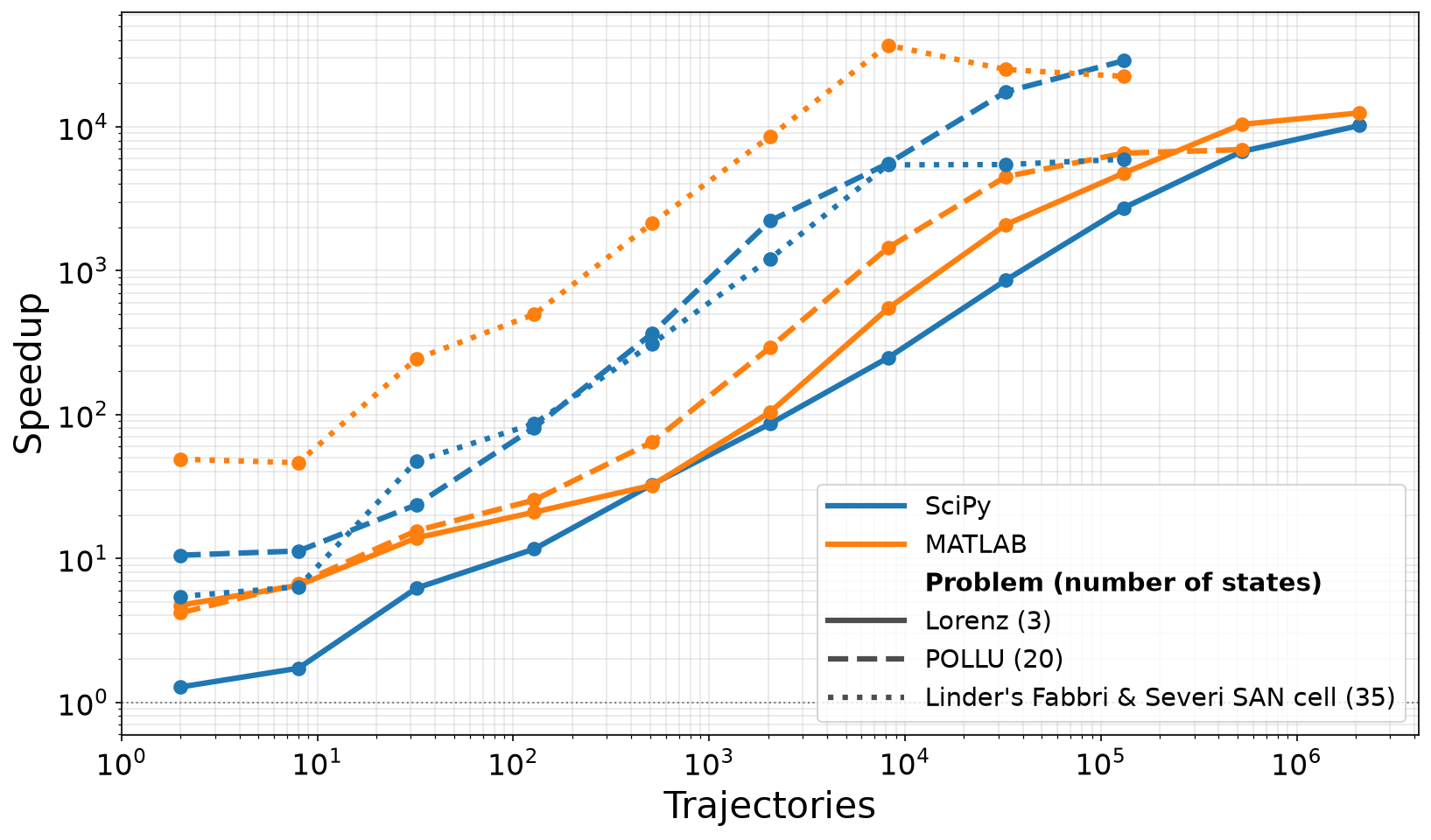
These numbers were obtained running the same batch of parameters on the same ODE systems (Lorenz, POLLU air-pollution, and the Linder et al. (2025) version of the Fabbri-Severi sino-atrial cell model). MATLAB ran its solves in a parfor loop, using ode45 for the Lorenz system and ode23s for the two stiff systems. SciPy ran in a multiprocessing parallel setup, using the Fortran dopri5 on Lorenz and Radau on the two stiff systems. Both MATLAB and SciPy were given a helping hand by using analytic Jacobians for the stiff systems, and SciPy's RHS was JIT compiled through numba, to give them a fighting chance.
Under the hood, cubie uses numba-cuda-mlir to compile
the integration algorithms and your provided ODE/DAE systems into GPU code
and ferry your data in between your computer and GPU. It goes fast because it strips as much data from the GPUs memory as it can, instead compiling it into the code that the GPU runs.
It's the fastest parallel integrator I've found. Similar work has been done in parallel, for JAX on Linux, by gradsolve and modax, in Julia by DiffEqGPU.jl, in CUDA C++ by MPGOS, and in higher-level systems Diffrax and torchdiffeq. Cubie held its own, at the time of measurement. For large systems and implicit algorithms, it really shines.
Capabilities
Solve huge batches
- Give Cubie the ranges you want to explore, and it will build and run every combination of them. Cubie is most comfortable in the hundreds of thousands, or millions, of trajectories.
- Calculate summary metrics during integration (averages, statistics, derivatives, etc) and discard the trajectories, so you keep only what you need and fit more runs into each solve.
- Save only the variables you need at the times you want them.
- If the results you want are still bigger than your computer's RAM or GPU's VRAM, Cubie chops it up into batches and gets it done without complaining.
- Rerun solvers cheaply - compiled kernels are cached for future use.
- Get results as NumPy arrays or pandas DataFrames.
Bring your model
- Define ODE and DAE systems as equation strings, Python functions, SymPy expressions, or CellML 1.0/1.1 models.
- Force your system with functions of time in its equations, or with arbitrary sampled (measured) signals which Cubie interpolates on the GPU.
- Structurally simplify DAEs with alias elimination, index reduction and tearing before Cubie generates solver code.
Choose your solver
- Cubie has a large range of Runge-Kutta methods available to pick from:
- Explicit:
tsit5(the default),euler,heun-21,ralston-33,rk23,rk4,rk45,cash-karp-54,fehlberg-45,vern7anddop853. - Diagonally-Implicit:
backwards_euler,crank_nicolson,implicit_midpoint,trapezoidal_dirk,sdirk_2_2,kvaerno3,kvaerno5,l_stable_dirk_3,l_stable_sdirk_4and threeeldirk32variants. - Fully Implicit:
radau_iia_3,radau_iia_5,radau_iia_9,firk_gauss_legendre_2andfirk_gauss_legendre_4. - Rosenbrock and Rosenbrock-W: choose from 37 methods, including
rosenbrock23,ros3p,rodas4,rodas4p,rodas5p,rodas6pand theros34pwfamily.
- Explicit:
- Pass MATLAB and SciPy names such as
ode45,ode23sorRadauand Cubie picks the matching method. Read the algorithm guide for help choosing one.
Customise (if you want to)
- Most inner details of the algorithms, step-size controllers, norms, solvers, etc are exposed as arguments, so if you're coming from an exhaustive differential equation suite like SciML's DifferentialEquations.jl, or you are deeply familiar with numerical integration and want to optimise, you can get your hands dirty.
Installation
pip install "cubie[cuda13]"
The extra in square brackets installs a CUDA toolkit: cuda13 for CUDA 13,
cuda12 for CUDA 12. Without it, pip install cubie finds whatever CUDA toolkit you have installed. If this means nothing to you, use cuda13.
Requirements
- Linux or Windows.
- Python 3.11-3.14.
- An NVIDIA GPU with compute capability 6.0 or later.
- An up-to-date NVIDIA driver.
- Optionally, Pandas and Matplotlib, which you can install with
pip install "cubie[optional]".
Quick start
import numpy as np
from cubie import create_ODE_system, solve_ivp


system = create_ODE_system(
    ["dx = v", "dv = mu * (1 - x*x) * v - x"],
    states={"x": 1.0, "v": 0.0},
    parameters={"mu": 1.5},
)

result = solve_ivp(
    system,
    y0={"x": np.linspace(1.0, 2.0, 1024)},
    parameters={"mu": np.linspace(1.0, 3.0, 1024)},
    duration=20.0,
)
Cubie integrates all 1,048,576 combinations of the 1,024 initial values of
x and the 1,024 values of mu, starting v from its default of 0.0.
On an RTX 4070 SUPER, Cubie takes about 1s to compile and run it for the first
time. Once it's compiled once, every future batch takes 30 to 45 ms, in the
same and future sessions.
For repeated solves, you would probably keep a Solver object and call
Solver.solve() (see the docs). This cuts repeated solve time to 8ms.
Documentation
The documentation covers system creation, batching, solver configuration, outputs, and performance.
Acknowledgements
- SciML, DifferentialEquations.jl — SciML's differential equations ecosystem was the main reference for every correctness, step-control, algorithm detail, or default constant question I ran into when building Cubie. Cubie's implementation differs a lot, mostly due to it's GPU-first nature, but almost every piece of math and many default settings values were either drawn from or rigorously checked against a SciML implementation. The DAE initialiser is ported directly from OrdinaryDiffEq.jl under an MIT license, as was some code in the DAE structural simplification pipeline. . Any solving of DAEs through Cubie should cite them directly: See Rackauckas and Nie (2017). If you want to explore numerical integration further, head to their docs, where they have many accessibly-written explanations of which algorithms do what well.
- ModelingToolkit.jl — Cubie's DAE tearing and structural-simplification implementation is largely a direct port of ModelingToolkit.jl's approach, adapted to Cubie's symbolic IR and CUDA code generation. DAE users should cite them directly as well: See Ma et al. (2021).
- cellmlmanip and chaste_codegen — Their work is used to import CellML models and detect and repair removable singularities in Goldman-Hodgkin-Katz-style equations. See Hendrix et al. (2022).
License
MIT (LICENSE); third-party notices in THIRD_PARTY_LICENSES.
Contributing
Pull requests are welcome. Please open an issue before starting a major change so that the design can be discussed first.
1 maintainer

Metadata
1 maintainer
Release files for cubie 0.19.1
For a detailed explanation of source distributions (sdists) and built distributions (wheels), please see the package formats documentation.
Source distribution (sdist)
| File | Size | Uploaded | Provenance | Actions |
|---|---|---|---|---|
| cubie-0.19.1.tar.gz | 760.8 kB | With provenance | Details for cubie-0.19.1.tar.gz |
Built distribution (wheel)
| File | Interpreter | ABI | Platform | Actions Reset |
|---|---|---|---|---|
| cubie-0.19.1-py3-none-any.whl | Python 3 | none | any | Details for cubie-0.19.1-py3-none-any.whl |
Total release size: 1.6 MB
Release files / cubie-0.19.1.tar.gz
| Download URL | cubie-0.19.1.tar.gz |
|---|---|
| Size | 760.8 kB |
| Tags | Source |
|
SHA-256 checksum How to use checksums |
b85a29d6db88c85c3de51ff2c7cf6b287e05e297180c1ca6e00371ac1114aa80
|
|
BLAKE2b-256 checksum How to use checksums |
7f604a57cbbf8fe166a089847f4a0814230c984ebbc881e72efa93a29bbc2b9f
|
| Upload date | |
|
Uploaded using Trusted Publishing? What is trusted publishing? |
Yes |
| Uploaded via |
twine/7.0.0 CPython/3.13.16
|
Provenance
Provenance describes where a file came from. On PyPI, provenance is shared via attestations, which provide a verifiable record of the build or publishing details. View details, limitations and caveats.


PyPI Publish Attestation
PyPI verified that this artifact, at this checksum, originated from the publisher listed below.
Signed by GitHub Actions, verified by PyPI on Nov 20, 2026.
Transparency logRelease files / cubie-0.19.1-py3-none-any.whl
| Download URL | cubie-0.19.1-py3-none-any.whl |
|---|---|
| Size | 832.8 kB |
| Tags | Python 3 |
|
SHA-256 checksum How to use checksums |
bc52a67bd907caa83a5fa25bf8472451517ecbab4002177230ae76b2fb1bf064
|
|
BLAKE2b-256 checksum How to use checksums |
d9beafdaf46cd0ac1c6c88cbdf494d575e09faac79f00cc6e4b7c74e14e5160a
|
| Upload date | |
|
Uploaded using Trusted Publishing? What is trusted publishing? |
Yes |
| Uploaded via |
twine/7.0.0 CPython/3.13.16
|
Provenance
Provenance describes where a file came from. On PyPI, provenance is shared via attestations, which provide a verifiable record of the build or publishing details. View details, limitations and caveats.
PyPI Publish Attestation
PyPI verified that this artifact, at this checksum, originated from the publisher listed below.
Signed by GitHub Actions, verified by PyPI on Nov 20, 2026.
Transparency logSecurity for cubie 0.19.1
Provenance
Provenance describes where a file came from. On PyPI, provenance is shared via attestations, which provide a verifiable record of the build or publishing details. View details, limitations and caveats.
Full provenance
Both files in this release have been uploaded with provenance metadata.
Attestation for cubie-0.19.1.tar.gz
PyPI Publish Attestation
PyPI verified that this artifact, at this checksum, originated from the publisher listed below.
Signed by GitHub Actions, verified by PyPI on Nov 20, 2026.
Transparency logA note on package security
PyPI is a repository for distributing packages, not a service for auditing them. While third-party security researchers and our staff do their best to detect and remove malicious packages, PyPI cannot guarantee the quality, security or suitability of any given package.
To learn more about protecting yourself from malicious actors, visit our package security documentation.














