
cue-kit
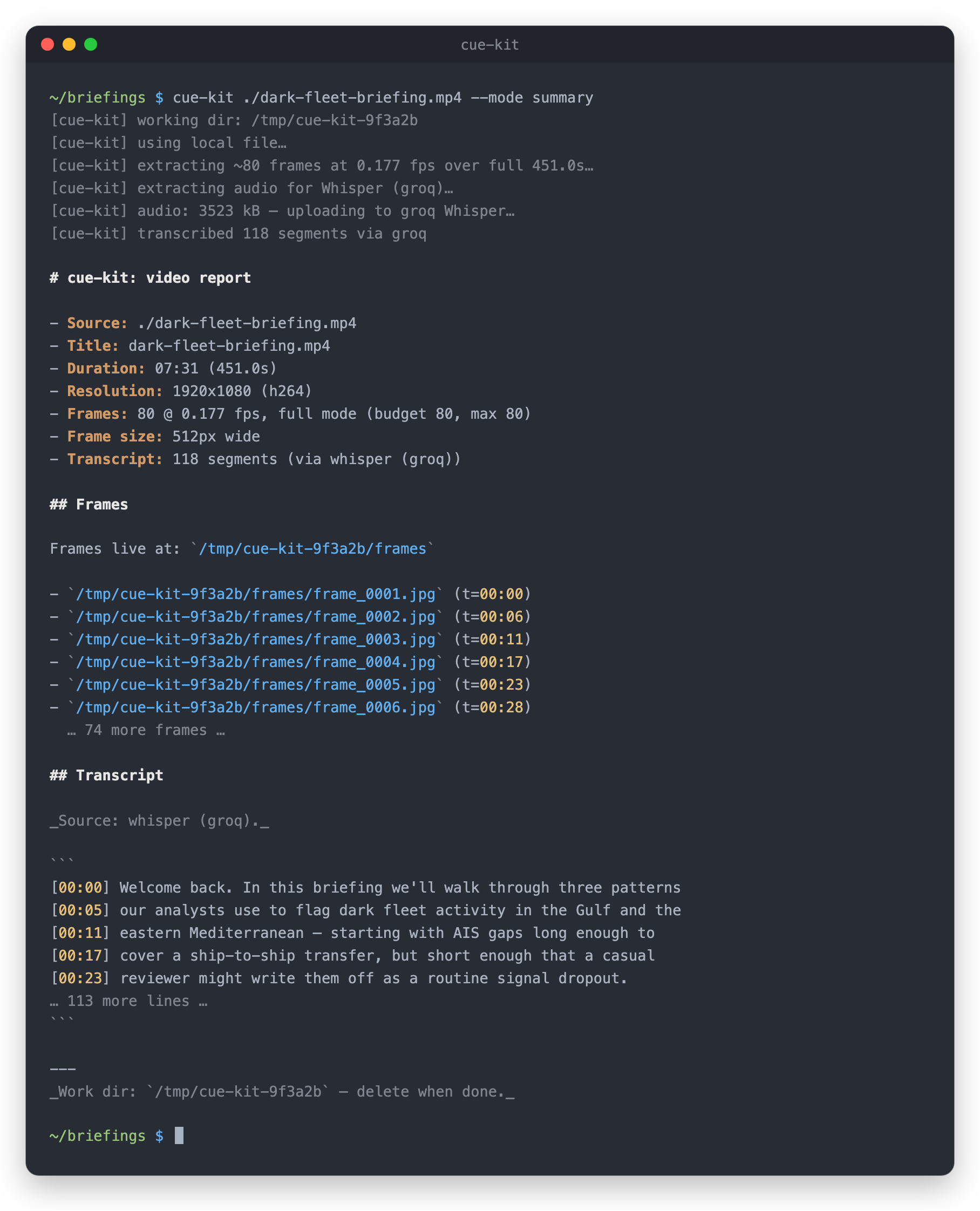


A tactical toolkit for turning video into structured, usable text. Feed it a URL or local file and get extracted frames, a timestamped transcript, and output tailored to your goal — from quick summaries and intel briefs to training docs, lecture notes, or clean transcripts.
LLMs like Claude can read pages, run code, and browse repos — but they can’t truly watch video. Drop in a YouTube link and they’re left guessing from titles or relying on incomplete transcripts that miss the visuals.
cue-kit fixes that. It converts video into frames plus a synchronized transcript that LLMs can actually process. With the bundled Claude Code skill, /cue-kit <url> <question> becomes a one-liner: Claude analyzes every frame, follows the transcript, and answers based on what’s really happening — on screen and in audio, not guesswork.
Status: alpha. The
summary,transcript, andlecture-notesmodes work today;training-docis scaffolded and under active development.
What it's for
- Watching a video so you don't have to.
- Converting recorded training videos into formatted, navigable docs.
- Capturing lecture-style content where someone narrates over slides — keeping the transcript aligned to each slide.
- Producing a clean, timestamped transcript for any video.
Common workflows
Tracking suspicious vessel behavior. Feed in AIS playback clips or screen recordings of vessel movement. Cue-kit isolates key segments—course changes, loitering patterns, or AIS gaps—and surfaces the exact moments where behavior deviates from norms. Instead of scrubbing timelines manually, you get a quick breakdown of when and how a vessel started acting suspiciously.
Analyzing port activity from video feeds. Drop in CCTV or drone footage from port areas and ask what changed over time. Cue-kit extracts key frames and summarizes activity patterns—unusual docking sequences, unexpected cargo handling, or irregular vessel arrivals. Useful for quickly spotting anomalies without reviewing hours of footage.
Extracting insights from incident recordings. After an onboard incident or near miss, upload bridge recordings or monitoring footage. Cue-kit identifies critical moments leading up to the event, highlights what was visible on instruments or surroundings, and reconstructs a timeline of what likely happened—helping with faster post-incident analysis.
Modes
| Mode | What it produces | Status |
|---|---|---|
summary |
Source metadata, frame timeline, and timestamped transcript (default) | working |
transcript |
Just a clean, timestamped transcript | working |
training-doc |
Raw frames + transcript + a suggested LLM prompt; downstream model produces the formatted doc | scaffolded |
lecture-notes |
One image per detected slide with the narration spoken while it was on screen; optional OCR of slide text | working |
Install
cue-kit runs on macOS, Linux, and Windows with Python 3.10+. It shells out to two system tools, ffmpeg (a full build, including ffprobe and the libmp3lame encoder — all standard packages qualify) and yt-dlp.
macOS (Homebrew):
brew install ffmpeg yt-dlp
Linux (Debian/Ubuntu):
sudo apt install ffmpeg
python3 -m pip install --user yt-dlp
Windows (PowerShell):
winget install Gyan.FFmpeg yt-dlp.yt-dlp
Open a new terminal afterwards so the updated PATH is picked up.
Then install cue-kit itself:
pip install cue-kit                 # latest release from PyPI
# or pin a specific release straight from GitHub:
pip install "git+https://github.com/atlas-bear/cue-kit@v0.3.0"
pipx (pipx install cue-kit) keeps it in an isolated environment and is the tidiest option for a CLI.
yt-dlpbreaks periodically as video sites change. If URL downloads start failing, update it first (brew upgrade yt-dlp,pip install -U yt-dlp, orwinget upgrade yt-dlp.yt-dlp).
For development from a clone:
git clone https://github.com/atlas-bear/cue-kit.git
cd cue-kit
pip install -e '.[dev]'
Optional slide OCR for lecture-notes --ocr needs the [ocr] extra plus the tesseract binary:
pip install 'cue-kit[ocr]'
# macOS: brew install tesseract
# Linux: sudo apt install tesseract-ocr
# Windows: winget install UB-Mannheim.TesseractOCR
Configure
A Whisper API key is only needed for videos without native captions (most local files). cue-kit reads keys from, in order: process environment, the user config file, then ./.env.
| OS | Config file |
|---|---|
| macOS / Linux | ~/.config/cue-kit/.env |
| Windows | %APPDATA%\cue-kit\.env |
# macOS / Linux
mkdir -p ~/.config/cue-kit
cp .env.example ~/.config/cue-kit/.env
chmod 600 ~/.config/cue-kit/.env
# Windows
New-Item -ItemType Directory -Force "$env:APPDATA\cue-kit"
Copy-Item .env.example "$env:APPDATA\cue-kit\.env"
cue-kit prefers Groq (whisper-large-v3 — cheaper, faster) and falls back to OpenAI (whisper-1). Set whichever you have.
Data handling: what leaves your machine
- Local files with
--no-whisper: nothing. All processing (frame extraction, caption parsing) happens locally. - URLs:
yt-dlpcontacts the hosting site to download the video and any captions. - Whisper fallback: only when no captions are available and an API key is configured, cue-kit extracts the audio track (mono, 16 kHz) and uploads it to Groq or OpenAI for transcription. Video frames are never uploaded by cue-kit.
- Working files (video, frames, audio) stay in the working directory on disk until you delete them.
For sensitive material, pass --no-whisper to guarantee no audio leaves the machine. Downstream, whatever reads cue-kit's output (for example, an LLM reading the frames) is governed by that tool's own data policy.
Quick start
# Default: summary of a YouTube video
cue-kit https://youtu.be/<id>

# Just a transcript
cue-kit https://youtu.be/<id> --mode transcript

# Training video → structured doc
cue-kit ./onboarding-screencast.mp4 --mode training-doc

# Lecture with slides → transcript grouped under each detected slide
cue-kit ./talk.mp4 --mode lecture-notes

# Focus on a specific section
cue-kit https://youtu.be/<id> --start 2:15 --end 5:00
Output goes to --out-dir if specified, otherwise a fresh temp directory. The working directory is printed at the start and end of the run. cue-kit --version prints the installed version.
CLI flags
| Flag | Default | What it does |
|---|---|---|
--mode {summary,transcript,training-doc,lecture-notes} |
summary |
Output shape |
--start T / --end T |
none | Focus on a section. Accepts SS, MM:SS, or HH:MM:SS. Triggers a denser frame budget. |
--max-frames N |
80 |
Cap on frame count. Hard ceiling 100. |
--resolution W |
512 |
Frame width in pixels. Bump to 1024 if Claude needs to read on-screen text. |
--fps F |
auto | Override the auto-scaled fps. Capped at 2.0. |
--out-dir PATH |
tmp | Working directory. Defaults to a fresh temp dir. |
--no-whisper |
off | Disable the Whisper fallback. Frames-only if no native captions. |
--whisper {groq,openai} |
auto | Force a backend. Default: prefer Groq, fall back to OpenAI. |
--slide-tolerance X |
0.003 |
lecture-notes: how much on-screen change is ignored when deciding the picture is holding still. Raise it (e.g. 0.01) for webcam insets or cursor movement; lower it if separate slides get merged. |
--ocr |
off | lecture-notes: OCR each slide image and include the slide text. Needs the [ocr] extra and tesseract. |
From the Claude Code skill, the same flags work alongside a question:
/cue-kit https://youtu.be/<id> --start 0:00 --end 0:30 what hook did they open with?
How it works
- Source. A URL (anything
yt-dlpsupports — YouTube, Loom, TikTok, X, Instagram, hundreds more) or a local file (.mp4,.mov,.mkv,.webm, plus a few others — full list indownload.VIDEO_EXTS). - Download.
yt-dlpfetches into a temp working directory; local files are probed in place, no copy. - Frames.
ffmpegextracts at an auto-scaled rate. The frame budget is duration-aware — up to 30s gets one frame per second (minimum 12, limited by the 2 fps cap), 30-60s gets 40, 1-3 min gets 60, and anything longer gets 80 (the default--max-frames; raise it to 100 for long videos).--start/--endranges get a denser budget. Hard caps: 2 fps, 100 frames. JPEGs at 512px wide by default; bump with--resolution 1024to read on-screen text. - Transcript. First try:
yt-dlppulls native captions (manual or auto-generated) — free, fast, and good enough for most public videos. Fallback: extract a mono 16 kHz mp3 and ship it to Whisper — Groq'swhisper-large-v3(preferred — cheaper and faster) or OpenAI'swhisper-1. - Output. The mode renderer prints frame paths with
t=MM:SSmarkers and a timestamped transcript. From the skill, ClaudeReads each frame in parallel — JPEGs render directly as images in its context — and answers grounded in what's actually on screen and in the audio. - Working directory. Printed at the end of the run. Not auto-cleaned today (see Roadmap) —
rm -rfit manually when you're done with follow-ups.
Lecture notes: how slide detection works
lecture-notes finds the stretches where the picture holds still for at least a second (ffmpeg's freezedetect filter). Each one is treated as a slide, and fades, animations and transitions are the gaps between them. For each slide it saves one image from the end of the still stretch, so bullet-by-bullet builds show up completed. Adjacent slides that barely differ, such as a moving cursor or a finished build, are merged. Every transcript line is then filed under the slide that was on screen when it was spoken.
It works best on screen-recorded slides: Zoom or Teams shares, PowerPoint or Keynote recordings, webinar exports. Expect these limits:
- Software walkthroughs and screencasts produce one entry per distinct screen state, which can be many more entries than a slide deck would.
- Camera-filmed talks (a phone in the audience, a moving stage camera) never hold still, so no slides are found. cue-kit warns and returns a single entry; use
summarymode instead. - Webcam insets can split a slide into two. Raise
--slide-toleranceto0.01if you see near-duplicates.
Architecture
cue_kit/
├── cli.py             # arg parsing, mode dispatch
├── config.py          # env / .env loading, per-OS config dir
├── errors.py          # CueKitError (user-facing failures)
├── pipeline.py        # download → frames → transcript orchestrator
├── download.py        # yt-dlp wrapper, local file resolver
├── frames.py          # ffmpeg frame extraction, auto-fps budgeting
├── transcribe.py      # WebVTT parsing, dedup, range filtering
├── whisper.py         # Groq / OpenAI Whisper API clients (stdlib only)
├── slides.py          # slide detection, slide OCR, narration grouping (lecture-notes)
└── modes/
    ├── summary.py
    ├── transcript.py
    ├── training_doc.py
    └── lecture_notes.py
The pipeline is mode-agnostic: it always produces a PipelineResult (frames, transcript segments, metadata). Each mode is a renderer that turns that shared payload into its own output shape.
Use as a Claude Code skill
skill/SKILL.md is a thin wrapper that lets Claude Code drive cue-kit. Copy (or symlink) the skill/ directory to ~/.claude/skills/cue-kit/ (or a project's .claude/skills/cue-kit/) and Claude can invoke /cue-kit with the same modes. The cue-kit CLI must be installed and on PATH.
Roadmap
-
training-docmode: section detection, step extraction, glossary - Optional vision-model captioning of frames (alternative to OCR)
- Output formatters: PDF, DOCX
- Zero-config install: detect missing
ffmpeg/yt-dlpand print the exactbrew/apt/wingetcommand for the current OS - Skill-driven cleanup of the temp working directory after a run with no follow-ups
Inspiration & Related Work
- claude-video — explores enabling Claude to work directly with video inputs
- OpenAI Whisper — a widely used foundation for speech-to-text transcription
- Google Video AI — a broader take on extracting structured information from video
- LangChain — tooling for building structured workflows around LLMs
- NotebookLM — an example of turning raw content into structured, usable knowledge
cue-kit builds on similar ideas but focuses on turning video into structured, task-ready outputs for downstream use.
Contributing & security
See CONTRIBUTING.md for development setup and the release process, CHANGELOG.md for version history, and SECURITY.md to report a vulnerability privately.
License
Copyright © 2025–2026 AB//LABS.
cue-kit is dual-licensed:
- AGPLv3 for open-source use — see LICENSE. Anyone running a modified version as a network service must release their changes under the same license.
- Commercial license available for proprietary use, private modifications, or any case where the AGPL's terms don't fit. A starting-point template lives at COMMERCIAL-LICENSE-TEMPLATE.md. Contact AB//LABS through the GitHub organization.
The Claude Code skill wrapper in skill/ is separately licensed under the MIT License so it can be copied freely into your own Claude Code setup; it contains no cue-kit program code and only invokes the installed CLI.
1 maintainer

Metadata
1 maintainer
Release files for cue-kit 0.3.0
For a detailed explanation of source distributions (sdists) and built distributions (wheels), please see the package formats documentation.
Source distribution (sdist)
| File | Size | Uploaded | |
|---|---|---|---|
| cue_kit-0.3.0.tar.gz | 50.7 kB | Details |
Built distribution (wheel)
| File | Interpreter | ABI | Platform | Reset |
|---|---|---|---|---|
| cue_kit-0.3.0-py3-none-any.whl | Python 3 | none | any | Details |
Total release size: 93.9 kB
Release files / cue_kit-0.3.0.tar.gz
| Download URL | cue_kit-0.3.0.tar.gz |
|---|---|
| Size | 50.7 kB |
| Tags | Source |
|
SHA-256 checksum How to use checksums |
fb79f65e3735f2690a944c6a5bf572efdc5860294244e52e0b32b7206e2b92f2
|
|
BLAKE2b-256 checksum How to use checksums |
7f7256621c0f0a209c5f42264d0f73b1ec6f6abd4ea8c80ab2d5365deeac93c7
|
| Upload date | |
|
Uploaded using Trusted Publishing? What is trusted publishing? |
Yes |
| Uploaded via |
twine/7.0.0 CPython/3.13.14
|
Provenance
Provenance describes where a file came from. On PyPI, provenance is shared via attestations, which provide a verifiable record of the build or publishing details. View details, limitations and caveats.


PyPI Publish Attestation
PyPI verified that this artifact, at this checksum, originated from the publisher listed below.
Signed by GitHub Actions, verified by PyPI on Oct 9, 2026.
Transparency logRelease files / cue_kit-0.3.0-py3-none-any.whl
| Download URL | cue_kit-0.3.0-py3-none-any.whl |
|---|---|
| Size | 43.2 kB |
| Tags | Python 3 |
|
SHA-256 checksum How to use checksums |
0d0ce171b43cd667d9ee6744bf103ff8480178a5271ce0e7ea5e8dce78ac71cf
|
|
BLAKE2b-256 checksum How to use checksums |
c5b6f02eef2b0c5a2b1bd14208a2383353bc33beab23b7782c3ecbe51873f61a
|
| Upload date | |
|
Uploaded using Trusted Publishing? What is trusted publishing? |
Yes |
| Uploaded via |
twine/7.0.0 CPython/3.13.14
|
Provenance
Provenance describes where a file came from. On PyPI, provenance is shared via attestations, which provide a verifiable record of the build or publishing details. View details, limitations and caveats.
PyPI Publish Attestation
PyPI verified that this artifact, at this checksum, originated from the publisher listed below.
Signed by GitHub Actions, verified by PyPI on Oct 9, 2026.
Transparency log













