
cuere






QR codes in your terminal — the way Claude Code CLI draws its remote-connection codes: Unicode half-blocks, low error correction so the code stays small, a proper quiet zone. Plus a Rich renderable and helpers for crypto-wallet URIs.
█▀▀▀▀▀█ ▄▀ ▄▀ █▀▀▀▀▀█
█ ███ █ ▄▀ ▄  █ ███ █
█ ▀▀▀ █ ▄▄█▀█ █ ▀▀▀ █
▀▀▀▀▀▀▀ ▀ █▄█ ▀▀▀▀▀▀▀
█▀█▀▀▄▀▀▀▀  █▀ █ █▄█▄
 ▄▄▄▄▄▀▄▀▀█▀ ▀ ▄█▀  ▀
 ▀▀  ▀▀ ██▀█▄█▄ ▀▄▀▄▄
█▀▀▀▀▀█ ▀▄█▄█▄█▀ ▄▀ █
█ ███ █ █ ▄ █  █  █
█ ▀▀▀ █ █ ▄▀ ▀ ▄█ █ ▄
▀▀▀▀▀▀▀ ▀  ▀ ▀  ▀ ▀
Demo
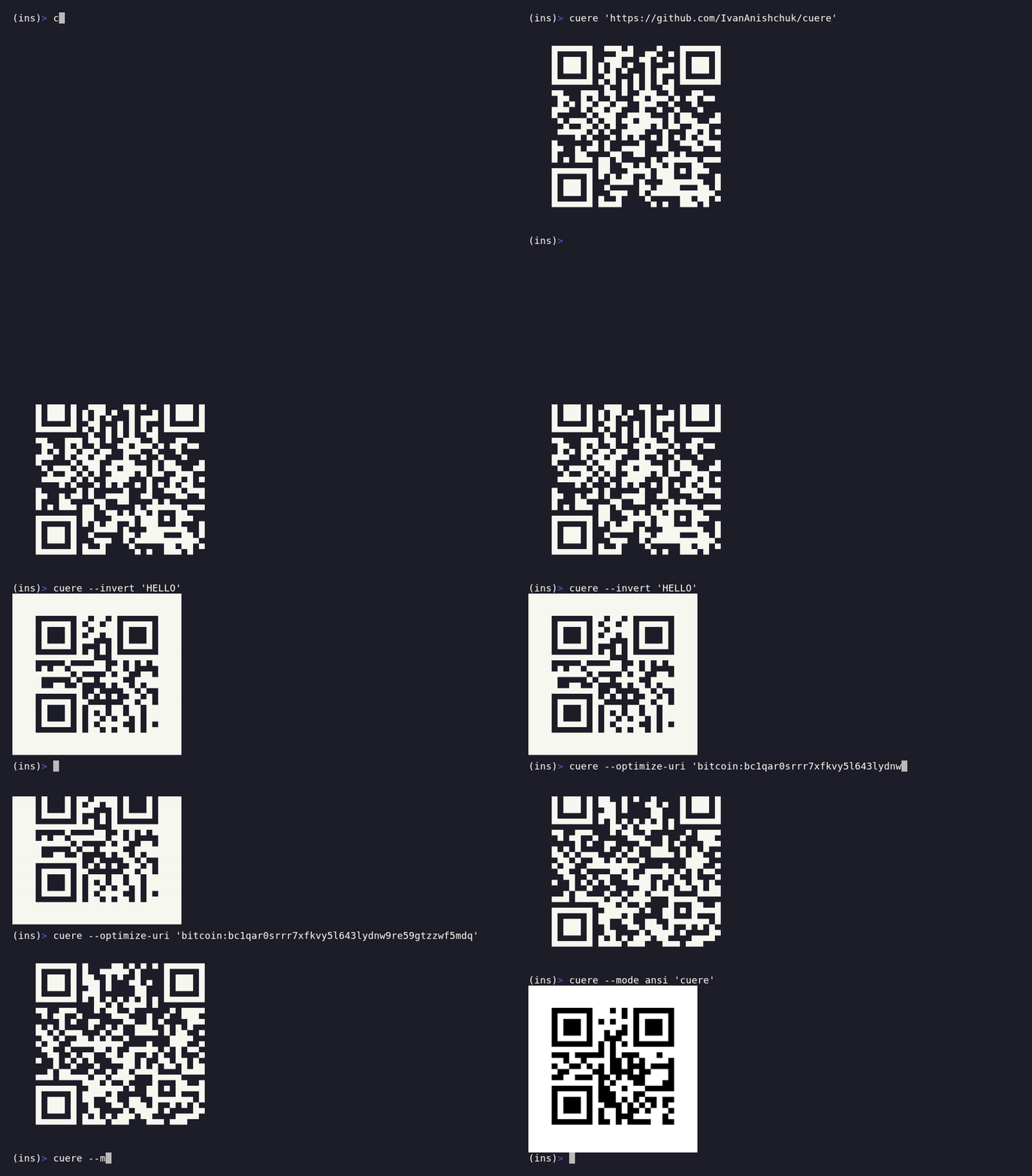
Recorded with vhs from
examples/demo.tape — regenerate with
uv run python scripts/render_demo.py (needs vhs, ttyd, and ffmpeg):
cuere "https://github.com/IvanAnishchuk/cuere"   # a first code
cuere --invert "HELLO"                            # light-on-dark
cuere --optimize-uri "bitcoin:bc1q..."            # smaller wallet code
cuere --mode ansi "cuere"                         # theme-proof colors
📖 Full documentation: ivananishchuk.github.io/cuere
Install
uv add cuere          # or: pip install cuere
uv add 'cuere[image]' # optional: adds PNG export (pulls in Pillow)
Use
from cuere import render, show, fits

payload = "wc:7f6e504b...@2?relay-protocol=irn&symKey=587d..."
show(payload)                                       # prints to stdout
text = render("HELLO", mode="block", invert=True)   # returns a str
if not fits(payload):                               # does it fit the terminal?
    ...
With Rich (centering, panels, layouts):
from rich.console import Console
from rich.panel import Panel
from cuere.rich import QRCode

Console().print(Panel(QRCode("bitcoin:BC1Q..."), title="scan to pay"), justify="center")
Wallet URIs — bitcoin_uri() builds a validated BIP-21
bitcoin: payment request, lightning_uri() wraps a bech32 Lightning payload
(BOLT11 invoice / LNURL / BOLT12 offer) in a lightning: URI, and
optimize_uri() uppercases a fully lowercase bitcoin: or lightning: URI
(bech32 is case-insensitive per BIP-173) so it encodes in QR alphanumeric mode,
yielding a smaller code. scheme_case() exposes the typed SchemeCase that
decides this: case-significant schemes (ethereum: EIP-55 checksums, wc:
WalletConnect), mixed-case URIs, and URIs with non-alphanumeric query parts are
returned unchanged:
from decimal import Decimal
from cuere import bitcoin_uri, lightning_uri, optimize_uri, show

show(optimize_uri(bitcoin_uri("bc1q...")))                  # smaller, scannable code
bitcoin_uri("bc1q...", amount=Decimal("0.01"), label="Tip") # -> "bitcoin:bc1q...?amount=0.01&label=Tip"
optimize_uri("bitcoin:bc1q...")                             # -> "BITCOIN:BC1Q..."
optimize_uri(lightning_uri("lnbc1..."))                     # -> "LIGHTNING:LNBC1..."
For Ethereum, ethereum_uri() and erc20_transfer_uri() build
EIP-681 ethereum: requests — a
native payment (value in wei) or an ERC-20 transfer. Their EIP-55 checksums
are case-significant, so these URIs are never passed through optimize_uri:
from cuere import erc20_transfer_uri, ethereum_uri

ethereum_uri("0xfb69...d359", value=10**16, chain_id=1)         # -> "ethereum:0xfb69...d359@1?value=10000000000000000"
erc20_transfer_uri("0xA0b8...eB48", to="0x8e23...d052", amount=1_000_000)  # -> "ethereum:0xA0b8...eB48/transfer?address=0x8e23...d052&uint256=1000000"
See the wallet cookbook for the full
payment-request recipes, and
the BIP-21 / Lightning /
EIP-681 summaries for the formats and the optimize_uri
scheme model.
Need the raw module grid (to render it yourself or inspect it)? Encode to a
QRMatrix:
from cuere import QRMatrix

m = QRMatrix.encode("HELLO", error="L", border=4)
m.modules   # tuple[tuple[bool, ...], ...] — True is a dark module
m.size      # side length, quiet zone included
Export to a file or bytes — save() writes the chosen format (inferred from the
path suffix when not given), render_bytes() returns the raw bytes:
from cuere import save, render_bytes

save("HELLO", "code.svg")                       # vector SVG, format from suffix
save("bitcoin:BC1Q...", "pay.png", scale=8)     # raster PNG (needs cuere[image])
png_bytes = render_bytes("HELLO", format="png") # -> bytes, no file
The formats are text (the terminal rendering), svg, and png (needs the
cuere[image] extra). See the exporting recipe and
output formats for the full model.
CLI:
cuere "wc:...your walletconnect uri..."
echo "some payload" | cuere
cuere --input payload.txt              # read the payload from a file
cuere 12345 --micro                    # compact Micro QR for a tiny payload
cuere HELLO --mode ansi --invert --border 2 --error M
cuere HELLO --mode ansi --dark "#1a1a1a" --light "#fafafa"   # custom ANSI colors
cuere HELLO --output svg:code.svg      # write SVG to a file (default stays terminal)
cuere HELLO -o png:- --scale 8 > code.png   # PNG to stdout (needs cuere[image])
Rendering modes
| mode | one module is | width of a v2 code | notes |
|---|---|---|---|
half (default) |
½ character (▀▄█) |
33 cols | survives copy-paste; inherits terminal colors |
ansi |
½ character, colored (black-on-white default) | 33 cols | theme-proof; customizable colors; show() downgrades it to half when piped or NO_COLOR is set |
block |
2 characters (██) |
66 cols | most font-robust, twice as wide |
The block-drawing glyphs (█▀▄) are East-Asian Ambiguous width: a terminal
configured to render those double-width will widen the output, so the column
counts above assume standard single-width rendering.
ansi mode's colors are customizable: pass dark / light to render / show
(and cuere.rich.QRCode, and the CLI --dark / --light flags) to set the
dark-module and light-ground colors — a name, a 256-palette index, or a truecolor
hex / (r, g, b) value. They default to spec-correct black-on-white. Colors are
ansi-only (passing them to half / block raises ColorError). See
terminal colors for the forms and the scanner-contrast caveats.
Scanning notes
- On dark terminals the default mode shows an inverted code (light modules
on dark). Modern phone cameras handle this; for a stubborn scanner pass
invert=True/--invert, or usemode="ansi"for spec-correct polarity. - Error correction defaults to
L: screens don't get dirty or torn, and lower correction means a smaller code that fits your terminal. - The quiet zone (4 modules) is part of the output on purpose — don't strip the "blank" margins.
Development
uv sync                  # editable install via meson-python
uv run pytest            # 100% branch coverage enforced
uv run ruff check && uv run mypy src/ tests/ && uv run ty check && uv run basedpyright
uv run pre-commit install --install-hooks
Build-system notes (meson-python):
- Every shipped file must be listed in
src/cuere/meson.build— meson does not glob.tests/test_packaging.pyfails if the list drifts. - The version lives only in the root
meson.build. - sdists are produced from committed files (
meson dist); commit beforeuv build.
License
CC0-1.0 — public domain.
1 maintainer

Metadata
1 maintainer
Release files for cuere 0.2.0
For a detailed explanation of source distributions (sdists) and built distributions (wheels), please see the package formats documentation.
Source distribution (sdist)
| File | Size | Uploaded | |
|---|---|---|---|
| cuere-0.2.0.tar.gz | 566.3 kB | Details |
Built distribution (wheel)
| File | Interpreter | ABI | Platform | Reset |
|---|---|---|---|---|
| cuere-0.2.0-py3-none-any.whl | Python 3 | none | any | Details |
Total release size: 599.7 kB
Release files / cuere-0.2.0.tar.gz
| Download URL | cuere-0.2.0.tar.gz |
|---|---|
| Size | 566.3 kB |
| Tags | Source |
|
SHA-256 checksum How to use checksums |
adc23b6694c65f6ca802bf5d74d650dfcac2c6ddc6e96e102f270bd67456a7b8
|
|
BLAKE2b-256 checksum How to use checksums |
a7814b2ad04972001acff2df3d46193dc1c3f64ffffd61d55d21979d600cd4bb
|
| Upload date | |
|
Uploaded using Trusted Publishing? What is trusted publishing? |
Yes |
| Uploaded via |
twine/6.1.0 CPython/3.13.13
|
Provenance
Provenance describes where a file came from. On PyPI, provenance is shared via attestations, which provide a verifiable record of the build or publishing details. View details, limitations and caveats.


PyPI Publish Attestation
PyPI verified that this artifact, at this checksum, originated from the publisher listed below.
Signed by GitHub Actions, verified by PyPI on Jun 18, 2026.
Transparency logRelease files / cuere-0.2.0-py3-none-any.whl
| Download URL | cuere-0.2.0-py3-none-any.whl |
|---|---|
| Size | 33.4 kB |
| Tags | Python 3 |
|
SHA-256 checksum How to use checksums |
af5398914da5975a8e473eaeb5c256549bcc452683cfbba11cd9ffe14b56bbd2
|
|
BLAKE2b-256 checksum How to use checksums |
669d6184965554c654ec3391f95cc36cabcab5486bfaf1401aa398c22b553c56
|
| Upload date | |
|
Uploaded using Trusted Publishing? What is trusted publishing? |
Yes |
| Uploaded via |
twine/6.1.0 CPython/3.13.13
|
Provenance
Provenance describes where a file came from. On PyPI, provenance is shared via attestations, which provide a verifiable record of the build or publishing details. View details, limitations and caveats.
PyPI Publish Attestation
PyPI verified that this artifact, at this checksum, originated from the publisher listed below.
Signed by GitHub Actions, verified by PyPI on Jun 18, 2026.
Transparency log













