
Thread-safe async-aware queue for Python

Project description
Mixed sync-async queue, supposed to be used for communicating between classic synchronous (threaded) code and asynchronous one, between two asynchronous codes in different threads, and for any other combination that you want. Based on the queue module. Built on the aiologic package. Inspired by the janus library.
Like Culsans god, the queue object from the library has two faces: synchronous and asynchronous interface. Unlike Janus library, synchronous interface supports eventlet, gevent, and threading, while asynchronous interface supports asyncio, trio, and anyio.
Synchronous is fully compatible with standard queue, asynchronous one follows asyncio queue design.
Installation
Install from PyPI (recommended):
pip install culsansOr from GitHub:
pip install git+https://github.com/x42005e1f/culsans.gitYou can also use other package managers, such as uv.
Usage
Three queues are available:
Queue
LifoQueue
PriorityQueue
Each has two properties: sync_q and async_q.
Use the first to get synchronous interface and the second to get asynchronous one.
Example
import anyio
import culsans


def sync_run(sync_q: culsans.SyncQueue[int]) -> None:
    for i in range(100):
        sync_q.put(i)
    else:
        sync_q.join()


async def async_run(async_q: culsans.AsyncQueue[int]) -> None:
    for i in range(100):
        value = await async_q.get()

        assert value == i

        async_q.task_done()


async def main() -> None:
    queue: culsans.Queue[int] = culsans.Queue()

    async with anyio.create_task_group() as tasks:
        tasks.start_soon(anyio.to_thread.run_sync, sync_run, queue.sync_q)
        tasks.start_soon(async_run, queue.async_q)

    queue.shutdown()


anyio.run(main)
Extras
Both interfaces support some additional features that are not found in the original queues.
growing & shrinking
You can dynamically change the upperbound limit on the number of items that can be placed in the queue with queue.maxsize = N. If it increases (growing), the required number of waiting putters will be woken up. If it decreases (shrinking), items exceeding the new limit will remain in the queue, but all putters will be blocked until enough items are retrieved from the queue. And if maxsize is less than or equal to zero, all putters will be woken up.
async with anyio.create_task_group() as tasks:
    async_q = culsans.Queue(1).async_q

    for i in range(4):
        tasks.start_soon(async_q.put, i)

    await anyio.sleep(1e-3)
    assert async_q.qsize() == 1

    async_q.maxsize = 2  # growing

    await anyio.sleep(1e-3)
    assert async_q.qsize() == 2

    async_q.maxsize = 1  # shrinking

    await anyio.sleep(1e-3)
    assert async_q.qsize() == 2

    async_q.get_nowait()

    await anyio.sleep(1e-3)
    assert async_q.qsize() == 1

    async_q.maxsize = 0  # now the queue size is infinite

    await anyio.sleep(1e-3)
    assert async_q.qsize() == 3
peek() & peek_nowait()
If you want to check the first item of the queue, but do not want to remove that item from the queue, you can use the peek() and peek_nowait() methods instead of the get() and get_nowait() methods.
sync_q = culsans.Queue().sync_q

sync_q.put("spam")

assert sync_q.peekable()
assert sync_q.peek() == "spam"
assert sync_q.peek_nowait() == "spam"
assert sync_q.qsize() == 1
These methods can be considered an implementation of partial compatibility with gevent queues.
clear()
In some scenarios it may be necessary to clear the queue. But it is inefficient to do this through a loop, and it causes additional difficulties when it is also necessary to ensure that no new items can be added during the clearing process. For this purpose, there is an atomic method clear() that clears the queue most efficiently.
async with anyio.create_task_group() as tasks:
    async_q = culsans.Queue(3).async_q

    for i in range(5):
        tasks.start_soon(async_q.put, i)

    await anyio.sleep(1e-3)
    assert async_q.qsize() == 3

    async_q.clear()  # clearing

    await anyio.sleep(1e-3)
    assert async_q.qsize() == 2
    assert async_q.get_nowait() == 3
    assert async_q.get_nowait() == 4
Roughly equivalent to:
def clear(queue):
    while True:
        try:
            queue.get_nowait()
        except Empty:
            break
        else:
            queue.task_done()
Subclasses
You can create your own queues by inheriting from existing queue classes as if you were using the queue module. For example, this is how you can create an unordered queue that contains only unique items:
from culsans import Queue


class UniqueQueue(Queue):
    def _init(self, maxsize):
        self.data = set()

    def _qsize(self):
        return len(self.data)

    def _put(self, item):
        self.data.add(item)

    def _get(self):
        return self.data.pop()

    _peek = None

    def _peekable(self):
        return False

    def _clear(self):
        self.data.clear()
sync_q = UniqueQueue().sync_q
sync_q.put_nowait(23)
sync_q.put_nowait(42)
sync_q.put_nowait(23)
assert sync_q.qsize() == 2
assert sorted(sync_q.get_nowait() for _ in range(2)) == [23, 42]All seven of these methods are called in exclusive access mode, so you can freely create your subclasses without thinking about whether your methods are thread-safe or not.
Greenlets
Libraries such as eventlet and gevent use greenlets instead of tasks. Since they do not use async-await syntax, their code is similar to synchronous code. There are three ways that you can tell culsans that you want to use greenlets instead of threads:
Set aiologic.lowlevel.current_green_library_tlocal.name (for the current thread).
Patch the threading module (for the main thread).
Specify AIOLOGIC_GREEN_LIBRARY environment variable (for all threads).
The value is the name of the library that you want to use.
Checkpoints
Sometimes it is useful when each asynchronous call switches execution to the next task and checks for cancellation and timeouts. For example, if you want to distribute CPU usage across all tasks. There are two ways to do this:
Set aiologic.lowlevel.<library>_checkpoints_cvar (for the current context).
Specify AIOLOGIC_<LIBRARY>_CHECKPOINTS environment variable (for all contexts).
The value is True or False for the first way, and a non-empty or empty string for the second.
Checkpoints are enabled by default for the trio library.
Compatibility
The interfaces are compliant with the Python API version 3.13, and the culsans library itself is fully compatible with the janus library version 2.0.0. If you are using janus in your application and want to switch to culsans, all you have to do is replace this:
import januswith this:
import culsans as janusand everything will work!
Performance
Being built on the aiologic package, the culsans library has speed advantages. When communication is performed within a single thread using the asynchronous API, culsans.Queue is typically 2 times faster than janus.Queue:
python |
janus |
culsans |
aiologic |
asyncio |
|---|---|---|---|---|
python3.9 |
×1.00 |
×2.15 |
×2.59 |
+98.40% |
python3.10 |
×1.00 |
×2.20 |
×2.55 |
+87.14% |
python3.11 |
×1.00 |
×2.23 |
×2.52 |
+83.15% |
python3.12 |
×1.00 |
×2.42 |
×2.81 |
+78.63% |
python3.13 |
×1.00 |
×2.46 |
×2.80 |
+80.98% |
python3.13t |
×1.00 |
×2.20 |
×2.60 |
+97.09% |
pypy3.10 |
×1.00 |
×3.64 |
×3.08 |
+83.94% |
And when communication is performed within two threads, they are the same:
python |
janus |
culsans |
aiologic |
asyncio |
|---|---|---|---|---|
python3.9 |
×1.00 |
+8.46% |
+11.18% |
-1.24% |
python3.10 |
×1.00 |
+4.04% |
+27.46% |
-6.72% |
python3.11 |
×1.00 |
+10.73% |
+16.00% |
-22.69% |
python3.12 |
×1.00 |
+4.61% |
+11.90% |
-22.24% |
python3.13 |
×1.00 |
+5.07% |
+2.01% |
-21.26% |
python3.13t |
×1.00 |
+9.65% |
+19.30% |
-23.99% |
pypy3.10 |
×1.00 |
+0.38% |
+4.90% |
-3.53% |
However, on your hardware the performance results may be different, especially for the PyPy case, which on older hardware may show a tenfold speedup or more in both tables, so you may find it useful to run benchmarks yourself to measure actual relative performance.
Communication channels
GitHub Discussions: https://github.com/x42005e1f/culsans/discussions
Feel free to post your questions and ideas here.
Support
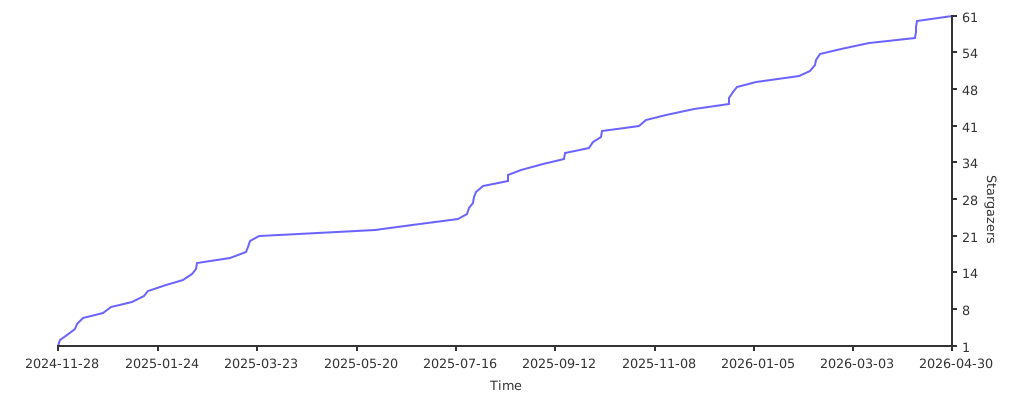
If you like culsans and want to support its development, star its repository on GitHub.
License
The culsans library is offered under the BSD Zero Clause License.
Release history Release notifications | RSS feed


Download files
Download the file for your platform. If you're not sure which to choose, learn more about installing packages.
Source Distribution
Built Distribution
Filter files by name, interpreter, ABI, and platform.
If you're not sure about the file name format, learn more about wheel file names.
Copy a direct link to the current filters
File details
Details for the file culsans-0.7.0.tar.gz.
File metadata
- Download URL: culsans-0.7.0.tar.gz
- Upload date:
- Size: 25.7 kB
- Tags: Source
- Uploaded using Trusted Publishing? No
- Uploaded via: twine/5.1.1 CPython/3.8.10
File hashes
| Algorithm | Hash digest | |
|---|---|---|
| SHA256 |
4c5c69bbc45c58d663ac9fa043b4915181bc16c5405faab9f04931bb2ce6fc2e
|
|
| MD5 |
d644ac5a7e40053d3c54e487e4dc5fa5
|
|
| BLAKE2b-256 |
1c05b648cb8de00076d0044be54d05346625b11092e32b02562f450185e2b99c
|
File details
Details for the file culsans-0.7.0-py3-none-any.whl.
File metadata
- Download URL: culsans-0.7.0-py3-none-any.whl
- Upload date:
- Size: 10.5 kB
- Tags: Python 3
- Uploaded using Trusted Publishing? No
- Uploaded via: twine/5.1.1 CPython/3.8.10
File hashes
| Algorithm | Hash digest | |
|---|---|---|
| SHA256 |
9c88421745755c5aa0b0f9bdc42051fd36895d85a98393a4eb2a32da8a0e4ff7
|
|
| MD5 |
6933ba73b2034181c80c256621d34781
|
|
| BLAKE2b-256 |
2da127d61ec834d2830885d8f8aecaa9d7e580589ad4eaedf1b8388deae5e23c
|






