
AWS Cloudwatch Insights



- Free software: Apache Software License 2.0

Though OpenAPI documented services offer a nice UI to test the endpoints, I couldn't find a good command line tool for
this. Here I created something that works nicely with zsh completions. If you have the OpenAPI spec available, you
put it in your ~/.carl/open_api. Then parameters can be passed as +{param-name}, with tab-completions, and then
these are passed to curl.
There is no way that this covers all the cases for the OpenAPI spec, but it hopefully covers the vast majority people of cases people actually encounter.
Installation
# globally
% pipx install 'curl_arguments_url'
# or in a particular virtual env
% pip install 'curl_arguments_url'

# to get the completions to work, add the following to your .zshrc
eval "$(carl utils zsh-print-script)"

# And copy the OpenAPI spec into ~/.carl/open_api to get the completions and curl-building working
% cp open_api-spec.yml ~/.carl/open_api

# if parsing of the open_api files is too slow for you, you can try installing the ryaml (Rust Yaml) extension. I
# didn't include this by default because I'm afraid it might not install correctly on certain systems, but it's much
# faster
% pipx install 'curl_arguments_url[ryaml]'
Examples
These examples use tests/resources/open_api/openapi-demo.yml
- Basic GET
% carl http://demo.io/v0/entities/\{path-item\} GET +path-item ID +query-item query-this --no-run --print-cmd
curl -X GET 'http://demo.io/v0/entities/ID?query-item=query-this'
- More complicated POST command
% carl http://demo.io/v0/entities/\{path-item\} POST \
    +path-item ID +field-one value +field-two an array of values \
    +field-three '{"complex":["sub","value"]}' \
    +field-header 'Header Param Value' \
    --no-run --print-cmd \
    -- --silent # you can get other arguments passed to curl at the end, like this
# the output wouldn't be this nicely formatted, but so you can see what curl command would be run
curl -X POST http://demo.io/v0/entities/ID \
  -H 'field-header: Header Param Value' -H 'Content-Type: application/json' \
  --data-binary \
  '{"field-one": "value", "field-two": ["an", "array", "of", "values"], "field-three": {"complex": ["sub", "value"]}}' \
  --silent
- Values are cached for completion by param name.
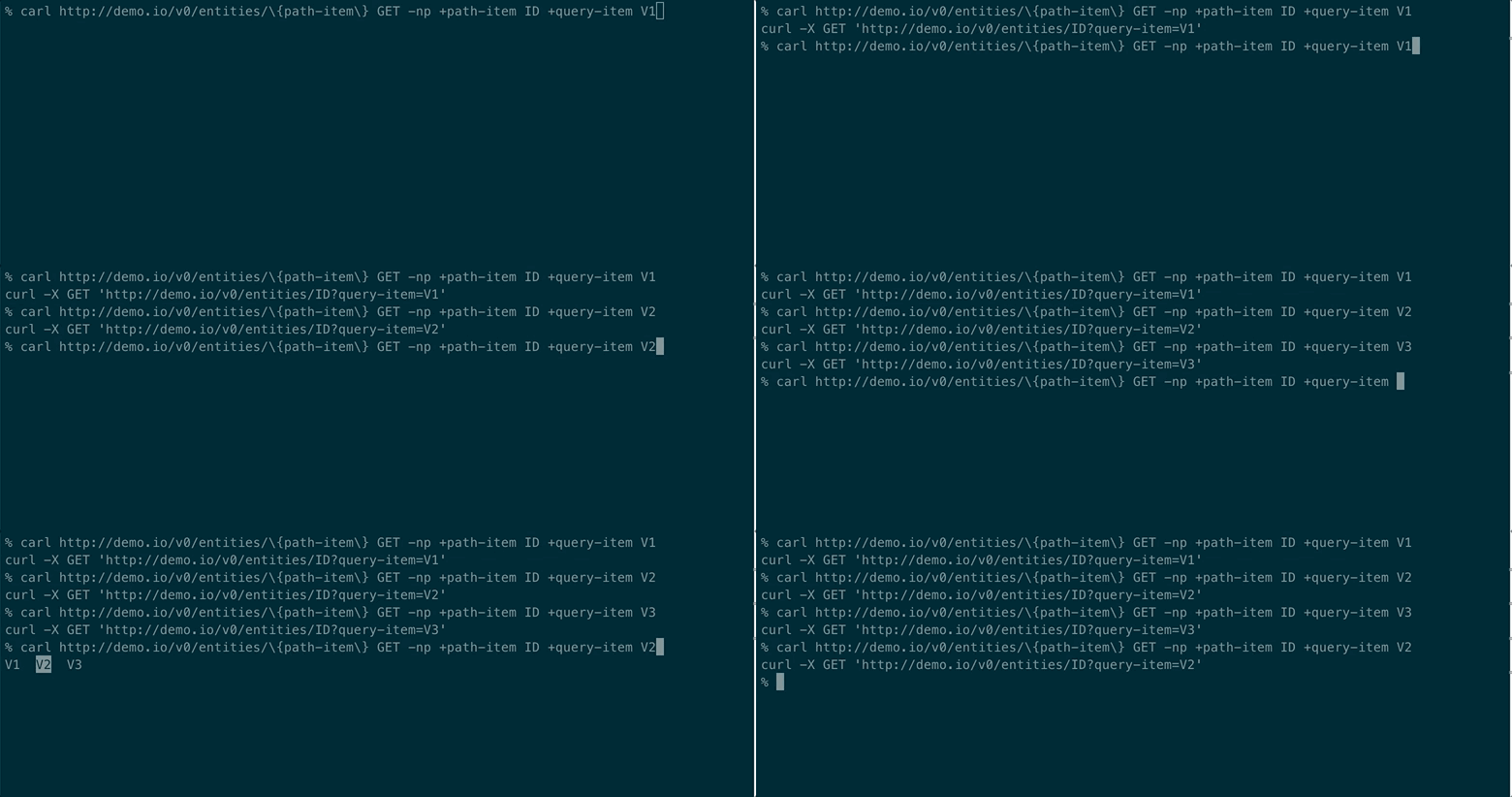
- These cached values can be managed with the
carl utils cached-valuesutility:
% carl utils cached-values --help
usage: carl utils cached-values [-h] {params,ls,rm,add} ...

positional arguments:
  {params,ls,rm,add}
    params            List all the param names that have values cached
    ls                List all the values cached for a particular param
    rm                Remove a value for an param from the cache for completions
    add               Add one or more values for a param to the cache

options:
  -h, --help          show this help message and exit
- Help is generated from the OpenAPI spec for your reference
% carl --help
usage: carl [-h] {utils,http://demo.io/v0/entities/{path-item},http://demo.io/v0/restricted,http://demo.io/v0/other,http://demo.io/v0/endpoints} ...

A Utility to cleanly take command-line arguments, for an endpoint you have the
OpenAPI specification for, and convert them into an appropriate curl command.
Spec files should be in /root/.carl/open_api directory or directory defined by
env variables (See below)

positional arguments:
  {utils,http://demo.io/v0/entities/{path-item},http://demo.io/v0/restricted,http://demo.io/v0/other,http://demo.io/v0/endpoints}
    utils               Utilities
    http://demo.io/v0/entities/{path-item}
                        Demo Entity Endpoint
    http://demo.io/v0/restricted
                        A Restricted Endpoint
    http://demo.io/v0/other
                        Another Endpoint
    http://demo.io/v0/endpoints
                        Yet Another Endpoint

options:
  -h, --help            show this help message and exit

Environment Variables:
    CARL_DIR: Directory which contains files for carl. Default: ~/.carl
    CARL_OPEN_API_DIR: Directory containing the OpenApi specifications and
                        Yaml files. Default: $CARL_DIR/open_api
    CARL_CACHE_DIR: Directory containing the cache. Default $CARL_DIR/cache
For a specific endpoint:
% carl http://demo.io/v0/entities/\{path-item\} POST --help
usage: carl http://demo.io/v0/entities/{path-item} POST [-h] [-p] [-n] [-R] [-b BODY_JSON] [+field-header FIELD_HEADER] [+field-one FIELD_ONE]
                                                        [+field-two FIELD_TWO [FIELD_TWO ...]] [+field-three FIELD_THREE] +path-item PATH_ITEM
                                                        [passed_to_curl ...]

Demo Post Command

positional arguments:
  passed_to_curl        Extra argument passed to curl, often after "--"

options:
  -h, --help            show this help message and exit
  -p, --print-cmd       Print the resulting curl command to standard out
  -n, --no-run          Don't run the curl command. Useful with -p
  -R, --no-requires     Don't check to see if required parameter values are missing or if values are one of the enumerated values
  -b BODY_JSON, --body-json BODY_JSON, --body BODY_JSON
                        Base json object to send in the body. Required body params are still required unless -R option passed. Useful for dealing with incomplete specs.
  +field-header FIELD_HEADER
                        Header Param
  +field-one FIELD_ONE  Demo Body String Field
  +field-two FIELD_TWO [FIELD_TWO ...]
                        Demo Body Array Field
  +field-three FIELD_THREE
                        Demo Body Complex Field
  +path-item PATH_ITEM
- Generic Optional Args:
  -p, --print-cmd       Print the resulting curl command to standard out
  -n, --no-run          Don't run the curl command. Useful with -p
  -R, --no-requires     Don't check to see if required parameter values are missing or if values are one of the enumerated values
  -b BODY_JSON, --body-json BODY_JSON, --body BODY_JSON
                        Base json object to send in the body. Required body params are still required unless -R option passed. Useful for dealing with incomplete specs.
- Relevant Environment Variables
    CARL_DIR: Directory which contains files for carl. Default: ~/.carl
    CARL_OPEN_API_DIR: Directory containing the OpenApi specifications and
                        Yaml files. Default: $CARL_DIR/open_api
    CARL_CACHE_DIR: Directory containing the cache. Default $CARL_DIR/cache
Hints for finding OpenAPI specs
The spec you're interested in might be on https://app.swaggerhub.com/. Also, sometimes the doc/sandbox page, for an api, which gives you a gui for interacting with the api, loads the swagger spec in the background. You can see this if you open the developer tools in Chrome under Network
Development
Requires make:
# setting up dev environment
$ make develop

# run tests
$ make test
# ... or
$ pytest

# run tests for all environments
$ make test-all
No CI/CD or coverage yet
To Do/Future Features
- A
--queryoption for adding query parameters directly - Some sort of hook infrastructure, so you could do things like have custom-completions for certain parameters or automatically add a particular env variable as an auth header
- Support file uploading and downloading
- Utilize the authorization part of the OpenAPI spec
- Better support for nested json objects in the body, so that
+param.sub-param valuewould set{"param"{"sub-param":"value"}} - Maybe support older versions of Swagger/OpenApi
- Speaking of which, in the code I sometimes use the term "swagger" and sometimes "open_api". I should make this consistent.
- Support bash and fish. With how I implemented this, I thought it would be easy to implement bash. But the way bash
parses and escapes arguments passed to the completion function made it surprisingly challenging. The
bash-completionbranch has my so-far attempts to deal with these issues. It might be close to done, or there might be a slew of other issues I haven't realized yet.
Credits
This package was created with cookiecutter and the audreyr/cookiecutter-pypackage project template.
1 maintainer

Download files
Download the file for your platform. If you're not sure which to choose, learn more about installing packages.
Source Distribution
Built Distribution
Filter files by name, interpreter, ABI, and platform.
If you're not sure about the file name format, learn more about wheel file names.
Copy a direct link to the current filters
File details
Details for the file curl_arguments_url-0.1.4.tar.gz.
File metadata
- Download URL: curl_arguments_url-0.1.4.tar.gz
- Upload date:
- Size: 24.6 kB
- Tags: Source
- Uploaded using Trusted Publishing? No
- Uploaded via:
twine/4.0.2 CPython/3.11.3
File hashes
| Algorithm | Hash digest | |
|---|---|---|
| SHA256 |
ab9e35e932cfb9b1e55a04a328dfe3eb3c27faa2029d0d3d9e5c23843b39cb7d
|
|
| MD5 |
af392f4a1565d22c229ee5483a413819
|
|
| BLAKE2b-256 |
d24b7d8a7399fdbad2fbe52286aa347f3d6e45ab5af10d91516c83d4bf68d190
|
File details
Details for the file curl_arguments_url-0.1.4-py2.py3-none-any.whl.
File metadata
- Download URL: curl_arguments_url-0.1.4-py2.py3-none-any.whl
- Upload date:
- Size: 23.4 kB
- Tags: Python 2, Python 3
- Uploaded using Trusted Publishing? No
- Uploaded via:
twine/4.0.2 CPython/3.11.3
File hashes
| Algorithm | Hash digest | |
|---|---|---|
| SHA256 |
005e4adc1de79f87df954240e715ba7a410c39006fc561c1d1ad0655f28e1ec2
|
|
| MD5 |
56fae3b69e65ff16238914a5ea49afec
|
|
| BLAKE2b-256 |
9a3432c076be900ca093640587abf11c3c9e10e4c875e50057f83d693b9130a5
|














