
CuRT allows to generate a specific number of RPS to a webservice. Permite generar un número específico de peticiones por segundo a un servicio web.

Project description
CuRT
Table of contents
Introduction
Custom RPS Tester is a tool to make specific requests per second to a webservice.
Requirements
-
Python version
- Python 3.13
-
Modules
- Pandas 2.3.1
- Plotly 6.2.0
- Requests 2.32.4
Get CuRT
pip install curt
Configuration
Git repository CuRT.py file is just a main file example.
Example
There are two file in ejemplos directory. properties.py file has example variables for CuRT.py file (i.e. host for https://jsonplaceholder.typicode.com/posts). post.json file is a sample json file for host.
In this example, the main file is CuRT.py, and it can import properties.py file:
try:
    from resources import properties as p
except (ModuleNotFoundError, ImportError):
    print('Error: Propiedades no encontradas.')
CuRT can be imported too:
from curt import dictionary_creator
from curt import threads_manager
from curt import reports
from curt import simple_rest
from curt import thread_safe_data
The HTTP methods to be used must be defined, and the request can be made using the imported post_request functions for POST requests, and get_request for GET requests.
Since the responses for each request are generated independently, there must be a way to store them. The example uses a thread-safe data collection system that prevents data loss at high request rates (10,000+ requests/second). Each request gets its own temporary file, eliminating race conditions. The dictionary_creator module contains a single function, which creates a dictionary taking the start time, end time, the json method used and the response obtained, so that, joining everything together, the function declaration part for the methods to be consumed would look something like this in the CuRT.py:
# Initialize thread-safe data collector
thread_safe_data.initialize_data_collector()


def post_ex():
    start = dt.datetime.now()
    # Método:
    json_method = "/posts"
    # Ubicación de la petición:
    request_file = 'resources/post.json'

    try:
        with open(request_file) as json_file:
            payload = json.load(json_file)

            # POST request
            response = simple_rest.post_request(p.HOST + json_method, payload, p.HEADERS)

            end = dt.datetime.now()

            # Use thread-safe data collection
            thread_safe_data.add_request_data(dictionary_creator.new_dict(start, end, json_method, response))
            print(f"POST request completed: {response.status_code}")
    except Exception as e:
        print(f"Error in POST request: {e}")
        end = dt.datetime.now()
        # Create a mock response for error cases
        class MockResponse:
            def __init__(self):
                self.status_code = 500
                self.reason = "Error"
                self.text = str(e)
        mock_response = MockResponse()
        thread_safe_data.add_request_data(dictionary_creator.new_dict(start, end, json_method, mock_response))


def get_ex():
    start = dt.datetime.now()
    # Método:
    json_method = "/posts/1"

    try:
        # GET request
        response = simple_rest.get_request(p.HOST + json_method, p.HEADERS)

        end = dt.datetime.now()

        # Use thread-safe data collection
        thread_safe_data.add_request_data(dictionary_creator.new_dict(start, end, json_method, response))
        print(f"GET request completed: {response.status_code}")
    except Exception as e:
        print(f"Error in GET request: {e}")
        end = dt.datetime.now()
        # Create a mock response for error cases
        class MockResponse:
            def __init__(self):
                self.status_code = 500
                self.reason = "Error"
                self.text = str(e)
        mock_response = MockResponse()
        thread_safe_data.add_request_data(dictionary_creator.new_dict(start, end, json_method, mock_response))
CuRT consumes the methods of the indicated web service and then generates a report with the results obtained. As all the tools to do this are included within CuRT itself, then they can be used to generate reports based on a previous .csv file. So in the example there are two functions that generate a report: hacer_pruebas and generar_html.
The reports module contains only one function, called loadtest, which is the one that contains the main functionality of the tool: making the reports. So regardless of what the data source is, it is this method that must be consumed to generate the report.
The module that is in charge of loadtesting as such is threads_manager. It contains functions that need three values: the duration of the test in seconds, the functions that perform consume the web service and the number of requests per second. The example uses start_threads_precise for accurate RPS control with calibration.
Putting these together, the functions look like this:
def hacer_pruebas(length, test_name, dark_mode, base_dir, functions, rps):
    print('## Custom RPS Tester ##')
    print('# Tester #')
    print(f'Test duration: {length} seconds')
    print(f'Requests per second: {rps}')
    print(f'Functions to test: {[f.__name__ for f in functions]}')

    start_time = dt.datetime.now()
    # Use the new precise threading approach with 5% compensation for 100%+ accuracy
    threads_manager.start_threads_precise(int(length), functions, int(rps), calibration_factor=1.05)
    end_time = dt.datetime.now()

    # Get all collected data using thread-safe collector
    df = thread_safe_data.get_all_data()
    print(f'Total requests made: {len(df)}')

    if len(df) == 0:
        print("Warning: No requests were made. Check your functions and network connectivity.")
        return

    print(f'DataFrame columns: {list(df.columns)}')

    report_dir = test_name + '_' + str(dt.datetime.now().timestamp())
    dir_name = base_dir + '/' + report_dir
    if not os.path.exists(dir_name):
        os.makedirs(dir_name)
    df.to_csv(dir_name + '/data.csv', index=False, encoding='utf-8-sig')

    if 'End' in df.columns:
        df.sort_values(by='End', inplace=True)
    else:
        print("Warning: 'End' column not found in DataFrame")
        print(f"Available columns: {list(df.columns)}")

    reports.loadtest(dark_mode=dark_mode, dir_name=dir_name, functions=functions, df=df, start_time=start_time,
             end_time=end_time, testing=True)

    # Clean up temporary files
    thread_safe_data.cleanup_data_collector()


def generar_html(dark_mode, dir_name, csv_location):
    print('## Custom RPS Tester ##')
    print('# Generador de reportes #')
    print('##########################################################################')
    if dir_name == 'NULL':
        dir_name = os.getcwd()
    print('Cargando archivo: ' + csv_location)
    df = pd.read_csv(csv_location, encoding='utf-8')
    print('Hecho.')
    print('##########################################################################')
    function_names = df['MethodName'].drop_duplicates().tolist()
    functions = []
    for function in function_names:
        functions.append(globals()[function])
    datetime_format = '%Y-%m-%d %H:%M:%S.%f'
    start_time = dt.datetime.strptime(df['Start'].min(), datetime_format)
    end_time = dt.datetime.strptime(df['End'].max(), datetime_format)
    df.sort_values(by='End', inplace=True)
    reports.loadtest(dark_mode=dark_mode, dir_name=dir_name, functions=functions, df=df, start_time=start_time,
             end_time=end_time, testing=False)
The testing flag is used to indicate the name of the report. For a new report, the final file will be index.html. For a report based on previous data, the final file will be index-[timestamp].html.
Finally, the main function will define which function will be called, so there are two possibilities:
- The loadtest is performed and then the report is generated:
def main():
    length = 20
    rps = 20
    test_name = 'Ejemplo'
    base_dir = 'Reports'
    functions = [post_ex, get_ex]
    dark_mode = True
    hacer_pruebas(length=length, test_name=test_name, dark_mode=dark_mode, base_dir=base_dir, functions=functions, rps=rps)
- The report is made based on existing data:
def main():
    dir_name = p.DIRECTORY + '/CuRT/Reports/Ejemplo_1670629990.446974'
    csv_location = dir_name + '/data.csv'
    dark_mode = True
    generar_html(dark_mode=dark_mode, dir_name=dir_name, csv_location=csv_location)
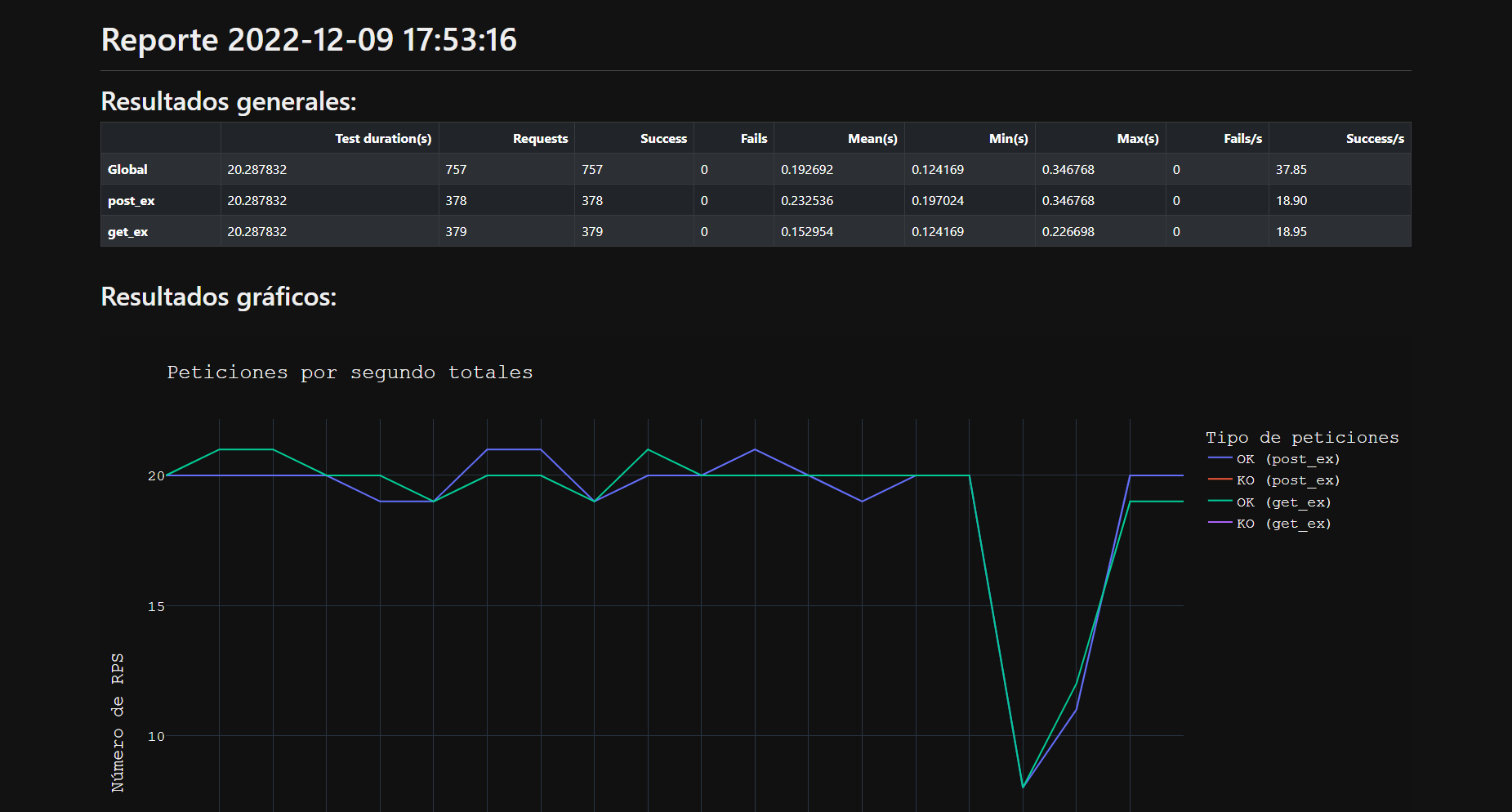
Finally the CuRT.py file is executed and the report is generated:
Using source code
Installation
Prerequisites
- Install Python 3.
- Add Python installation path to
pathenvironment variable.
Get started
- Create a virtual environment (
pipenv,virtualenv, etc.). - Activate the virtual environment.
- Install required modules (
requirements.txt):
pip install -r requirements.txt
TODO
Future features planned for CuRT:
- Debug Mode: Add optional debug functionality to provide detailed logging and troubleshooting information during test execution and report generation.
- Additional HTTP Methods: Extend the
simple_rest.pymodule to support all HTTP methods including PUT, DELETE, PATCH, HEAD, OPTIONS, and TRACE for comprehensive REST API testing capabilities.
Maintenance
Current developers who maintain the code:
- Jahaziel Alvarez (jahaziel.alvarez@pm.me)


Download files
Download the file for your platform. If you're not sure which to choose, learn more about installing packages.
Source Distribution
Built Distribution
Filter files by name, interpreter, ABI, and platform.
If you're not sure about the file name format, learn more about wheel file names.
Copy a direct link to the current filters
File details
Details for the file curt-0.0.5.tar.gz.
File metadata
- Download URL: curt-0.0.5.tar.gz
- Upload date:
- Size: 22.3 kB
- Tags: Source
- Uploaded using Trusted Publishing? No
- Uploaded via: twine/6.1.0 CPython/3.13.2
File hashes
| Algorithm | Hash digest | |
|---|---|---|
| SHA256 |
f6fe1f9191f27116e0193de5d32a76530514a6b89500f836745235d6cd1262aa
|
|
| MD5 |
4985bfc846d7cacd0b69a597751c42f0
|
|
| BLAKE2b-256 |
977ab6266b0445f2370f75fabe813c492013e1f0c7b3fd89c9226e2fd83f7a82
|
File details
Details for the file curt-0.0.5-py3-none-any.whl.
File metadata
- Download URL: curt-0.0.5-py3-none-any.whl
- Upload date:
- Size: 21.7 kB
- Tags: Python 3
- Uploaded using Trusted Publishing? No
- Uploaded via: twine/6.1.0 CPython/3.13.2
File hashes
| Algorithm | Hash digest | |
|---|---|---|
| SHA256 |
4aa54fd9e12c8c29ce3495d13aa7bab5ec46a148626dbc83581701536662ee2b
|
|
| MD5 |
a557c010225267331b08c0e4a18a7749
|
|
| BLAKE2b-256 |
4866a85a09dbad737f5621c3379dff90b0cda34348105d7a8518d6b27fa4b465
|






