
Draw text along an arbitrary curve in matplotlib, with arc-length positioning and a perpendicular offset.
Verified details
These details have been verified by PyPIProject links
GitHub Statistics
Maintainers

Project description
curved-text

Draw text that follows an arbitrary curve in matplotlib.
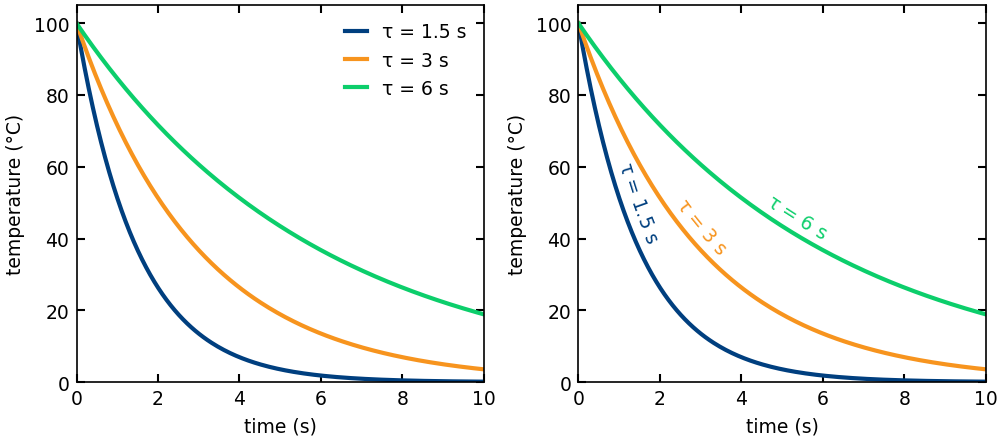
Label curves along their own paths instead of in a legend, so the eye never leaves the data to decode a colour key.
Each character is placed in display coordinates and rotated to the chord across its own advance, which follows the curve's local tangent while staying smooth even when the curve is coarsely sampled. The layout is recomputed on every draw, so the label keeps following the curve through layout, resizing, and interactive panning or zooming. Placement is controlled by three independent parameters:
pos-- where the label is anchored along the curve, as a fraction of arc length (0.0= first point,1.0= last).anchor-- which part of the label lands atpos:"start","center", or"end".offset-- a perpendicular shift off the curve, in typographic points, along the normal of the label's chord (positive is above a left-to-right curve).
A label that overruns either end of the curve is not clipped: the curve is extended along its end tangent and the overrunning glyphs sit on that straight extension.
If you know LaTeX, this is matplotlib's analogue of TikZ's text along path
decoration (from decorations.text): pos/anchor play the role of text align and the indents, offset plays the role of raise, and overrunning
text rides the tangent extension instead of being truncated at the path's end.
Install
pip install curved-text
Or, from a clone, an editable install:
pip install -e .
Usage
import numpy as np
import matplotlib.pyplot as plt
from curved_text import curved_text

x = np.linspace(0, 2 * np.pi, 400)
y = np.sin(x)

fig, ax = plt.subplots()
ax.plot(x, y)
curved_text(ax, x, y, "text that follows the curve",
            pos=0.5, anchor="center", offset=6.0, color="C3")
plt.show()
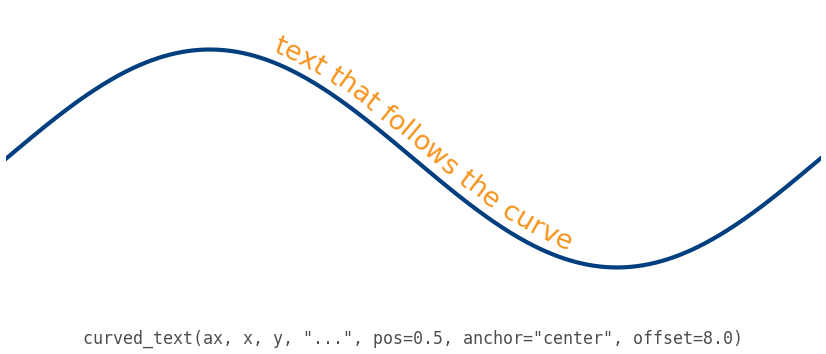
More worked examples -- the three placement controls, overrun behaviour, and integration with seaborn and pandas -- are in examples/.
The object-oriented form is also available:
from curved_text import CurvedText

CurvedText(x, y, "along the curve", ax, pos=0.2, anchor="start", offset=4.0)
Note the axes argument position: the CurvedText class takes it after x, y, text (matching matplotlib.text.Text), while the curved_text function takes it
first (matching matplotlib's axes-first helper functions).
Any extra keyword arguments (color, fontsize, alpha, fontfamily, ...) are
passed through to each character's matplotlib.text.Text.
Mathtext
A $...$ run in the label is laid out by matplotlib's
mathtext
engine and bent through the same arc-length frame as plain text. Every glyph
outline and rule box is mapped through the curve, so radicals, fractions, and
sized delimiters stay connected and follow it at any curvature. Plain and math
runs mix freely in one string:
curved_text(ax, x, y, r"flux $\propto \sqrt{D_{\mathrm{eff}}}\,(L/L_0)^2$",
            pos=0.5, anchor="center", offset=8.0)
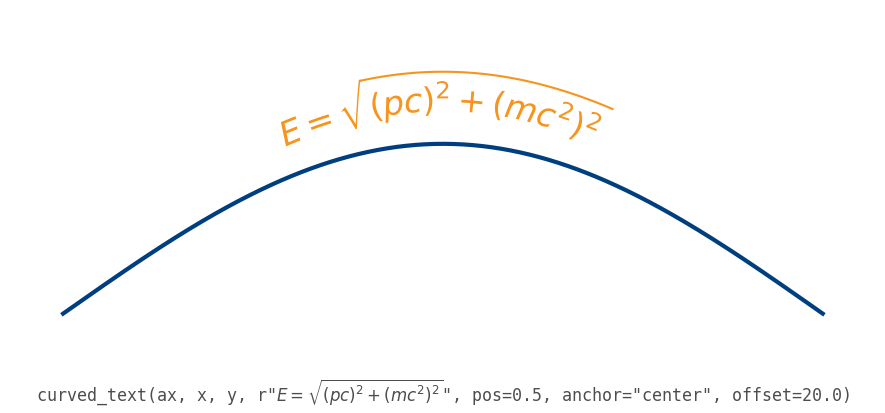
Pass parse_math=False to treat dollar signs literally. Tall expressions
compress vertically on the inside of tight bends, so choose the label size
relative to the curvature. text.usetex is not supported.
Clearing the line behind the label
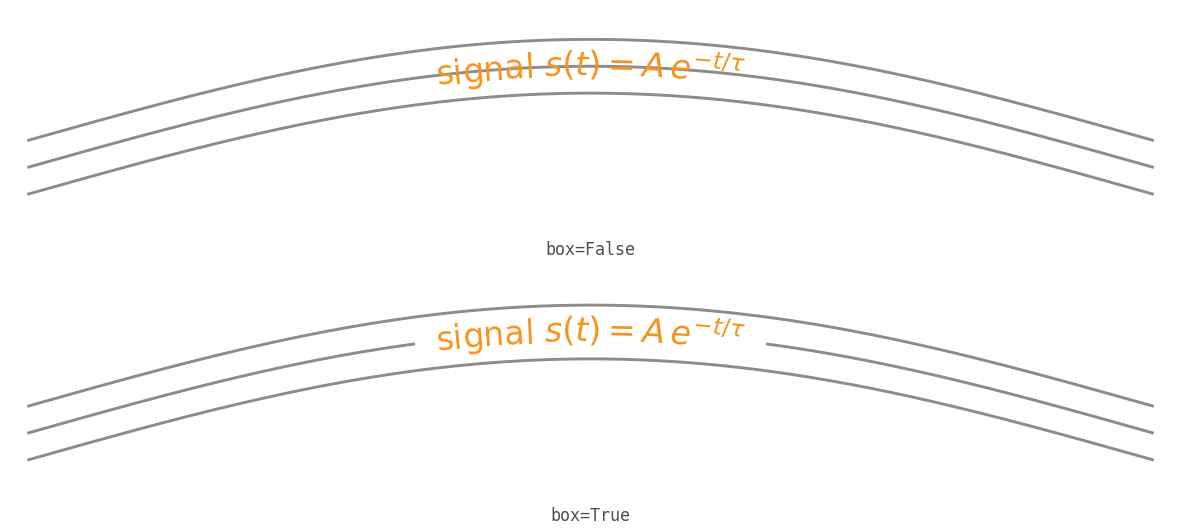
Set box to draw a casing behind the label: a band that follows the curve at
the label's height, under the glyphs, so the label stays legible where it
crosses the lines it labels. It is a single fill, so it gives solid coverage
behind plain text and mathtext alike:
curved_text(ax, x, y, r"signal $s(t) = A\,e^{-t/\tau}$", box=True)
box accepts True, a color string, or a dict (color, pad for the band
height relative to the tallest glyph, and alpha).
For a lighter, glyph-hugging casing instead, pass a white withStroke through
matplotlib's
path_effects,
which reach every glyph and mathtext run like they do on any Text. A wide
stroke there merges adjacent per-character glyphs, so box is the way to get
solid coverage under plain text:
import matplotlib.patheffects as pe

curved_text(ax, x, y, r"signal $s(t) = A\,e^{-t/\tau}$",
            path_effects=[pe.withStroke(linewidth=4, foreground="white")])
Works with seaborn, pandas, and other matplotlib-backed libraries
curved_text needs a matplotlib.axes.Axes, so it works with any library that
draws on matplotlib. seaborn's axes-level functions return an Axes, its
figure-level functions expose one through .axes, and pandas DataFrame.plot
returns an Axes as well. Pass that axes in directly:
import seaborn as sns

ax = sns.lineplot(data=df, x="x", y="y")
curved_text(ax, df["x"], df["y"], "along the curve",
            pos=0.5, anchor="center", offset=6.0)
Notes
- The curve
(x, y)should be ordered along the curve (monotonic in arc length) and have at least two points. - Arc length and the offset are computed in display space, so spacing and the offset are correct at any DPI and figure size.
- The curve should be smooth relative to the glyph size. Each glyph (and each mathtext run) follows the local tangent, so when the curve reverses direction within a glyph's width -- as raw noisy data does -- the label collides with itself. Label a smoothed or fitted trend line rather than the raw samples.
Related
matplotlib-label-lines labels
one or many lines inline at a chosen or automatically picked point, each label
rotated to the local slope. It is the quickest way to replace a legend across a
set of lines. curved-text solves the adjacent problem: making a single string
(plain or mathtext) follow the curve character by character, with arc-length
placement and a perpendicular offset, recomputed on every draw. Reach for
label-lines to drop legend labels onto several lines, and for curved-text to
make text ride a path. In the ggplot2 world,
geomtextpath covers similar
text-on-path ground.
License
MIT
Project details
Verified details
These details have been verified by PyPIProject links
GitHub Statistics
Maintainers


Download files
Download the file for your platform. If you're not sure which to choose, learn more about installing packages.
Source Distribution
Built Distribution
Filter files by name, interpreter, ABI, and platform.
If you're not sure about the file name format, learn more about wheel file names.
Copy a direct link to the current filters
File details
Details for the file curved_text-0.3.0.tar.gz.
File metadata
- Download URL: curved_text-0.3.0.tar.gz
- Upload date:
- Size: 20.9 kB
- Tags: Source
- Uploaded using Trusted Publishing? Yes
- Uploaded via: twine/6.1.0 CPython/3.13.13
File hashes
| Algorithm | Hash digest | |
|---|---|---|
| SHA256 |
4261a3564119fead5d4b04a0b8992f207d7bc55bd5d055c2842444a8c23b4b14
|
|
| MD5 |
654c72cbf18fdd8a0ef243b75ab2e4f9
|
|
| BLAKE2b-256 |
968f1c2d1c4dcc0243d9d985930f598bef81965e3584256bced13364e7f71d5e
|
Provenance
The following attestation bundles were made for curved_text-0.3.0.tar.gz:
Publisher:
publish.yml on thiebes/curved-text
-
Statement:
-
Statement type:
https://in-toto.io/Statement/v1 -
Predicate type:
https://docs.pypi.org/attestations/publish/v1 -
Subject name:
curved_text-0.3.0.tar.gz -
Subject digest:
4261a3564119fead5d4b04a0b8992f207d7bc55bd5d055c2842444a8c23b4b14 - Sigstore transparency entry: 1813081590
- Sigstore integration time:
-
Permalink:
thiebes/curved-text@0d1adc620a6a14c3d69746997b7fc980b1c6dd77 -
Branch / Tag:
refs/tags/v0.3.0 - Owner: https://github.com/thiebes
-
Access:
public
-
Token Issuer:
https://token.actions.githubusercontent.com -
Runner Environment:
github-hosted -
Publication workflow:
publish.yml@0d1adc620a6a14c3d69746997b7fc980b1c6dd77 -
Trigger Event:
push
-
Statement type:
File details
Details for the file curved_text-0.3.0-py3-none-any.whl.
File metadata
- Download URL: curved_text-0.3.0-py3-none-any.whl
- Upload date:
- Size: 13.5 kB
- Tags: Python 3
- Uploaded using Trusted Publishing? Yes
- Uploaded via: twine/6.1.0 CPython/3.13.13
File hashes
| Algorithm | Hash digest | |
|---|---|---|
| SHA256 |
021d96034c807f06a747f27ce929261e30213d461be24ad01a769a7b03978396
|
|
| MD5 |
569da2089ac81ccb7fdd3da29656fade
|
|
| BLAKE2b-256 |
46542d0068bbd4b791c7db4ea7555741ff8556bdac155f04889d8c103f8d7008
|
Provenance
The following attestation bundles were made for curved_text-0.3.0-py3-none-any.whl:
Publisher:
publish.yml on thiebes/curved-text
-
Statement:
-
Statement type:
https://in-toto.io/Statement/v1 -
Predicate type:
https://docs.pypi.org/attestations/publish/v1 -
Subject name:
curved_text-0.3.0-py3-none-any.whl -
Subject digest:
021d96034c807f06a747f27ce929261e30213d461be24ad01a769a7b03978396 - Sigstore transparency entry: 1813081822
- Sigstore integration time:
-
Permalink:
thiebes/curved-text@0d1adc620a6a14c3d69746997b7fc980b1c6dd77 -
Branch / Tag:
refs/tags/v0.3.0 - Owner: https://github.com/thiebes
-
Access:
public
-
Token Issuer:
https://token.actions.githubusercontent.com -
Runner Environment:
github-hosted -
Publication workflow:
publish.yml@0d1adc620a6a14c3d69746997b7fc980b1c6dd77 -
Trigger Event:
push
-
Statement type:






