
curveforge
Build Dirac Live target curves from research-grounded recipes.
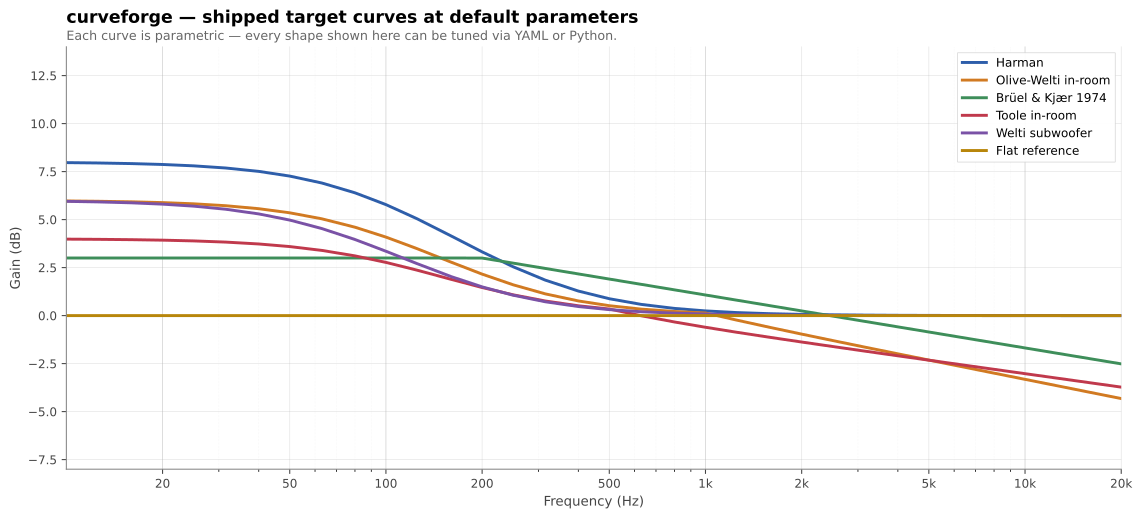
curveforge is a small CLI that turns a YAML recipe into a .targetcurve
file ready to load into Dirac Live 2/3. It ships with a curated library of
in-room target curves (Harman, Olive-Welti, B&K, Toole, Welti-sub, flat) —
each parameterised so you can sweep, compare, and tune them rather than
being stuck with whatever shelf level a preset shipped with.
Install
pip install curveforge            # or: uvx curveforge
pip install 'curveforge[plot]'    # adds matplotlib for the `plot` command
Requires Python ≥ 3.11.
Quick start
A recipe is a YAML file describing a base curve, an ordered list of transforms, and where to write the result.
# my-living-room.yml
output:
  path: living-room.targetcurve
  device_name: Living Room
  low_limit_hz: 10
  high_limit_hz: 24000

base:
  type: harman
  params:
    shelf_level: 8

transforms:
  - peq: { freq: 22, gain_db: 4, q: 1.5 }
  - rolloff: { freq: 15, order: 2 }
curveforge build my-living-room.yml
# wrote living-room.targetcurve
Drop the file into Dirac Live → Custom Target Curve → load.
Cookbook
Worked recipes for common situations. Each one builds cleanly with
curveforge build <yaml>; the full versions live in
gallery/.
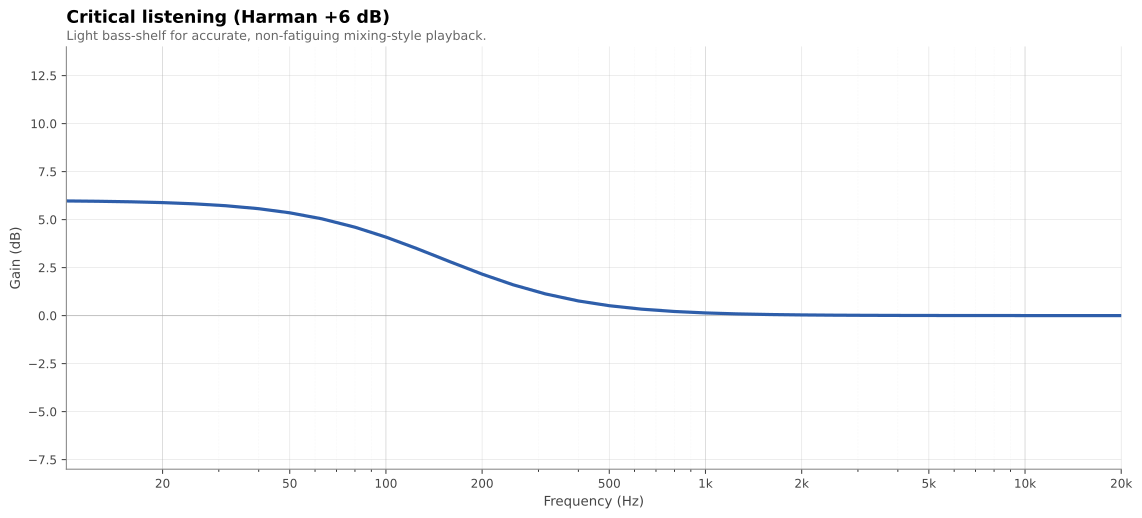
Critical listening (Harman +6)
A lean, balanced Harman shelf for accurate mixing-style playback. Light bass weight — the right baseline if you want clarity over physical impact.
base:
  type: harman
  params: { shelf_level: 6 }
Cinema / bass-heavy
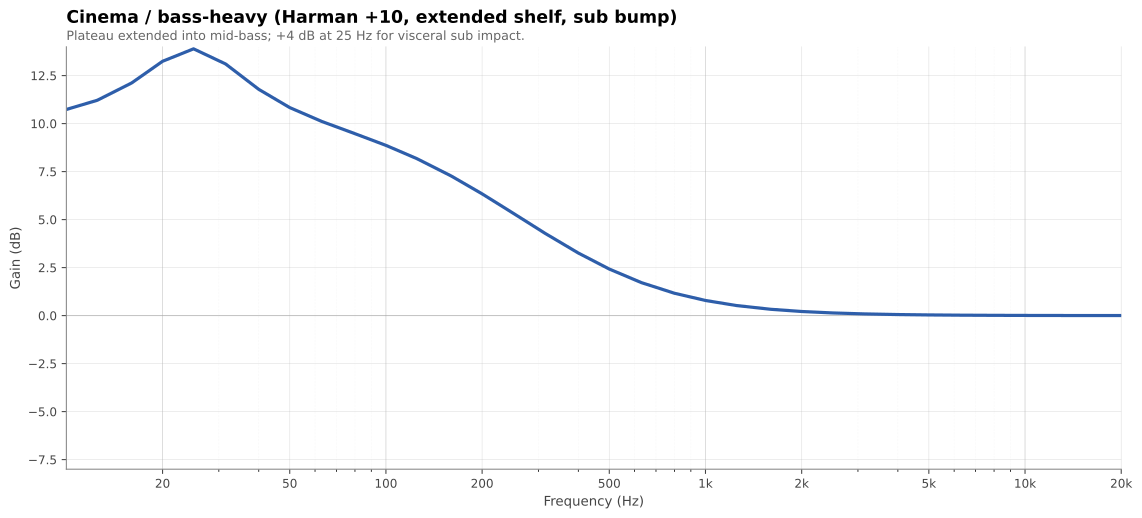
Harman +10 with the shelf extended into mid-bass (shelf_corner: 150),
plus a +4 dB peak at 25 Hz for visceral sub impact. Compensates for the
steepening equal-loudness contours at low listening levels.
base:
  type: harman
  params: { shelf_level: 10, shelf_corner: 150 }
transforms:
  - peq: { freq: 25, gain_db: 4, q: 1.0 }
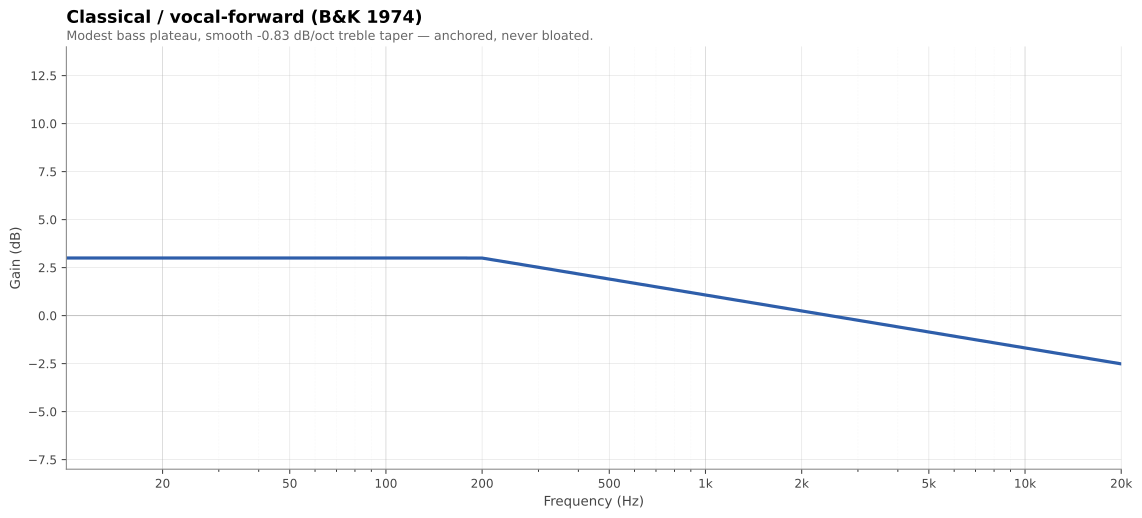
Classical / vocal-forward (B&K 1974)
Modest bass plateau, smooth 0.83 dB/oct treble taper. Anchored without being bloated; smooth without being dark. The closest thing to a "natural room" target.
base:
  type: b_and_k
  params: { bass_level: 3, bass_corner: 200, treble_slope: -0.83 }
Sub-only calibration
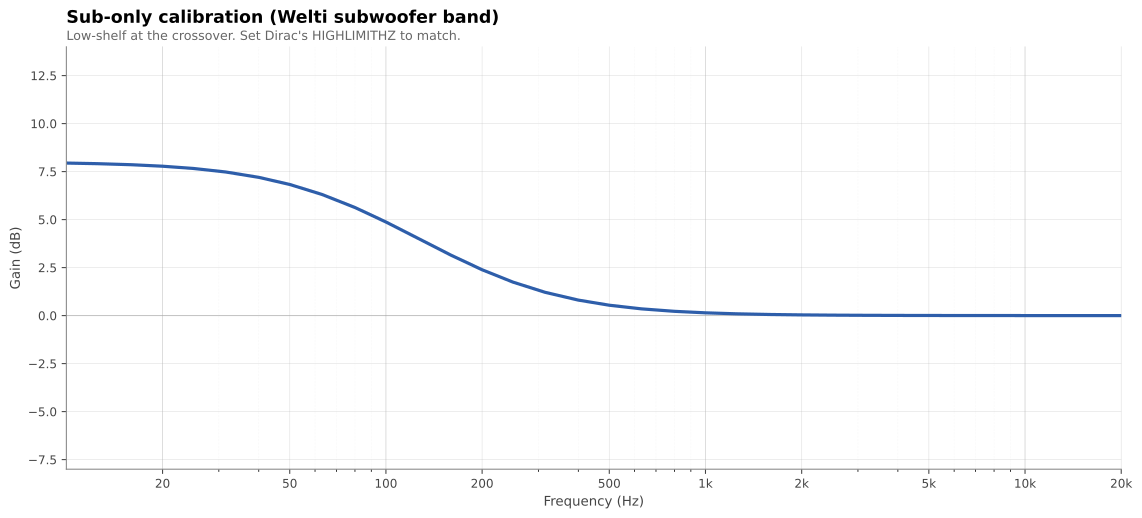
Low-shelf with corner at the sub-to-mains crossover. Use this for
independent sub-channel correction in Dirac; set Dirac's HIGHLIMITHZ to
match the crossover_hz value.
base:
  type: welti_sub
  params: { shelf_level: 8, crossover_hz: 80 }
Comparing curves at a glance
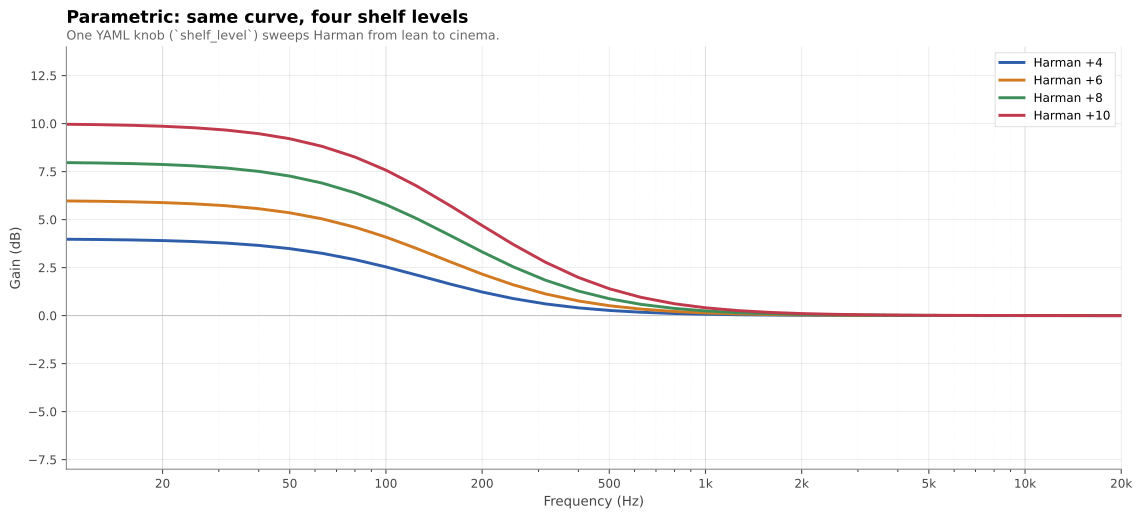
One YAML knob sweeps Harman from lean to cinema — curveforge plot
overlays several recipes side-by-side so you can see exactly what each
parameter does.
curveforge plot harman-4.yml harman-6.yml harman-8.yml harman-10.yml \
    -o comparison.svg
Case study: real-world iteration
Want to see how to use these tools to actually voice a system? The Triangle BR09 + SVS SB-2000 case study walks through ~10 listening iterations: each one frames a complaint as a frequency band, diagnoses speaker-voicing-vs-room with the Dirac L+R overlay, applies a targeted recipe change, and reflects on what worked. The point isn't to copy the curve — it's to copy the process.
Curves shipped
| Name | Shape | Best for |
|---|---|---|
harman |
First-order bass shelf, flat treble | Music; the community default. shelf_level 4–14 sweeps from lean to cinema. |
olive_welti_inroom |
Bass shelf + downward treble tilt | Bright rooms, near-field, or "finished mix" sound. |
b_and_k |
Modest bass plateau + linear treble taper | Classical, jazz, vocals. Smooth, natural-room character. |
toole_inroom |
Flat below 500 Hz + gentle tilt above | Directionally well-behaved speakers in treated rooms. The "preserve what good speakers do" target. |
welti_sub |
Sub-band low-shelf at the crossover | Sub-only calibration runs (mains corrected separately). |
flat |
0 dB everywhere | Baseline before transforms; measurement reference. |
breakpoints |
User-supplied (Hz, dB) pairs | Hand-drawn curves; imports from other tools. |
curveforge list curves and curveforge info <name> print parameters and
citations from the CLI. Detailed background on each curve is in the
References section at the bottom.
Transforms shipped
| Name | What it does |
|---|---|
gain |
Boost or cut a frequency band by a fixed dB, with cosine-tapered edges |
peq |
Parametric peaking EQ (RBJ analog biquad — freq + gain + Q) |
shelf |
First-order low- or high-shelf added on top of the current curve |
rolloff |
Butterworth high-pass attenuation (Nth-order) for sub protection |
tilt |
Linear dB/octave slope across the spectrum, anchored to a chosen Hz |
Transforms apply in the order they appear in the recipe.
Python library
from curveforge import build_curve, write_targetcurve

curve = build_curve(
    base="harman",
    base_params={"shelf_level": 8, "shelf_corner": 105},
    transforms=[
        ("peq", {"freq": 25, "gain_db": 4, "q": 1.0}),
        ("rolloff", {"freq": 15, "order": 2}),
    ],
)

write_targetcurve(
    path="living-room.targetcurve",
    curve=curve,
    name="My target",
    device_name="Living Room",
    low_limit_hz=10,
    high_limit_hz=24000,
)
Useful for batch jobs, notebooks, or wrapping curveforge in your own tools.
Other commands
curveforge list curves|transforms|all
curveforge info <curve_or_transform_name>
curveforge validate path/to/file.targetcurve
curveforge diff a.targetcurve b.targetcurve
curveforge render recipe.yml --stdout --format csv
curveforge plot recipe.yml [-o curve.svg]      # needs [plot] extra; format inferred from extension
curveforge plot a.yml b.yml -o overlay.svg     # overlay multiple recipes
curveforge tweak input.targetcurve tweak.yml   # apply transforms to an existing curve
Why this exists
Existing Dirac target-curve resources (the GUI editor, hand-curated target-curve files shared on audio forums) force you to choose between a small set of fixed shapes or hand-edit breakpoints. curveforge gives you the parametric model behind each research target, so you can:
- Sweep a Harman shelf from +4 to +14 dB by changing one number
- Layer a sub-bass peak or a protective rolloff on top of any base curve
- Compare scientific targets at equivalent settings (e.g. Harman vs B&K vs Toole at +6 dB bass)
- Treat target curves as code: version-controlled, diffable, reproducible
References
Each curve module ships with full citations accessible via
curveforge info <name>. The condensed sources:
harman— Olive, S. E. & Welti, T. — multiple AES papers on listener preference for in-room loudspeaker response (Harman International). See also Toole, F. E., Sound Reproduction (3rd ed., 2017), Routledge / AES Presents.olive_welti_inroom— Olive, S. E., Welti, T., & McMullin, E. (2013). "Listener Preferences for In-Room Loudspeaker and Headphone Target Responses." AES 135th Convention, paper 8994. (See also paper 8867 at the 134th Convention, which introduces the RR1_G reference curve.)b_and_k— Brüel & Kjær Application Note 17-197 (1974), "Relevant loudspeaker tests in studios, in Hi-Fi dealers' demo rooms, in the home, etc., using 1/3 octave, pink-weighted, random noise."toole_inroom— Toole, F. E. (2017). Sound Reproduction: The Acoustics and Psychoacoustics of Loudspeakers and Rooms (3rd ed.). Routledge / AES Presents.welti_sub— Welti, T. & Devantier, A. (2006). "Low-Frequency Optimization Using Multiple Subwoofers." J. AES 54(5), pp. 347–364. See also Welti, Subwoofers: Optimum Number and Locations (Harman).
License
MIT
1 maintainer

Metadata
1 maintainer
Release files for curveforge 0.1.0.post1
For a detailed explanation of source distributions (sdists) and built distributions (wheels), please see the package formats documentation.
Source distribution (sdist)
| File | Size | Uploaded | |
|---|---|---|---|
| curveforge-0.1.0.post1.tar.gz | 187.4 kB | Details |
Built distribution (wheel)
| File | Interpreter | ABI | Platform | Reset |
|---|---|---|---|---|
| curveforge-0.1.0.post1-py3-none-any.whl | Python 3 | none | any | Details |
Total release size: 228.4 kB
Release files / curveforge-0.1.0.post1.tar.gz
| Download URL | curveforge-0.1.0.post1.tar.gz |
|---|---|
| Size | 187.4 kB |
| Tags | Source |
|
SHA-256 checksum How to use checksums |
3322ab653d5bab6a18bc3594828d65767b27d883c675c400a5928c4ad0c90741
|
|
BLAKE2b-256 checksum How to use checksums |
43d7ebc743fc97a548de04acd82533820249b48fb0de23d89893c3c8d44515c2
|
| Upload date | |
|
Uploaded using Trusted Publishing? What is trusted publishing? |
Yes |
| Uploaded via |
twine/6.1.0 CPython/3.13.12
|
Provenance
Provenance describes where a file came from. On PyPI, provenance is shared via attestations, which provide a verifiable record of the build or publishing details. View details, limitations and caveats.


PyPI Publish Attestation
PyPI verified that this artifact, at this checksum, originated from the publisher listed below.
Signed by GitHub Actions, verified by PyPI on May 13, 2026.
Transparency logRelease files / curveforge-0.1.0.post1-py3-none-any.whl
| Download URL | curveforge-0.1.0.post1-py3-none-any.whl |
|---|---|
| Size | 41.0 kB |
| Tags | Python 3 |
|
SHA-256 checksum How to use checksums |
658f190c097ec94f14b7d0026230d775c6ab906e6c8905337d1b9ffaf540f965
|
|
BLAKE2b-256 checksum How to use checksums |
0d8e7945b6a8dd6bb24917e3fbaa507c304e71b4ab0b0246c0941d8d85ed6e5a
|
| Upload date | |
|
Uploaded using Trusted Publishing? What is trusted publishing? |
Yes |
| Uploaded via |
twine/6.1.0 CPython/3.13.12
|
Provenance
Provenance describes where a file came from. On PyPI, provenance is shared via attestations, which provide a verifiable record of the build or publishing details. View details, limitations and caveats.
PyPI Publish Attestation
PyPI verified that this artifact, at this checksum, originated from the publisher listed below.
Signed by GitHub Actions, verified by PyPI on May 13, 2026.
Transparency log













