
custmatch



Find the records that are the same customer - across your CRM, billing and web sign-ups - group them into households, and write one golden record per customer.
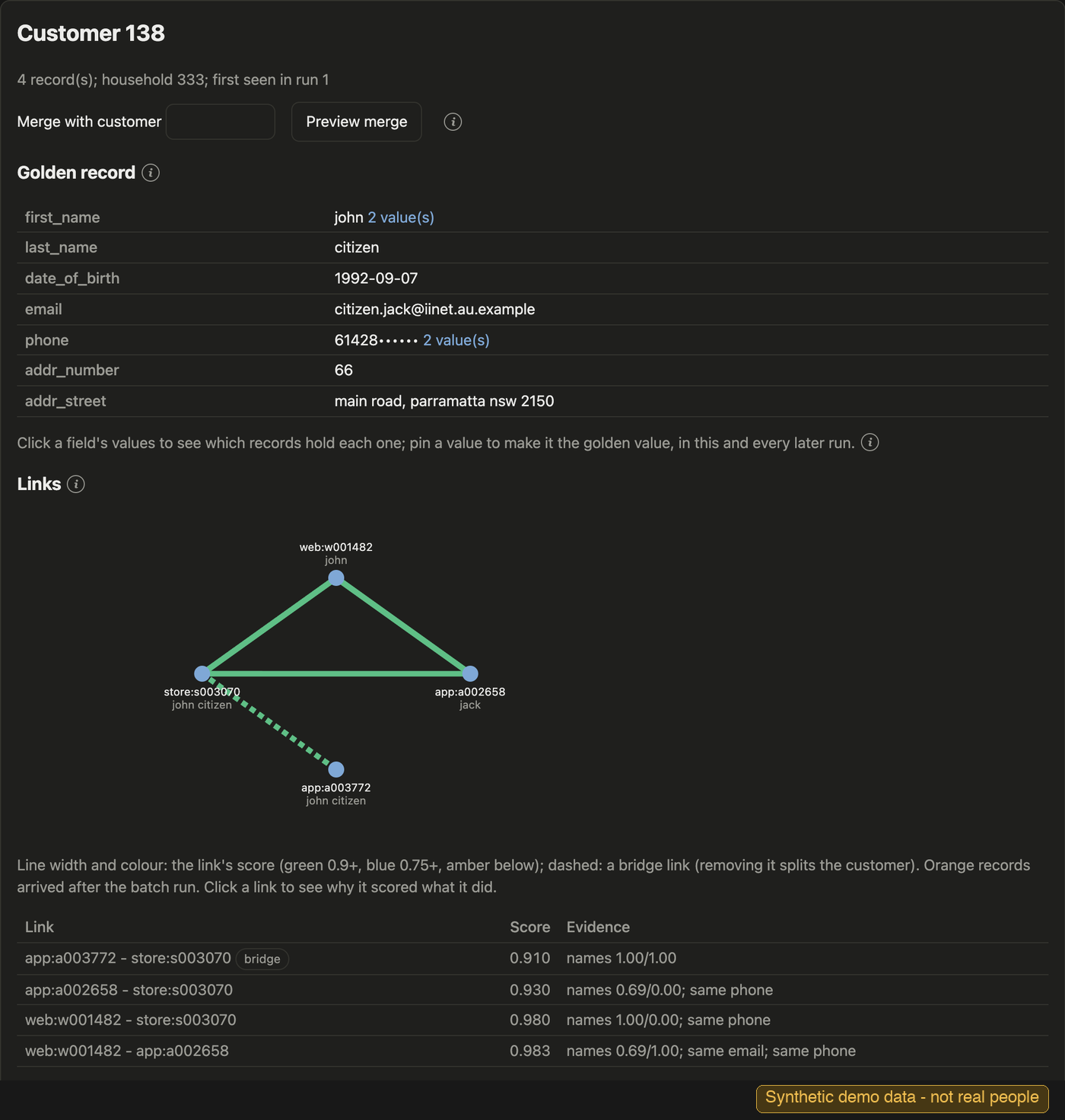
One customer, John Citizen, found in four records from a web sign-up, the app and a store. The golden record at the top takes the best value of each field; "2 value(s)" marks where the records disagree, and a steward can pin the right one. Below it, each line is a link the model made between two records, green for a score of 0.9 or more, with the evidence in the table: "jack" in the app joined through the same email and phone. The dashed line is a bridge - the only link holding app:a003772 to the rest - so it is the one to check if the customer ever looks wrong.
Why
Customer-matching projects stumble on the same problems. Records arrive in different formats, with typos, nicknames and swapped names, and web sign-ups carry little more than a first name and an email. Contact details lie: "noemail@noemail.com" is on a hundred records, a family shares one email, a call centre typed in its own phone number. Spouses, parents and children, twins and two John Smiths look like one person; one weak link chains strangers into a giant customer; nobody can say why two records were merged; a steward's correction is lost on the next run; customer IDs churn downstream; and the data is personal. custmatch is built around those problems: junk and shared contacts are recognised rather than trusted, households are kept apart from people, the match threshold is judged on whole customers so it cannot chain, every link is explained, decisions and IDs survive reruns, and contacts can be matched hashed.
How it works
records ─► clean & normalise ─► profile contacts ─► blocking ─► compare pairs ─► random forest
                                                                                      │
golden records ◄─ households ◄─ customers ◄─ threshold chosen on whole customers ◄────┘
- Clean and normalise names, phones, dates, emails and addresses by country (US, AU, NZ, GB, CA): nicknames, transliteration, Gmail dots, phone formats.
- Profile contacts: each email and phone is personal, a household's, or junk - judged by who shares it, so junk and shared values stop counting as proof.
- Blocking compares only records that share a key (a surname and street, an email...), so a million records make millions of pairs, not half a trillion.
- Compare pairs with name similarity, rarity and graded dates; a random forest learns from a few hundred labelled pairs (active learning picks the useful ones).
- Threshold on whole customers: links are joined into customers, and the threshold is the one whose customers, not pairs, are most accurate, estimated from cross-fitted labels - the project's central design choice.
- Households group customers by address and shared contacts; a golden record takes the best value of each field.
docs/guide.md explains each step.
Results
On other people's data. Public benchmarks, with every tool given the same labelled pairs and Splink its documented settings. Clustered F1; the best in each row is bold (chapter 9 has the details):
| Dataset | custmatch | Splink | dedupe |
|---|---|---|---|
| NCVR (Leipzig): real voter names, generated errors, 20,000 people | 99.22, against a blocking ceiling of 99.46 | 98.01 | not run |
| NCVR (Leipzig), 200,000 people | 95.63 | 93.94 | not run |
| historical_50k (Splink's): dense genealogy records | 87.02 | 76.82; 82.79 at its documented threshold | 80.02 |
| febrl4 (Splink's) | 99.84 | 99.83 | 99.11 |
| febrl3 (Splink's) | 99.42 | 99.63 | 98.11 |
| fake_1000 (Splink's) | 87.11 | 92.52 with its tutorial's looser blocking | 70.26 |
| csv_example (dedupe's): childcare sites | 86.95 | 64.59 | 91.37 |
| patent_example (dedupe's): patent applicants | 87.26 with "max_block": 300; 75.88 by default |
80.19 | 49.66 |
On real names custmatch comes within a quarter of a point of what its blocking allows; on clean records the tools tie; on organisations, which it is not built for, dedupe or its own settings win.
At scale, on synthetic customer data. A file generated with the placeholders, shared contacts and households custmatch was built for - its home ground:
| 10 million records | 1 million records | Messy customer data | Ensemble option |
|---|---|---|---|
| 31 minutes on one 16-core machine, 96.89 clustered F1 | 71 seconds on a laptop, 97.99 clustered F1 | 97.3 clustered F1, against Splink's 84.4 | +0.41 F1 on average, +1.8 on sparse records |
The two sizes ran on different machines: per record the laptop was about 2 to 2.6 times faster than the cloud machine. On one machine, time per million records rose by about a quarter from 2 to 10 million, most of it in the household and golden-record stage.
Where it is stronger
- Messy customer data. Placeholder, shared and household contacts are recognised, not trusted, so they stop chaining strangers together: at a million records custmatch scores 97.99 clustered F1 where Splink scores 78.88, and against a CDP's exact-identifier matching it finds 22 to 26 more points of the true matches.
- It keeps going. Accuracy holds as the file grows - 97.99 at a million records, 96.89 at ten million, on one machine. dedupe, about as accurate on 20,134 records (97.75), took 499 seconds and 8.5 GB there against custmatch's 5.4 seconds and 0.35 GB, so a million records was out of reach on the same 16 GB laptop.
- Modest memory. A million records peak at 3.64 GB on a laptop (Splink: 5.96 GB); ten million at 34.0 GB, about 3.4 GB per million, so a 16 GB laptop holds about four million. dedupe needed 8.5 GB for 20,134 records.
- An ensemble for hard files.
"matcher_model": "forest_catboost"averages the random forest with CatBoost: +0.41 clustered F1 on average over six datasets, +1.3 on dense genealogy records and +1.8 on sparse sign-ups, never more than 0.03 behind on any dataset, for runs about 30% longer.
Where others win. Splink needs no labels; custmatch needs about 300, most of them picked for you by active learning (within 1.6 points of 1,000 on five of six datasets; with none, no cut-off held across datasets - chapter 4). Splink is also faster once its large blocks are skipped (21.6 seconds at a million records), and it can run on Spark across a cluster: its developers matched a billion records that way. custmatch runs on one machine - about 3.4 GB per million records, so tens of millions, not hundreds. On clean records with names and places only, the tools are close.
The report has the full
comparison - against Splink, dedupe and a CDP's exact matching, on these files and on each tool's
own datasets - with every caveat: the synthetic and Australian files were generated for this
project, so their errors are ones the tool was designed around, and it needs good labels. The
test suite checks every number against research/results/*.json.
Quick start
pip install custmatch                 # Python 3.10+ (or from a clone: pip install -e .)
# try it on the bundled demo (1,766 synthetic records, 600 pairs already labelled):
custmatch run examples/demo/config.json --labels examples/demo/labels.csv --out demo_out/

# on your own files: map the columns in a config, label pairs 1 or 0, run
custmatch sample config.json --n 300 --out to_label.csv
custmatch sample config.json --active to_label.csv --n 100 --out more.csv   # the most useful pairs next
custmatch run config.json --labels labels.csv --out results/
config.json maps your files' columns onto custmatch's fields; examples/demo/config.json is a
small working example, and all example data is synthetic (examples/README.md). For sparse
records - only a first name plus an email or mobile - add "country": "AU" (or your country's
code) and label with sample --active: on a sparse Australian test file that took clustered F1
from 54.9 to 81.7 (examples/au/config.json). The run writes clusters.csv (customer and
household per record), golden_records.csv, links.csv (every link with its evidence, weakest
first), suspect_records.csv and a summary.json with warnings.
The service: custmatch-server
The library runs a batch over files. custmatch-server runs it as a self-hosted service next to your data - one Docker image, one database (Postgres, or SQLite for a trial):
- Source records and their loads kept in the database, every version of every record; files dropped in an inbox loaded and the batch run on a schedule, with health checks and alerts.
- Real-time matching and lookups over HTTP (
POST /match,GET /records/...), consistent with the batch run, which reconciles every real-time decision. - A steward dashboard: the review queue with a breakdown of every score, customers as a
network of links, merge and split with previews, pinned golden-record values, decisions that
train the next run, approval by a second steward, the model's accuracy and the data's quality
- every chart with an explanation of how it is calculated and what good looks like.
- API keys with roles, an audit log of every steward action.
docker compose -f server/docker-compose.yml up -d --build db api # then see server/README.md
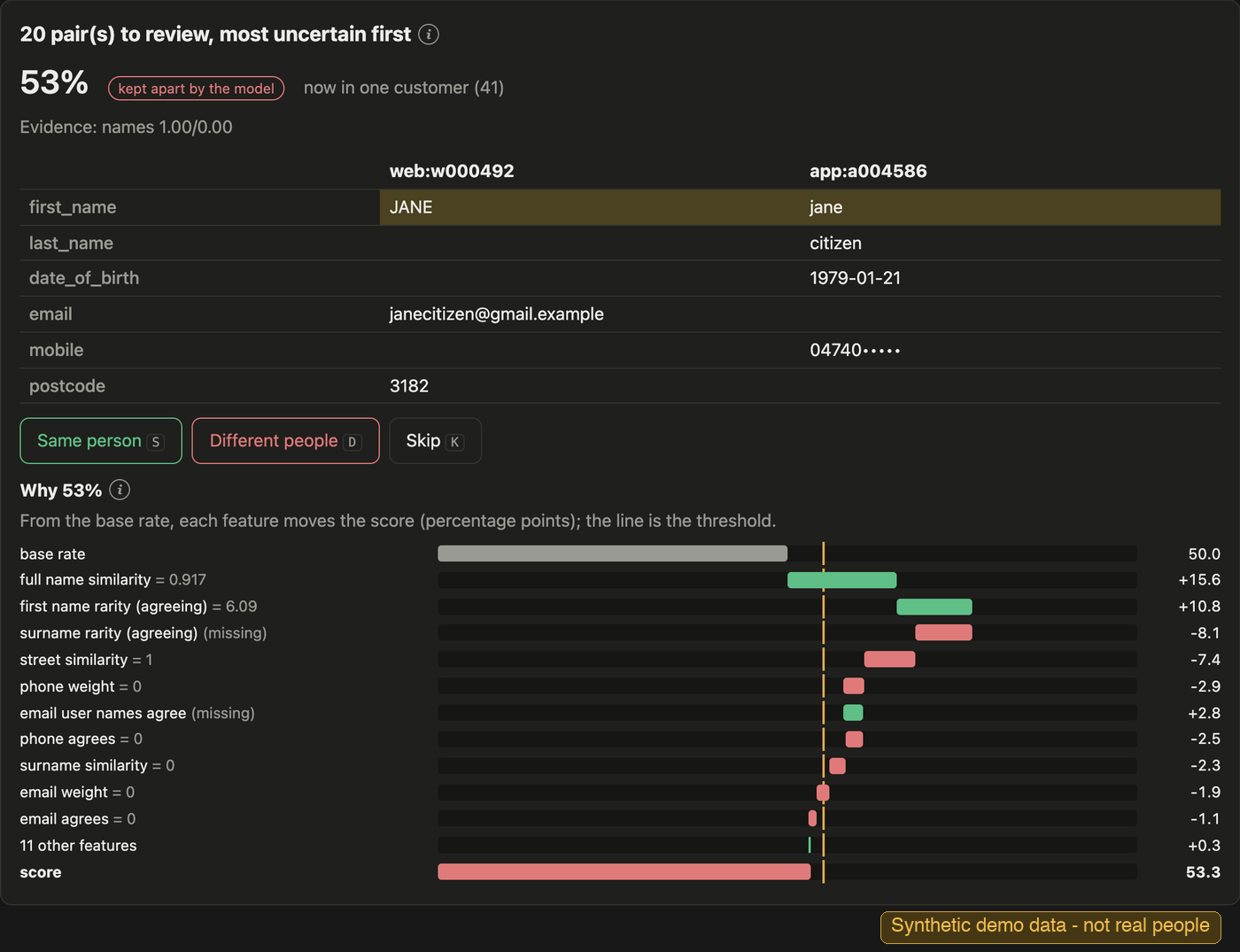
The review queue shows the pairs the model was least sure of, closest calls first. Both records here say Jane, but the web sign-up has only an email and a postcode, the app record a surname, a birth date and a mobile, and they share nothing else. The chart explains the 53%: from the base rate, the agreeing first name pushes the score up, and the missing surname and unshared contacts pull it back below the threshold (the yellow line), where the model kept them apart. A steward answers Same person or Different people*; the answer applies at once and teaches the next run.*
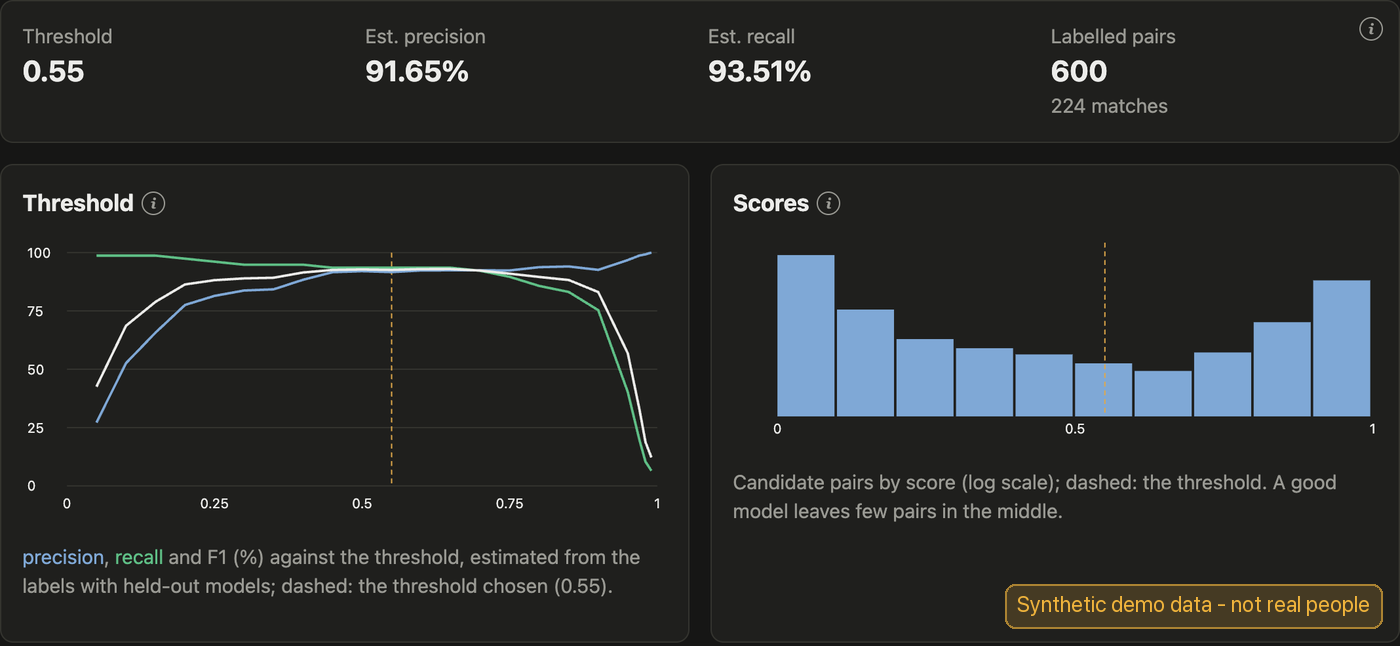
How well the model is doing, and where its line is drawn. Each pair of records gets a score from 0 to 1, and the threshold is the score above which two records count as one person. The left chart moves that threshold from 0 to 1: raise it and precision (blue - of the records joined, the share that truly are one person) rises while recall (green - of the true matches, the share found) falls. The dashed line is where custmatch set it, the point where the two balance best (F1, white), judged on whole customers: here an estimated 91.65% precision and 93.51% recall. The right chart counts the pairs at each score. A confident model puts most pairs near 0 (clearly different) or near 1 (clearly the same); the few in the middle are the ones it sends to the review queue.
server/README.md is the operator guide; the report's chapter on the service what it was measured at.
Features
Key: ✅ done and measured · ◐ opt-in · ❌ not built yet.
Matching
| Feature | Status | Notes |
|---|---|---|
| Learns from your labelled pairs; the threshold is chosen on whole customers, which stops chaining | ✅ | The central design choice: closure amplifying false links is well known (Hassanzadeh et al., 2009); custmatch picks the threshold that resists it from the labels |
| Active learning: it picks the pairs worth labelling | ✅ | Essential on sparse records |
| Country profiles: US, AU, NZ, GB, CA, several per file | ✅ | Phones, dates, emails, postcodes, SSN checks, nicknames |
| Name variation: nicknames, typos, swapped names, accents, Chinese and Arabic script | ✅ | |
| Junk and placeholder contacts ignored (test@test.com, 0400 000 000) | ✅ | Bought "gold" numbers kept; placeholder names and addresses opt-in |
| Sparse records: a first name and an email or mobile | ✅ | |
| Households: couples, families, shared phones and emails | ✅ | |
| Large entities that share every key (an organisation with hundreds of records) | ✅ | Checked by the model, not skipped as junk |
| Suspect records flagged for review: profanity, disposable or random-looking emails | ✅ | suspect_records.csv; never changes a match |
| Twins kept apart | ◐ | "twin_guard" |
| Safe contact details: a precision target, and contacts taken only through certain links | ◐ | "min_precision", "contact_confidence", contacts.csv |
| One record per person in a duplicate-free source (a voter roll, a loyalty scheme) | ◐ | "unique_sources" |
| Trusted IDs: same loyalty or customer number, same person | ✅ | "trusted_ids" |
| Record dates: moves, name changes, reissued mobiles | ◐ | "record_dates" |
| Cookie and device-ID stitching, with shared-device and call-centre guards | ✅ | "identity_events" |
| A forest and CatBoost averaged, for hard and sparse files | ◐ | "matcher_model": "forest_catboost" |
| Address verification against official files (G-NAF, USPS) | ❌ | Needs licensed reference data |
| Business (B2B) matching: companies and their contacts | ❌ | People and households |
Golden records
| Feature | Status | Notes |
|---|---|---|
| A golden record per customer, with survivorship rules per field | ✅ | Most recent, most common, preferred sources with a fallback |
Operating over time
| Feature | Status | Notes |
|---|---|---|
| New, updated and deleted records without a full rerun | ✅ | custmatch add, --delete |
| Stable customer IDs with a history of merges and splits | ✅ | Records stop swapping between people as data arrives |
| Review queue for uncertain pairs | ✅ | review.csv |
| Steward overrides and unmerge, kept across runs | ✅ | "overrides" |
| Monitoring: match rates and drift across runs | ✅ | custmatch monitor |
| Real-time matching and lookup | ✅ | custmatch-server: POST /match, GET /records/... |
| Steward dashboard, scheduled runs, health checks and alerts | ✅ | custmatch-server |
Trust and privacy
| Feature | Status | Notes |
|---|---|---|
| Why two records were, or were not, matched | ✅ | links.csv, custmatch explain |
| Matching on hashed emails, phones and IDs | ✅ | "hash_fields" |
| Result files without names or contacts: record keys and evidence only | ◐ | "minimal_outputs"; the saved state that custmatch add needs still holds the records |
| Erasure requests | ✅ | custmatch forget |
Documentation
| docs/guide.md | Using custmatch: how it works, step by step; your config, labels and a run; running it over time; every option; a glossary |
| docs/report/ | The research: what was found, then one chapter per question - whole customers not pairs, which matcher, labels, fake contacts and households, blocking and scale, golden records, CDPs, other tools - and reproductions of published work |
| docs/reproducing.md | Rebuilding the datasets, rerunning every experiment, the test suite, and reproduction traps |
| server/README.md | Running custmatch-server: start it, load data, keys, schedules, the dashboard, monitoring, backup, upgrades |
Tests
pip install -e '.[test]' && pytest tests/
pip install -e ./server httpx              # the service's tests too
The suite includes a check that every number quoted in the docs still matches research/results/*.json.
License
1 maintainer

Metadata
1 maintainer
Release files for custmatch 0.1.1
For a detailed explanation of source distributions (sdists) and built distributions (wheels), please see the package formats documentation.
Source distribution (sdist)
| File | Size | Uploaded | |
|---|---|---|---|
| custmatch-0.1.1.tar.gz | 175.1 kB | Details |
Built distribution (wheel)
| File | Interpreter | ABI | Platform | Reset |
|---|---|---|---|---|
| custmatch-0.1.1-py3-none-any.whl | Python 3 | none | any | Details |
Total release size: 287.6 kB
Release files / custmatch-0.1.1.tar.gz
| Download URL | custmatch-0.1.1.tar.gz |
|---|---|
| Size | 175.1 kB |
| Tags | Source |
|
SHA-256 checksum How to use checksums |
12b232814f77ef216e60d768c61227503a0792cb5a9ecc917dff598ea4d7ed82
|
|
BLAKE2b-256 checksum How to use checksums |
9c3c960b222309be51aed356bea8f002e44f84f9981653bd05d7720ee3159ae5
|
| Upload date | |
|
Uploaded using Trusted Publishing? What is trusted publishing? |
Yes |
| Uploaded via |
twine/7.0.0 CPython/3.13.14
|
Provenance
Provenance describes where a file came from. On PyPI, provenance is shared via attestations, which provide a verifiable record of the build or publishing details. View details, limitations and caveats.


PyPI Publish Attestation
PyPI verified that this artifact, at this checksum, originated from the publisher listed below.
Signed by GitHub Actions, verified by PyPI on Oct 11, 2026.
Transparency logRelease files / custmatch-0.1.1-py3-none-any.whl
| Download URL | custmatch-0.1.1-py3-none-any.whl |
|---|---|
| Size | 112.5 kB |
| Tags | Python 3 |
|
SHA-256 checksum How to use checksums |
d82b89c3efc584751bd604e1660e9a24d92cec427f0f067372d6af7d933a0f31
|
|
BLAKE2b-256 checksum How to use checksums |
aa384ead2d93c17a06abf8819002d00fddb930a65de16b1819f2b36ed79c566c
|
| Upload date | |
|
Uploaded using Trusted Publishing? What is trusted publishing? |
Yes |
| Uploaded via |
twine/7.0.0 CPython/3.13.14
|
Provenance
Provenance describes where a file came from. On PyPI, provenance is shared via attestations, which provide a verifiable record of the build or publishing details. View details, limitations and caveats.
PyPI Publish Attestation
PyPI verified that this artifact, at this checksum, originated from the publisher listed below.
Signed by GitHub Actions, verified by PyPI on Oct 11, 2026.
Transparency log













