
Library for colored output of unit tests in the console

Project description
Customcolor


Customcolor is a library for colorful output of test run information in the console when using Python's built-in unittest module.
If you're not using PyCharm but, for example, an environment like VS Code, you may have noticed that with a large number of tests, it can be difficult to quickly spot which test has failed. Moreover, it might be hard to see where the output of the failed test ends. This can make it harder to analyze test results and identify issues. That's why you might want to use the customcolor library.
Platforms
Customcolor is designed for use on Windows and Linux operating systems.
You may also try to use it on macOS, though it hasn't been tested there. If you manage to get it running, let me know — I'd be happy to update this section!
Installation
Downloading customcolor is easy since it's available on PyPI. You can install it with the following command:
pip install customcolor
Usage
In essence, all the library does is create a ColorTestRunner class, which you can pass to the standard unittest.main() function.
Example
Suppose your project has the following structure:
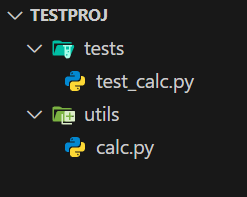
And the file test_calc.py contains the following code:
import unittest
from customcolor.runner import ColorTestRunner

from utils.calc import *


class MyTest(unittest.TestCase):
    def test_failed(self):
        """Test that fails"""
        self.assertEqual(add(3, 6), 11)


    def test_error(self):
        """Test that raises an error"""
        raise ValueError("Unexpected error")


    def test_ok(self):
        """Test that passes"""
        self.assertEqual(add(2, 2), 4)


if __name__ == "__main__":
    unittest.main(testRunner=ColorTestRunner(verbosity=2))
If you run the test the usual way, like this:
python -m unittest -v tests.test_calc
you won't see colored output. This is because in this case, unittest uses the default classes TextTestRunner and TextTestResult.
To run the test with colored output, you should use the command:
python -m tests.test_calc
Output without the library vs with the library
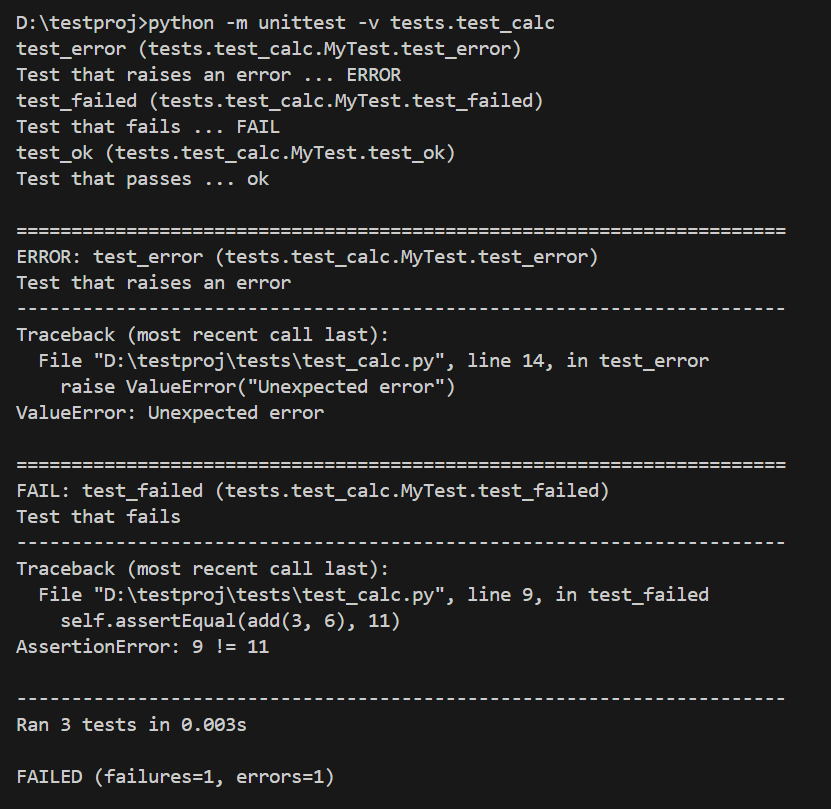 |
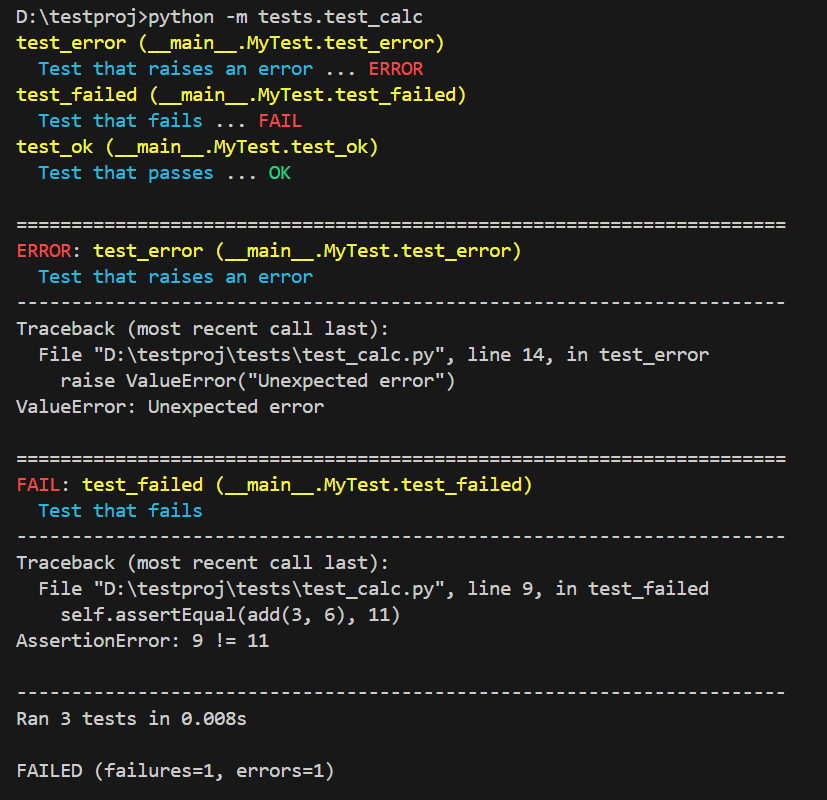 |
Additional Features
Since this library has no dependencies and is written entirely in pure Python, it includes color print functions, which are wrappers around the standard print function.
This means if you install the library, you can use colored console output without needing to install any additional modules. However, the number of available colors might be limited for your needs.
Example
from customcolor.colors import *


print_dark_yellow("DARK_YELLOW")
print_yellow("YELLOW")
print_gray("GRAY")
print_light_gray("LIGHT_GRAY")
print_white("WHITE")
print_black("BLACK")
print_dark_blue("DARK_BLUE")
print_blue("BLUE")
print_dark_red("DARK_RED")
print_red("RED")
print_dark_green("DARK_GREEN")
print_green("GREEN")
print_dark_magenta("DARK_MAGENTA")
print_magenta("MAGENTA")
print_dark_cyan("DARK_CYAN")
print_cyan("CYAN")

color_print("GREEN", color=TextColor.GREEN)
Output in cmd
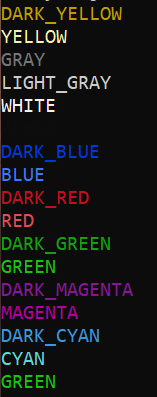
Release history Release notifications | RSS feed

Download files
Download the file for your platform. If you're not sure which to choose, learn more about installing packages.
Source Distribution
Built Distribution
Filter files by name, interpreter, ABI, and platform.
If you're not sure about the file name format, learn more about wheel file names.
Copy a direct link to the current filters
File details
Details for the file customcolor-0.0.4.tar.gz.
File metadata
- Download URL: customcolor-0.0.4.tar.gz
- Upload date:
- Size: 7.7 kB
- Tags: Source
- Uploaded using Trusted Publishing? No
- Uploaded via: twine/5.1.1 CPython/3.11.4
File hashes
| Algorithm | Hash digest | |
|---|---|---|
| SHA256 |
cc94c5d2a41ce51b2dbe8a9b092964f245558e745de6c20a8320b4ce13925ebe
|
|
| MD5 |
f2eb3bc5d7ba8bf2a689815783d228a4
|
|
| BLAKE2b-256 |
0b86e914a2c587d92ae0d625546c95f7339f2bdf29160d9199eef781ac6a5076
|
File details
Details for the file customcolor-0.0.4-py3-none-any.whl.
File metadata
- Download URL: customcolor-0.0.4-py3-none-any.whl
- Upload date:
- Size: 7.7 kB
- Tags: Python 3
- Uploaded using Trusted Publishing? No
- Uploaded via: twine/5.1.1 CPython/3.11.4
File hashes
| Algorithm | Hash digest | |
|---|---|---|
| SHA256 |
555be7b959851a44299809f0509abcbe5b1a166160e11be3028e6fb0441cce89
|
|
| MD5 |
3fd815d3da9fa26f389b8bf57fc3e73b
|
|
| BLAKE2b-256 |
fd11b697068fcd3b197802195517b740e6f501f4d77de9e339a90886193c958e
|






