
cutiepynb 💖





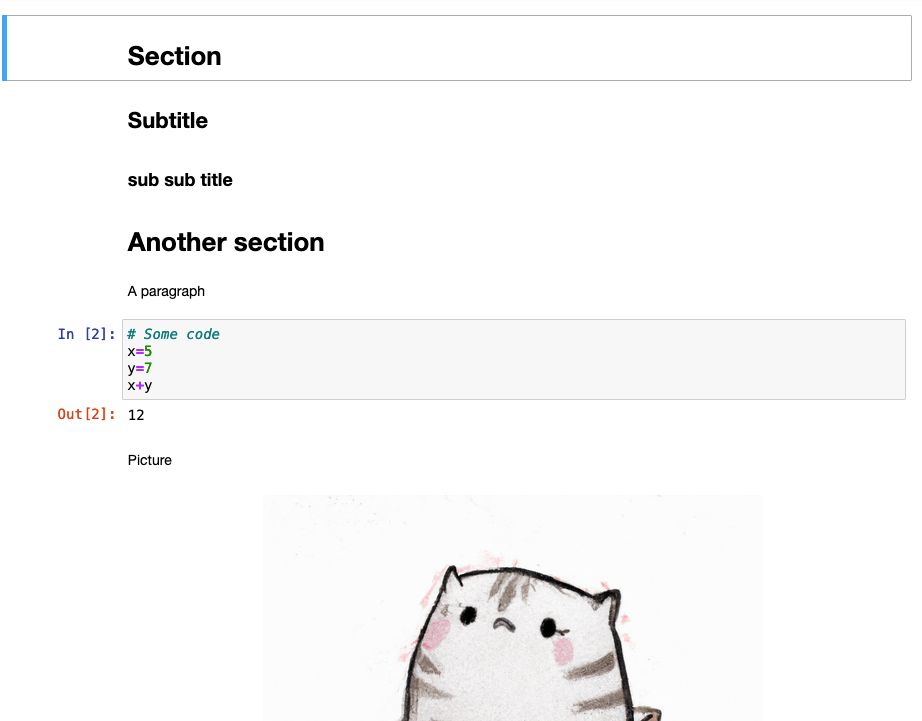
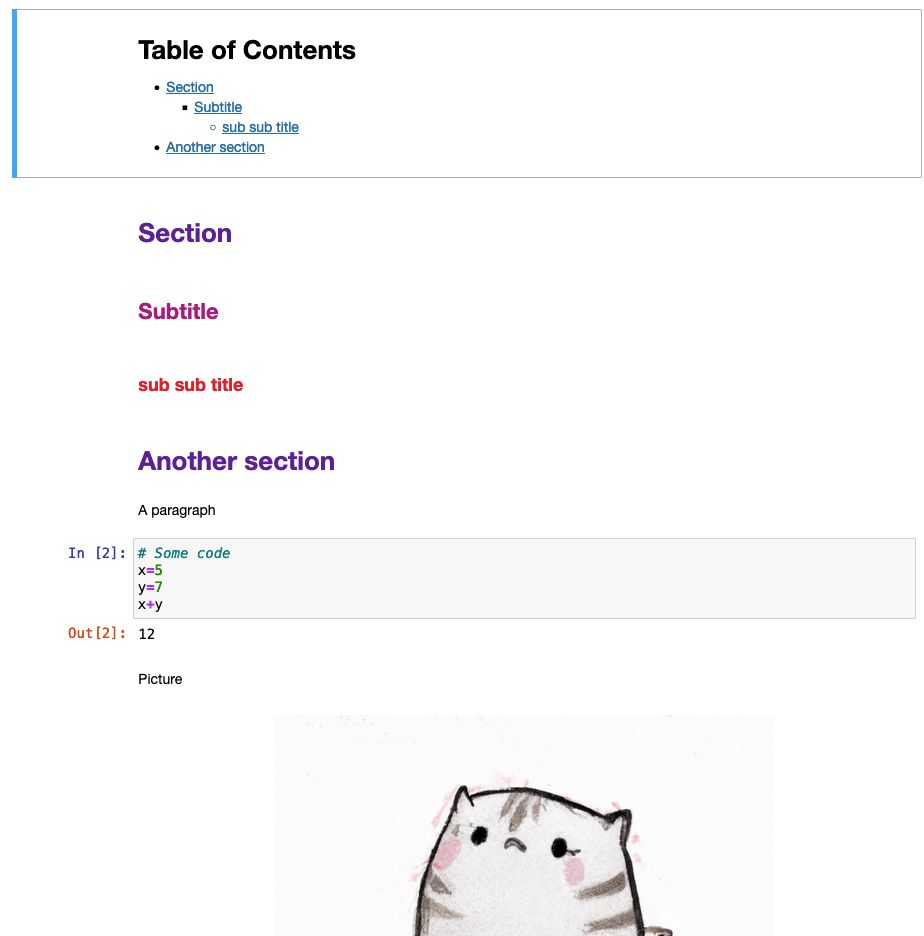
Turn an ordinary Jupyter notebook into a colorful, easy-to-navigate notebook.
cutiepynb styles Markdown headings, adds stable anchors, and generates a
linked table of contents. The base package has no runtime dependencies.
Prefer not to install anything? The browser app can also fix heading titles and levels. Its native JavaScript formatter starts immediately and runs locally in your tab—there is no Python runtime or notebook upload: open cutiepynb studio.
Before and after
| Before | After |
|---|---|
 |
 |
Install
python -m pip install cutiepynb
Quick start
From the terminal:
cutiepynb analysis.ipynb \
  --color "#5D2197" \
  --color "#AB1A7C" \
  --color "#DE2227"
This creates analysis_chulo.ipynb and leaves the original untouched. Existing
output is protected; use --force only when you intend to replace it.
Or from Python:
from cutiepynb import process_notebook

output = process_notebook(
    "analysis.ipynb",
    colors=["#5D2197", "#AB1A7C", "#DE2227"],
)
print(output)
cutiepy_nb(...), the original API, is still available for existing notebooks.
Highlights
- Colors heading levels with your own CSS color palette.
- Generates a nested table of contents with unique links.
- Handles several headings in one Markdown cell.
- Ignores headings inside code cells and fenced Markdown examples.
- Produces the same result when safely run more than once.
- Lets the browser studio rename headings, change H1–H6 levels, and recolor notebooks it styled earlier.
- Supports both a Python API and a command-line interface.
- Uses seaborn palettes through the optional
cutiepynb[palette]extra. - Includes a private-by-design browser studio that never executes notebook code.
- Keeps the native browser formatter aligned with Python through shared transformation fixtures.
Read the full tutorial for custom output paths, in-place editing, seaborn palettes, recoloring, and in-memory transformations.
Development
git clone https://github.com/emarquezz/cutiepynb.git
cd cutiepynb
python -m venv .venv
source .venv/bin/activate  # Windows: .venv\Scripts\activate
python -m pip install -e ".[dev]"
pytest
mkdocs serve
Released under the MIT License.
1 maintainer

Metadata
1 maintainer
Release files for cutiepynb 1.1.0
For a detailed explanation of source distributions (sdists) and built distributions (wheels), please see the package formats documentation.
Source distribution (sdist)
| File | Size | Uploaded | Provenance | Actions |
|---|---|---|---|---|
| cutiepynb-1.1.0.tar.gz | 420.9 kB | Without provenance | Details for cutiepynb-1.1.0.tar.gz |
Built distribution (wheel)
| File | Interpreter | ABI | Platform | Actions Reset |
|---|---|---|---|---|
| cutiepynb-1.1.0-py3-none-any.whl | Python 3 | none | any | Details for cutiepynb-1.1.0-py3-none-any.whl |
Total release size: 434.7 kB
Release files / cutiepynb-1.1.0.tar.gz
| Download URL | cutiepynb-1.1.0.tar.gz |
|---|---|
| Size | 420.9 kB |
| Tags | Source |
|
SHA-256 checksum How to use checksums |
6671fd41d77fdad22a6ce0f60ac505a7eb703ef3f6a2da99cc3ad39de762f34c
|
|
BLAKE2b-256 checksum How to use checksums |
9eb7f6ccbb08cb0d2d37d25bc2e93a5da11e001e145f3faef9ceac2b2ab30083
|
| Upload date | |
|
Uploaded using Trusted Publishing? What is trusted publishing? |
No |
| Uploaded via |
twine/7.0.0 CPython/3.14.7
|
Release files / cutiepynb-1.1.0-py3-none-any.whl
| Download URL | cutiepynb-1.1.0-py3-none-any.whl |
|---|---|
| Size | 13.8 kB |
| Tags | Python 3 |
|
SHA-256 checksum How to use checksums |
8011d966f16190fe34d6f3cc96b779e5fd9600fceeb6f37db304518fec417347
|
|
BLAKE2b-256 checksum How to use checksums |
17bcb0cde22d4f2b1c032707ad2e54f2bff02b51e70335d4468634d16e61a00d
|
| Upload date | |
|
Uploaded using Trusted Publishing? What is trusted publishing? |
No |
| Uploaded via |
twine/7.0.0 CPython/3.14.7
|
Security for cutiepynb 1.1.0
Provenance
Provenance describes where a file came from. On PyPI, provenance is shared via attestations, which provide a verifiable record of the build or publishing details. View details, limitations and caveats.
No provenance found
None of the files in this release were uploaded with provenance metadata.
A note on package security
PyPI is a repository for distributing packages, not a service for auditing them. While third-party security researchers and our staff do their best to detect and remove malicious packages, PyPI cannot guarantee the quality, security or suitability of any given package.
To learn more about protecting yourself from malicious actors, visit our package security documentation.














