
cv-aid
CV Aid is a set of helpers of computer vision tasks.
Installation
pip install cv-aid
From source
git clone https://github.com/khalidelboray/cv-aid
cd cv-aid
poetry install
poetry run python setup.py install
Tests
poetry run test
all tests are in tests/ directory.
Examples
-
Basic Frame Functions
from cv_aid import Frame

frame = Frame.load('/path/to/image.jpg')
# or
import cv2
frame = Frame(cv2.imread('/path/to/image.jpg'))

# Grayscale image
gray = frame.gray()

# Resize image
small = frame.resize(width=100, height=100)

# Crop image
cropped = frame.crop(x=100, y=100, width=100, height=100)

# All methods return a new Frame object, so you can chain them
new_frame = frame.resize(width=100, height=100).crop(x=100, y=100, width=100, height=100)

# Save image
frame.save('/path/to/image.jpg')
-
Basic Video Functions
from cv_aid import VideoStream, Frame
import cv2
import numpy as np


def on_frame(frame: Frame) -> Frame:
    """
    A function that is called when a frame is read from the video stream.

    :param frame: The frame that was read.
    :return: The frame that was read.
    """
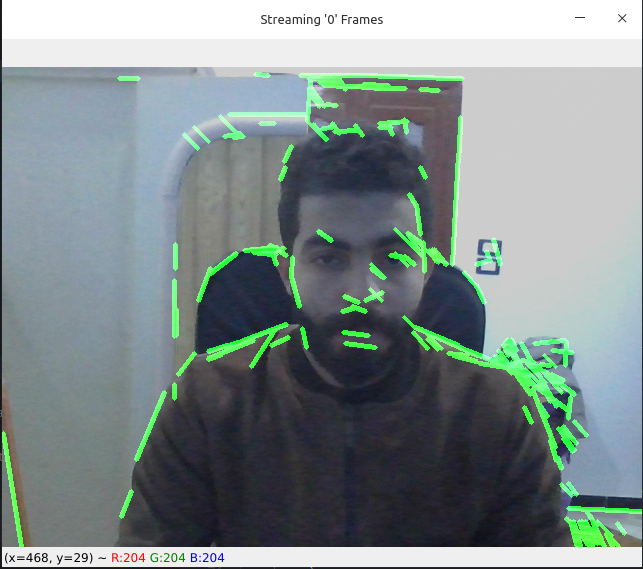
    orig = frame
    canny = frame.gray().canny(50, 100)
    line_image = Frame(np.copy(orig.frame) * 0)
    lines = cv2.HoughLinesP(
        canny.frame, 1, np.pi / 180, 50, np.array([]), minLineLength=10, maxLineGap=5
    )
    if lines is not None:
        for line in lines:
            line = line[0]
            line_image = line_image.line(
                (line[0], line[1]), (line[2], line[3]), (0, 255, 0), 3
            )
    lines_edges = cv2.addWeighted(orig.frame, 0.8, line_image.frame, 1, 1)
    return Frame(lines_edges)


stream = VideoStream(src=0, on_frame=on_frame).start()
stream.start_window()
Output Demo:
-
Haar Cascade Functions
from cv_aid import VideoStream, Frame

def on_frame(frame: Frame) -> Frame:
    """
    A function that is called when a frame is read from the video stream.

    :param frame: The frame that was read.
    :return: The frame that was read.
    """
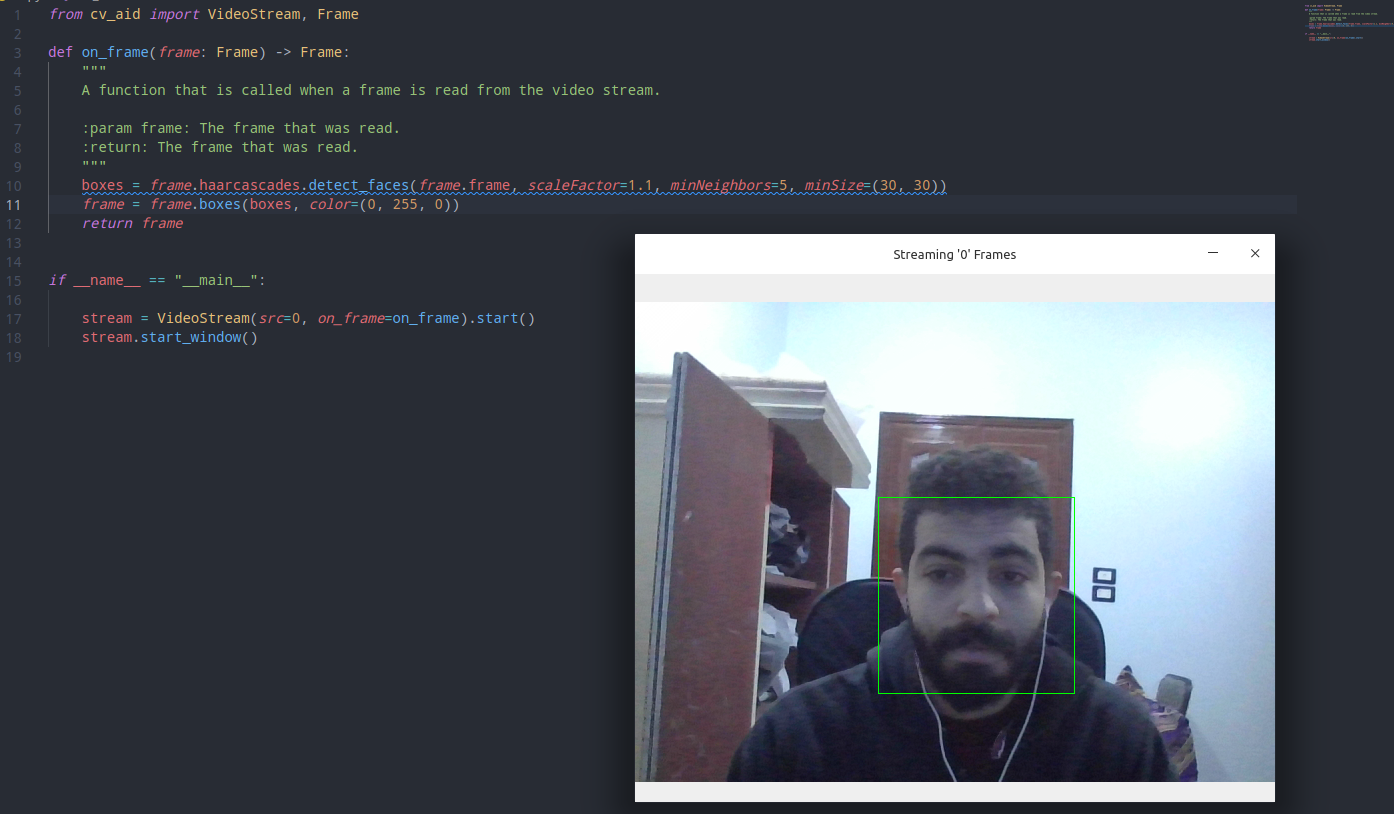
    boxes = frame.haarcascades.detect_faces(frame.frame, scaleFactor=1.1, minNeighbors=5, minSize=(30, 30))
    frame = frame.boxes(boxes, color=(0, 255, 0))
    return frame


if __name__ == "__main__":

    stream = VideoStream(src=0, on_frame=on_frame).start()
    stream.start_window()
Output Demo:
-
Tourch Hub (Yolov5)
from cv_aid import VideoStream, Frame
import torch

model = torch.hub.load('ultralytics/yolov5', 'yolov5s')

def on_frame(frame: Frame) -> Frame:
    """
    A function that is called when a frame is read from the video stream.

    :param frame: The frame that was read.
    :return: The frame that was read.
    """
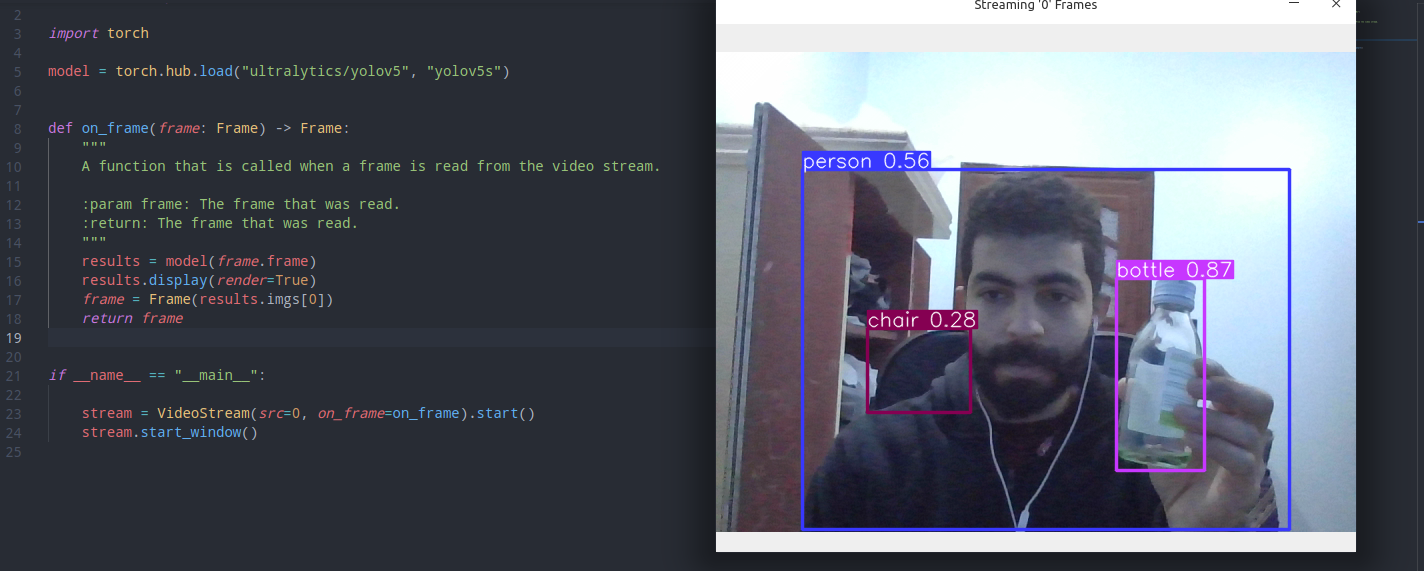
    results = model(frame.frame)
    results.display(render=True)
    frame = Frame(results.imgs[0])
    return frame


if __name__ == "__main__":

    stream = VideoStream(src=0, on_frame=on_frame).start()
    stream.start_window()
-
Dlib (
Download model)from cv_aid._dlib import Dlib saved_model = Dlib.download_landmark_detector(path='/dir/to/download/model/at/') dlib = Dlib(landmark_predictor_path=saved_model) face_recognetion_model = Dlib.download_face_recognition_model_v1(path='/dir/to/download/model/at/')
-
Dlib (Face landmark)
Give it a try!# pylint: disable=C0103 import math import cv2 import numpy as np from skimage.draw import disk, polygon, set_color from cv_aid import Frame, VideoStream RIGHT_EYE_POINTS = list(range(36, 42)) LEFT_EYE_POINTS = list(range(42, 48)) def get_poly_data(desired, landmarks, shape): points = [] for i in desired: points.append((landmarks.part(i).x, landmarks.part(i).y)) points = np.array(points, dtype=np.int32) rr, cc = polygon(points[:, 1], points[:, 0], shape) return points, rr, cc def on_frame(frame: Frame) -> Frame: """ A function that is called when a frame is read from the video stream. :param frame: The frame that was read. :return: The frame that was read. """ faces = frame.dlib.detect_faces(frame.frame) for face in faces: face_landmarks = frame.dlib.detect_landmarks(frame.frame, face) left_eye, *_ = get_poly_data(LEFT_EYE_POINTS, face_landmarks, frame.shape) right_eye, *_ = get_poly_data(RIGHT_EYE_POINTS, face_landmarks, frame.shape) left_eye_center = left_eye.mean(axis=0).astype("int") right_eye_center = right_eye.mean(axis=0).astype("int") left_eye_radius = ( int( math.sqrt( (left_eye[3][0] - left_eye[0][0]) ** 2 + (left_eye[3][1] - left_eye[0][1]) ** 2 ) ) - 10 ) right_eye_radius = ( int( math.sqrt( (right_eye[3][0] - right_eye[0][0]) ** 2 + (right_eye[3][1] - right_eye[0][1]) ** 2 ) ) - 10 ) frame = ( # Glasses connection line frame.line( (left_eye_center[0] - left_eye_radius, left_eye_center[1]), (right_eye_center[0] + right_eye_radius, right_eye_center[1]), (0, 0, 0), 4, ) # Glasses circle 1 *Border* .circle( left_eye_center, left_eye_radius, (0, 0, 0), 4, ) # Glasses circle 1 .circle( left_eye_center, left_eye_radius, (0, 0, 255), 2, ) # Glasses circle 2 *Border* .circle( right_eye_center, right_eye_radius, (0, 0, 0), 4, ) # Glasses circle 2 .circle( right_eye_center, right_eye_radius, (0, 0, 255), 2, ) # Ears connection line 1 .line( (face_landmarks.part(0).x, face_landmarks.part(0).y), (right_eye_center[0] - right_eye_radius, right_eye_center[1]), (0, 0, 255), 2, ) # Ears connection line 1 .line( (face_landmarks.part(16).x, face_landmarks.part(16).y), (left_eye_center[0] + left_eye_radius, left_eye_center[1]), (0, 0, 255), 2, ) ) # Overlay the frame with the image of the glasses colored in transparent black overlay = frame.frame.copy() alpha = 0.5 # Get first circle rows and columns (pixel coordinates) rr, cc = disk(right_eye_center[::-1], right_eye_radius) # Set the color of the circle set_color(overlay, (rr, cc), (0, 0, 0)) # Get second circle rows and columns (pixel coordinates) rr, cc = disk(left_eye_center[::-1], left_eye_radius) # Set the color of the circle set_color(overlay, (rr, cc), (0, 0, 0)) # Overlay the image with the overlay image frame.frame = cv2.addWeighted(overlay, alpha, frame.frame, 1 - alpha, 0) return frame if __name__ == "__main__": stream = VideoStream(src=0, on_frame=on_frame).start() stream.start_window()
1 maintainer

Metadata
1 maintainer
Release files for cv-aid 1.0.1
For a detailed explanation of source distributions (sdists) and built distributions (wheels), please see the package formats documentation.
Source distribution (sdist)
| File | Size | Uploaded | |
|---|---|---|---|
| cv-aid-1.0.1.tar.gz | 1.3 MB | Details |
Built distribution (wheel)
| File | Interpreter | ABI | Platform | Reset |
|---|---|---|---|---|
| cv_aid-1.0.1-py3-none-any.whl | Python 3 | none | any | Details |
Total release size: 2.5 MB
Release files / cv-aid-1.0.1.tar.gz
| Download URL | cv-aid-1.0.1.tar.gz |
|---|---|
| Size | 1.3 MB |
| Tags | Source |
|
SHA-256 checksum How to use checksums |
202e3cdbb4da360c9c3a0c962b05ae1dec5813fb3a567a5294ba1303d504c8c8
|
|
BLAKE2b-256 checksum How to use checksums |
88f20676c3dce15ef9eec7cf5cd41b169c05fe88f1284e9faf35d613bfa8d758
|
| Upload date | |
|
Uploaded using Trusted Publishing? What is trusted publishing? |
No |
| Uploaded via |
poetry/1.1.12 CPython/3.8.10 Linux/5.13.0-28-generic
|
Release files / cv_aid-1.0.1-py3-none-any.whl
| Download URL | cv_aid-1.0.1-py3-none-any.whl |
|---|---|
| Size | 1.3 MB |
| Tags | Python 3 |
|
SHA-256 checksum How to use checksums |
f7d311b4f5ee1341d5cbe16f03e129d1195d714a36f5722a851bf05bb8f262b6
|
|
BLAKE2b-256 checksum How to use checksums |
986334790bd4fd05583df05bad13609bc94be8c4fbc18aab69eaaf12d4b1174d
|
| Upload date | |
|
Uploaded using Trusted Publishing? What is trusted publishing? |
No |
| Uploaded via |
poetry/1.1.12 CPython/3.8.10 Linux/5.13.0-28-generic
|














