
Command-line tool to generate resumes from YAML and LaTeX templates

Project description
CV CLI



CV CLI is a simple Python script that generates a LaTeX resume using the Jinja2 templating engine. It allows you to create a professional-looking resume in PDF format with minimal effort.
Features
- Easy to use: Just fill in a YAML file with your information and run the script.
- Multiple Profiles: Supports multiple profiles, allowing you to create different resumes for different job types.
- Customizable: Supports multiple templates and allows you to create your own.
- Output in PDF format: Generates a high-quality PDF resume using LaTeX.
- Cross-platform: Works on Windows, macOS, and Linux.
Resume Previews
| Default Template | Sheets Template |
|---|---|
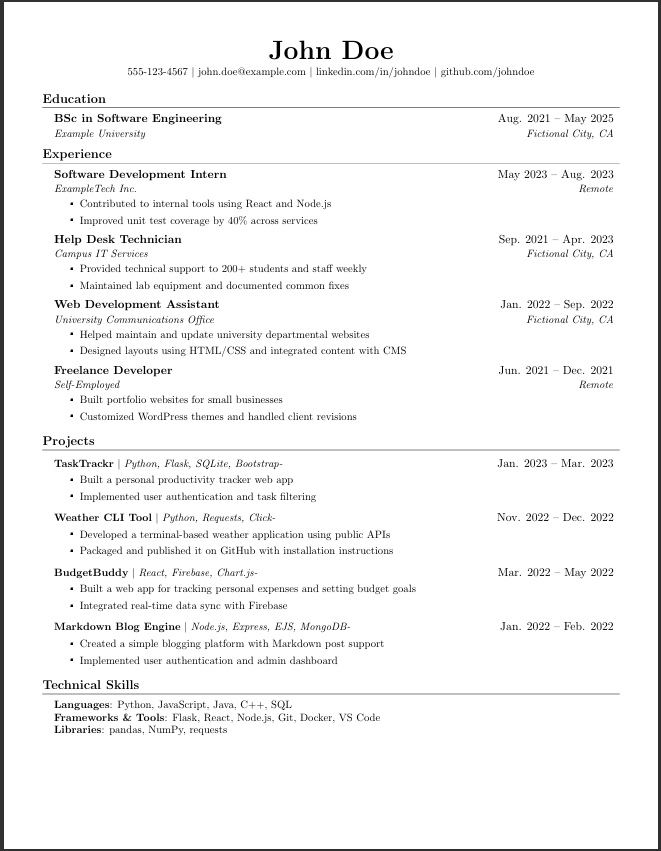 |
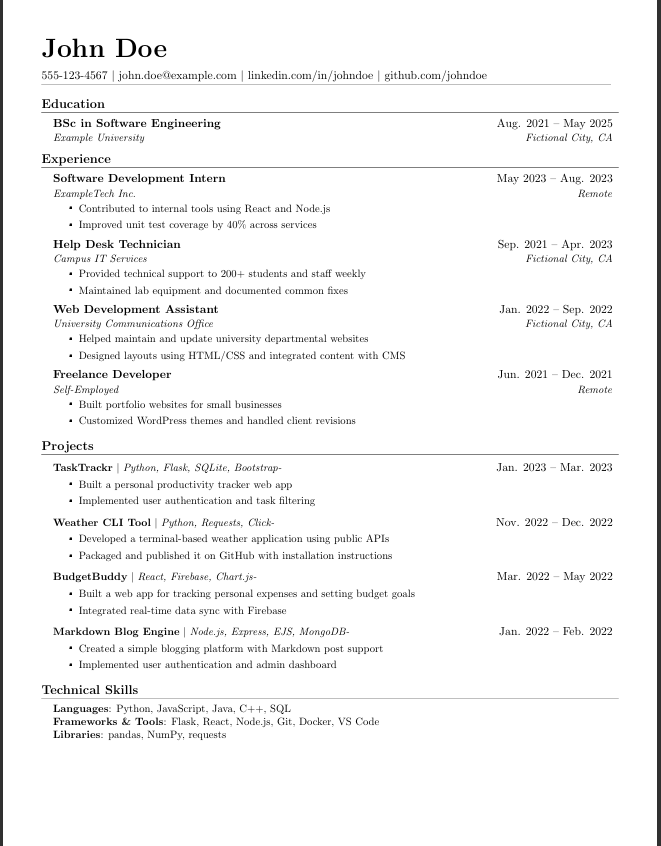 |
Getting Started
Prerequisites
- Python 3.6 or higher
- LaTeX distribution (e.g., TeX Live, MikTeX) installed on your system
Installation
pip install cv-cli
Usage
cv-cli <COMMAND> [OPTIONS]
Ex. cv-cli build -p example -t default
Commands
Build
Build CV PDF.
build [OPTIONS]
Profiles
Create, edit and sync Profiles.
cv-cli profiles new <name>
cv-cli profiles edit <name>
cv-cli profiles clone <url>
cv-cli profiles init
cv-cli profiles rm <name>
Templates
Create, edit and sync Templates:
cv-cli templates new <name>
cv-cli templates edit <name>
cv-cli templates clone <url>
cv-cli templates init
cv-cli templates rm <name>
Acknowledgements
- This project uses the Resume Template by Jake Gutierrez as a base for the LaTeX templates. Thank you for your work!
- The provided sheets template is inspired by the famous Sheets Resume by Sheets Resume.
License
This project is licensed under the MIT License. See the LICENSE file for details.
Planned Features
- Git Integration
- Import & Sync Profiles
- Import & Sync Templates
- Template Configuration
- Name templates
- Editor Integration
- VSCode
- Verbosity Argument
Release history Release notifications | RSS feed


Download files
Download the file for your platform. If you're not sure which to choose, learn more about installing packages.
Source Distribution
Built Distribution
Filter files by name, interpreter, ABI, and platform.
If you're not sure about the file name format, learn more about wheel file names.
Copy a direct link to the current filters
File details
Details for the file cv_cli-1.1.0.tar.gz.
File metadata
- Download URL: cv_cli-1.1.0.tar.gz
- Upload date:
- Size: 229.0 kB
- Tags: Source
- Uploaded using Trusted Publishing? No
- Uploaded via: python-httpx/0.28.1
File hashes
| Algorithm | Hash digest | |
|---|---|---|
| SHA256 |
61274644928265af6a3d1b94b0ee7e8ae71c6f3eae748dd236d4d3a87ee8d9f4
|
|
| MD5 |
2540a7303f1229bce613b1379424452d
|
|
| BLAKE2b-256 |
46fe4f0ed598cd8e645dc87563eec5acaa197f0c33abc6796797d46621565ebe
|
File details
Details for the file cv_cli-1.1.0-py3-none-any.whl.
File metadata
- Download URL: cv_cli-1.1.0-py3-none-any.whl
- Upload date:
- Size: 9.2 kB
- Tags: Python 3
- Uploaded using Trusted Publishing? No
- Uploaded via: python-httpx/0.28.1
File hashes
| Algorithm | Hash digest | |
|---|---|---|
| SHA256 |
125b1767dbcd6db43e503cc3ff91c760e16392ce514eb8d5d5ec693f3d3275f8
|
|
| MD5 |
ac25c751ec994b4ebeb36a4119c1bc9c
|
|
| BLAKE2b-256 |
bdd83a48927dfe6d1468371cb9df387f4a9e3e72e5e7280054bc086408d33c53
|






