
cv2_enumerate_cameras



Retrieve camera names, VID/PID information, device paths, and the corresponding OpenCV indices.
Installation
Install from PyPI
pip install cv2-enumerate-cameras
Quick Start
Run as a Script
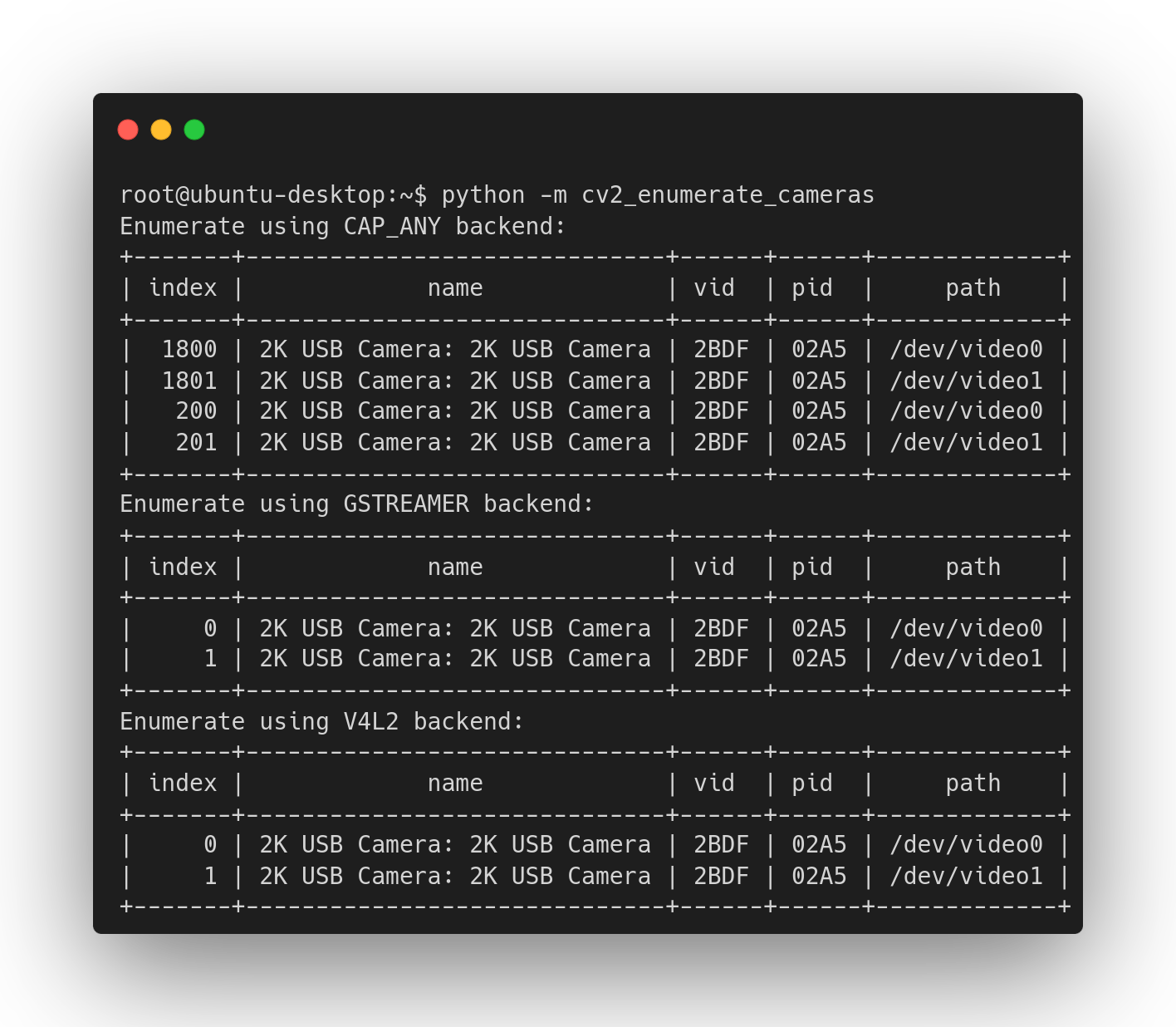
A simple command-line script is provided to enumerate all cameras:
lscam
Or run the module directly:
python -m cv2_enumerate_cameras
Integrate into Your Project
To enumerate cameras inside your code:
from cv2_enumerate_cameras import enumerate_cameras

for camera_info in enumerate_cameras():
    print(camera_info)
By default, enumerate_cameras() is called with the parameter CAP_ANY, which instructs cv2_enumerate_cameras to probe all supported backends when enumerating cameras. Example output:
1400: 2K USB Camera (2BDF:02A5)
700: 2K USB Camera (2BDF:02A5)
701: OBS Virtual Camera
These seemingly unusual indices are intentional: OpenCV encodes the backend ID into the high digits of the index. For example, 701 indicates the second camera (1) on the DSHOW backend (700).
To explicitly use a specific backend:
import cv2
from cv2_enumerate_cameras import enumerate_cameras

for camera_info in enumerate_cameras(cv2.CAP_MSMF):
    print(camera_info)
Output:
0: 2K USB Camera (2BDF:02A5)
1: ...
2: ...
Once you have found the target camera, you can create a cv2.VideoCapture by its index and backend properties.
cap = cv2.VideoCapture(camera_info.index, camera_info.backend)
When using CAP_ANY, the backend argument can be omitted. But for robust behavior, explicitly passing it is strongly recommended.
Supported Backends
Not all OpenCV backends support camera enumeration. Use the following snippet to print the names of the supported backends:
from cv2.videoio_registry import getBackendName
from cv2_enumerate_cameras import supported_backends

for backend in supported_backends:
    print(getBackendName(backend))
Windows:
- Microsoft Media Foundation (
CAP_MSMF) - DirectShow (
CAP_DSHOW)
Linux:
- GStreamer (
CAP_GSTREAMER) - V4L/V4L2 (
CAP_V4L2)
macOS:
- AVFoundation (
CAP_AVFOUNDATION)
CameraInfo Object
enumerate_cameras() returns a list of CameraInfo objects:
def enumerate_cameras(apiPreference: int = CAP_ANY) -> list[CameraInfo]:
    ...
CameraInfo.index: Camera index for the selected backendCameraInfo.name: Human-readable device nameCameraInfo.path: Device path (macOS:uniqueID);CameraInfo.vid: USB Vendor ID (if available);CameraInfo.pid: USB Product ID (if available);CameraInfo.backend: OpenCV backend used for enumeration.
Examples
Automatically Select a Camera by VID/PID
This example finds a camera using VID/PID and creates a VideoCapture:
import cv2
from cv2_enumerate_cameras import enumerate_cameras

# Search for a specific camera by VID and PID
def find_camera(vid, pid, apiPreference=cv2.CAP_ANY):
    for i in enumerate_cameras(apiPreference):
        if i.vid == vid and i.pid == pid:
            return cv2.VideoCapture(i.index, i.backend)
    raise RuntimeError('Camera not found!')

# Example: Find the camera with VID 0x04F2 and PID 0xB711
cap = find_camera(0x04F2, 0xB711)

# Capture and display frames
while True:
    ok, frame = cap.read()
    if not ok:
        break
    cv2.imshow('frame', frame)
    if cv2.waitKey(1) == ord('q'):
        break
1 maintainer

Metadata
1 maintainer
Release files for cv2-enumerate-cameras 1.3.4
For a detailed explanation of source distributions (sdists) and built distributions (wheels), please see the package formats documentation.
Source distribution (sdist)
| File | Size | Uploaded | |
|---|---|---|---|
| cv2_enumerate_cameras-1.3.4.tar.gz | 12.2 kB | Details |
Built distributions (wheels)
| File | Interpreter | ABI | Platform | Reset |
|---|---|---|---|---|
| cv2_enumerate_cameras-1.3.4-py3-none-any.whl | Python 3 | none | any | Details |
| cv2_enumerate_cameras-1.3.4-cp32-abi3-win_amd64.whl | CPython 3.2 | abi3 | Windows x86-64 | Details |
| cv2_enumerate_cameras-1.3.4-cp32-abi3-win32.whl | CPython 3.2 | abi3 | Windows x86-32 | Details |
Total release size: 63.9 kB
Release files / cv2_enumerate_cameras-1.3.4.tar.gz
| Download URL | cv2_enumerate_cameras-1.3.4.tar.gz |
|---|---|
| Size | 12.2 kB |
| Tags | Source |
|
SHA-256 checksum How to use checksums |
e4e76e330c39806e9bc5f6ca307eecd7725bbca07b0045318b78ad9339bf25a8
|
|
BLAKE2b-256 checksum How to use checksums |
82c6623f4bd52d98bf2176273bb1108430f5f37ed5186da477dae2dd12dd0196
|
| Upload date | |
|
Uploaded using Trusted Publishing? What is trusted publishing? |
Yes |
| Uploaded via |
twine/7.0.0 CPython/3.13.14
|
Provenance
Provenance describes where a file came from. On PyPI, provenance is shared via attestations, which provide a verifiable record of the build or publishing details. View details, limitations and caveats.


PyPI Publish Attestation
PyPI verified that this artifact, at this checksum, originated from the publisher listed below.
Signed by GitHub Actions, verified by PyPI on Sep 24, 2026.
Transparency logRelease files / cv2_enumerate_cameras-1.3.4-py3-none-any.whl
| Download URL | cv2_enumerate_cameras-1.3.4-py3-none-any.whl |
|---|---|
| Size | 11.4 kB |
| Tags | Python 3 |
|
SHA-256 checksum How to use checksums |
bec484925e0b18f4e5cc282ab03c81d931d3eb0112f88875421b77cc7115d343
|
|
BLAKE2b-256 checksum How to use checksums |
8d8db2b04bba38a1069f852d2a1e95a7307bdf4c6502531ad73b355056d306cd
|
| Upload date | |
|
Uploaded using Trusted Publishing? What is trusted publishing? |
Yes |
| Uploaded via |
twine/7.0.0 CPython/3.13.14
|
Provenance
Provenance describes where a file came from. On PyPI, provenance is shared via attestations, which provide a verifiable record of the build or publishing details. View details, limitations and caveats.
PyPI Publish Attestation
PyPI verified that this artifact, at this checksum, originated from the publisher listed below.
Signed by GitHub Actions, verified by PyPI on Sep 24, 2026.
Transparency logRelease files / cv2_enumerate_cameras-1.3.4-cp32-abi3-win_amd64.whl
| Download URL | cv2_enumerate_cameras-1.3.4-cp32-abi3-win_amd64.whl |
|---|---|
| Size | 20.6 kB |
| Tags | CPython 3.2 Windows x86-64 abi3 |
|
SHA-256 checksum How to use checksums |
28ec6a390fdca27a200796ae37108e07b0a2cf05617573c65025b8ef098ec5a2
|
|
BLAKE2b-256 checksum How to use checksums |
8e612f94926b3d95e8152d69eb9ac9a49b3a53518e181a29ce3ff111e1e5fdcc
|
| Upload date | |
|
Uploaded using Trusted Publishing? What is trusted publishing? |
Yes |
| Uploaded via |
twine/7.0.0 CPython/3.13.14
|
Provenance
Provenance describes where a file came from. On PyPI, provenance is shared via attestations, which provide a verifiable record of the build or publishing details. View details, limitations and caveats.
PyPI Publish Attestation
PyPI verified that this artifact, at this checksum, originated from the publisher listed below.
Signed by GitHub Actions, verified by PyPI on Sep 24, 2026.
Transparency logRelease files / cv2_enumerate_cameras-1.3.4-cp32-abi3-win32.whl
| Download URL | cv2_enumerate_cameras-1.3.4-cp32-abi3-win32.whl |
|---|---|
| Size | 19.7 kB |
| Tags | CPython 3.2 Windows x86-32 abi3 |
|
SHA-256 checksum How to use checksums |
276683a950b46b647fdfd94c32ff022df65decbe71c941b29c807a5c5276d594
|
|
BLAKE2b-256 checksum How to use checksums |
8b6709e6da3c8ab6b6219a78b81953d2d96f34db6d2089210779849ccc954ec1
|
| Upload date | |
|
Uploaded using Trusted Publishing? What is trusted publishing? |
Yes |
| Uploaded via |
twine/7.0.0 CPython/3.13.14
|
Provenance
Provenance describes where a file came from. On PyPI, provenance is shared via attestations, which provide a verifiable record of the build or publishing details. View details, limitations and caveats.
PyPI Publish Attestation
PyPI verified that this artifact, at this checksum, originated from the publisher listed below.
Signed by GitHub Actions, verified by PyPI on Sep 24, 2026.
Transparency log













