
CVAugmentor






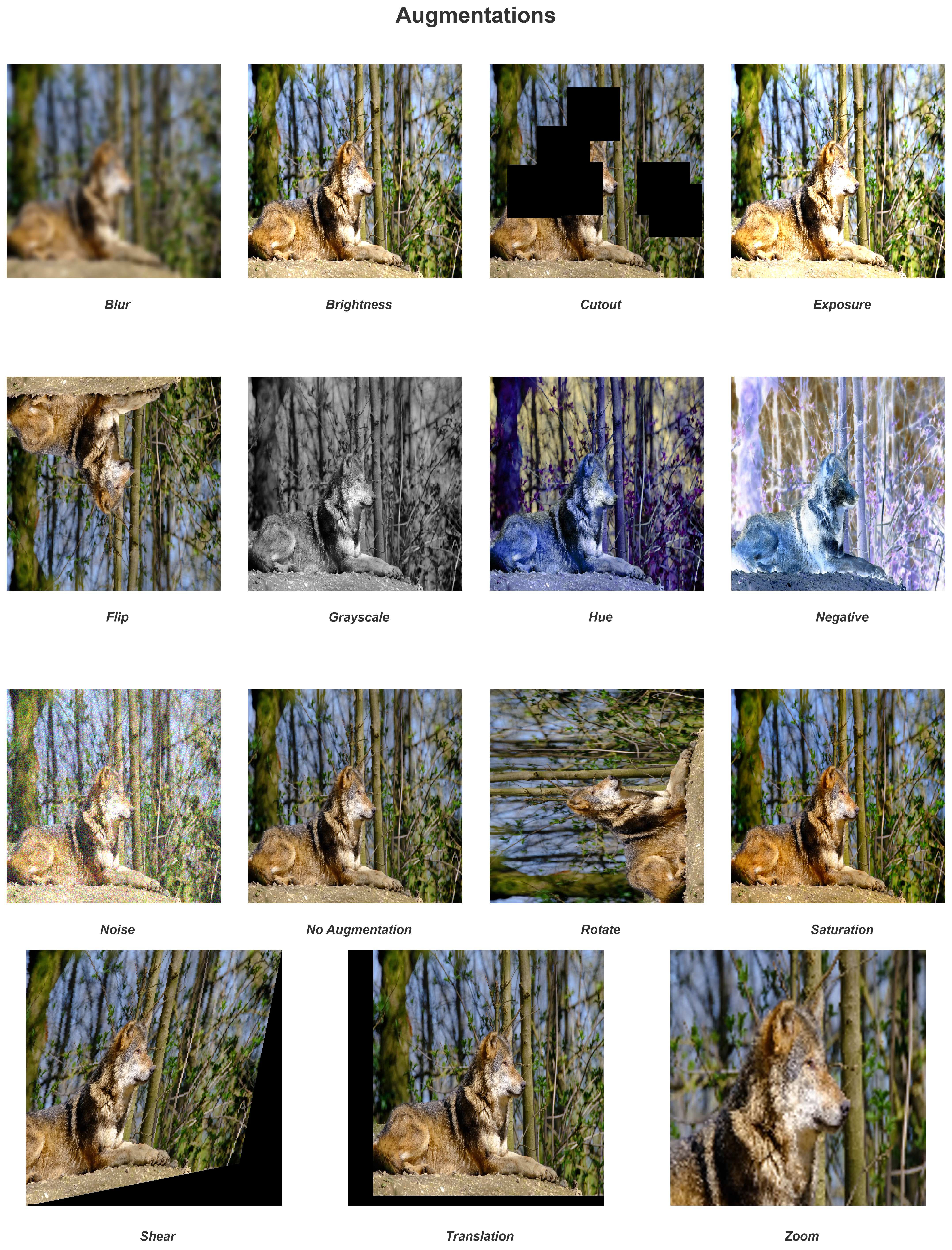
Augment images and videos for computer vision tasks, from one file or a whole directory.
CVAugmentor applies a catalog of transformations to stills and moving pictures through one pipeline, either writing each augmentation on its own or chaining them into a single output. Built from Keel, the package template of the My-Styles family.
The Philosophy: Why Does This Exist?
People training vision models need more data than they have, and the usual answer is a transform pipeline that lives inside the training loop and hands tensors to a model. That serves the loop well and leaves the dataset implicit. It stops serving when the augmented set has to exist as files: when a result must be reproducible months later, when the same transformations have to reach video as well as stills, or when the data is something a team reviews, shares, and versions rather than something regenerated invisibly every epoch.
CVAugmentor takes the other position and materialises the dataset. Point it at a file or a directory, name the augmentations, and it writes the outputs, either one file per augmentation or all of them chained into one. Video passes through the same augmentations as stills. A seed makes a whole pass replay. Every run returns a report naming each file written and each input skipped, so what you have is inspectable rather than inferred.
The output is lossless, because a dataset that quietly loses a level per pass is worse than no dataset. Nothing here is written back through a lossy encoder unless you name one.
The Domain: Why Augmentation Demands This
Augmenting a dataset looks like a loop and turns out not to be one, because the awkward requirements all live in the corners.
- A video must stay coherent. A blur radius drawn per frame produces a video that crawls. So a random parameter is drawn once per instance and held, and a placement that depends on frame size is derived from a held seed, which is why every frame of one video is treated identically while two videos differ.
- A dataset must vary. The opposite requirement holds across files, so
PipelineConfig(random_state=True)redraws every augmentation between items in a batch. - The two modes are genuinely different jobs. Writing fifteen variants of one image and writing one image with fifteen effects stacked on it read the same in a call and share almost no code path, so
sequentialandsingularare named and separated rather than inferred. - One bad file must not cost a dataset. A directory of ten thousand images with one truncated PNG in it should not lose the other 9,999, so a failure is recorded against its item and the walk continues unless you ask it to halt.
- Augmented data must lose nothing the augmentation did not intend. A pass that shifts a level here and rounds one there compounds over a dataset, so the output is lossless and the two colour paths a machine may take are held to one level of each other.
- The fast codecs are not installable everywhere. Two of the platforms this runs on publish no wheel for them, so the work has to complete without them rather than refuse to start.
Core Architectural Pillars
The reasoning behind each of these is in the map at docs/ARCHITECTURE.md and the records it links.
- Ports and Adapters. The orchestration depends only on Protocols, and
PipelineBuilderchecks every injected implementation against its own at wiring time rather than mid-directory. - The Opaque Frame. Pixels cross the core as a handle nothing inside it reads, so a codec can be swapped without the loop that walks a directory noticing (decision 0042).
- Optional Accelerators. Every accelerated operation carries a NumPy fallback, and the two agree within one level, so a platform without the fast wheels loses speed and never a format (decision 0053).
- Library Citizenship. No global mutable state, no environment read at import, a
NullHandleron the package logger, and random draws kept out of NumPy's global generator.
Project Structure
CVAugmentor/
├── src/
│   └── cvaugmentor/            # The installable package
│       ├── facade/             # Public surface (Pipeline, PipelineBuilder, CLI, reports, translators)
│       ├── core/               # Package-wide infrastructure (Config, Logging, Plugins)
│       ├── domain/             # Absolute source of truth (Interfaces, Domain Schemas, Exceptions)
│       ├── adapters/           # Concrete implementations (Augmentations, Codecs, Progress, Workspace)
│       └── services/           # Business logic orchestration (the AugmentationRunner walk)
│
├── docs/                       # Technical documentation (the annotated map lives at docs/ARCHITECTURE.md)
├── scripts/                    # Tracked repository tooling (the docs audit)
├── tests/                      # Automated test suite mirroring the src structure
├── AGENTS.md                   # Agent entry point and the documentation index
├── CHANGELOG.md                # What each release changes for the people who install it
├── STATE.md                    # Living project state
└── pyproject.toml              # PEP 621 metadata, hatchling build backend, entry points
Key Features
- Lossless and Fast: Fifteen augmentations over a 1920x1080 image, written as fifteen PNGs, take 413 ms with the accelerators installed (decision 0052 measures where that time goes). Nothing is re-encoded lossily unless you ask for a lossy format.
- Runs Everywhere, Accelerates Where It Can: NumPy and Pillow are the only hard requirements and both ship wheels for every target, so a plain install never fails. OpenCV and Intel ISA-L are optional and simply make it faster.
- Fifteen Augmentations: Blur, Brightness, Cutout, Exposure, Flip, Grayscale, Hue, Negative, NoAugmentation, Noise, Rotate, Saturation, Shear, Translation, and Zoom.
- Images and Video Through One Pipeline: The same augmentations apply to a still or to every frame of a video, and a long video is decoded lazily rather than held in memory.
- Two Application Modes:
sequentialwrites one output per augmentation, andsingularchains them all into one. - Single File or Whole Directory: A batch walks a directory in the order a person counting filenames expects, skipping what is not the medium you asked for.
- Guarded Fluent Builder:
PipelineBuildervalidates every injected implementation against itsProtocolat wiring time, so a misconfiguration fails at build rather than midway through a dataset. - Reports Rather Than Silence: Every pass returns an
AugmentationReportnaming what was written and what was skipped. - Plugin Entry Points: Third parties can ship augmentations via the
cvaugmentor.augmentationsentry-point group, with per-plugin failure isolation. - Modern Packaging: src layout, PEP 621 metadata, PEP 561
py.typed, PEP 735 dev dependency group, and a console script pluspython -mexecution.
Getting Started
This package is built with Python 3.14. Every class and method is documented at its source, and those docstrings are published as the API reference.
1. Installation
Install it with the accelerators, which is the recommended form and the one video needs:
pip install "CVAugmentor[fast,video]"
A plain install works too, and works on every platform NumPy and Pillow reach, including Alpine and Windows on ARM. It runs the NumPy fallbacks, which are about four times faster than 1.x rather than about ten, and it cannot process video:
pip install CVAugmentor
Or from a clone:
git clone https://github.com/AliKHaliliT/CVAugmentor.git
cd CVAugmentor
pip install -e ".[fast,video]"
On what the extras change. numpy and pillow are the only hard requirements, so a
plain install never fails over a missing wheel. fast adds OpenCV for the operations and
Intel ISA-L for compression, and video adds OpenCV, which is the only video codec here.
Where an accelerator is absent the adapters fall back to NumPy and the standard library and
keep every image format. The two paths agree within one level per channel rather than
exactly, because OpenCV's vectorised colour kernel rounds differently from its own scalar
formula, so a dataset built with the extras and one built without are not byte-identical.
2. Augmenting One Image
Each augmentation is written on its own, named by the label it was registered under.
from cvaugmentor import PipelineBuilder
from cvaugmentor import augmentations as aug

pipeline = (
    PipelineBuilder()
    .with_augmentations(
        aug.Blur(2.5),
        aug.Brightness(0.25),
        aug.Cutout(max_size=64, max_count=6),
        aug.Flip(),
        aug.Translation((25, -10)),
    )
    .build()
)

report = pipeline.augment("samples/0.png", "output/0.png", "image", "single", "sequential")
print(report.total_written, "files written")
3. Augmenting a Directory of Videos
Here every augmentation is chained into one output per video, and each video gets its own random draw.
from cvaugmentor import PipelineBuilder, PipelineConfig
from cvaugmentor import augmentations as aug

pipeline = (
    PipelineBuilder()
    .with_augmentations(aug.Hue(), aug.Saturation(), aug.Noise())
    .with_config(PipelineConfig(verbose=True, augmentation_verbose=True, random_state=True))
    .build()
)

report = pipeline.augment("samples/videos", "output/videos", "video", "batch", "singular")

for item in report.items:
    print(item.source, "->", item.written or item.skipped_reason)
4. From the Command Line
cvaugmentor --list
cvaugmentor samples/0.png output/0.png --all
cvaugmentor samples/videos output/videos --target video --process batch --mode singular --augmentation flip
5. Rebuilding the Same Dataset
An augmentation left without a setting draws one. Pass a seed to fix every draw it makes,
including the redraws random_state asks for between items, and the pass replays.
pipeline = (
    PipelineBuilder()
    .with_augmentations(aug.Blur(seed=7), aug.Hue(seed=8), aug.Noise(seed=9))
    .with_config(PipelineConfig(random_state=True))
    .build()
)
6. Running the Same Augmentation Twice
Labels name the output file, so pass one explicitly to register an augmentation more than once.
pipeline = (
    PipelineBuilder()
    .with_augmentation(aug.Blur(1.0), label="blur_soft")
    .with_augmentation(aug.Blur(5.0), label="blur_hard")
    .build()
)
7. Shipping a Third-Party Augmentation
Expose an IAugmentation implementation from your own package, then opt in during construction.
[project.entry-points."cvaugmentor.augmentations"]
my_augmentation = "my_package.augmentations:MyAugmentation"
pipeline = PipelineBuilder().with_discovered_augmentations().build()
Conventions
The project's conventions live in one place, the rulebook at docs/CONVENTIONS.md. It holds the documentation system (a vendor-neutral AGENTS.md as the agent entry point and the single index of every document, STATE.md as the living project state, docs/ARCHITECTURE.md as the current map, and immutable decision records under docs/decisions/ as the reasoning behind every settled choice), the docstring convention in its code-level section, and the prose law in its Prose section. That file is normative and must not be modified; the rationale behind the system itself is recorded in the style's founding decision record, 0001.
The rulebook is owned at the style level. A project built from this template never changes it locally, and an improvement discovered while refactoring against the template is not kept as a private advantage; the project's UPSTREAM.md carries it back to the template as AGENTS.md describes, where it is verified and, if it holds, adopted for every project that follows the style.
License
This work is under an MIT License.
1 maintainer

Metadata
1 maintainer
Release files for cvaugmentor 2.0.0
For a detailed explanation of source distributions (sdists) and built distributions (wheels), please see the package formats documentation.
Source distribution (sdist)
| File | Size | Uploaded | |
|---|---|---|---|
| cvaugmentor-2.0.0.tar.gz | 177.3 kB | Details |
Built distribution (wheel)
| File | Interpreter | ABI | Platform | Reset |
|---|---|---|---|---|
| cvaugmentor-2.0.0-py3-none-any.whl | Python 3 | none | any | Details |
Total release size: 247.8 kB
Release files / cvaugmentor-2.0.0.tar.gz
| Download URL | cvaugmentor-2.0.0.tar.gz |
|---|---|
| Size | 177.3 kB |
| Tags | Source |
|
SHA-256 checksum How to use checksums |
6471b38bc09a313bdbd98788cbe5d9f889086fe9b54ea7a00888acbe6b4dcce9
|
|
BLAKE2b-256 checksum How to use checksums |
1eb5fadc097b53f8ade06d8eebd7e25dc6475afc1ccd1788be5a10965a824811
|
| Upload date | |
|
Uploaded using Trusted Publishing? What is trusted publishing? |
Yes |
| Uploaded via |
twine/7.0.0 CPython/3.13.14
|
Provenance
Provenance describes where a file came from. On PyPI, provenance is shared via attestations, which provide a verifiable record of the build or publishing details. View details, limitations and caveats.


PyPI Publish Attestation
PyPI verified that this artifact, at this checksum, originated from the publisher listed below.
Signed by GitHub Actions, verified by PyPI on Sep 9, 2026.
Transparency logRelease files / cvaugmentor-2.0.0-py3-none-any.whl
| Download URL | cvaugmentor-2.0.0-py3-none-any.whl |
|---|---|
| Size | 70.5 kB |
| Tags | Python 3 |
|
SHA-256 checksum How to use checksums |
da8c77a3b2fca0c48a4b7395a49fe1f9dd43d1db52d5d271bdc4be70c1706dce
|
|
BLAKE2b-256 checksum How to use checksums |
c9e8b2e126dff3043ea30985e0c92bb470a98dcdc0cab73a8e8b0df25145a5f9
|
| Upload date | |
|
Uploaded using Trusted Publishing? What is trusted publishing? |
Yes |
| Uploaded via |
twine/7.0.0 CPython/3.13.14
|
Provenance
Provenance describes where a file came from. On PyPI, provenance is shared via attestations, which provide a verifiable record of the build or publishing details. View details, limitations and caveats.
PyPI Publish Attestation
PyPI verified that this artifact, at this checksum, originated from the publisher listed below.
Signed by GitHub Actions, verified by PyPI on Sep 9, 2026.
Transparency log













