
cvflair





Türkçe sürüm: README.tr.md. Ayrıntılı belgeler Türkçe.
A thin layer that draws computer vision detections on screen in three lines, with themes that already look finished.
The camera loop, the themes and the drawing are one package with no dependencies beyond numpy and opencv. It is model-agnostic: anything that produces boxes -- YOLO, MediaPipe, InsightFace, your own model -- is drawn by the same theme.
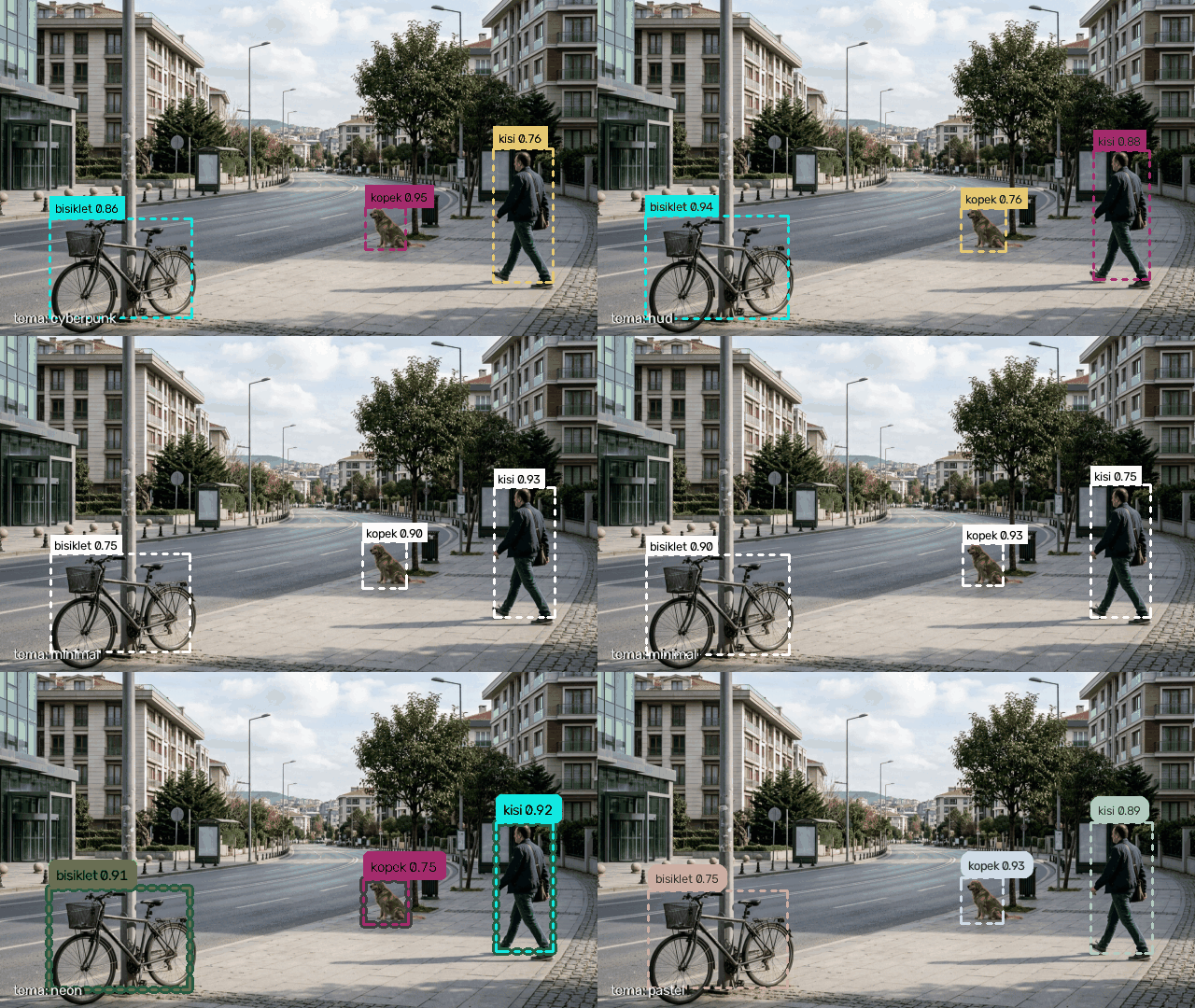
The same detections, four themes. Produced by tools/make_demo_gif.py: boxes
drawn over docs/city.png. Use --background <path> for another image.
Nine box styles, five ready themes, hand, pose and face skeletons -- all from one
Theme(...) line. Try them without installing anything:
theme playground →
Boxes and skeletons have separate preview modes; change the settings, copy the
generated Python. The page runs entirely in the browser.
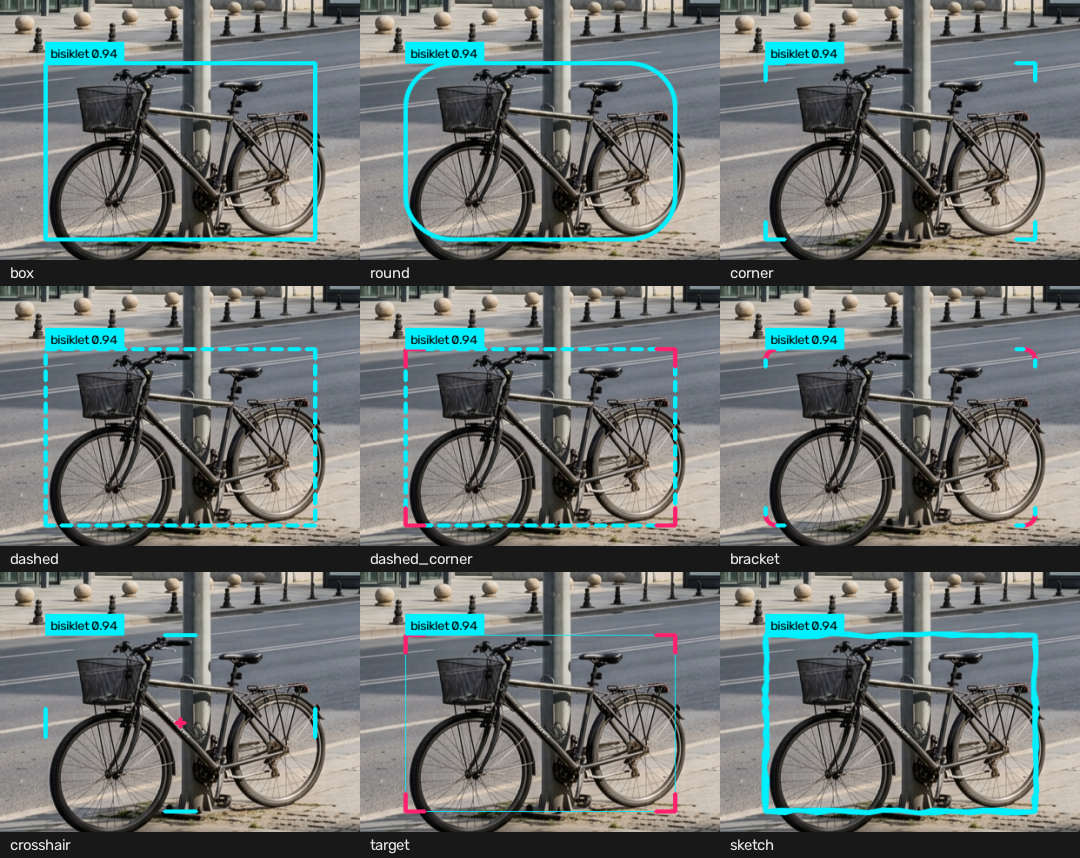
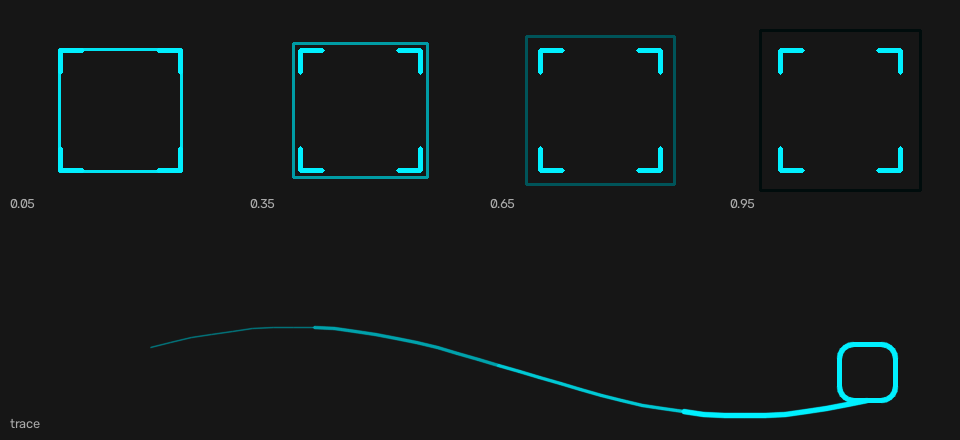
There is also drawing that sits on top of the box: a lock-on pulse and the trail a tracked object leaves behind.
Install
Python 3.10 or newer.
pip install cvflair
For YOLO, the Ultralytics extra (licence note at the bottom):
pip install "cvflair[yolo]"
Quick start
No code needed -- the package ships a command:
cvflair 0 --theme neon --model yolov8n.pt
It reads a camera, a video file, an image or a folder of images. A look tuned in
the playground travels as a file: --theme theme.json.
The same thing from Python:
from cvflair import Camera

cam = Camera(source=0, theme="neon")
for frame in cam.stream():
    cam.show(frame)
The camera opens, frames are read on their own thread, and the window closes on
q or ESC -- no release() call, no while True.
That loop shows bare frames: a theme draws only when there is something to draw.
Attach a model and every step becomes a (frame, detections) pair with the theme
applied for you:
cam = Camera(source=0, theme="hud")
for frame, detections in cam.stream(model="yolov8n.pt"):
    cam.show(frame, detections)
Instead of model you can pass your own function returning Detections -- that
is what keeps the library model-agnostic.
Hand, pose and face skeletons are drawn beside the boxes; the points come from your model as well:
from cvflair import HAND_21, KeyPoints

cam.show(frame, keypoints=KeyPoints(xy=hand_points), skeleton=HAND_21)
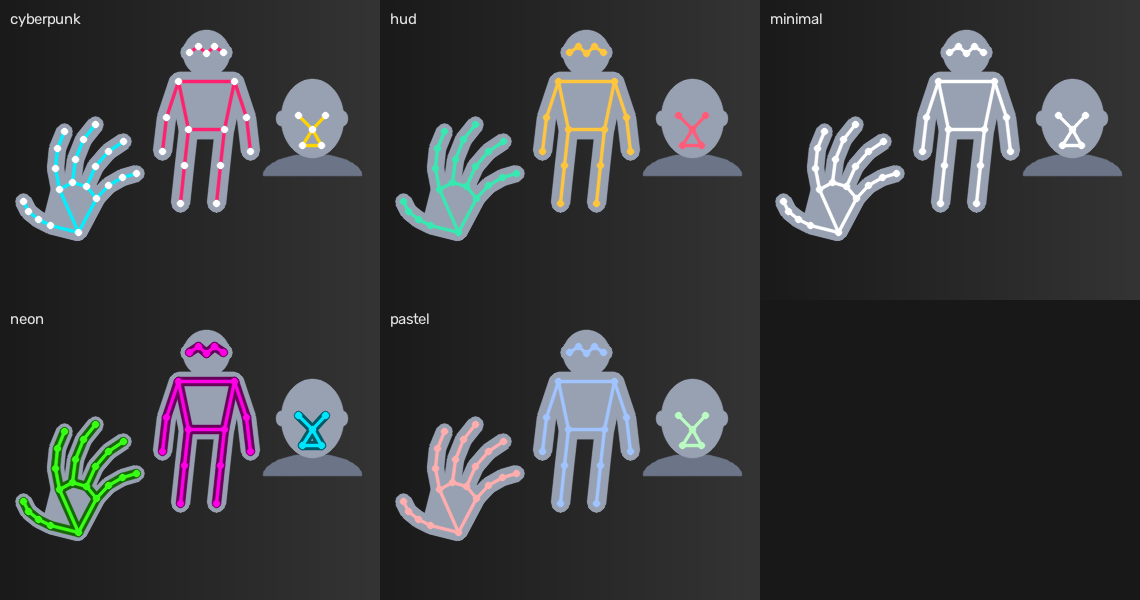
Face detectors fit the same way: FACE_5 connects the five points they agree on
-- eyes, nose, mouth corners. The ones reporting (x, y, w, h) instead of two
corners, like OpenCV cascades and MediaPipe, go through
Detections.from_xywh(...) and Detections.from_mediapipe(...).
In Jupyter or Colab, where cv2.imshow has no window to draw on:
import cvflair

theme.annotate(frame, detections)
cvflair.notebook.show(frame)
Documentation
The detailed docs are in Turkish; this page and the playground are bilingual.
| Themes and box styles | Five themes, nine styles, pulse and trace, accent colour, palettes, stats panel, writing your own theme |
| Command line and video writing | The cvflair command, sources and options, VideoWriter |
| Key points and skeletons | Hand, pose and face skeletons, KeyPoints, shipped topologies, MediaPipe, your own layout |
| Models and detections | stream(model=...), your own detector, Detections, xywh and MediaPipe boxes, Ultralytics settings, video files |
| API summary and internals | The whole public surface, thread and queue behaviour, measured performance |
| Example gallery | Ten working examples; which need a camera and which do not |
| Contributing | Setup, scope boundaries, how to add a theme |
Three of them need no camera at all:
python examples/theme_preview.py          # writes a PNG per theme
python examples/video_file.py input.mp4   # annotates a file into a copy
python examples/image_folder.py photos/   # annotates a folder of images
With a camera, examples/motion_detection.py gives real detections without a
neural network -- background subtraction only, nothing to download.
Why it is built this way
- The queue holds one frame. A new frame replaces the waiting one, so lag
does not pile up when processing slows down and the screen always shows the
newest frame.
drop_frames=Falsereverses this for video files, where every frame counts. - Drawing objects are built once and reused on every frame.
- The dependency surface is deliberately narrow.
import cvflairtakes about 0.3 s; the install is around 170 MB, nearly all of it opencv and numpy. - Models stay outside the package. No weights and no model code are bundled.
Measured numbers and the reasoning behind them: API and internals.
Development
git clone https://github.com/kbycode/cvflair.git
cd cvflair
pip install -e ".[dev]"

pytest              # no camera required
ruff check .
mypy                # the package ships py.typed, so the claim is checked
Details and the contribution flow: CONTRIBUTING.md
Licence
MIT -- see LICENSE. Both
dependencies are permissively licensed (opencv-python Apache 2.0, numpy BSD).
No YOLO weights and no Ultralytics code are bundled here. If you use Ultralytics, meeting its AGPL-3.0 terms is the responsibility of the project that uses it.
1 maintainer

Release files for cvflair 0.14.0
For a detailed explanation of source distributions (sdists) and built distributions (wheels), please see the package formats documentation.
Source distribution (sdist)
| File | Size | Uploaded | |
|---|---|---|---|
| cvflair-0.14.0.tar.gz | 101.2 kB | Details |
Built distribution (wheel)
| File | Interpreter | ABI | Platform | Reset |
|---|---|---|---|---|
| cvflair-0.14.0-py3-none-any.whl | Python 3 | none | any | Details |
Total release size: 149.3 kB
Release files / cvflair-0.14.0.tar.gz
| Download URL | cvflair-0.14.0.tar.gz |
|---|---|
| Size | 101.2 kB |
| Tags | Source |
|
SHA-256 checksum How to use checksums |
4dac1425018ec89200d7d529b0fd9bbcd91a7e7f5462fa7a9d9106d13ed8d5f4
|
|
BLAKE2b-256 checksum How to use checksums |
7a56a8ae0429a4557f478203094b54977ffa43296ef004d8dc25013bdda74d07
|
| Upload date | |
|
Uploaded using Trusted Publishing? What is trusted publishing? |
Yes |
| Uploaded via |
twine/7.0.0 CPython/3.13.14
|
Provenance
Provenance describes where a file came from. On PyPI, provenance is shared via attestations, which provide a verifiable record of the build or publishing details. View details, limitations and caveats.


PyPI Publish Attestation
PyPI verified that this artifact, at this checksum, originated from the publisher listed below.
Signed by GitHub Actions, verified by PyPI on Aug 1, 2026.
Transparency logRelease files / cvflair-0.14.0-py3-none-any.whl
| Download URL | cvflair-0.14.0-py3-none-any.whl |
|---|---|
| Size | 48.1 kB |
| Tags | Python 3 |
|
SHA-256 checksum How to use checksums |
232e056973958ee396852aa5864461815b469653195de18f5fab98cb05430207
|
|
BLAKE2b-256 checksum How to use checksums |
e456e5133a06edf79efcf432c922bde00dd50160c23be9a17477805cfc436bcf
|
| Upload date | |
|
Uploaded using Trusted Publishing? What is trusted publishing? |
Yes |
| Uploaded via |
twine/7.0.0 CPython/3.13.14
|
Provenance
Provenance describes where a file came from. On PyPI, provenance is shared via attestations, which provide a verifiable record of the build or publishing details. View details, limitations and caveats.
PyPI Publish Attestation
PyPI verified that this artifact, at this checksum, originated from the publisher listed below.
Signed by GitHub Actions, verified by PyPI on Aug 1, 2026.
Transparency log













