
CVLAB [WIP]
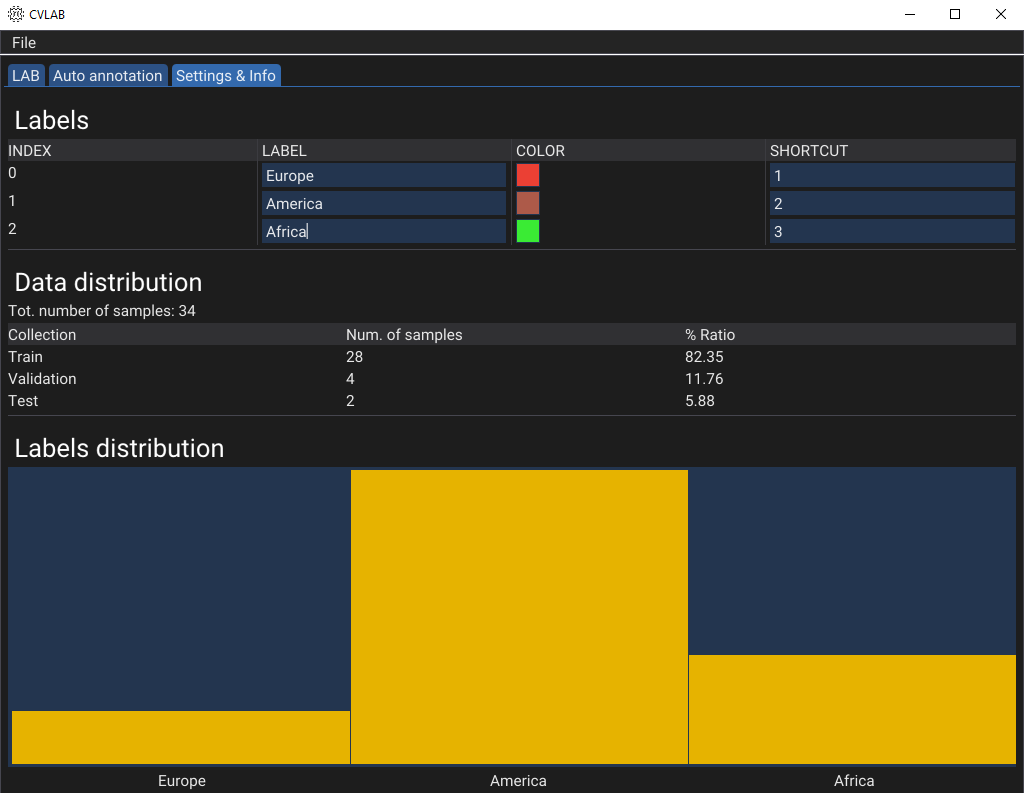
CVLAB is a computer vision annotation tool written in python. pyimgui has been adopted for the graphical user interface.
My goal is to realize a simple, lightweight and standalone app that let you annotate your images, run auto-annotation experiments with your own models, import/export data collections and analyse your data distribution.
Right now the project is a work in progress. Fundamental features are available and operative, but not ready for a daily usage yet.
Install from PyPI (Windows only)
pip install cvlab-gui
Installation requirements
pyimgui
Yolo-LAB runs on the docking branch of PyImgui (not on PyPI atm). You can install the provided wheels.
windows
pip install *win_amd64.whl
linux
pip install *linux_x86_64.whl
other requirements
pip install -r requirements.txt
pip install -r yolov5/requirements.txt
Setup new project
python -m cvlab_gui.setup_project
Run CVLAB GUI
python -m cvlab_gui.main
1 maintainer

Metadata
1 maintainer
Release files for cvlab-gui 0.0.36
For a detailed explanation of source distributions (sdists) and built distributions (wheels), please see the package formats documentation.
Source distribution (sdist)
| File | Size | Uploaded | Provenance | Actions |
|---|---|---|---|---|
| cvlab-gui-0.0.36.tar.gz | 11.5 MB | Without provenance | Details for cvlab-gui-0.0.36.tar.gz |
Built distribution (wheel)
| File | Interpreter | ABI | Platform | Actions Reset |
|---|---|---|---|---|
| cvlab_gui-0.0.36-py3-none-any.whl | Python 3 | none | any | Details for cvlab_gui-0.0.36-py3-none-any.whl |
Total release size: 12.4 MB
Release files / cvlab-gui-0.0.36.tar.gz
| Download URL | cvlab-gui-0.0.36.tar.gz |
|---|---|
| Size | 11.5 MB |
| Tags | Source |
|
SHA-256 checksum How to use checksums |
fcf75f2926b37aa69d9c00e84b3d34a6fd76a89e6874e76b3deedfcf1d01f12c
|
|
BLAKE2b-256 checksum How to use checksums |
5d16a1b2876074aeab51b360621564e1d15e672956c515409ab6209760aac158
|
| Upload date | |
|
Uploaded using Trusted Publishing? What is trusted publishing? |
No |
| Uploaded via |
python-requests/2.28.1
|
Release files / cvlab_gui-0.0.36-py3-none-any.whl
| Download URL | cvlab_gui-0.0.36-py3-none-any.whl |
|---|---|
| Size | 904.0 kB |
| Tags | Python 3 |
|
SHA-256 checksum How to use checksums |
19ad63cd837b92e950fe7452005eda631febc04b342bb9d16b320f572207e617
|
|
BLAKE2b-256 checksum How to use checksums |
b9da3935e046af9a0095c881acc6e8cca470204d587f5cdbe5ee0cfa8fcea295
|
| Upload date | |
|
Uploaded using Trusted Publishing? What is trusted publishing? |
No |
| Uploaded via |
python-requests/2.28.1
|
Security for cvlab-gui 0.0.36
Provenance
Provenance describes where a file came from. On PyPI, provenance is shared via attestations, which provide a verifiable record of the build or publishing details. View details, limitations and caveats.
No provenance found
None of the files in this release were uploaded with provenance metadata.
A note on package security
PyPI is a repository for distributing packages, not a service for auditing them. While third-party security researchers and our staff do their best to detect and remove malicious packages, PyPI cannot guarantee the quality, security or suitability of any given package.
To learn more about protecting yourself from malicious actors, visit our package security documentation.














