
Major plot function used by SZQ lab from China Agricultural University

Project description
cvmcore


Introduction
The core function of data analysis for plot or data process used by SZQ lab from China Agricultural University
Example usage
from Bio import Phylo
import matplotlib as mpl
import matplotlib.pyplot as plt
from io import StringIO
import matplotlib.collections as mpcollections
from copy import copy

import pandas as pd
import numpy as np
import seaborn as sn

from cvmcore.cvmcore import cvmplot

from scipy.cluster.hierarchy import linkage, dendrogram, complete, to_tree
from scipy.spatial.distance import squareform
mlst = [[np.nan, 19., 12.,  9.,  5.,  9.,  2.],
        [np.nan, 19., 12.,  9.,  5.,  9.,  2.],
        [10., 17., 12.,  9., np.nan,  9.,  2.],
        [10., 19., 12., np.nan,  5.,  9.,  2.],
        [np.nan, 19., 13.,  9.,  5.,  9.,  2.]]
genes = np.char.replace(np.array(np.arange(1, 8), dtype='str'), '', 'gene_', count=1)
samples = np.char.replace(np.array(np.arange(1, 6), dtype='str'), '', 'sample_', count=1)
df_mlst = pd.DataFrame(mlst, index=samples, columns=genes)
diff_matrix = cvmplot.get_diff_df(df_mlst)
diff_matrix
| sample_1 | sample_2 | sample_3 | sample_4 | sample_5 | |
|---|---|---|---|---|---|
| sample_1 | 0 | 0 | 1 | 0 | 1 |
| sample_2 | 0 | 0 | 1 | 0 | 1 |
| sample_3 | 1 | 1 | 0 | 1 | 2 |
| sample_4 | 0 | 0 | 1 | 0 | 1 |
| sample_5 | 1 | 1 | 2 | 1 | 0 |
link_matrix =linkage(squareform(diff_matrix), method='complete')
link_matrix
array([[0., 1., 0., 2.],
       [3., 5., 0., 3.],
       [2., 6., 1., 4.],
       [4., 7., 2., 5.]])
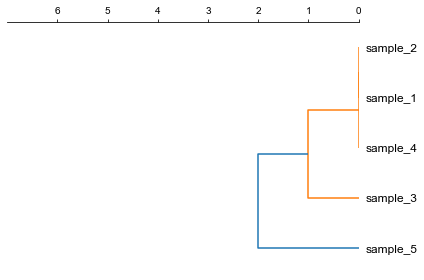
1. Plot a rectangular dendrogram
fig, ax= plt.subplots(1,1)
lableorder, ax = cvmplot.rectree(link_matrix, scale_max=7, labels=samples, ax=ax)
fig.tight_layout()
fig.savefig('screenshots/dendrogram.png')
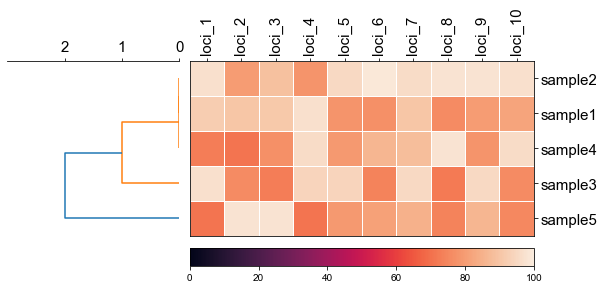
2. Plot rectangular dendrogram with heatmap
#create dataframe
mat = np.random.randint(70, 100, (5, 10))
loci = np.char.replace(np.array(np.arange(1, 11), dtype='str'), '', 'loci_', count=1)
sample = np.char.replace(np.array(np.arange(1, 6), dtype='str'), '', 'sample', count=1)
df_heatmap = pd.DataFrame(mat, index=sample, columns=loci)
#create linkage matrix
diff_matrix = [[0, 0, 1, 0, 1],
               [0, 0, 1, 0, 1],
               [1, 1, 0, 1, 2],
               [0, 0, 1, 0, 1],
               [1, 1, 2, 1, 0]]

linkage_matrix = linkage(squareform(diff_matrix),'complete')
fig, (ax1, ax2) = plt.subplots(1,2,figsize=(8,3), gridspec_kw={'width_ratios': [1, 2]})

fig.tight_layout(w_pad=-2)

row_order, ax1 = cvmplot.rectree(linkage_matrix,labels=sample, no_labels=True, scale_max=3, ax=ax1)
cvmplot.heatmap(df_heatmap, order=row_order, ax=ax2, cbar=True, yticklabel=False)

ax1.set_xticklabels(ax1.get_xticklabels(), fontsize=15)

ax2.set_xticklabels(ax2.get_xticklabels(), rotation=90, fontsize=15)
ax2.set_yticklabels(ax2.get_yticklabels(), fontsize=15)
ax2.xaxis.tick_top()

# fig.tight_layout()
fig.savefig('screenshots/dendrogram_with_heatmap.png', bbox_inches='tight')
[ 5 15 25 35 45]
['sample5', 'sample3', 'sample4', 'sample1', 'sample2']
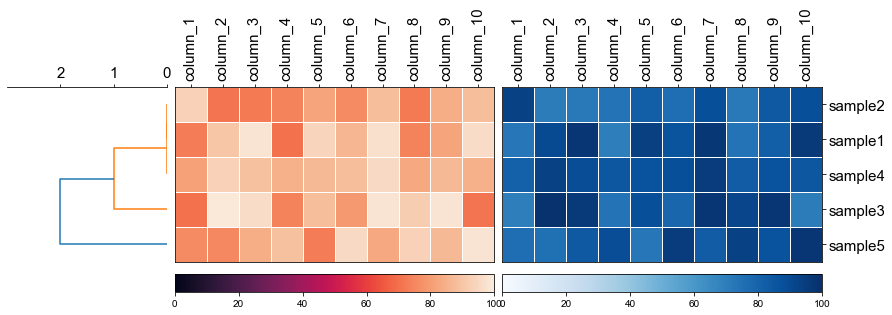
fig, (ax1, ax2, ax3) = plt.subplots(1,3,figsize=(12,3), gridspec_kw={'width_ratios': [1, 2, 2]})

fig.tight_layout(w_pad=-2)

row_order, ax1 = cvmplot.rectree(linkage_matrix,labels=sample, no_labels=True, scale_max=3, ax=ax1)

# remove the yticklabels in ax2
ax2 = cvmplot.heatmap(df_heatmap, order=row_order, ax=ax2, cbar=True, yticklabel=False)
# add ax3 heatmap
ax3 = cvmplot.heatmap(df_heatmap, order=row_order, ax=ax3, cmap='Blues', cbar=True, yticklabel=True)

#set ticklabels property of x or y from ax1, ax2, ax3
ax1.set_xticklabels(ax1.get_xticklabels(), fontsize=15)

ax2.set_xticklabels(ax2.get_xticklabels(), rotation=90, fontsize=15)
ax2.xaxis.tick_top()

ax3.set_xticklabels(ax3.get_xticklabels(), rotation=90, fontsize=15)
ax3.set_yticklabels(ax3.get_yticklabels(), fontsize=15)
ax3.xaxis.tick_top()


# fig.tight_layout()
fig.savefig('screenshots/multiple_heatmap.png', bbox_inches='tight')
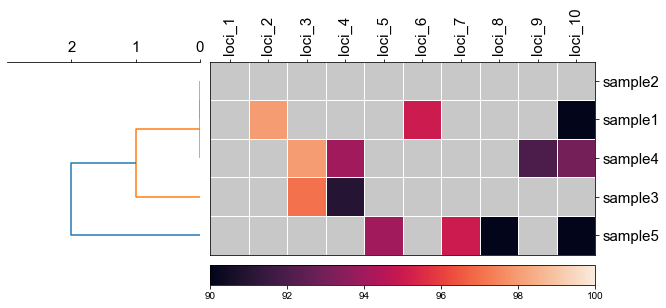
2.1 set minimum value of heatmap
fig, (ax1, ax2) = plt.subplots(1,2,figsize=(8,3), gridspec_kw={'width_ratios': [1, 2]})
fig.tight_layout(w_pad=-2)

order, ax1 = cvmplot.rectree(linkage_matrix,labels=sample, no_labels=True, scale_max=3, ax=ax1)
cvmplot.heatmap(df_heatmap, order=order, ax=ax2, cbar=True, vmin=90)

ax1.set_xticklabels(ax1.get_xticklabels(), fontsize=15)

ax2.set_xticklabels(ax2.get_xticklabels(), rotation=90, fontsize=15)
ax2.set_yticklabels(ax2.get_yticklabels(), fontsize=15)
ax2.xaxis.tick_top()

fig.savefig('screenshots/dendrogram_heatmap_minimumvalue.pdf', bbox_inches='tight')
[ 5 15 25 35 45]
['sample5', 'sample3', 'sample4', 'sample1', 'sample2']
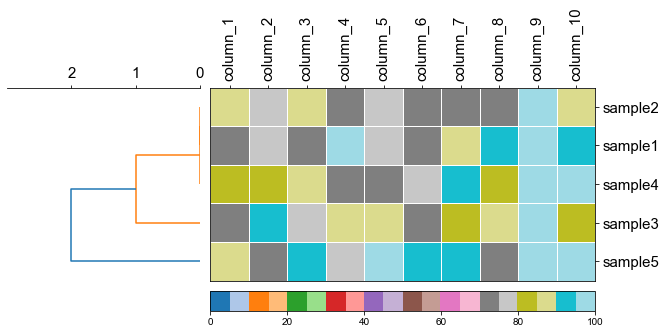
2.2 using cmap to change color
fig, (ax1, ax2) = plt.subplots(1,2,figsize=(8,3), gridspec_kw={'width_ratios': [1, 2]})
fig.tight_layout(w_pad=-2)

order, ax1 = cvmplot.rectree(linkage_matrix,labels=sample, no_labels=True, scale_max=3, ax=ax1)
cvmplot.heatmap(df_heatmap, order=order, ax=ax2, cmap='tab20', cbar=True)

ax1.set_xticklabels(ax1.get_xticklabels(), fontsize=15)

ax2.set_xticklabels(ax2.get_xticklabels(), rotation=90, fontsize=15)
ax2.set_yticklabels(ax2.get_yticklabels(), fontsize=15)
ax2.xaxis.tick_top()
fig.savefig('screenshots/dendrogram_heatmap_cmap.pdf', bbox_inches='tight')
[ 5 15 25 35 45]
['sample5', 'sample3', 'sample4', 'sample1', 'sample2']
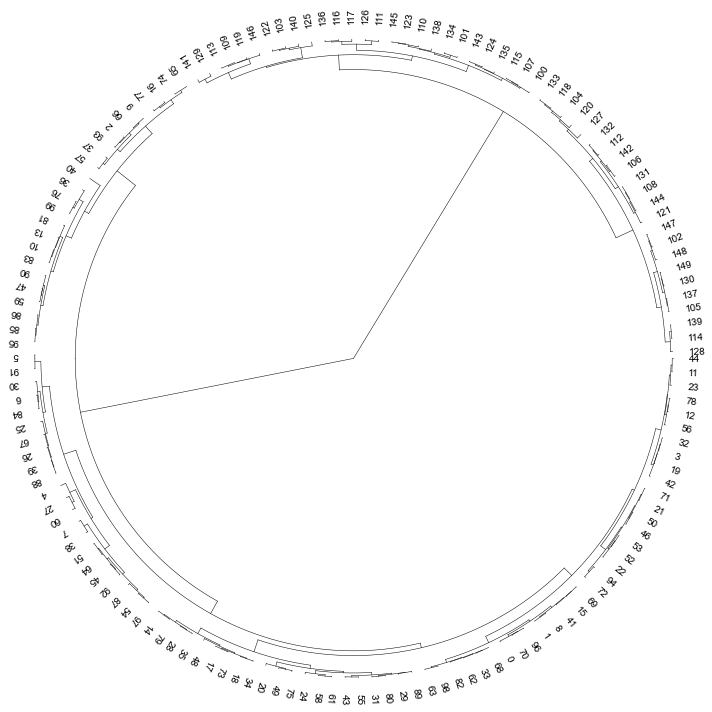
3. Plot a circular dendrogram
# generate two clusters: a with 100 points, b with 50:
np.random.seed(4711)  # for repeatability of this tutorial
a = np.random.multivariate_normal([10, 0], [[3, 1], [1, 4]], size=[100,])
b = np.random.multivariate_normal([0, 20], [[3, 1], [1, 4]], size=[50,])
X = np.concatenate((a, b),)
Z = linkage(X, 'ward')
Z2 = dendrogram(Z, no_plot=True)
# set open angle
fig, ax= plt.subplots(1,1,figsize=(10,10))

cvmplot.circulartree(Z2,addlabels=True, fontsize=10, ax=ax)
fig.tight_layout()
fig.savefig('screenshots/circular_dendrogram.png', bbox_inches='tight')
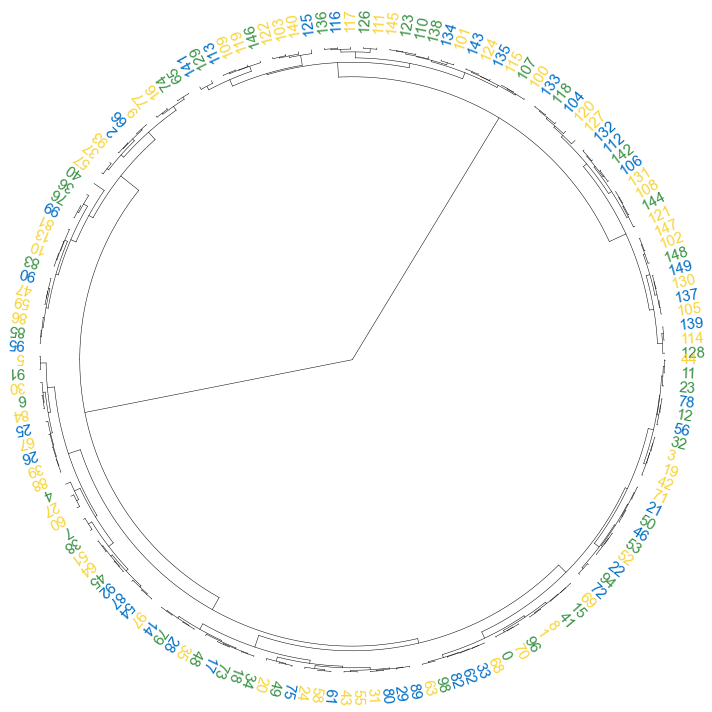
3.1 color label
colors = [{'#0070c7':'2021'}, {'#3a9245':'2022'}, {'#f8d438':'2023'}]
result = np.random.choice(colors, size=150)
label_colors_map = dict(zip(Z2['ivl'], result))
point_colors_map = dict(zip(Z2['ivl'], result))
fig, ax= plt.subplots(1,1,figsize=(10,10))
cvmplot.circulartree(Z2, addlabels=True, branch_color=False, label_colors= label_colors_map, fontsize=15)
fig.tight_layout()
fig.savefig('screenshots/circular_dendrogram_color_label.png')
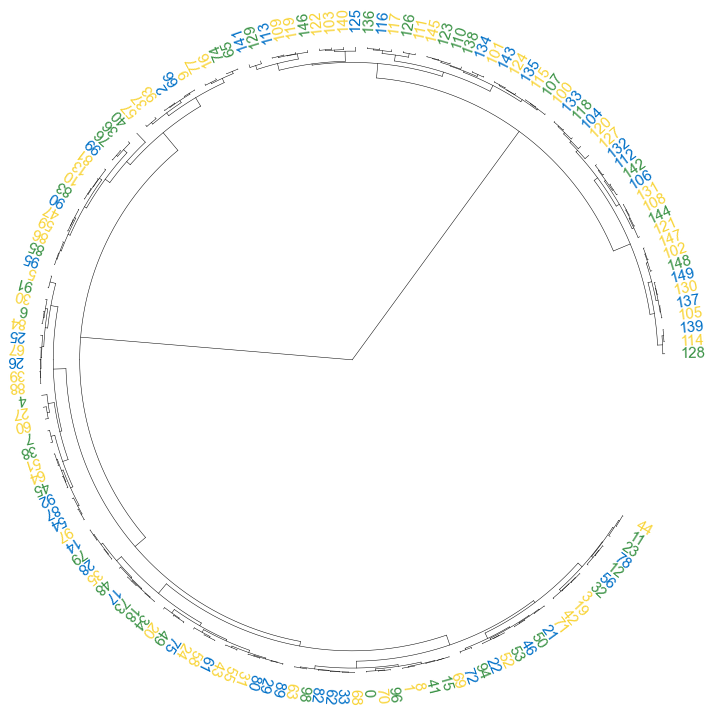
3.2 set open angle
fig, ax= plt.subplots(1,1,figsize=(10,10))
cvmplot.circulartree(Z2, addlabels=True, branch_color=False, label_colors= label_colors_map, fontsize=15, open_angle=30)
fig.tight_layout()
fig.savefig('screenshots/circular_dendrogram_openangle.png')
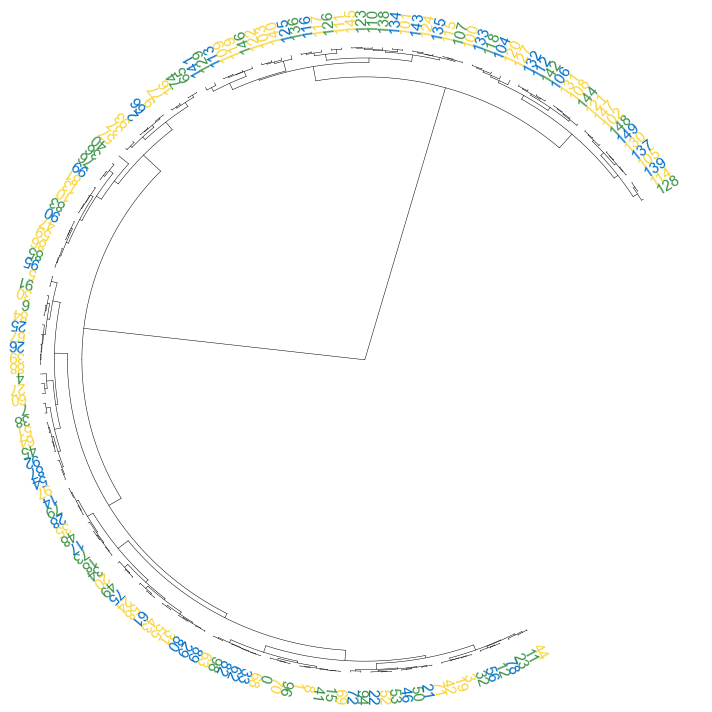
3.3 set start angle
fig, ax= plt.subplots(1,1,figsize=(10,10))
cvmplot.circulartree(Z2, addlabels=True, branch_color=False, label_colors= label_colors_map, fontsize=15, open_angle=90,
                     start_angle=30
                    )
fig.tight_layout()
fig.savefig('screenshots/circular_dendrogram_startangle.png')
3.4 add point
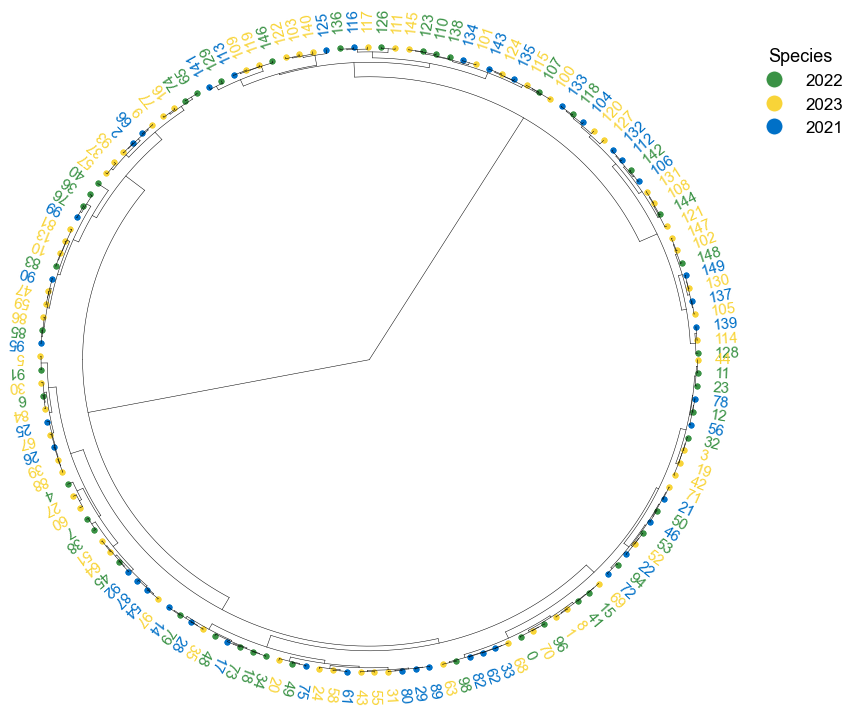
fig, ax= plt.subplots(1,1,figsize=(12,10))
cvmplot.circulartree(Z2, addlabels=True, branch_color=False, label_colors= label_colors_map, fontsize=15, addpoints=True,
                     point_colors = point_colors_map, point_legend_title='Species', pointsize=25)
fig.tight_layout()
fig.savefig('screenshots/circular_dendrogram_tippoints.png')
4. Plot phylogenetic tree
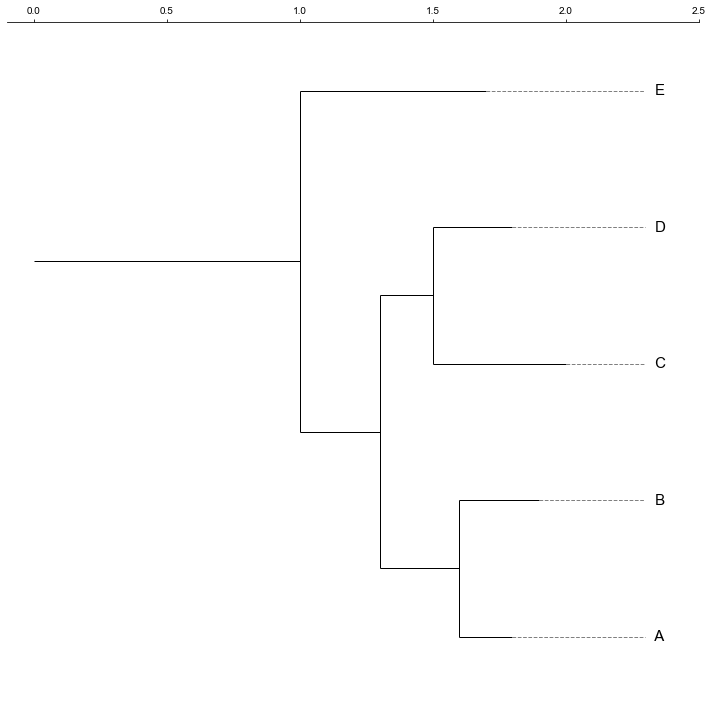
tree = "(((A:0.2, B:0.3):0.3,(C:0.5, D:0.3):0.2):0.3, E:0.7):1.0;"
tree = Phylo.read(StringIO(tree), 'newick')
fig, ax= plt.subplots(1,1, figsize=(10, 10))
ax, lable_order = cvmplot.phylotree(tree=tree, color='k', lw=1, ax=ax, show_label=True, align_label=True, labelsize=15)
fig.tight_layout()
fig.savefig('screenshots/phylogenetic tree.png')
4.1 Plot tree with heatmap
#create dataframe
mat = np.random.randint(70, 100, (5, 10))
col = np.char.replace(np.array(np.arange(1, 11), dtype='str'), '', 'column_', count=1)
strains = ['A', 'B', 'C', 'D', 'E']
df_heatmap = pd.DataFrame(mat, index=strains, columns=col)
df_heatmap
| column_1 | column_2 | column_3 | column_4 | column_5 | column_6 | column_7 | column_8 | column_9 | column_10 | |
|---|---|---|---|---|---|---|---|---|---|---|
| A | 89 | 73 | 91 | 75 | 95 | 90 | 93 | 74 | 99 | 97 |
| B | 73 | 90 | 75 | 89 | 85 | 72 | 82 | 85 | 96 | 82 |
| C | 84 | 82 | 86 | 74 | 72 | 75 | 91 | 83 | 97 | 98 |
| D | 72 | 77 | 72 | 98 | 79 | 73 | 87 | 91 | 98 | 94 |
| E | 88 | 75 | 88 | 73 | 77 | 72 | 74 | 73 | 99 | 86 |
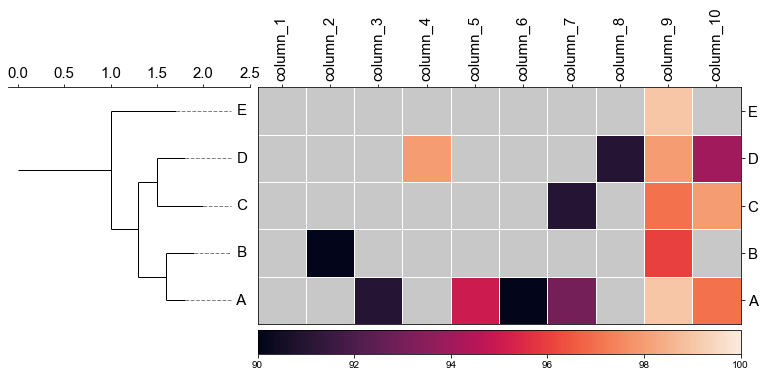
fig,(ax1, ax2)= plt.subplots(1,2, figsize=(8, 3), gridspec_kw={'width_ratios':[1, 2]})
fig.tight_layout(w_pad=-2)
ax1, order = cvmplot.phylotree(tree=tree, color='k', lw=1, ax=ax1, show_label=True, align_label=True, labelsize=15)
cvmplot.heatmap(df_heatmap, order=order, ax=ax2, cbar=True, vmin=90)

ax1.set_xticklabels(ax1.get_xticklabels(), fontsize=15)

ax2.set_xticklabels(ax2.get_xticklabels(), rotation=90, fontsize=15)
ax2.set_yticklabels(ax2.get_yticklabels(), fontsize=15)
ax2.xaxis.tick_top()

fig.savefig('screenshots/phylotree_with_heatmap.pdf')
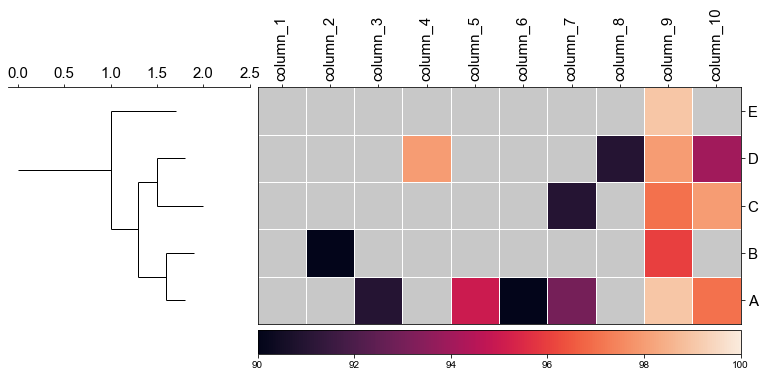
4.2 remove labels at the tip of the tree
fig,(ax1, ax2)= plt.subplots(1,2, figsize=(8, 3), gridspec_kw={'width_ratios':[1, 2]})
fig.tight_layout(w_pad=-2)
ax1, order = cvmplot.phylotree(tree=tree, color='k', lw=1, ax=ax1, show_label=False)
cvmplot.heatmap(df_heatmap, order=order, ax=ax2, cbar=True, vmin=90)

ax1.set_xticklabels(ax1.get_xticklabels(), fontsize=15)

ax2.set_xticklabels(ax2.get_xticklabels(), rotation=90, fontsize=15)
ax2.set_yticklabels(ax2.get_yticklabels(), fontsize=15)
ax2.xaxis.tick_top()

fig.savefig('screenshots/phylotree_with_heatmap-remove_tiplable.pdf', bbox_inches='tight')
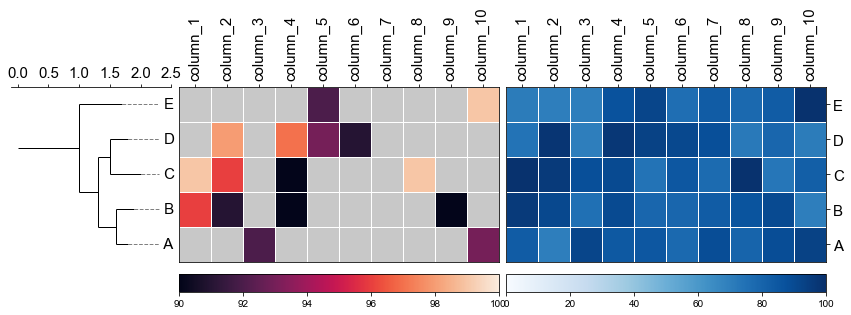
4.3 Plot multiple heatmap with phylotree
fig,(ax1, ax2, ax3)= plt.subplots(1,3, figsize=(12, 3), gridspec_kw={'width_ratios':[1, 2, 2]})
fig.tight_layout(w_pad=-2)
ax1, order = cvmplot.phylotree(tree=tree, color='k', lw=1, ax=ax1, show_label=True, align_label=True, labelsize=15)
ax2 = cvmplot.heatmap(df_heatmap, order=order, ax=ax2, cbar=True, vmin=90, yticklabel=False)
# add ax3 heatmap
ax3 = cvmplot.heatmap(df_heatmap, order=order, ax=ax3, cmap='Blues', cbar=True, yticklabel=True)

#set ticklabels property of x or y from ax1, ax2, ax3
ax1.set_xticklabels(ax1.get_xticklabels(), fontsize=15)

ax2.set_xticklabels(ax2.get_xticklabels(), rotation=90, fontsize=15)
ax2.xaxis.tick_top()

ax3.set_xticklabels(ax3.get_xticklabels(), rotation=90, fontsize=15)
ax3.set_yticklabels(ax3.get_yticklabels(), fontsize=15)
ax3.xaxis.tick_top()


# fig.tight_layout()
fig.savefig('screenshots/phylotree_multiple_heatmap.png', bbox_inches='tight')
5. Gene environment plot
First, you shoud prepare a dataframe from the gff file, The columns should include the feature start, end, strand, label(gene name or whatever you want show next to the arrow) and the arrow color.
| TRACK | START | END | STRAND | LABEL | COLOR |
|---|---|---|---|---|---|
| A | 100 | 900 | -1 | label1 | #ec9631 |
| A | 1100 | 1300 | 1 | label2 | #ec9631 |
| A | 1350 | 1500 | 1 | label3 | #ec9631 |
| A | 1520 | 1700 | 1 | label4 | #ec9631 |
| A | 1900 | 2200 | -1 | label5 | #ec9631 |
| A | 2500 | 2700 | 1 | label6 | #ec9631 |
| A | 2700 | 2800 | -1 | label7 | #ec9631 |
| A | 2850 | 3000 | -1 | label8 | red |
| A | 3100 | 3500 | 1 | label9 | #ec9631 |
| A | 3600 | 3800 | -1 | label10 | #ec9631 |
| A | 3900 | 4200 | -1 | label11 | #ec9631 |
| A | 4300 | 4700 | -1 | label12 | #ec9631 |
| A | 4800 | 4850 | 1 | label13 | #ec9631 |
| B | 100 | 900 | -1 | label14 | #ec9631 |
| B | 1100 | 1300 | 1 | label15 | #ec9631 |
| B | 1350 | 1500 | 1 | label16 | #ec9631 |
| B | 1520 | 1700 | 1 | label17 | #ec9631 |
| B | 1900 | 2200 | -1 | label18 | #ec9631 |
| B | 2500 | 2700 | 1 | label19 | #ec9631 |
| B | 2700 | 2800 | -1 | label20 | #ec9631 |
| B | 2850 | 3000 | -1 | label21 | #ec9631 |
| B | 3100 | 3500 | 1 | label22 | #ec9631 |
| B | 3600 | 3800 | -1 | label23 | #ec9631 |
| B | 3900 | 4200 | -1 | label24 | #ec9631 |
| B | 4300 | 4700 | -1 | label25 | #ec9631 |
| B | 4800 | 4850 | 1 | label26 | #ec9631 |
| C | 100 | 900 | -1 | label27 | #ec9631 |
| C | 1100 | 1300 | 1 | label28 | #ec9631 |
| C | 1350 | 1500 | 1 | label29 | #ec9631 |
| C | 1520 | 1700 | 1 | label30 | #ec9631 |
| C | 1900 | 2200 | -1 | label31 | green |
| C | 2500 | 2700 | 1 | label32 | #ec9631 |
| C | 2700 | 2800 | -1 | label33 | #ec9631 |
| C | 2850 | 3000 | -1 | label34 | #ec9631 |
| C | 3100 | 3500 | 1 | label35 | #ec9631 |
| C | 3600 | 3800 | -1 | label36 | #ec9631 |
| C | 3900 | 4200 | -1 | label37 | #ec9631 |
| C | 4300 | 4700 | -1 | label38 | #ec9631 |
| C | 4800 | 4850 | 1 | label39 | #ec9631 |
| D | 100 | 900 | -1 | label40 | #ec9631 |
| D | 1100 | 1300 | 1 | label41 | #ec9631 |
| D | 1350 | 1500 | 1 | label42 | #ec9631 |
| D | 1520 | 1700 | 1 | label43 | #ec9631 |
| D | 1900 | 2200 | -1 | label44 | #ec9631 |
| D | 2500 | 2700 | 1 | label45 | #ec9631 |
| D | 2700 | 2800 | -1 | label46 | #ec9631 |
| D | 2850 | 3000 | -1 | label47 | #ec9631 |
| D | 3100 | 3500 | 1 | label48 | #ec9631 |
| D | 3600 | 3800 | -1 | label49 | #ec9631 |
| D | 3900 | 4200 | -1 | label50 | #ec9631 |
| D | 4300 | 4700 | -1 | label51 | #ec9631 |
| D | 4800 | 4850 | 1 | label52 | #ec9631 |
| E | 100 | 900 | -1 | label53 | #ec9631 |
| E | 1100 | 1300 | 1 | label54 | #ec9631 |
| E | 1350 | 1500 | 1 | label55 | #ec9631 |
| E | 1520 | 1700 | 1 | label56 | #ec9631 |
| E | 1900 | 2200 | -1 | label57 | #ec9631 |
| E | 2500 | 2700 | 1 | label58 | #ec9631 |
| E | 2700 | 2800 | -1 | label59 | #ec9631 |
| E | 2850 | 3000 | -1 | label60 | #ec9631 |
| E | 3100 | 3500 | 1 | label61 | #ec9631 |
| E | 3600 | 3800 | -1 | label62 | #ec9631 |
| E | 3900 | 4200 | -1 | label63 | #ec9631 |
| E | 4300 | 4700 | -1 | label64 | #ec9631 |
| E | 4800 | 4850 | 1 | label65 | #ec9631 |
5. Plot genes
# Create arrow dictionary
arrow_dict = {k: g.to_dict(orient='records') for k, g in df.set_index('TRACK').groupby(level=0)}

# Define the display order of your tracks
order = ['D', 'A',  'C', 'B', 'E']
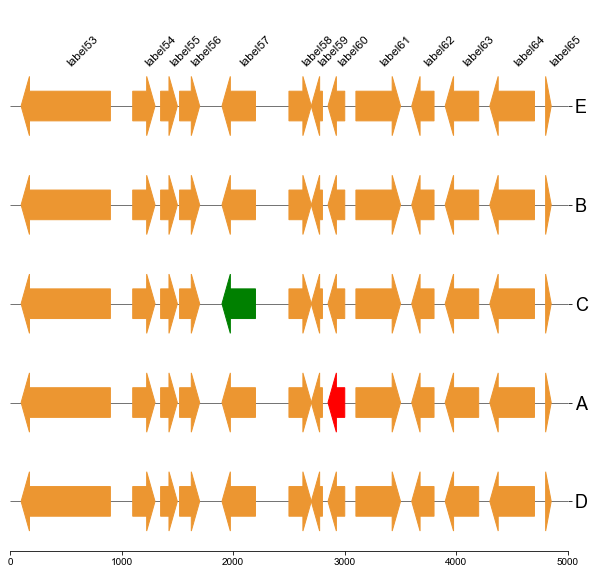
5.1 Plot gene arrows and label on top track
fig, ax = plt.subplots(1,1, figsize=(10,10))
ax = cvmplot.plotgenes(dc=arrow_dict, order=order, ax=ax, max_track_size=5000, addlabels=True, label_track='top')
fig.savefig('screenshots/gene_arrow_top.png', bbox_inches='tight')
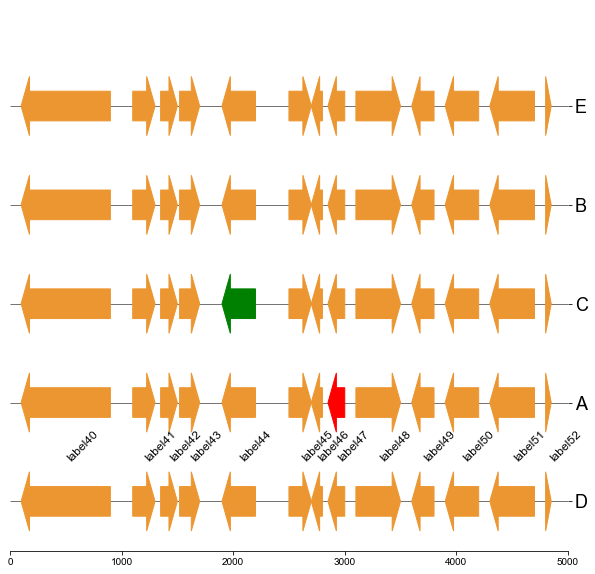
5.2 Plot gene arrows and label on bottom track
fig, ax = plt.subplots(1,1, figsize=(10,10))
ax = cvmplot.plotgenes(dc=arrow_dict, order=order, ax=ax, max_track_size=5000, addlabels=True, label_track='bottom')
fig.savefig('screenshots/gene_arrow_bottom.png', bbox_inches='tight')
5.3 Plot gene arrows and label on all tracks
fig, ax = plt.subplots(1,1, figsize=(10,10))
ax = cvmplot.plotgenes(dc=arrow_dict, order=order, ax=ax, max_track_size=5000, addlabels=True, label_track='all')
fig.savefig('screenshots/gene_arrow_all.png', bbox_inches='tight')
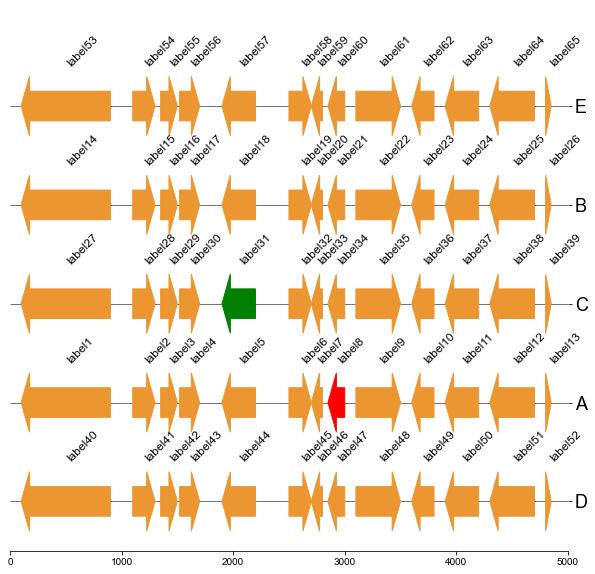
5.4 Plot gene arrows with phylotree and heatmap
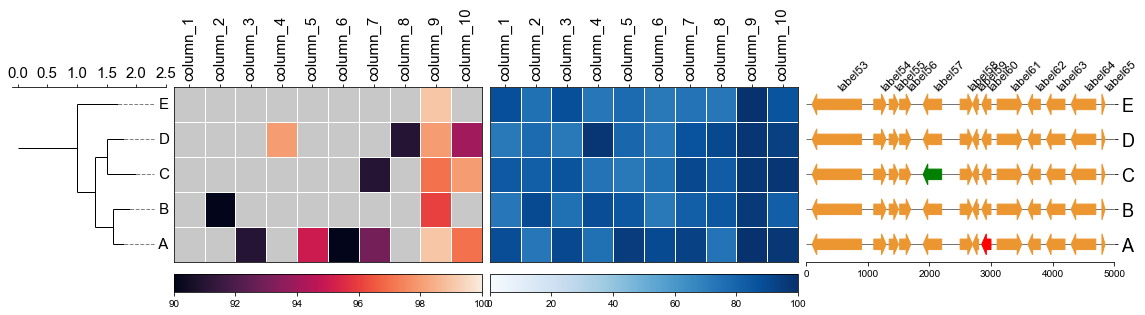
Put together!
# Put together
fig,(ax1, ax2, ax3, ax4)= plt.subplots(1,4, figsize=(16, 3), gridspec_kw={'width_ratios':[1, 2, 2, 2]})
fig.tight_layout(w_pad=-2)
ax1, order = cvmplot.phylotree(tree=tree, color='k', lw=1, ax=ax1, show_label=True, align_label=True, labelsize=15)
ax2 = cvmplot.heatmap(df_heatmap, order=order, ax=ax2, cbar=True, vmin=90, yticklabel=False)
# add ax3 heatmap
ax3 = cvmplot.heatmap(df_heatmap, order=order, ax=ax3, cmap='Blues', cbar=True, yticklabel=False)

ax4 = cvmplot.plotgenes(dc=arrow_dict, order=order, ax=ax4, max_track_size=5000, addlabels=True, label_track='top', ylim=(-3, 3))


#set ticklabels property of x or y from ax1, ax2, ax3
ax1.set_xticklabels(ax1.get_xticklabels(), fontsize=15)

ax2.set_xticklabels(ax2.get_xticklabels(), rotation=90, fontsize=15)
ax2.xaxis.tick_top()

ax3.set_xticklabels(ax3.get_xticklabels(), rotation=90, fontsize=15)
ax3.set_yticklabels(ax3.get_yticklabels(), fontsize=15)
ax3.xaxis.tick_top()


# fig.tight_layout()
fig.savefig('screenshots/phylotree_heatmap_withgenes.png', bbox_inches='tight')


Download files
Download the file for your platform. If you're not sure which to choose, learn more about installing packages.
Source Distribution
Built Distribution
Filter files by name, interpreter, ABI, and platform.
If you're not sure about the file name format, learn more about wheel file names.
Copy a direct link to the current filters
File details
Details for the file cvmcore-0.3.0.tar.gz.
File metadata
- Download URL: cvmcore-0.3.0.tar.gz
- Upload date:
- Size: 2.6 MB
- Tags: Source
- Uploaded using Trusted Publishing? No
- Uploaded via: twine/6.2.0 CPython/3.10.10
File hashes
| Algorithm | Hash digest | |
|---|---|---|
| SHA256 |
55998d6359fea71f27f748caba7f29392d2c1efd3a79801a1da74496c443d9f4
|
|
| MD5 |
a7eb5601423f0335e5e5c973e93c0dac
|
|
| BLAKE2b-256 |
c858dabfdfc7de6f7d160fce9413c4bd2e20d8e013cb0604e0e41039614edf11
|
File details
Details for the file cvmcore-0.3.0-py3-none-any.whl.
File metadata
- Download URL: cvmcore-0.3.0-py3-none-any.whl
- Upload date:
- Size: 7.8 kB
- Tags: Python 3
- Uploaded using Trusted Publishing? No
- Uploaded via: twine/6.2.0 CPython/3.10.10
File hashes
| Algorithm | Hash digest | |
|---|---|---|
| SHA256 |
c5c930d68f35e146cfd7ad81daeab2e7980ebfd3cade4207e5e983d87950f850
|
|
| MD5 |
776dfb583fb49a76f55e43d1d11c6a57
|
|
| BLAKE2b-256 |
0b2ac0ac6edaf64322ca4645843b40d4950e707b0cae22c3d6d6f38d1ffb2afa
|






