





CVXlab is an open-source Python laboratory for modeling and solving convex optimization problems. It extends cvxpy with user-friendly interfaces, integrated data management and support for multiple, interconnected optimization models.
Table of Contents
- Installation
- Quick Overview
- Guided Interface
- Documentation
- Changelog
- Contributing
- Community & Support
- License
- Citing
Installation
From PyPI
pip install cvxlab
From source (for development):
git clone https://github.com/cvxlab/cvxlab.git
cd cvxlab
pip install -e .[dev]
See the Installation Guide for detailed instructions.
Quick Overview
CVXlab allows you to define optimization problems using:
- General-purpose model generator: Model problems as you would mathematically, without restrictive solver forms.
- Almost no-code required: Build models using Excel or YAML—no coding required.
- Centralized data management: Centralized data input/output via SQLite database.
- Multi-Model Support: Generate and solve multiple parallel, sequential, or integrated optimization problems.
- Powerful engine embedded: Built on cvxpy package, leveraging its extensive solver support.
Typical workflow:
The figure below provides a synthetic and simplified overview of the CVXlab modeling process.
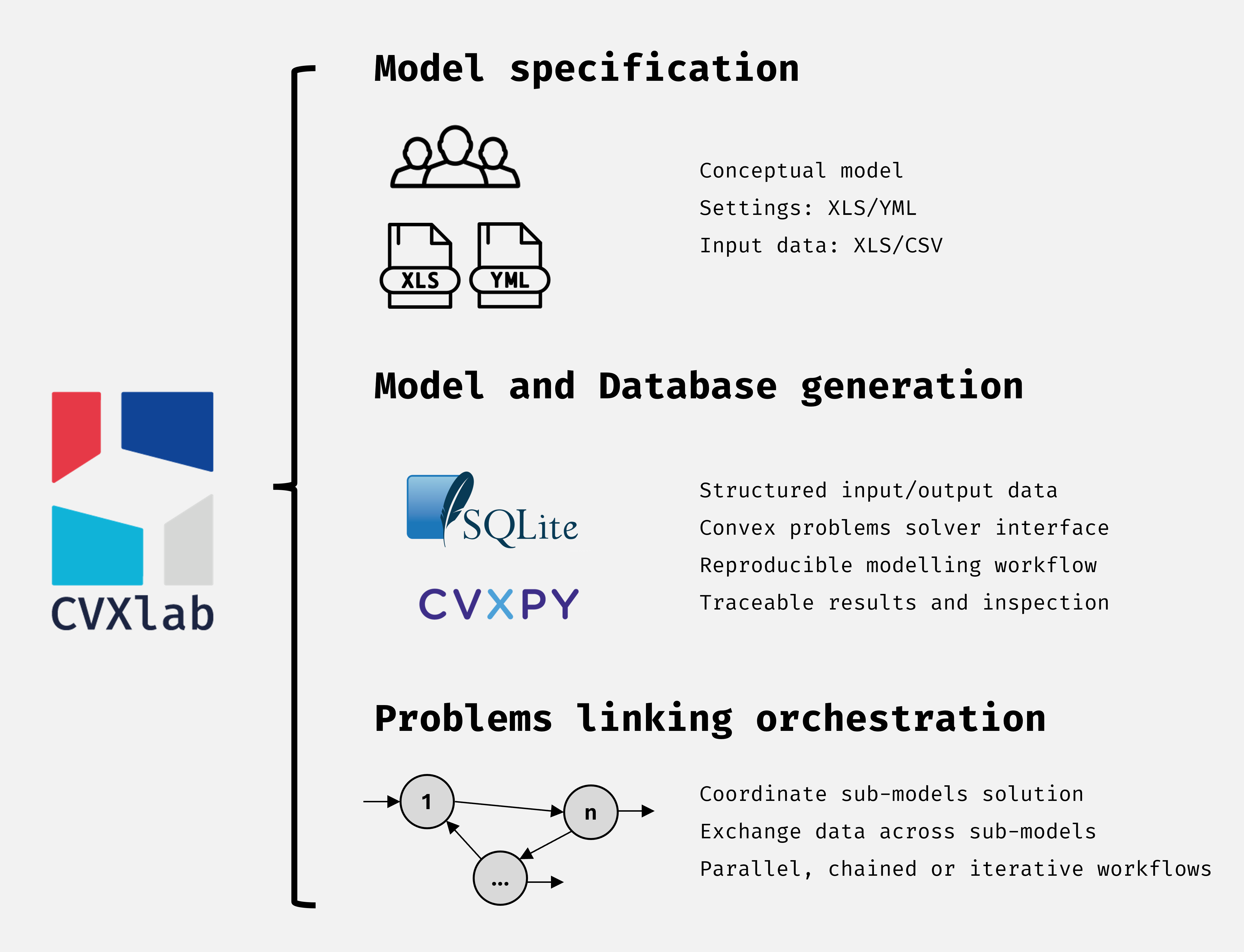
In generating and handling a CVXlab model, the user must follow the five fundamental activities summarized below:
- The user defines the model settings and the related structure: model scope, structure of variables, and list of mathematical expressions, including equalities, inequalities and (eventually) objective function. This activity requires almost no coding, as model definition can be performed via Excel files or YAML configuration files.
- The user proceeds by generating a CVXlab Model object, consisting in a Python class instance embedding all the model settings and the methods useful to manage the model. At the same time, other items are generated, including the SQLite database file (to store all model data), and the Excel files serving as blank templates for collecting exogenous data from the user.
- The user feeds input data to SQLite database through blank Excel template files. Specifically, user defines the data input required to characterize exogenous model variables.
- The numerical problem is generated, exogenous data fetched from the database, and the problem is solved through CVXPY engine.
- If problem is successfuly solved, results are finally exported to the database. Due to the structure of the relational database, it can be easily linked and inspected via Excel or SQL queries, or imported into Business Intelligence tools (such as PowerBI or Tableau) for more elaborated data visualization and analysis.
Guided Interface
CVXlab provides an interactive guided interface that walks you through the full
modeling workflow, from directory setup to model solution via a terminal menu.
Launch it with the cvxlab.gui() function:
import cvxlab

frontend_config = {
    'model_dir_name': 'my_model',
    'main_dir_path': '/path/to/models',
    'action_settings': {
        'run_model': {
            'solution_mode': 'parallel',
            'solver': 'CLARABEL',
        },
    },
}

cvxlab.gui(**frontend_config)
Model settings are supplied at the top level, while API-specific values belong
under action_settings. All values are optional: after an action is selected,
the interface asks only for the settings that were not preconfigured. The
use_existing_data model option is selected through Model session: choose
Create new Model instance for False or Open existing Model environment
for True.
Documentation
Full documentation is available at cvxlab.readthedocs.io. You can also browse the source documentation in the docs/source directory.
Changelog
See CHANGELOG.md for a detailed history of changes.
Contributing
We welcome contributions from the community! Please see CONTRIBUTING.md for guidelines.
Community & Support
Submit issues and ideas for improvements in GitHub GitHub Issues
License
Licensed under the Apache License 2.0. See LICENSE for details.
Citing
If you use CVXlab in academic work, please cite the software as follows.
APA
Rocco, M. V. (2026). CVXlab (Version 1.1.0) [Software]. Zenodo. https://doi.org/10.5281/zenodo.20644006
BibTeX
@software{rocco_cvxlab_2026,
  author    = {Rocco, Matteo V.},
  title     = {{CVXlab}},
  version   = {1.1.0},
  year      = {2026},
  publisher = {Zenodo},
  doi       = {10.5281/zenodo.20644006},
  url       = {https://doi.org/10.5281/zenodo.20644006}
}
For industry or non-academic use, we'd love to hear your feedback: reach out via email at matteovincenzo.rocco@polimi.it.
1 maintainer

Download files
Download the file for your platform. If you're not sure which to choose, learn more about installing packages.
Source Distribution
Built Distribution
Filter files by name, interpreter, ABI, and platform.
If you're not sure about the file name format, learn more about wheel file names.
Copy a direct link to the current filters
File details
Details for the file cvxlab-1.1.0.tar.gz.
File metadata
- Download URL: cvxlab-1.1.0.tar.gz
- Upload date:
- Size: 153.4 kB
- Tags: Source
- Uploaded using Trusted Publishing? No
- Uploaded via:
twine/7.0.0 CPython/3.11.15
File hashes
| Algorithm | Hash digest | |
|---|---|---|
| SHA256 |
a16990e0f1d304a69ca609b6cbe87680095d95156c8207cee56dce0dd2129caa
|
|
| MD5 |
657c1646a3856213cf086e2f81e1b454
|
|
| BLAKE2b-256 |
341e63e22fb493e29ff50e76947c19ab42e17ef09f110eca80842480938737c1
|
File details
Details for the file cvxlab-1.1.0-py3-none-any.whl.
File metadata
- Download URL: cvxlab-1.1.0-py3-none-any.whl
- Upload date:
- Size: 165.6 kB
- Tags: Python 3
- Uploaded using Trusted Publishing? No
- Uploaded via:
twine/7.0.0 CPython/3.11.15
File hashes
| Algorithm | Hash digest | |
|---|---|---|
| SHA256 |
bf29974251679e74f6a93a6c719b1b1e2ba1528a45fcc0a863267a166979eea5
|
|
| MD5 |
d0f5667d256946ccc5b3b63f7a795cdb
|
|
| BLAKE2b-256 |
a926a91babec8d3b2dd7edee056a184a42a3da02e25ae5d50cb20368b23558fc
|














