
MCP server for SSH remote server management
Verified details
These details have been verified by PyPIProject links
GitHub Statistics
Maintainers

Project description

cygnus-ssh-mcp
The most powerful SSH MCP server for AI assistants




Give Claude full control of your Linux, macOS, and Windows servers with 43 specialized tools
Why cygnus-ssh-mcp?
Most SSH MCP servers let you run commands. cygnus-ssh-mcp lets you manage servers.
| What you get | Basic SSH MCP | cygnus-ssh-mcp |
|---|---|---|
| Run commands | ✅ | ✅ |
| Pre-configured hosts with aliases | ❌ | ✅ |
| Sudo support (Linux/macOS) | Limited | ✅ |
| Windows Server support | ❌ | ✅ |
| Background task management | ❌ | ✅ |
| Line-level file editing | ❌ | ✅ |
| Command history with output | ❌ | ✅ |
| Recursive directory operations | ❌ | ✅ |
| Archive create/extract | ❌ | ✅ |
| Full Unicode support | ? | ✅ |
Installation
pip install cygnus-ssh-mcp
Or run without installing using uvx:
uvx cygnus-ssh-mcp
Quick Start
1. Create your hosts file
Create ~/.mcp_ssh_hosts.toml:
# Minimal (password auth) - only required fields
["user@server.example.com"]
password = "your_password"
port = 22

# With alias and sudo (most common setup)
["admin@production.example.com"]
password = "your_password"
port = 22
sudo_password = "sudo_pass"        # optional: for use_sudo operations
alias = "prod"                     # optional: connect by alias
description = "Production server"  # optional: for documentation

# SSH key authentication
["deploy@staging.example.com"]
keyfile = "~/.ssh/id_ed25519"
port = 22
alias = "staging"

# Windows Server (requires OpenSSH)
["administrator@winserver.example.com"]
password = "your_password"
port = 22
alias = "win-prod"
Required fields: port + (password OR keyfile)
Optional fields: alias, description, sudo_password, key_passphrase
Host file locations: Default is
~/.mcp_ssh_hosts.toml. Falls back to./mcp_ssh_hosts.tomlif not found. Use--config /path/to/hosts.tomlfor a custom location.
2. Add to Claude Desktop
Edit your claude_desktop_config.json:
{
  "mcpServers": {
    "ssh": {
      "command": "cygnus-ssh-mcp"
    }
  }
}
Or with a custom hosts file location:
{
  "mcpServers": {
    "ssh": {
      "command": "cygnus-ssh-mcp",
      "args": ["--config", "/path/to/my_hosts.toml"]
    }
  }
}
3. Start managing servers
In Claude, just say:
"Connect to prod and show me the disk usage"
"Edit /etc/nginx/nginx.conf and change worker_connections to 2048"
"Find all .log files larger than 100MB in /var/log"
Platform Support
cygnus-ssh-mcp works from any client (Windows, Linux, macOS) to any target server:
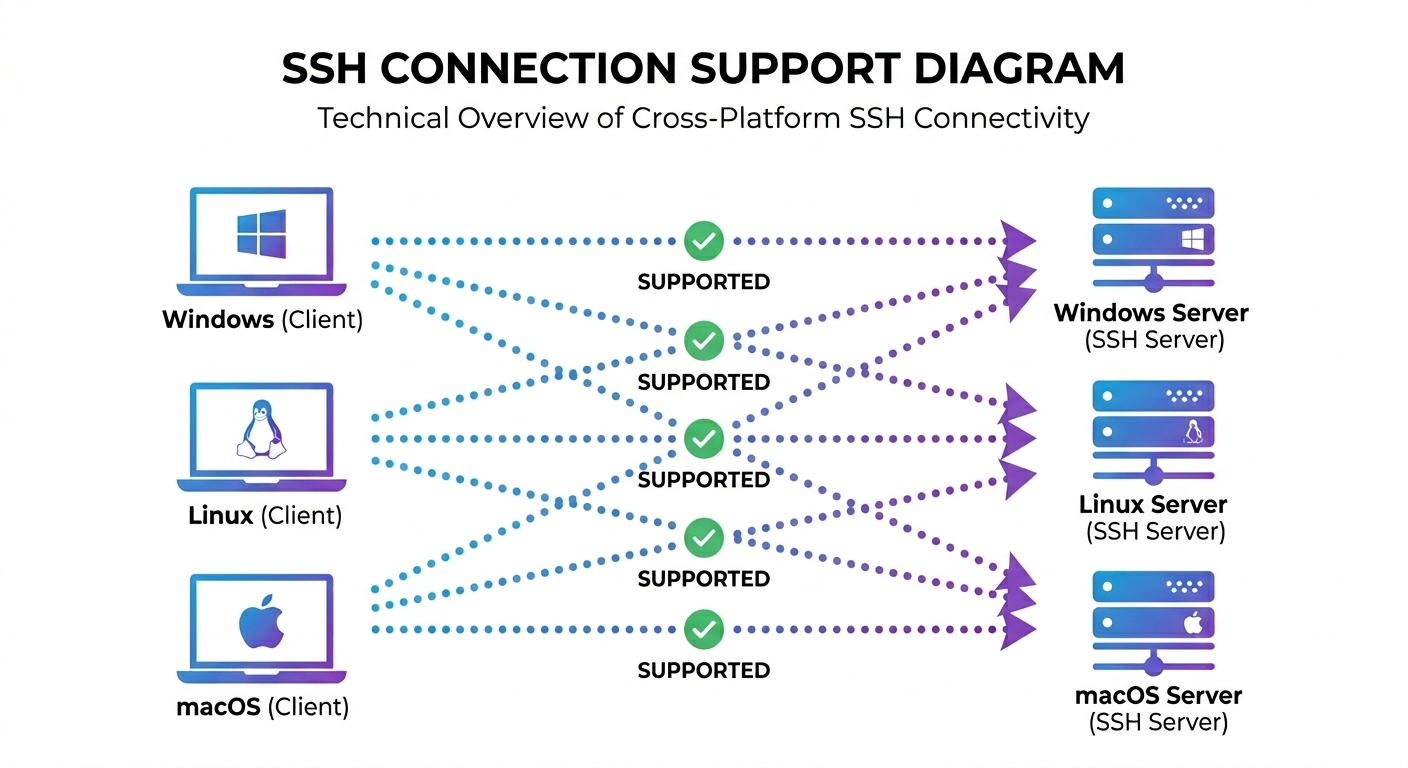
| From (Client) | To (Target) | Status |
|---|---|---|
| Windows | Linux | ✅ Tested |
| Windows | Windows | ✅ Tested |
| Linux | Linux | ✅ Tested |
| Linux | Windows | ✅ Tested |
| macOS | Any | ✅ Supported |
Windows targets require OpenSSH Server installed and running.
Features
Host Configuration
Stop typing credentials. Connect by alias.
["admin@server.com"]
password = "secret"
port = 22
alias = "web"
Then just: "Connect to web"
Supports password, SSH key, and encrypted keys with passphrase.
Line-Level File Editing
Edit config files with surgical precision—no download/upload needed.
# Replace a single line
ssh_file_replace_line(
    file_path="/etc/nginx/nginx.conf",
    match_line="worker_connections 1024;",
    new_line="worker_connections 4096;"
)

# Insert lines after a match
ssh_file_insert_lines_after_match(
    file_path="/etc/hosts",
    match_line="# Custom entries",
    lines_to_insert=["192.168.1.10 app.local", "192.168.1.11 db.local"]
)
Safety built-in: Operations fail if the match isn't unique—no accidental mass edits.
Background Task Management
Launch long-running processes and check back later.
# Start a backup (returns immediately)
ssh_task_launch(command="./backup.sh", stdout_log="/var/log/backup.log")

# Check status anytime
ssh_task_status(pid=12345)  # → 'running' or 'exited'

# Kill if needed
ssh_task_kill(pid=12345, force=True)
Comprehensive Sudo Support
Every tool supports use_sudo. Password is handled automatically.
ssh_file_write(path="/etc/app/config.yaml", content="...", use_sudo=True)
ssh_dir_mkdir(path="/opt/myapp", use_sudo=True)
ssh_archive_extract(archive="/backup.tar.gz", dest="/", use_sudo=True)
Dual Timeout System
Never get stuck on a hanging command.
ssh_cmd_run(
    command="./long_script.sh",
    io_timeout=60.0,       # Kill if no output for 60s
    runtime_timeout=3600.0  # Kill if total time exceeds 1 hour
)
Full Unicode Support
Write and read files with emojis, international text, and special characters—on all platforms.
✅ ❌ 🎉 • → ≥ ∞ │ ┌ ─ 你好 مرحبا Привет café naïve
How it works: ssh_file_read and ssh_file_write use SFTP for direct binary transfer, completely bypassing shell encoding issues. This means Unicode works perfectly even on Windows targets where PowerShell's console encoding would normally corrupt special characters.
Windows Server Support
Full support for Windows targets with OpenSSH Server:
- PowerShell & CMD command execution
- Windows path handling (backslashes, drive letters, UNC paths)
- Administrator detection — shows if session has elevated privileges
- SFTP-based file operations — Unicode-safe, no encoding issues
Note: use_sudo is ignored on Windows (no sudo equivalent). For elevated operations, connect with an Administrator account.
And Much More...
- Command history with output retention and pattern filtering
- Recursive directory operations: search, copy, delete with dry-run
- Archive operations: create and extract tar.gz
- System info: OS version, memory, disk, CPU, uptime
- Pattern search: regex and plain text in files
All 43 Tools
Connection & Host Management (10 tools)
| Tool | Description |
|---|---|
ssh_conn_connect |
Connect using pre-configured host (by key or alias) |
ssh_conn_is_connected |
Check if SSH connection is active |
ssh_conn_status |
Get connection status (user, host, OS, cwd) |
ssh_conn_host_info |
Get detailed system information |
ssh_conn_verify_sudo |
Verify sudo access |
ssh_conn_add_host |
Add new host to configuration |
ssh_host_list |
List all configured hosts |
ssh_host_remove |
Remove host from configuration |
ssh_host_disconnect |
Disconnect current session |
list_tools |
List all available tools |
Command Execution (6 tools)
| Tool | Description |
|---|---|
ssh_cmd_run |
Execute command with I/O and runtime timeouts |
ssh_cmd_kill |
Terminate running command |
ssh_cmd_check_status |
Check command status |
ssh_cmd_output |
Retrieve output from command |
ssh_cmd_history |
Get command history with filtering |
ssh_cmd_clear_history |
Clear command history |
Background Tasks (3 tools)
| Tool | Description |
|---|---|
ssh_task_launch |
Launch command in background |
ssh_task_status |
Check if task is running |
ssh_task_kill |
Send signal to task |
File Operations (12 tools)
| Tool | Description |
|---|---|
ssh_file_stat |
Get file metadata |
ssh_file_read |
Read file contents via SFTP (Unicode-safe) |
ssh_file_write |
Create/overwrite/append file |
ssh_file_copy |
Copy file |
ssh_file_move |
Move or rename file |
ssh_file_transfer |
Upload or download files |
ssh_file_find_lines_with_pattern |
Search for pattern in file |
ssh_file_get_context_around_line |
Get context around match |
ssh_file_replace_line |
Replace single line |
ssh_file_replace_line_multi |
Replace with multiple lines |
ssh_file_insert_lines_after_match |
Insert lines after match |
ssh_file_delete_line_by_content |
Delete line by content |
Directory Operations (10 tools)
| Tool | Description |
|---|---|
ssh_dir_mkdir |
Create directory |
ssh_dir_remove |
Remove directory |
ssh_dir_list_files_basic |
Basic directory listing |
ssh_dir_list_advanced |
Recursive listing with metadata |
ssh_dir_search_glob |
Search files by pattern |
ssh_dir_search_files_content |
Search text in files |
ssh_dir_calc_size |
Calculate directory size |
ssh_dir_delete |
Delete with dry-run support |
ssh_dir_batch_delete_files |
Batch delete by pattern |
ssh_dir_copy |
Copy directory recursively |
Archive Operations (2 tools)
| Tool | Description |
|---|---|
ssh_archive_create |
Create tar.gz archive |
ssh_archive_extract |
Extract archive |
Documentation
Detailed guides available in docs/:
- Overview
- Installation
- Platform Compatibility
- Windows Support
- Host Configuration
- Tools Reference
- Command Execution
- Process Management
- Logging
- Claude Desktop Setup
Use Cases
- DevOps Automation — Deploy, configure, and manage servers via AI
- Log Analysis — Search and analyze logs across multiple servers
- Configuration Management — Edit configs with precision line operations
- Backup & Recovery — Create archives, transfer files, restore backups
- System Monitoring — Check status, verify services, monitor processes
- Security Auditing — Search for sensitive patterns, verify configurations
License
GPL-3.0 — Free and open source.
Built by Cygnus Systems
Star this repo if you find it useful!
Project details
Verified details
These details have been verified by PyPIProject links
GitHub Statistics
Maintainers


Download files
Download the file for your platform. If you're not sure which to choose, learn more about installing packages.
Source Distribution
Built Distribution
Filter files by name, interpreter, ABI, and platform.
If you're not sure about the file name format, learn more about wheel file names.
Copy a direct link to the current filters
File details
Details for the file cygnus_ssh_mcp-1.3.0.tar.gz.
File metadata
- Download URL: cygnus_ssh_mcp-1.3.0.tar.gz
- Upload date:
- Size: 99.4 kB
- Tags: Source
- Uploaded using Trusted Publishing? Yes
- Uploaded via: twine/6.1.0 CPython/3.13.7
File hashes
| Algorithm | Hash digest | |
|---|---|---|
| SHA256 |
6f5dbd683f22e5a741fb19b0001e618cb5019afb2d3f7fe418d4fa4641cdbf7f
|
|
| MD5 |
23638ac2d92039d16d81b493f0e4a386
|
|
| BLAKE2b-256 |
0e0b029c80e6c3025068190b21fac70cc90c975415e66c17c1c8226de7511b62
|
Provenance
The following attestation bundles were made for cygnus_ssh_mcp-1.3.0.tar.gz:
Publisher:
publish.yml on cygnussystems/cygnus-ssh-mcp
-
Statement:
-
Statement type:
https://in-toto.io/Statement/v1 -
Predicate type:
https://docs.pypi.org/attestations/publish/v1 -
Subject name:
cygnus_ssh_mcp-1.3.0.tar.gz -
Subject digest:
6f5dbd683f22e5a741fb19b0001e618cb5019afb2d3f7fe418d4fa4641cdbf7f - Sigstore transparency entry: 1180091393
- Sigstore integration time:
-
Permalink:
cygnussystems/cygnus-ssh-mcp@55b4de46a2aba6a9a010c88506548bc27b5e10ae -
Branch / Tag:
refs/tags/v1.3.0 - Owner: https://github.com/cygnussystems
-
Access:
public
-
Token Issuer:
https://token.actions.githubusercontent.com -
Runner Environment:
github-hosted -
Publication workflow:
publish.yml@55b4de46a2aba6a9a010c88506548bc27b5e10ae -
Trigger Event:
push
-
Statement type:
File details
Details for the file cygnus_ssh_mcp-1.3.0-py3-none-any.whl.
File metadata
- Download URL: cygnus_ssh_mcp-1.3.0-py3-none-any.whl
- Upload date:
- Size: 84.1 kB
- Tags: Python 3
- Uploaded using Trusted Publishing? Yes
- Uploaded via: twine/6.1.0 CPython/3.13.7
File hashes
| Algorithm | Hash digest | |
|---|---|---|
| SHA256 |
37d51fb17bbe31e640ec6fb8ff6b6a444d14a6acf60f04b40450a2dee1982295
|
|
| MD5 |
83d4e38b6af795a7c6c38922ddf2114f
|
|
| BLAKE2b-256 |
732e6978e004ef9b4545776a276513a4a52c5712f689d8aafd8e5fb5a15a9952
|
Provenance
The following attestation bundles were made for cygnus_ssh_mcp-1.3.0-py3-none-any.whl:
Publisher:
publish.yml on cygnussystems/cygnus-ssh-mcp
-
Statement:
-
Statement type:
https://in-toto.io/Statement/v1 -
Predicate type:
https://docs.pypi.org/attestations/publish/v1 -
Subject name:
cygnus_ssh_mcp-1.3.0-py3-none-any.whl -
Subject digest:
37d51fb17bbe31e640ec6fb8ff6b6a444d14a6acf60f04b40450a2dee1982295 - Sigstore transparency entry: 1180091394
- Sigstore integration time:
-
Permalink:
cygnussystems/cygnus-ssh-mcp@55b4de46a2aba6a9a010c88506548bc27b5e10ae -
Branch / Tag:
refs/tags/v1.3.0 - Owner: https://github.com/cygnussystems
-
Access:
public
-
Token Issuer:
https://token.actions.githubusercontent.com -
Runner Environment:
github-hosted -
Publication workflow:
publish.yml@55b4de46a2aba6a9a010c88506548bc27b5e10ae -
Trigger Event:
push
-
Statement type:






