
A productivity enhancer for creating Cypher queries in Python

Project description
Cymple-Kuzu - Cypher Modular Pythonic Language Extension
Forked from https://github.com/Accenture/Cymple and adapted for kuzu
A productivity tool for creating Cypher queries in Python.
About the project
Consider using Cymple if you want:
- auto-completion for writing Cypher
- to write compound Cypher queries without getting involved with strings
- to write Cypher queries in a scalable and extensible manner
- to be able to easily reuse Cypher queries across your code
Getting Started
Setup
pip install cymple-kuzu
Examples
Simple Example
Let's take a look at the following snippet.
from cymple import QueryBuilder

qb = QueryBuilder()
query = qb.match().node(labels='Person', ref_name='p')
query = query.where('p.name', '=', '"Michelle"').return_literal('p')
print(query)
This snippet will output the following Cypher query:
MATCH (p: Person) WHERE p.name = "Michelle" RETURN p
See the samples directory for examples.
Cymple is intended for creating Cypher queries in Python, rather than executing queries on an actual DB.
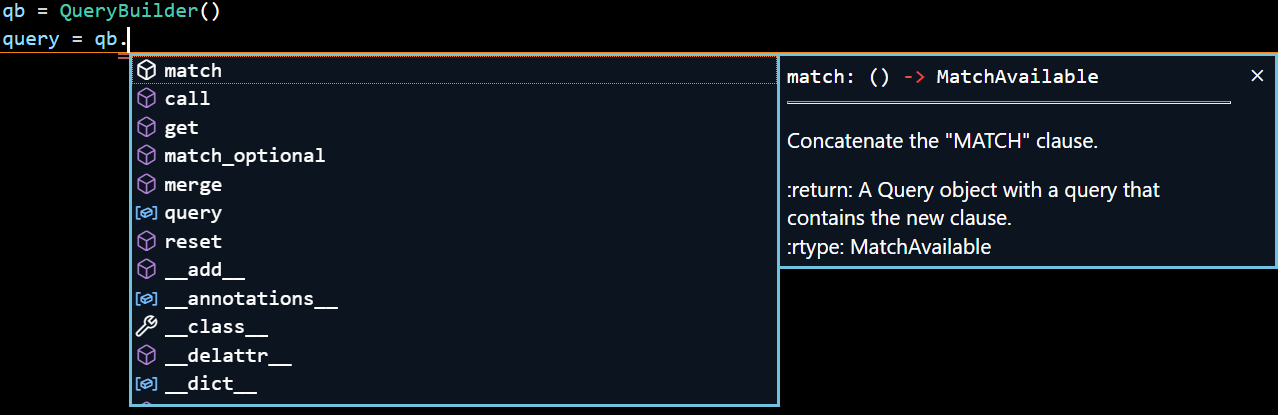
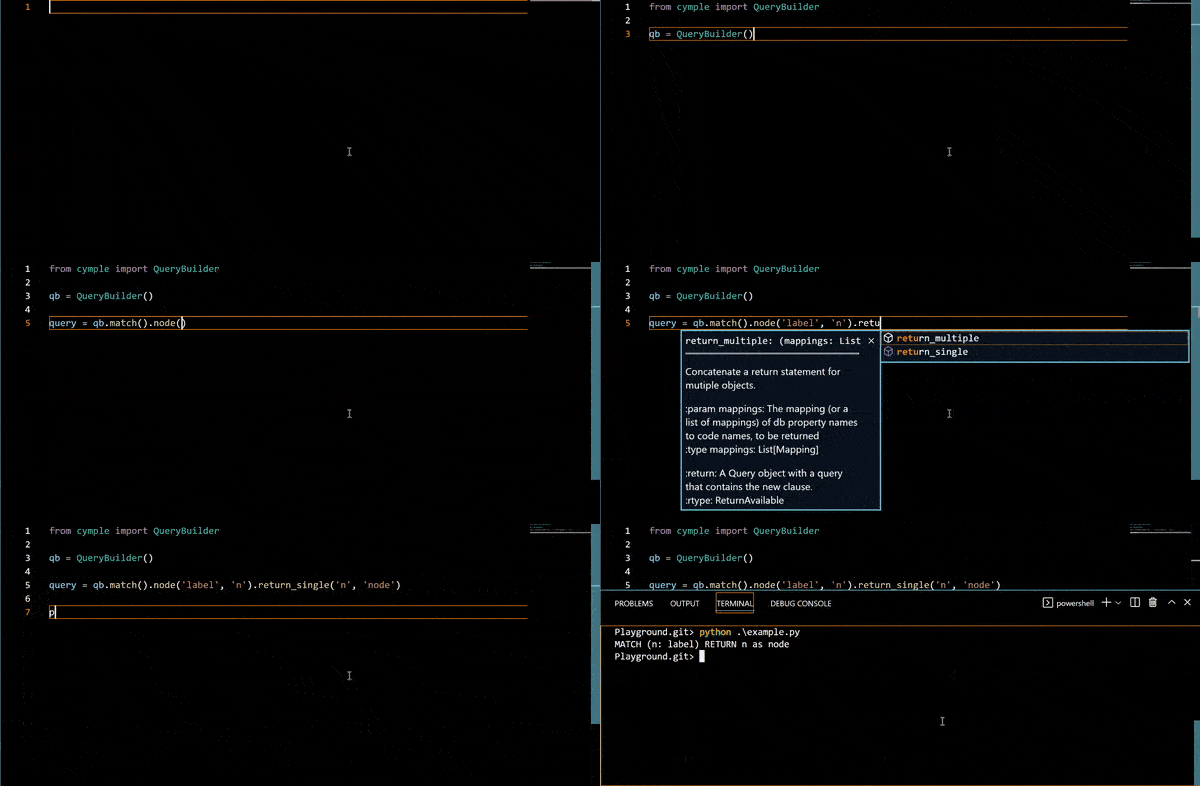
Autocompletion
Cymple is designed to provide autocompletion on IDEs that support autocompletion. This feature is context aware with respect to the current query being written.
Reusing Queries
Two queries can be combined to a create a new one.
qb = QueryBuilder()
query1 = qb.match().node(labels='Person', ref_name='p').with_('p')
query2 = qb.match().node(labels='Person', ref_name='q').related_to('friend_of').node(ref_name='p')
query = query1 + query2
print(query)
This snippet will output the following Cypher query:
MATCH (p: Person) WITH p MATCH (q: Person)-[: friend_of]->(p)
Prerequisites
- Python 3.9+
Contributing
Intro
We encourage you to help us to improve this package! These instructions will give you a copy of the project up and running on your local machine for development and testing purposes.
Installing a Development Environment
# Set virtual environment.
python -m venv .venv
source .venv/bin/activate

# Upgrade pip

# Install development dependencies.
# Tools needed for deployment and packaging will be installed now.

pip install -r requirements-dev.txt
Development tools configurations
-
setuptoolsis configured insetup.cfg -
pycodestyleis configured insetup.cfg -
coverage.pyis configured inpyproject.toml
Testing
pytest is used as a test runner.
pytest configurations reside in pyproject.toml
pytest fixtures are stored in tests/conftest.py file.
How-to run tests:
# Install test requirements.

pip install -r requirements-test.txt

# Run tests.
# All the tests under tests/ directory will be run.

pytest --cov=cymple
Adding a new Cypher clause
Adding a new Cypher clause to Cymple consists of few simple steps:
- Go to
src/cymple/internal/declarations/. This directory contains all supported clause declarations. - Add a json file describing the clause and the method(s) interfaces(s) of the new clause that you would like to add to the builder. If you do it for the first time, take a look at existing json files of currently supported Cypher clauses.
- Identify all the existing clauses that can precede your new clause, and add your new clause's name to the 'successors' list of those clauses' JSONs.
- Run
python src/cymple/internal/internal_renderer.py. This script generates a newbuilder.pyfile with all clauses that were declared insrc/cymple/internal/declarations/. - By default, by adding a declaration json file, the
internal_builder.pyscript takes the declared clause and generates a method that simply concatenates your new clause to the builder's current query. However, if you need anything more complex than that, you can write your own implementation by creating a new method with your clause's name atsrc/cymple/internal/overloads/. Don't forget to runpython src/cymple/internal/internal_renderer.pyagain :) - If you're satisfied with the new clause, add a unit test in
test_clauses.pyand make sure it generates the expected Cypher string.
Generating Documentation
Make sure you run:
pip install -r requirements-dev.txt
or
pip install sphinx
to proceed.
To generate a new HTML documentation, run:
cd docs
make clean html
make html
Versioning
Semantic Versioning is used for versioning.
For the versions available, see the tags on the repository.
Current version is stored in src/cymple/version.py.
Project structure
cymple/
├── docs/   # Project documentation
├── pyproject.toml  # Development and packaging tools configurations
├── README.md  # Project general information
├── requirements-dev.txt  # Development dependencies, such as packaging tools, etc.
├── requirements-test.txt  # Test dependencies
├── requirements.txt       # Pinned versions of all the end-user dependency tree
├── setup.cfg  # packaging tool configurations
├── setup.py   # Packaging script
├── src/  # All source code
│   └── cymple/  # Cymple source code
│       ├── internal/  # Cypher builder internal renderer
│       │   ├── declarations/        # clause declarations
│       │   ├── overloads/           # custom clause implementations
│       │   ├── finale.py            # A part of the rendered code that comes last
│       │   ├── internal_renderer.py # Internal renderer implementation for creating Cymple's user-facing code
│       │   └── preface.py           # A part of the rendered code that comes first
│       ├── __init__.py  # Package initialization
│       ├── __main__.py  # Main script when run as a command line tool
│       ├── builder.py   # Query Builder implementation
│       ├── typedefs.py  # Query Builder typedefs to be used in Cymple's API
│       └── version.py   # Package version
└── tests/  # Tests
    ├── conftest.py  # Fixtures
    ├── data/  # Tests data files, such as input/output files, mocks, etc.
    ├── e2e/   # End-to-End functional tests
    ├── integration  # Integration tests
    └── unit  # Unit tests
        ├── __init__.py
        └── test_real_use_cases.py  # Test project startup


Download files
Download the file for your platform. If you're not sure which to choose, learn more about installing packages.
Source Distribution
Built Distribution
Filter files by name, interpreter, ABI, and platform.
If you're not sure about the file name format, learn more about wheel file names.
Copy a direct link to the current filters
File details
Details for the file cymple_kuzu-0.0.5.tar.gz.
File metadata
- Download URL: cymple_kuzu-0.0.5.tar.gz
- Upload date:
- Size: 16.3 kB
- Tags: Source
- Uploaded using Trusted Publishing? Yes
- Uploaded via: twine/6.1.0 CPython/3.12.9
File hashes
| Algorithm | Hash digest | |
|---|---|---|
| SHA256 |
563ef55b577d5f0881f705383ef999add3115d9d72d06b9eba79550b9334f61c
|
|
| MD5 |
1ff1a9dd49e3ae5d45c173293648b90b
|
|
| BLAKE2b-256 |
7c0f340da4767e61b52341f273e821ed71a7fa43912753eb86ea563f684d9765
|
Provenance
The following attestation bundles were made for cymple_kuzu-0.0.5.tar.gz:
Publisher:
workflow.yml on pcadmanbosse/Cymple-Kuzu
-
Statement:
-
Statement type:
https://in-toto.io/Statement/v1 -
Predicate type:
https://docs.pypi.org/attestations/publish/v1 -
Subject name:
cymple_kuzu-0.0.5.tar.gz -
Subject digest:
563ef55b577d5f0881f705383ef999add3115d9d72d06b9eba79550b9334f61c - Sigstore transparency entry: 251788741
- Sigstore integration time:
-
Permalink:
pcadmanbosse/Cymple-Kuzu@299a4a7be108e3923c7610e49fa889246a982a49 -
Branch / Tag:
refs/tags/0.0.5 - Owner: https://github.com/pcadmanbosse
-
Access:
public
-
Token Issuer:
https://token.actions.githubusercontent.com -
Runner Environment:
github-hosted -
Publication workflow:
workflow.yml@299a4a7be108e3923c7610e49fa889246a982a49 -
Trigger Event:
release
-
Statement type:
File details
Details for the file cymple_kuzu-0.0.5-py2.py3-none-any.whl.
File metadata
- Download URL: cymple_kuzu-0.0.5-py2.py3-none-any.whl
- Upload date:
- Size: 14.0 kB
- Tags: Python 2, Python 3
- Uploaded using Trusted Publishing? Yes
- Uploaded via: twine/6.1.0 CPython/3.12.9
File hashes
| Algorithm | Hash digest | |
|---|---|---|
| SHA256 |
8e0108c92df93b939a5b9716d2d71a92a0fa180fa4e41c0bc49014ed9572e879
|
|
| MD5 |
379632c0f82d13f4374f2cd6bb72bd04
|
|
| BLAKE2b-256 |
a4e7245fb2b44d026a3f179de06830ab9cb035ee6aa23521207cbdc13366a926
|
Provenance
The following attestation bundles were made for cymple_kuzu-0.0.5-py2.py3-none-any.whl:
Publisher:
workflow.yml on pcadmanbosse/Cymple-Kuzu
-
Statement:
-
Statement type:
https://in-toto.io/Statement/v1 -
Predicate type:
https://docs.pypi.org/attestations/publish/v1 -
Subject name:
cymple_kuzu-0.0.5-py2.py3-none-any.whl -
Subject digest:
8e0108c92df93b939a5b9716d2d71a92a0fa180fa4e41c0bc49014ed9572e879 - Sigstore transparency entry: 251788744
- Sigstore integration time:
-
Permalink:
pcadmanbosse/Cymple-Kuzu@299a4a7be108e3923c7610e49fa889246a982a49 -
Branch / Tag:
refs/tags/0.0.5 - Owner: https://github.com/pcadmanbosse
-
Access:
public
-
Token Issuer:
https://token.actions.githubusercontent.com -
Runner Environment:
github-hosted -
Publication workflow:
workflow.yml@299a4a7be108e3923c7610e49fa889246a982a49 -
Trigger Event:
release
-
Statement type:






