


cython-extensions-sc2
API Documentation - for a full list of included functions.
cython-extensions-sc2 is a library designed for the python-sc2 API.
Its purpose is to offer optimized Cython alternatives for commonly used functions,
along with additional useful custom functions.
Note: This library is included for ares-sc2 users by default, no further setup is required.
This library also supports python-sc2 and sharpy-sc2 bots, see Getting Started below.
Example speedups, results may vary depending on machine and exact scenario. This is by no means a list of all functionality offered.
| python-sc2 function | cython speedup |
|---|---|
units.closest_to |
6.85 - 13x speedup depending on scenario |
distance_to |
3 to 7x speedup depending on scenario |
position.center |
2x speedup |
already_pending for units |
6.62x speedup |
already_pending for structures |
4x speedup |
units.in_attack_range |
2.05x speedup |
units.sorted_by_distance_to |
8.62x speedup |
unit.is_facing |
9.1x speedup |
Point2.towards |
14.29x speedup |
has_creep |
4 - 5x speedup |
in_pathing_grid |
4 - 5x speedup |
closer_than |
12x speedup |
further_than |
12x speedup |
Tip: use cy_distance_to_squared where possible for extra 1.3x speedup.
Getting started
To quickly get up and running locally (for python versions 3.11, 3.12), install cython-extensions-sc2 with:
pip install cython-extensions-sc2
Type Safety
cython-extensions-sc2 includes type safety checking to prevent your bot failing with silent errors.
This is disabled by default for pure performance reasons, to enable it call enable_safe_mode(True).
from cython_extensions import enable_safe_mode
# immediately after importing any cython functions
enable_safe_mode(True)
Even with safe mode disabled, there will still be some function overhead, but it should be negligible. However, if you want to squeeze every last bit of performance out of your bot, you can import cython functions directly from the cython files to avoid using the type checker functionality all together.
Example using cy_closest_to turning off safe mode for some performance:
from cython_extensions import cy_closest_to, enable_safe_mode
enable_safe_mode(False)
You could instead import cy_closest_to directly:
from cython_extensions.units_utils import cy_closest_to
Shipping to ladder
When shipping to ladder, grab ubuntu-latest_python3.12.zip from releases in this repo
and extract cython_extensions directory within the zip to the root of your bot's directory, like so:
MyBot
└───cython_extensions
│   └───cython-extensions library files
└───your bot files and directories
Alternative local setup
If you already have a python-sc2, or sharpy-sc2 development environment setup,
then cython-extensions should work out the box with your bot without the need to install extra requirements. Simply check out the releases on this
repo and download the correct zip for your system.
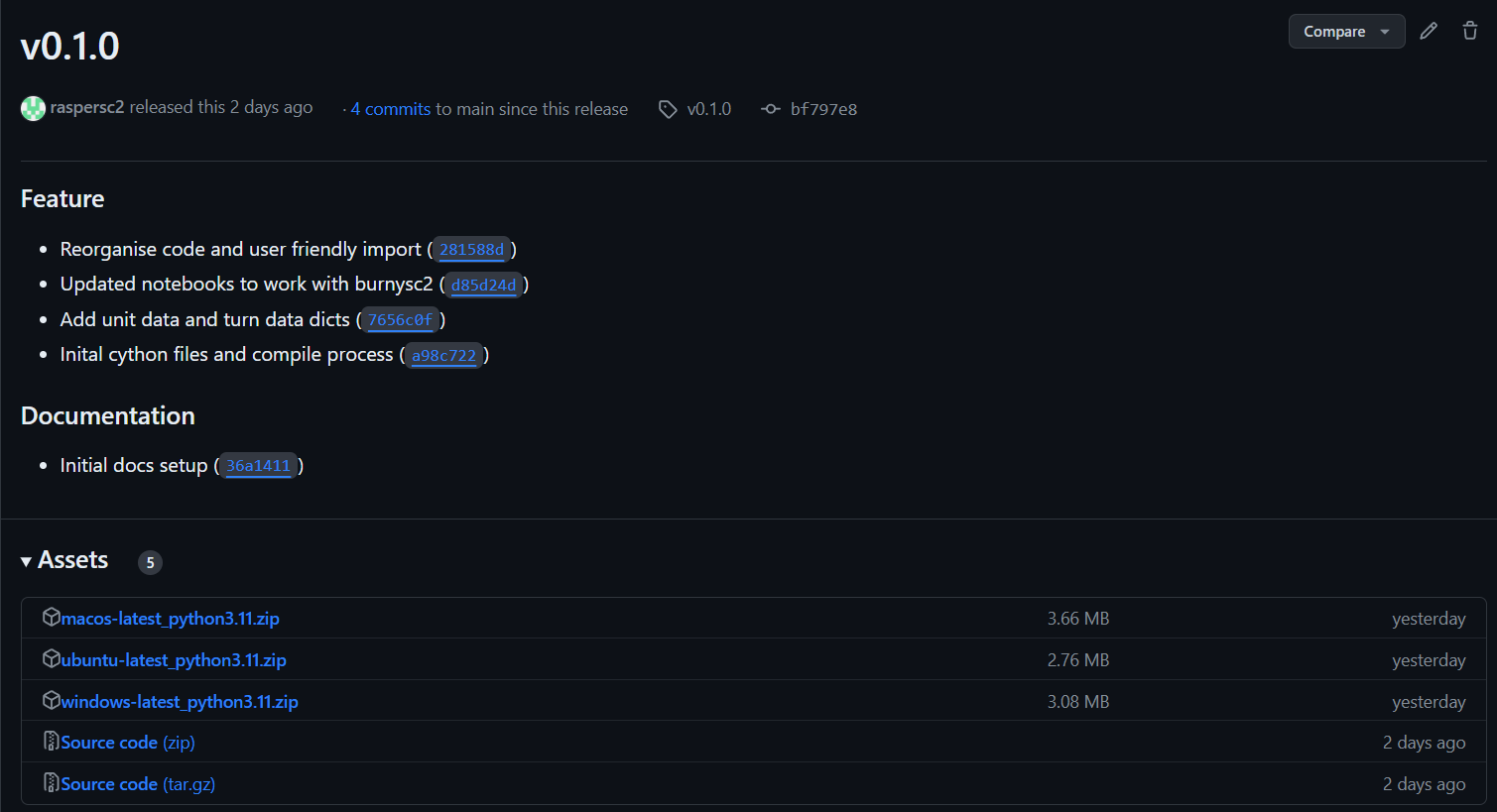
For example a Windows user should download windows-latest_python3.12.zip.
Inside this zip you will find a cython_extensions directory, this should be placed in your bot's root directory
like so:
MyBot
└───cython_extensions
│   └───cython-extensions library files
└───your bot files and directories
Start using cython-extensions-sc2
For ease of use all cython functions are importable via the main module, for example:
from cython_extensions import cy_distance_to, cy_attack_ready, cy_closest_to
note: in this project all library functions have a cy_ prefix to prevent confusion with python alternatives.
Contributor / Cloning the project
Install poetry if you do not already have it installed.
Then to setup a full development environment run:
poetry install --with dev,test,docs,semver
This will set up a new environment, install all required dependencies and compile the cython code for your system.
If you modify the cython code, run poetry build to compile it.
Jupyter Notebooks
Run poetry run jupyter notebook to open jupyter notebook in the environment. See the notebooks
directory for examples. Use template_notebook.ipynb as a starting point for your own notebooks.
Updating ids
ability_mapping.pyx ids are generated via a script, these should be updated after a new SC2 version is released.
Run poetry run python scripts/update_ability_mapping to update the ids.
Run Test Bot
Edit the map in bot_test.py and run with:
poetry run python tests/bot_test.py
Contributing
Contributors are very welcome! There are many missing alternative python-sc2 functions, and if you're
into optimization, the existing functions could likely be improved.
Adding new functions
If you want to add a new function, please add it to the relevant '.pyx' and '.pyi' files. See
existing functions for examples. Please also add tests for your function in the tests directory.
Additionally, the new function should be added to the type checking system in cython_extensions/type_checking
First add a validation function inside cython_extensions/type_checking/validators.py using the
existing examples as guidance.
Then add a safe_wrapper function inside cython_extensions/type_checking/safe_wrappers.py using the
existing examples as an example. Ensure your new function is exported at the bottom of this file.
Preferably check the new function works in a real bot before submitting a PR. You can use tests/bot_test.py
to test your function.`
Commit messages
Please use conventional commits if you choose to contribute, it helps the automatic releases detect a new version and generates an accurate changelog.
Example git messages:
feat: add new cython function
fix: fixed buggy function
test: add new test
ci: update github workflow
docs: add new docs
chore: add dependency
1 maintainer

Metadata
1 maintainer
Release files for cython-extensions-sc2 0.18.0
For a detailed explanation of source distributions (sdists) and built distributions (wheels), please see the package formats documentation.
Built distributions (wheels)
Total release size: 44.6 MB
Release files / cython_extensions_sc2-0.18.0-cp313-cp313-win_amd64.whl
| Download URL | cython_extensions_sc2-0.18.0-cp313-cp313-win_amd64.whl |
|---|---|
| Size | 735.2 kB |
| Tags | CPython 3.13 Windows x86-64 |
|
SHA-256 checksum How to use checksums |
729e876a2bb934243019817083bc8e321d0efc17990daf0345b44064bea41ad0
|
|
BLAKE2b-256 checksum How to use checksums |
d57d5a6b1e109d5a6dcaafc15b5f5c4db8a53a917f341d9f1bd8a18764370d68
|
| Upload date | |
|
Uploaded using Trusted Publishing? What is trusted publishing? |
No |
| Uploaded via |
twine/7.0.0 CPython/3.13.14
|
Release files / cython_extensions_sc2-0.18.0-cp313-cp313-win32.whl
| Download URL | cython_extensions_sc2-0.18.0-cp313-cp313-win32.whl |
|---|---|
| Size | 571.2 kB |
| Tags | CPython 3.13 Windows x86-32 |
|
SHA-256 checksum How to use checksums |
762ccd18bccf9ab79d9147ba5c89dde49996cc1dc9da51e32765333289cb0628
|
|
BLAKE2b-256 checksum How to use checksums |
33937b308cb37f23200a6ae73913aae358b660251dc6602dc61a23c8686e5aa1
|
| Upload date | |
|
Uploaded using Trusted Publishing? What is trusted publishing? |
No |
| Uploaded via |
twine/7.0.0 CPython/3.13.14
|
Release files / cython_extensions_sc2-0.18.0-cp313-cp313-musllinux_1_2_x86_64.whl
| Download URL | cython_extensions_sc2-0.18.0-cp313-cp313-musllinux_1_2_x86_64.whl |
|---|---|
| Size | 6.2 MB |
| Tags | CPython 3.13 Linux musl 1.2+ x86-64 |
|
SHA-256 checksum How to use checksums |
2aa4be639bb6a8341a9de8a7a9dfe85ed30ce7145071dab21d8d44c696e1df68
|
|
BLAKE2b-256 checksum How to use checksums |
d938d8440ae09e4b392783a4a05c5c7b5781ab858d9e1e33504dbd683943b5fb
|
| Upload date | |
|
Uploaded using Trusted Publishing? What is trusted publishing? |
No |
| Uploaded via |
twine/7.0.0 CPython/3.13.14
|
Release files / cython_extensions_sc2-0.18.0-cp313-cp313-manylinux2014_x86_64.manylinux_2_17_x86_64.manylinux_2_28_x86_64.whl
| Download URL | cython_extensions_sc2-0.18.0-cp313-cp313-manylinux2014_x86_64.manylinux_2_17_x86_64.manylinux_2_28_x86_64.whl |
|---|---|
| Size | 6.3 MB |
| Tags | CPython 3.13 Linux glibc 2.17+ x86-64 Linux glibc 2.28+ x86-64 |
|
SHA-256 checksum How to use checksums |
0795239c11ee88a71e4b4e0069ddd2d99ee5328a4e45a28b700e5751ed376dc1
|
|
BLAKE2b-256 checksum How to use checksums |
e8e0c29bc509368bc0ba2ef8cf37933aaebf3062aec48847eef0488b85ac48c7
|
| Upload date | |
|
Uploaded using Trusted Publishing? What is trusted publishing? |
No |
| Uploaded via |
twine/7.0.0 CPython/3.13.14
|
Release files / cython_extensions_sc2-0.18.0-cp313-cp313-macosx_11_0_arm64.whl
| Download URL | cython_extensions_sc2-0.18.0-cp313-cp313-macosx_11_0_arm64.whl |
|---|---|
| Size | 826.9 kB |
| Tags | CPython 3.13 macOS 11.0+ ARM64 |
|
SHA-256 checksum How to use checksums |
bd5f299df1cd045858e4fd57358b47372a9f8b069736ee70f5c52cc22ca403af
|
|
BLAKE2b-256 checksum How to use checksums |
d4ffd00264f711a97595efb577de1e37ca1aa4903a8c2c5699156e4678b3abf8
|
| Upload date | |
|
Uploaded using Trusted Publishing? What is trusted publishing? |
No |
| Uploaded via |
twine/7.0.0 CPython/3.13.14
|
Release files / cython_extensions_sc2-0.18.0-cp312-cp312-win_amd64.whl
| Download URL | cython_extensions_sc2-0.18.0-cp312-cp312-win_amd64.whl |
|---|---|
| Size | 739.6 kB |
| Tags | CPython 3.12 Windows x86-64 |
|
SHA-256 checksum How to use checksums |
f34d10604917b91dfda752e9508fb9e42ea324fd9bd4d76d66e463f386334029
|
|
BLAKE2b-256 checksum How to use checksums |
69ced4bd775f71f0ff16e0c5b171dab82fbdc96c7e9cdb6d7942455e68390561
|
| Upload date | |
|
Uploaded using Trusted Publishing? What is trusted publishing? |
No |
| Uploaded via |
twine/7.0.0 CPython/3.13.14
|
Release files / cython_extensions_sc2-0.18.0-cp312-cp312-win32.whl
| Download URL | cython_extensions_sc2-0.18.0-cp312-cp312-win32.whl |
|---|---|
| Size | 573.2 kB |
| Tags | CPython 3.12 Windows x86-32 |
|
SHA-256 checksum How to use checksums |
4113736f7d0a7149f4832f6073c635f9277402e271e92810dbd83a8a64033a95
|
|
BLAKE2b-256 checksum How to use checksums |
154e29883d36cb2fe0735c97e785bd0e8e88a88e02691f8d36168c18e4cca01c
|
| Upload date | |
|
Uploaded using Trusted Publishing? What is trusted publishing? |
No |
| Uploaded via |
twine/7.0.0 CPython/3.13.14
|
Release files / cython_extensions_sc2-0.18.0-cp312-cp312-musllinux_1_2_x86_64.whl
| Download URL | cython_extensions_sc2-0.18.0-cp312-cp312-musllinux_1_2_x86_64.whl |
|---|---|
| Size | 6.3 MB |
| Tags | CPython 3.12 Linux musl 1.2+ x86-64 |
|
SHA-256 checksum How to use checksums |
aa5881973eda9c3dd48cc1d48c87b8a680b9ce1ed950db7c87f087b15ccc0712
|
|
BLAKE2b-256 checksum How to use checksums |
c27a026213a3ce27eacf9c2e93f8960137630619ac5f1102f15ed402c534fa7c
|
| Upload date | |
|
Uploaded using Trusted Publishing? What is trusted publishing? |
No |
| Uploaded via |
twine/7.0.0 CPython/3.13.14
|
Release files / cython_extensions_sc2-0.18.0-cp312-cp312-manylinux2014_x86_64.manylinux_2_17_x86_64.manylinux_2_28_x86_64.whl
| Download URL | cython_extensions_sc2-0.18.0-cp312-cp312-manylinux2014_x86_64.manylinux_2_17_x86_64.manylinux_2_28_x86_64.whl |
|---|---|
| Size | 6.3 MB |
| Tags | CPython 3.12 Linux glibc 2.17+ x86-64 Linux glibc 2.28+ x86-64 |
|
SHA-256 checksum How to use checksums |
9a0d3d8b20c790af274a679099b49d2601cc0c1abe268cf9948853fe2ee59783
|
|
BLAKE2b-256 checksum How to use checksums |
ee5d47e7cf07d9007456718fd32ff478d8c337df7d609b576a2395e3d9e02739
|
| Upload date | |
|
Uploaded using Trusted Publishing? What is trusted publishing? |
No |
| Uploaded via |
twine/7.0.0 CPython/3.13.14
|
Release files / cython_extensions_sc2-0.18.0-cp312-cp312-macosx_11_0_arm64.whl
| Download URL | cython_extensions_sc2-0.18.0-cp312-cp312-macosx_11_0_arm64.whl |
|---|---|
| Size | 831.8 kB |
| Tags | CPython 3.12 macOS 11.0+ ARM64 |
|
SHA-256 checksum How to use checksums |
7ed5cca99165c94c0e6459c0b9a79ca22664f9f893774a81f841b55665e0772b
|
|
BLAKE2b-256 checksum How to use checksums |
89d18fade65ef393f87da80780502339229378d7a2674ac73246ad310d364b67
|
| Upload date | |
|
Uploaded using Trusted Publishing? What is trusted publishing? |
No |
| Uploaded via |
twine/7.0.0 CPython/3.13.14
|
Release files / cython_extensions_sc2-0.18.0-cp311-cp311-win_amd64.whl
| Download URL | cython_extensions_sc2-0.18.0-cp311-cp311-win_amd64.whl |
|---|---|
| Size | 756.0 kB |
| Tags | CPython 3.11 Windows x86-64 |
|
SHA-256 checksum How to use checksums |
000cd4591cf9060db886baf3b92705746e4a97e72ae295b30de079657f4b890e
|
|
BLAKE2b-256 checksum How to use checksums |
10355998de40154eeb32c8b7950f92e95af730ab2a80c1fcd550833c55a3fd3a
|
| Upload date | |
|
Uploaded using Trusted Publishing? What is trusted publishing? |
No |
| Uploaded via |
twine/7.0.0 CPython/3.13.14
|
Release files / cython_extensions_sc2-0.18.0-cp311-cp311-win32.whl
| Download URL | cython_extensions_sc2-0.18.0-cp311-cp311-win32.whl |
|---|---|
| Size | 589.5 kB |
| Tags | CPython 3.11 Windows x86-32 |
|
SHA-256 checksum How to use checksums |
93a30ec539a2fdc86f66c5e6a5fbce8f42c3091ab201e38f3b75f0b349b19209
|
|
BLAKE2b-256 checksum How to use checksums |
fcd676db75be52839c0285370fd79665336cc120d8556b2b4dce8970b7301e7a
|
| Upload date | |
|
Uploaded using Trusted Publishing? What is trusted publishing? |
No |
| Uploaded via |
twine/7.0.0 CPython/3.13.14
|
Release files / cython_extensions_sc2-0.18.0-cp311-cp311-musllinux_1_2_x86_64.whl
| Download URL | cython_extensions_sc2-0.18.0-cp311-cp311-musllinux_1_2_x86_64.whl |
|---|---|
| Size | 6.5 MB |
| Tags | CPython 3.11 Linux musl 1.2+ x86-64 |
|
SHA-256 checksum How to use checksums |
94126baf6614f485f4db6ab0473440a1f356fdc08fd6b0e65e91f2b7167c33b4
|
|
BLAKE2b-256 checksum How to use checksums |
1b12a790a147fe1feca5f55dfd7f9c54fd82e2c45b1230a549ba109cec3d77b6
|
| Upload date | |
|
Uploaded using Trusted Publishing? What is trusted publishing? |
No |
| Uploaded via |
twine/7.0.0 CPython/3.13.14
|
Release files / cython_extensions_sc2-0.18.0-cp311-cp311-manylinux2014_x86_64.manylinux_2_17_x86_64.manylinux_2_28_x86_64.whl
| Download URL | cython_extensions_sc2-0.18.0-cp311-cp311-manylinux2014_x86_64.manylinux_2_17_x86_64.manylinux_2_28_x86_64.whl |
|---|---|
| Size | 6.4 MB |
| Tags | CPython 3.11 Linux glibc 2.17+ x86-64 Linux glibc 2.28+ x86-64 |
|
SHA-256 checksum How to use checksums |
acbec5f041d594fafc14903cb1e7aef53bd7e87c7746c149b94cea78b674aa31
|
|
BLAKE2b-256 checksum How to use checksums |
07c79a450e3727275bdbbf19e3052b0fd09bc12641fe2994fc96db7ad6f1f99d
|
| Upload date | |
|
Uploaded using Trusted Publishing? What is trusted publishing? |
No |
| Uploaded via |
twine/7.0.0 CPython/3.13.14
|
Release files / cython_extensions_sc2-0.18.0-cp311-cp311-macosx_11_0_arm64.whl
| Download URL | cython_extensions_sc2-0.18.0-cp311-cp311-macosx_11_0_arm64.whl |
|---|---|
| Size | 855.8 kB |
| Tags | CPython 3.11 macOS 11.0+ ARM64 |
|
SHA-256 checksum How to use checksums |
5be13bcdac3f49682d7759d2b2e2d35f8bcca122af45bcaa00deae70ce9fcdde
|
|
BLAKE2b-256 checksum How to use checksums |
86b9878f9382a1fc2e01c94d7084d566bfdd9e67459125590dd4ef60cc81528f
|
| Upload date | |
|
Uploaded using Trusted Publishing? What is trusted publishing? |
No |
| Uploaded via |
twine/7.0.0 CPython/3.13.14
|














