
Cytocraft
Overview
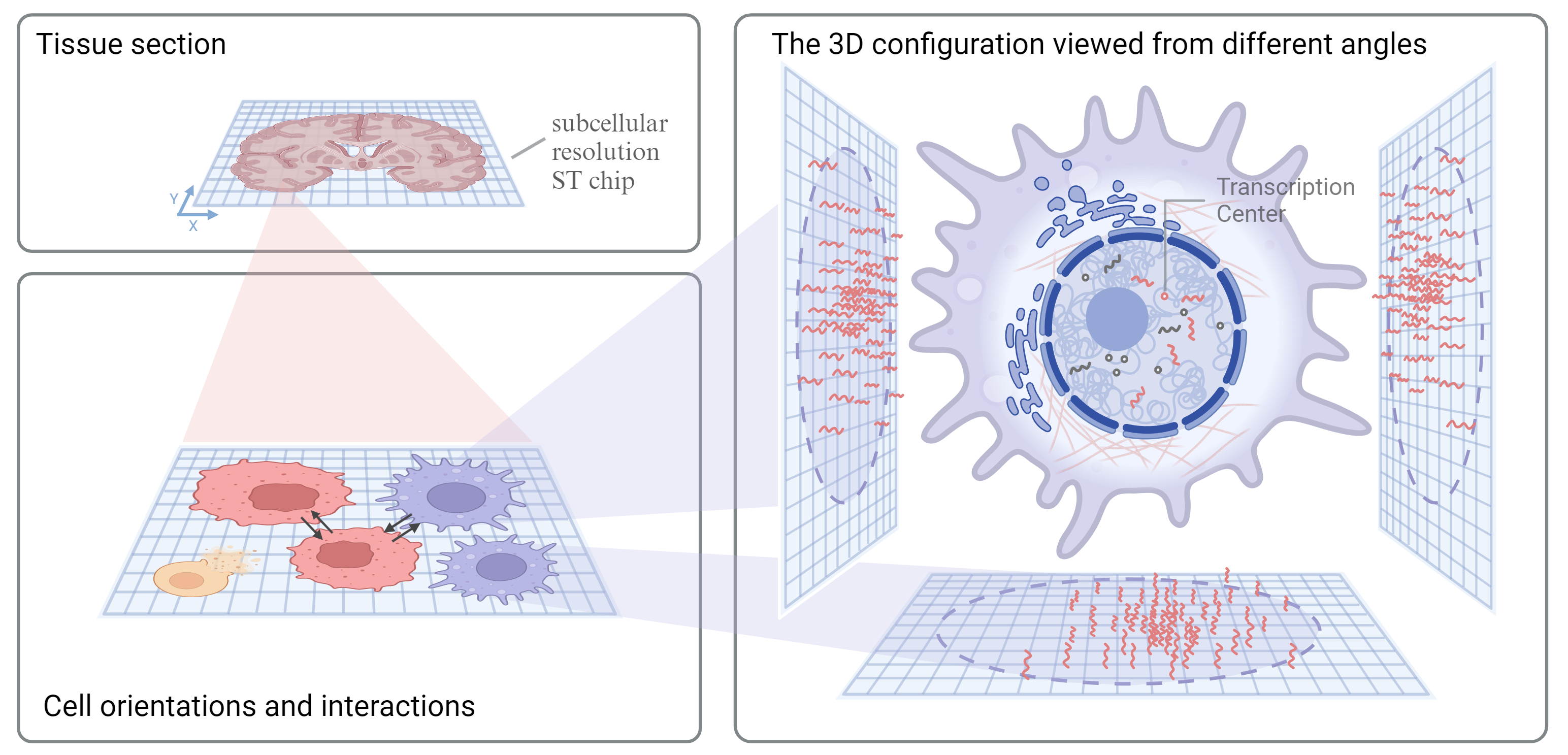
The Cytocraft package generates a 3D reconstruction of transcription centers based on subcellular resolution spatial transcriptomics.
Cytocraft employs a multi-start optimization strategy, running the reconstruction algorithm from multiple distinct random initializations (default: 5) and selecting the solution with the lowest final reconstruction error. This approach improves robustness and helps avoid local minima.
System Requirements
- Operating Systems:
- Ubuntu 20.04
- macOS 11.2
- Windows 10
- Software Dependencies:
- Python 3.8 or higher
- Required Python packages: numpy, pandas, scanpy, matplotlib, shapely
- Tested Versions:
- Python 3.8, 3.9, 3.12
- Hardware Requirements:
- No specific non-standard hardware required
Installation
pip install cytocraft
Installation Guide
- Ensure Python 3.8 or higher is installed.
- Run the command above to install Cytocraft and its dependencies.
- Typical install time on a "normal" desktop computer is approximately 1-5 minutes.
Interactive Mode Usage
import
import cytocraft.craft as cc
read input
gem_path = 'path_to_your_data.csv'
gem = cc.read_gem_as_csv(gem_path, sep=',')
adata = cc.read_gem_as_adata(gem_path, sep=',')
run cytocraft (see tutorial for more details)
adata = cc.craft(
  gem=gem,
  adata=adata,
  species='YourSpecies',
  seed=your_seed,
  samplename='your_sample_name',
  n_starts=5  # Number of random initializations (default: 5)
  )
The n_starts parameter controls the multi-start optimization strategy. Cytocraft will run the reconstruction from n_starts distinct random initializations and automatically select the solution with the lowest final reconstruction error.
CLI Mode Usage
python craft.py [-h] [-p/-n PERCENT/NUMBER] [-t GENE_FILTER_THRESH] [-r RMSD_THRESH] [--sep \t] [-c CELLTYPE] [--ctkey CTKEY] [--cikey CIKEY] [--csep \t] [--seed SEED] [--n_starts N_STARTS] -i gem_path -o out_path --species {Human,Mouse,Axolotls,Monkey}
Positional arguments:
-i,--gem_path Input: Path of input gene expression matrix file
-o,--out_path Output: Directory to save results
--species Species of the input data, e.g. {Human,Mouse,Axolotls,Monkey}
Optional arguments:
-h, --help Show this help message and exit
-p/-n, --percent/--number Percent/Number of anchor gene for rotation derivation, default: 0.001/10
-t, --gene_filter_thresh The maximum allowable proportion of np.nan values in a column (representing a gene) of the observed transcription centers (Z), default: 0.90
-r, --rmsd_thresh RMSD threshold. If the computed RMSD value is less than or equal to this threshold, it means the process has reached an acceptable level of similarity or convergence, and the loop is exited. default: 0.01
--sep Separator of the input gene expression matrix file
-c, --celltype Path of the annotation file containing cell types, multi-celltype mode only
--ctkey Key of celltype column in the cell type file, multi-celltype mode only
--cikey Key of cell id column in the cell type file, multi-celltype mode only
--csep Separator of the annotation file, multi-celltype mode only, default: \t
--seed Random seed, default: random int between 0 to 1000
--n_starts Number of random initializations for multi-start optimization strategy, default: 5
One-celltype example:
python craft.py -i ./data/SS200000108BR_A3A4_scgem.Spinal_cord_neuron.csv -o ./results/ --species Mouse
Multi-celltype example:
python craft.py -i ./data/SSSS200000108BR_A3A4_scgem.csv -o ./results/ --species Mouse --celltype ./data/cell_feature.csv --ctkey cell_type --cikey cell_id
Demo
Instructions to run on demo data
- Download the example data from the repository.
- Open and run the tutorial notebook provided in the repository to process the demo data step-by-step.
Expected Output
- A h5ad format adata file containing the 3D reconstruction, rotation matrices of cells, and all other input information.
- The
adata.uns["multistart_info"]field contains metadata about the multi-start optimization, including:n_starts: Number of initializations usedbest_start_id: Which initialization produced the best resultbest_seed: Random seed of the best runbest_rmsd: Final RMSD of the best runall_rmsds: List of final RMSDs from all runsconvergence_status: Convergence status for each run
- The
- A log file containing the following information:
- Species
- Sample Name
- Seed
- Cell Number
- Gene Number
- Arguments
- Task ID
- Multi-start optimization summary
- RMSD values in each loop for each start
- Number of transcription centers in the configuration.
Expected Run Time
- Approximately 5-20 hours.
1 maintainer

Metadata
1 maintainer
Release files for cytocraft 1.0.0
For a detailed explanation of source distributions (sdists) and built distributions (wheels), please see the package formats documentation.
Source distribution (sdist)
| File | Size | Uploaded | |
|---|---|---|---|
| cytocraft-1.0.0.tar.gz | 8.5 MB | Details |
Built distribution (wheel)
| File | Interpreter | ABI | Platform | Reset |
|---|---|---|---|---|
| cytocraft-1.0.0-py3-none-any.whl | Python 3 | none | any | Details |
Total release size: 14.7 MB
Release files / cytocraft-1.0.0.tar.gz
| Download URL | cytocraft-1.0.0.tar.gz |
|---|---|
| Size | 8.5 MB |
| Tags | Source |
|
SHA-256 checksum How to use checksums |
56b45704b6bfe5934db48e9df90f37ed09ffdd3d3559c7a0684c1b25a3861e3d
|
|
BLAKE2b-256 checksum How to use checksums |
863e9bdbdfc7f025e877d077ecb783c5361735f4432a98c587642b4a31f4e11e
|
| Upload date | |
|
Uploaded using Trusted Publishing? What is trusted publishing? |
No |
| Uploaded via |
twine/6.1.0 CPython/3.8.17
|
Release files / cytocraft-1.0.0-py3-none-any.whl
| Download URL | cytocraft-1.0.0-py3-none-any.whl |
|---|---|
| Size | 6.1 MB |
| Tags | Python 3 |
|
SHA-256 checksum How to use checksums |
93e598347177011000c94031acec37bf16175e862f8b20b9e13b0d20336055bc
|
|
BLAKE2b-256 checksum How to use checksums |
8306c5e9c93225196231142386afc42eeb6ca1358fc628a27f03682511592159
|
| Upload date | |
|
Uploaded using Trusted Publishing? What is trusted publishing? |
No |
| Uploaded via |
twine/6.1.0 CPython/3.8.17
|














