
CZI Shader
Introduction
This project aims to reproduce the appearance of CZI files (coloring raw data) found in Zeiss Zen software using Python and provides a simple CZI channel information parser.
Installation
pip install czi-shader
Usage
Example:
import cv2
from czi_shader import CZIChannel, shading_czi

p = '/mnt/inner-data/sc-C057-146-O4213.czi'
[print(c) for c in CZIChannel.from_czi(p)]

res = shading_czi(p, scale_factor=0.01)
cv2.imwrite(p + '.png', cv2.cvtColor(res, cv2.COLOR_RGB2BGR))
Output:
CZIChannel(id=0, name='Cy5', bit_count_range=16, pixel_type='Gray16', dye_name='Cy5', short_name='Cy5', illumination_type='Fluorescence', dye_max_emission=673, dye_max_excitation=650, dye_id='McNamara-Boswell-0774', dye_database_id='66071726-cbd4-4c41-b371-0a6eee4ae9c5', color='#FFFF0014', original_color='#FFFF0014', color_mode=None, palette_name=None, gamma=None, low=0.0059662775616083005, high=0.03865110246433204, is_selected=None)
CZIChannel(id=1, name='Cy3', bit_count_range=16, pixel_type='Gray16', dye_name='Cy3', short_name='Cy3', illumination type='Fluorescence', dye_max_emission=561, dye_max_excitation=548, dye_id='McNamara-Boswell-0615', dye_database_id='66071726-cbd4-4c41-b371-0a6eee4ae9c5', color='#FFFFAD00', original_color='#FFFFAD00', color_mode=None, palette_name=None, gamma=None, low=0.006240939955748837, high=0.13965056839856566, is_selected=None)
CZIChannel(id=2, name='EGFP', bit_count_range=16, pixel_type='Gray16', dye_name='EGFP', short_name='EGFP', illumination_type='Fluorescence', dye_max_emission=509, dye_max_excitation=488, dye_id='McNamara-Boswell-0828', dye_database_id='66071726-cbd4-4c41-b371-0a6eee4ae9c5', color='#FF00FF5B', original_color='#FF00FF5B', color_mode=None, palette_name=None, gamma=None, low=0.004196231021591516, high=0.1739833676661326, is_selected=None)
CZIChannel(id=3, name='DAPI', bit_count_range=16, pixel_type='Gray16', dye_name='DAPI', short_name='DAPI', illumination_type='Fluorescence', dye_max_emission=465, dye_max_excitation=353, dye_id='McNamara-Boswell-0434', dye_database_id='66071726-cbd4-4c41-b371-0a6eee4ae9c5', color='#FF00A0FF', original_color='#FF00A0FF', color_mode=None, palette_name=None, gamma=None, low=0.003936827649347677, high=0.15408560311284047, is_selected=None)
You can see that the four fluorescence channels (Cy5, Cy3, EGFP, DAPI) along with their corresponding wavelengths, depths, display colors, and display upper and lower limits are listed. The final merged image comparison is shown below:
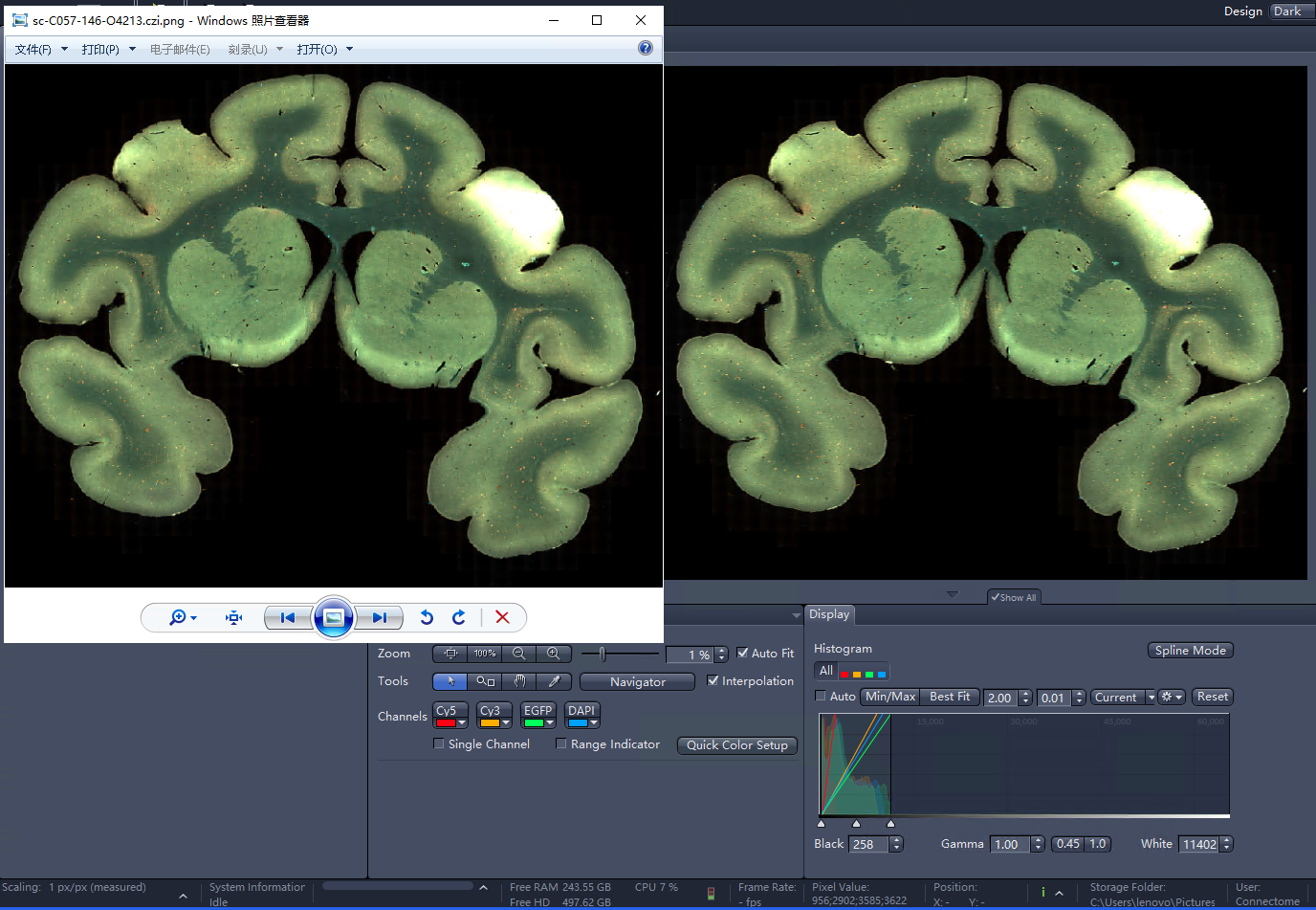
The main color tone is related to what is displayed in Zen, with slight differences due to the 0.01 scale used in generating the image.
example 2:
Get the physical resolution of the lens:
from czi_shader import CZIMeta

p = '/mnt/inner-data/sc-C057-146-O4213.czi'
meta = CZIMeta.from_czi(p)
print('image:', meta.image_info)
print('resolution:', meta.resolution)

print('channels:')
for ch in meta.channels:
    print(ch)
output:
image: CZIImageInfo(acquisition_date_and_time=datetime.datetime(2020, 12, 1, 4, 45, 35, 982910, tzinfo=datetime.timezone.utc), size_c=4, component_bit_count=16, pixel_type='Gray16', size_x=71234, size_y=56688, size_s=1, size_m=839, original_compression_method='JpgXr', original_encoding_quality=85, acquisition_duration=1716335.2106)
resolution: CZIPhysicalResolution(x=<Quantity(6.5e-07, 'micrometer / pixel')>, y=<Quantity(6.5e-07, 'micrometer / pixel')>)
channels:
CZIChannel(id=0, name='Cy5', bit_count_range=16, pixel_type='Gray16', dye_name='Cy5', short_name='Cy5', illumination_type='Fluorescence', dye_max_emission=673, dye_max_excitation=650, dye_id='McNamara-Boswell-0774', dye_database_id='66071726-cbd4-4c41-b371-0a6eee4ae9c5', color='#FFFF0014', original_color='#FFFF0014', color_mode=None, palette_name=None, gamma=None, low=0.0059662775616083005, high=0.03865110246433204, is_selected=None)
CZIChannel(id=1, name='Cy3', bit_count_range=16, pixel_type='Gray16', dye_name='Cy3', short_name='Cy3', illumination_type='Fluorescence', dye_max_emission=561, dye_max_excitation=548, dye_id='McNamara-Boswell-0615', dye_database_id='66071726-cbd4-4c41-b371-0a6eee4ae9c5', color='#FFFFAD00', original_color='#FFFFAD00', color_mode=None, palette_name=None, gamma=None, low=0.006240939955748837, high=0.13965056839856566, is_selected=None)
CZIChannel(id=2, name='EGFP', bit_count_range=16, pixel_type='Gray16', dye_name='EGFP', short_name='EGFP', illumination_type='Fluorescence', dye_max_emission=509, dye_max_excitation=488, dye_id='McNamara-Boswell-0828', dye_database_id='66071726-cbd4-4c41-b371-0a6eee4ae9c5', color='#FF00FF5B', original_color='#FF00FF5B', color_mode=None, palette_name=None, gamma=None, low=0.004196231021591516, high=0.1739833676661326, is_selected=None)
CZIChannel(id=3, name='DAPI', bit_count_range=16, pixel_type='Gray16', dye_name='DAPI', short_name='DAPI', illumination_type='Fluorescence', dye_max_emission=465, dye_max_excitation=353, dye_id='McNamara-Boswell-0434', dye_database_id='66071726-cbd4-4c41-b371-0a6eee4ae9c5', color='#FF00A0FF', original_color='#FF00A0FF', color_mode=None, palette_name=None, gamma=None, low=0.003936827649347677, high=0.15408560311284047, is_selected=None)
1 maintainer

Release files for czi-shader 0.1.5
For a detailed explanation of source distributions (sdists) and built distributions (wheels), please see the package formats documentation.
Source distribution (sdist)
| File | Size | Uploaded | |
|---|---|---|---|
| czi_shader-0.1.5.tar.gz | 6.6 kB | Details |
Built distribution (wheel)
| File | Interpreter | ABI | Platform | Reset |
|---|---|---|---|---|
| czi_shader-0.1.5-py3-none-any.whl | Python 3 | none | any | Details |
Total release size: 14.0 kB
Release files / czi_shader-0.1.5.tar.gz
| Download URL | czi_shader-0.1.5.tar.gz |
|---|---|
| Size | 6.6 kB |
| Tags | Source |
|
SHA-256 checksum How to use checksums |
19ed3aaba34abfd8128d24bac637a739547bab89258bb9b97aaa1bc139d26bca
|
|
BLAKE2b-256 checksum How to use checksums |
93b796861d8383181957e1d5012af67e58d2535f2653a9ed05990f2e3566958c
|
| Upload date | |
|
Uploaded using Trusted Publishing? What is trusted publishing? |
No |
| Uploaded via |
poetry/1.8.3 CPython/3.12.6 Linux/6.6.44-1-MANJARO
|
Release files / czi_shader-0.1.5-py3-none-any.whl
| Download URL | czi_shader-0.1.5-py3-none-any.whl |
|---|---|
| Size | 7.4 kB |
| Tags | Python 3 |
|
SHA-256 checksum How to use checksums |
a091db46468ac6c3723ca7c49a2d994e29a2de8209b1540042455778fa50ca67
|
|
BLAKE2b-256 checksum How to use checksums |
da347473c2c07969ca021c73ec584bedc0cca89feecb911b53fffac69f51fc13
|
| Upload date | |
|
Uploaded using Trusted Publishing? What is trusted publishing? |
No |
| Uploaded via |
poetry/1.8.3 CPython/3.12.6 Linux/6.6.44-1-MANJARO
|














